



An API gateway is easy to replace in an architecture diagram and painful to replace once dozens of services, policies, and client applications depend on it.
A poor choice can leave a team paying more than expected, maintaining plugins it no longer needs, or forcing every API through a cloud platform that doesn’t fit its architecture. Switching later may mean rebuilding authentication rules, routing logic, monitoring, plugins, and developer workflows.
This post is for developers, architects, DevOps teams, and technology leaders evaluating API gateway options. It compares the leading tools based on their features, deployment models, limitations, pricing, and suitability for different environments. If you need a refresher, take a look at our guide on what an API gateway is.
How We Evaluated These API Gateways
We compared each tool across five areas:
- Performance: Ability to handle high traffic with low latency.
- Security: Auth support, rate limiting, validation, mTLS, and WAF support.
- Deployment: Managed cloud, self-hosted, Kubernetes, and hybrid options.
- Developer experience: Setup, configuration, documentation, plugins, and automation.
- Pricing: Open-source availability, managed-service charges, and enterprise costs.
Actual performance will depend on your infrastructure, enabled policies, plugins, and traffic patterns.
Quick API Gateway Comparison
| Tool | Type | Best for | Open Source? | Pricing |
|---|---|---|---|---|
| Kong Gateway | Self-hosted or cloud | Extensibility and plugins | Yes | Free OSS + paid plans |
| AWS API Gateway | Managed cloud | AWS and serverless workloads | No | Pay per use |
| Apigee | Managed or hybrid | Enterprise API programs | No | Usage-based or subscription |
| Azure API Management | Managed or hybrid | Azure and Microsoft environments | No | Consumption and tiered plans |
| Traefik | Self-hosted or commercial cloud | Kubernetes and containers | Partly | Free Proxy + paid platform |
| NGINX | Self-hosted | Lightweight traffic management | Yes | Free OSS + NGINX Plus |
| Tyk | Self-hosted, hybrid, or cloud | Open-source and GraphQL | Gateway only | Free gateway + paid platform |
| Gravitee | Self-hosted or cloud | Event-driven and asynchronous APIs | Yes | Free OSS + paid plans |
| Cloudflare API Gateway | Edge cloud | API security at the edge | No | Plan-based |
| Apache APISIX | Self-hosted | Dynamic open-source deployments |
API Gateway Breakdown
Kong Gateway
Kong Gateway is one of the most widely adopted open-source API gateways and is often the baseline against which platform teams compare other options. It runs as a Lua application on top of NGINX and OpenResty, giving it a lightweight core that can be extended through plugins. Teams can self-host the gateway or use Kong Konnect for cloud-based management.
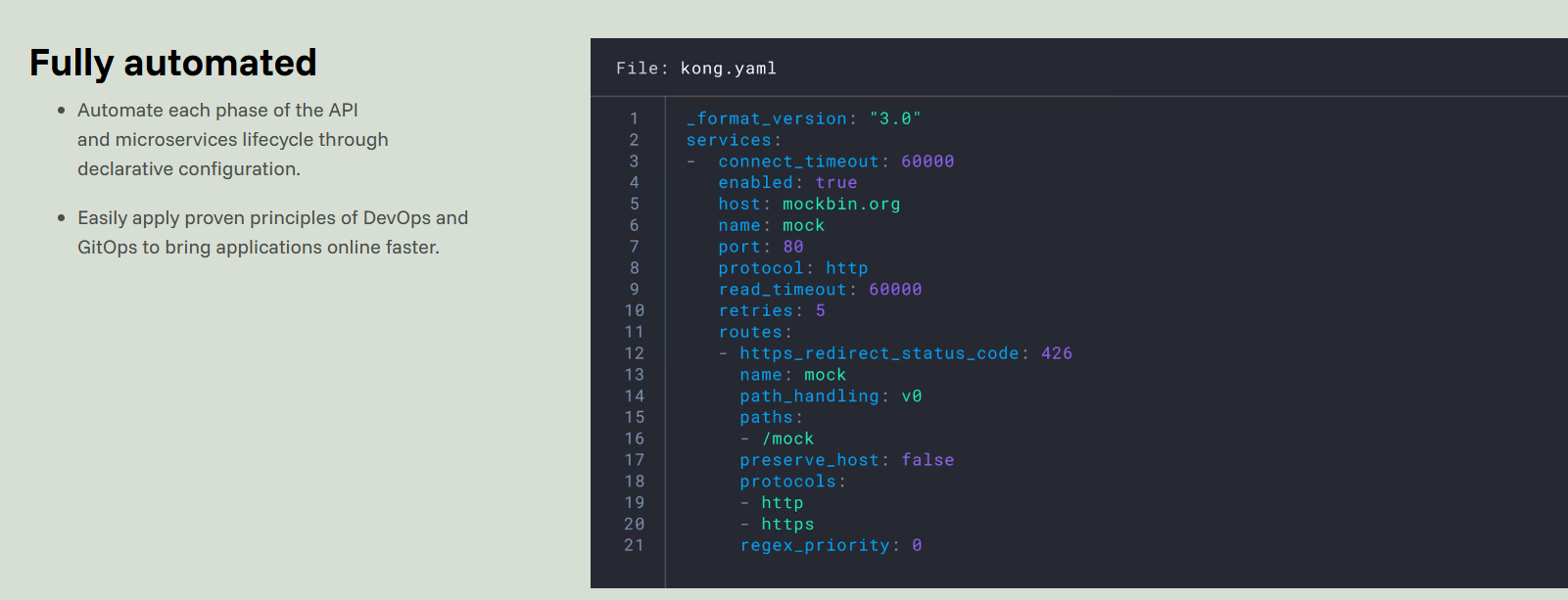
Kong has become a kind of reference point in the API gateway market. Its adoption and mature ecosystem mean it is often the baseline against which teams compare newer open-source and commercial gateways.
Key features
- Lua-based plugin architecture: Kong uses Lua modules to add authentication, rate limiting, transformations, logging, observability, and other capabilities
- Declarative configuration: Services, routes, consumers, and plugins can be managed through declarative files, decK, Terraform, or the Admin API.
- Extensive plugin ecosystem: Kong provides bundled plugins and development kits for building custom plugins around an organization’s specific requirements.
- Flexible deployment: It supports traditional database-backed deployments, DB-less operation, Kubernetes, and hybrid control-plane and data-plane architectures.
- Service mesh integration: Kong Gateway can work as a delegated gateway alongside Kong Mesh, although Kong Mesh is a separate product rather than a feature built directly into the open-source gateway.
- Kong Konnect: The managed platform adds centralized administration, API catalogs, developer portals, analytics, governance, and metering.
Best for: Teams that want maximum flexibility, a mature plugin ecosystem, and the option to deploy across cloud, on-premises, Kubernetes, or hybrid infrastructure.
Weak spots: Kong’s flexibility can introduce complexity. Large plugin inventories and custom plugins require careful testing during upgrades, and several management and governance capabilities are only available in paid editions.
Pricing: Kong Gateway OSS is free to self-host. Kong Konnect offers consumption-based and commercial plans, with advanced platform features and support available at higher tiers.
AWS API Gateway
AWS API Gateway is a fully managed service for creating, securing, and monitoring REST, HTTP, and WebSocket APIs. It is deeply integrated with Lambda and other AWS services. It’s best for serverless applications and teams that do not want to operate their own gateway infrastructure.
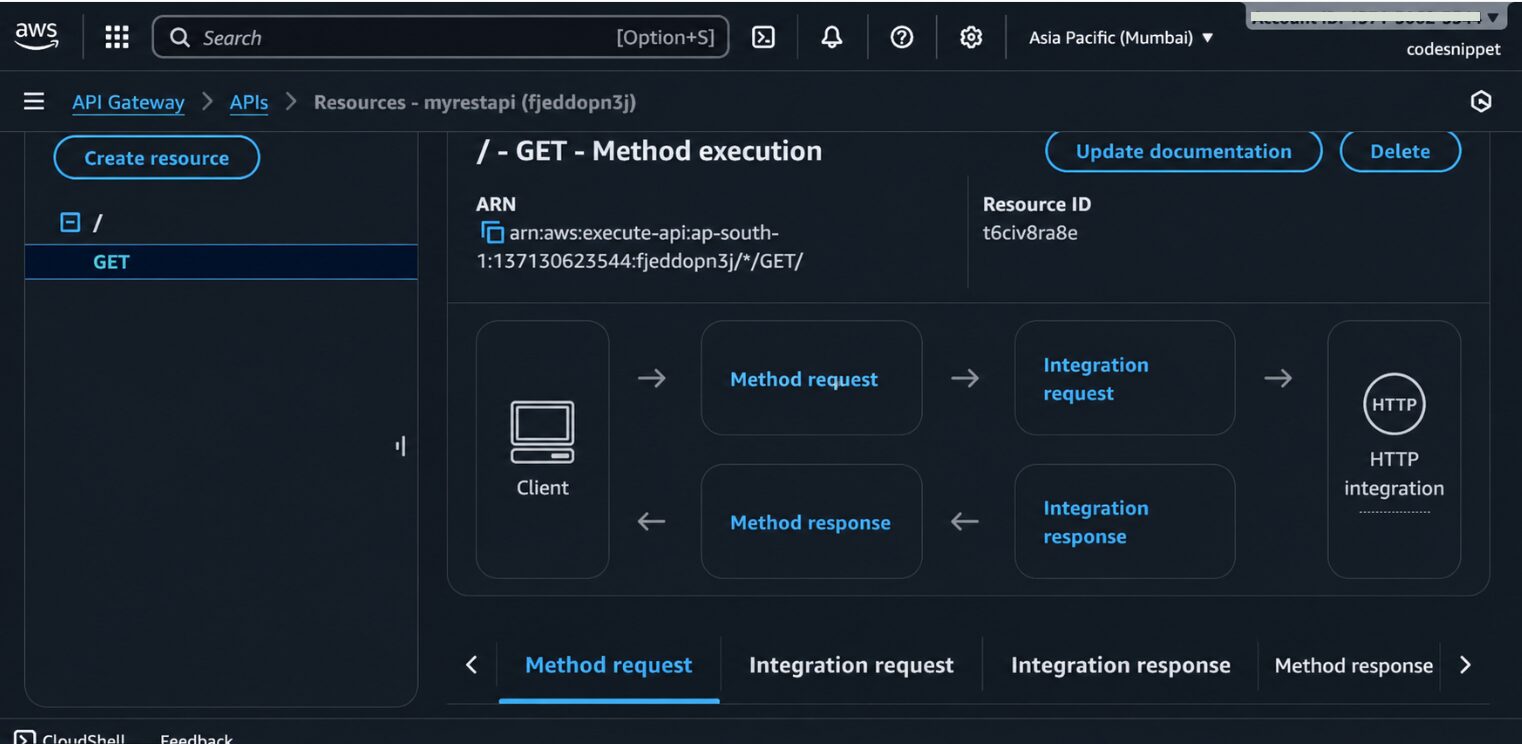
In the screenshot below, you can see how to configure a GET method in AWS API Gateway. It shows the complete request and response flow between the client and the HTTP backend.
Key features
- REST, HTTP, and WebSocket APIs: Teams can choose a feature-rich REST API, a lower-cost HTTP API, or a WebSocket API for bidirectional communication.
- Lambda integration: Requests can invoke Lambda functions directly without requiring a separate web server or application gateway.
- Built-in throttling: Rate and burst limits help protect APIs and their backends from sudden traffic spikes.
- Usage plans: REST APIs can be packaged into usage plans with API keys, quotas, and per-client throttling.
- AWS security services: API Gateway integrates with IAM, Cognito, Lambda authorizers, AWS WAF, CloudTrail, and CloudWatch.
- Managed scaling: AWS provisions and scales the gateway, so there is no need for the team to maintain gateway nodes or clusters.
Best for: Teams already running on AWS, particularly those building serverless applications or Lambda-heavy backends.
Weak spots: API Gateway is closely tied to AWS, making it less attractive for multi-cloud or portable architectures. It also offers less freedom for custom gateway behavior than a plugin-based, self-hosted product.
Pricing: AWS charges according to API type, request volume, payload size, data transfer, caching, and related services. The per-request rate can look inexpensive, but the total bill may rise quickly when traffic, payload sizes, logging, or caching increase, so costs should be modeled before committing.
Kong vs. AWS API Gateway
Choose AWS API Gateway when you want AWS to manage scaling and availability and your applications already depend heavily on AWS services. Kong is the stronger option when you need custom plugins, self-hosting, multi-cloud portability, or more control over the gateway data plane.
Apigee
Apigee is Google Cloud’s enterprise API management platform, combining a gateway with analytics, developer onboarding, governance, and monetization. It is best for organizations running a formal API program rather than teams that only need routing and authentication.
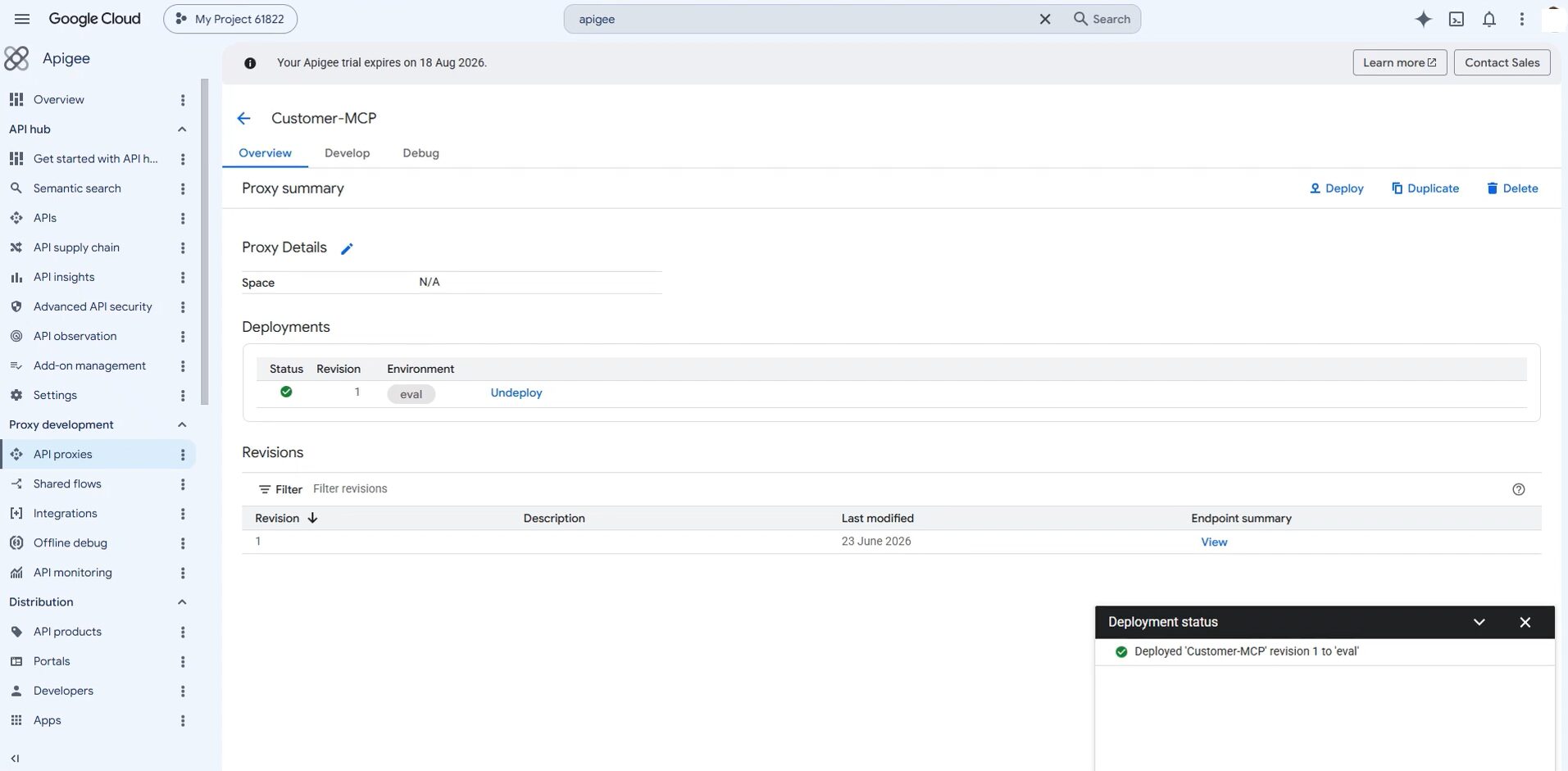
In the screenshot below, Apigee shows a deployed API proxy along with its revision and target environment. The surrounding navigation also gives access to debugging, monitoring, API products, portals, developers, and apps, showing how Apigee extends beyond gateway traffic management into the wider API lifecycle. The deployment status is easy to verify, although deeper operational data sits in separate sections.
Key features
- API analytics: Apigee tracks traffic, latency, errors, developers, applications, and API product consumption.
- Developer portal: External and internal developers can discover APIs, read documentation, register applications, and request access.
- API monetization: Organizations can define rate plans, calculate fees, manage subscriptions, and collect billing information for API products.
- Security policies: Authentication, quotas, rate limits, threat protection, caching, and request transformations can be applied through configurable policies.
- API products: APIs can be grouped and offered to different developer or partner audiences with separate access rules.
- Hybrid deployment: Apigee Hybrid keeps the runtime plane in the organization’s Kubernetes environment while Google Cloud manages the control plane.
Best for: Large enterprises that expose APIs to customers or partners and need analytics, governance, developer onboarding, and monetization in the same platform. When API access itself is being sold as a product, few gateways offer Apigee’s depth.
Weak spots: Apigee is expensive and complex compared with standalone gateways. It is likely to be excessive for a small set of internal services or teams that only require basic traffic management.
Pricing: Apigee offers evaluation, pay-as-you-go, and subscription options. Costs can include runtime environments, API calls, regions, analytics, security, and monetization add-ons.
Azure API Management
Azure API Management is Microsoft’s managed platform for publishing, securing, and monitoring APIs. It combines an API gateway with a developer portal, policy engine, subscriptions, analytics, and close integration with Azure and Microsoft Entra ID. A self-hosted gateway extends the platform to on-premises and multicloud backends.
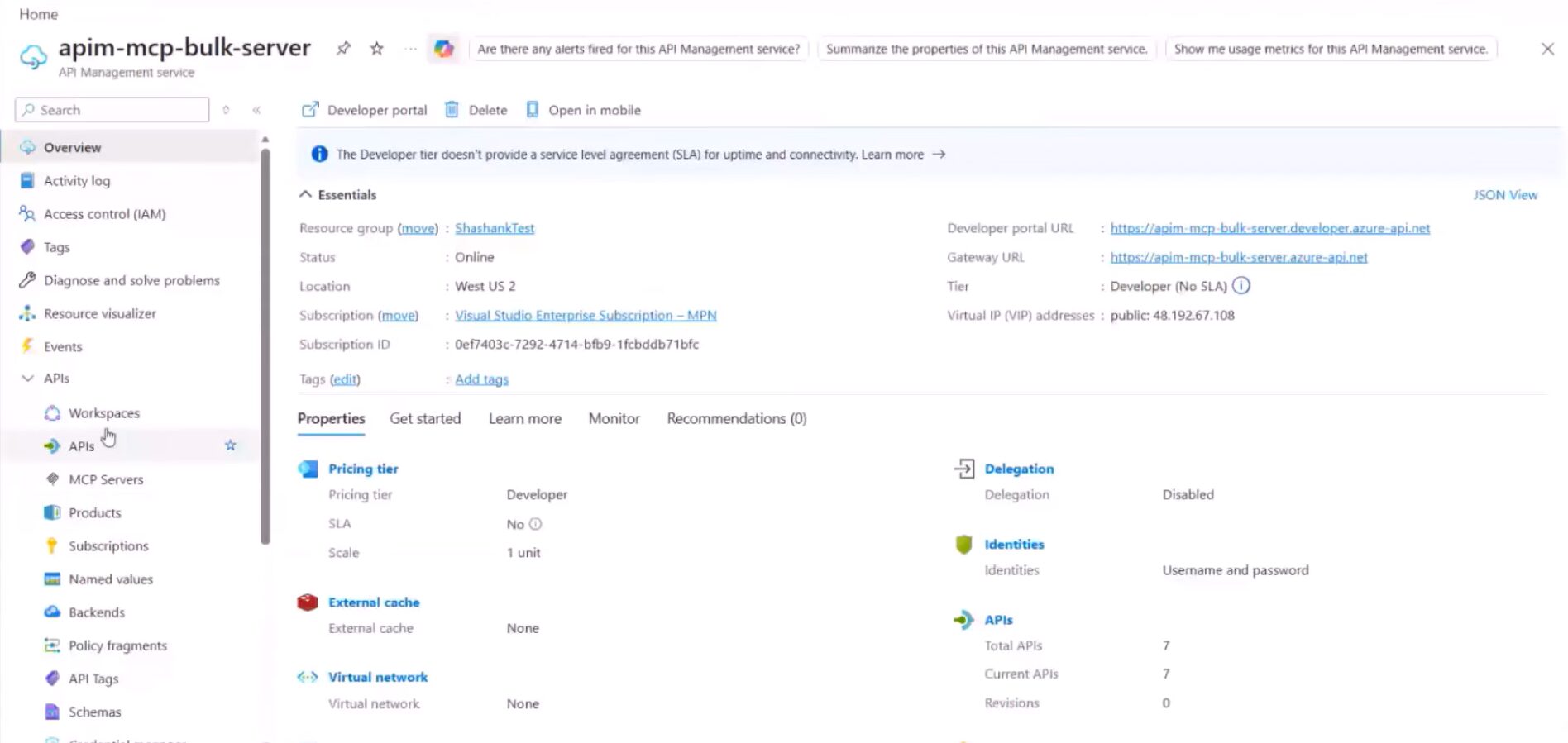
Azure API Management’s overview page brings together the service’s gateway URL, developer portal, deployment region, pricing tier, and API count. The navigation also shows how the platform handles products, subscriptions, backends, policy fragments, and schemas from the same interface.
Key features
- Policy engine: XML-based policies can validate tokens, apply quotas, rewrite URLs, transform payloads, cache responses, and control request processing.
- Developer portal: API consumers can discover APIs, view documentation, test requests, register applications, and request access.
- OAuth and OpenID Connect: Azure API Management supports OAuth 2.0, OpenID Connect, JWT validation, subscription keys, and Microsoft Entra ID integration.
- Hybrid deployment: Its containerized self-hosted gateway can run near APIs hosted on-premises or in another cloud.
- Azure integrations: It works closely with Azure Functions, Logic Apps, Application Insights, Key Vault, and other Azure services.
- Products and subscriptions: APIs can be grouped into products with separate policies, access rules, and subscription requirements.
Best for: Enterprises using Azure or Microsoft identity services, particularly those with APIs spread across Azure, on-premises systems, and other clouds.
Weak spots: Complex policies can produce lengthy XML files that are difficult to read and maintain. Some of the strongest networking, scaling, and hybrid features are also limited to higher-priced tiers.
Pricing: Azure API Management uses consumption-based and tiered pricing. Microsoft now offers classic and v2 tiers, so the available options extend beyond the older Developer, Basic, Standard, and Premium structure.
Traefik
Traefik is a cloud-native reverse proxy and gateway for Kubernetes, Docker, and other dynamic environments. It watches infrastructure providers and updates routes as workloads are added, removed, or changed. Traefik Proxy provides the open-source foundation, while Traefik Hub adds broader commercial API gateway and management features.
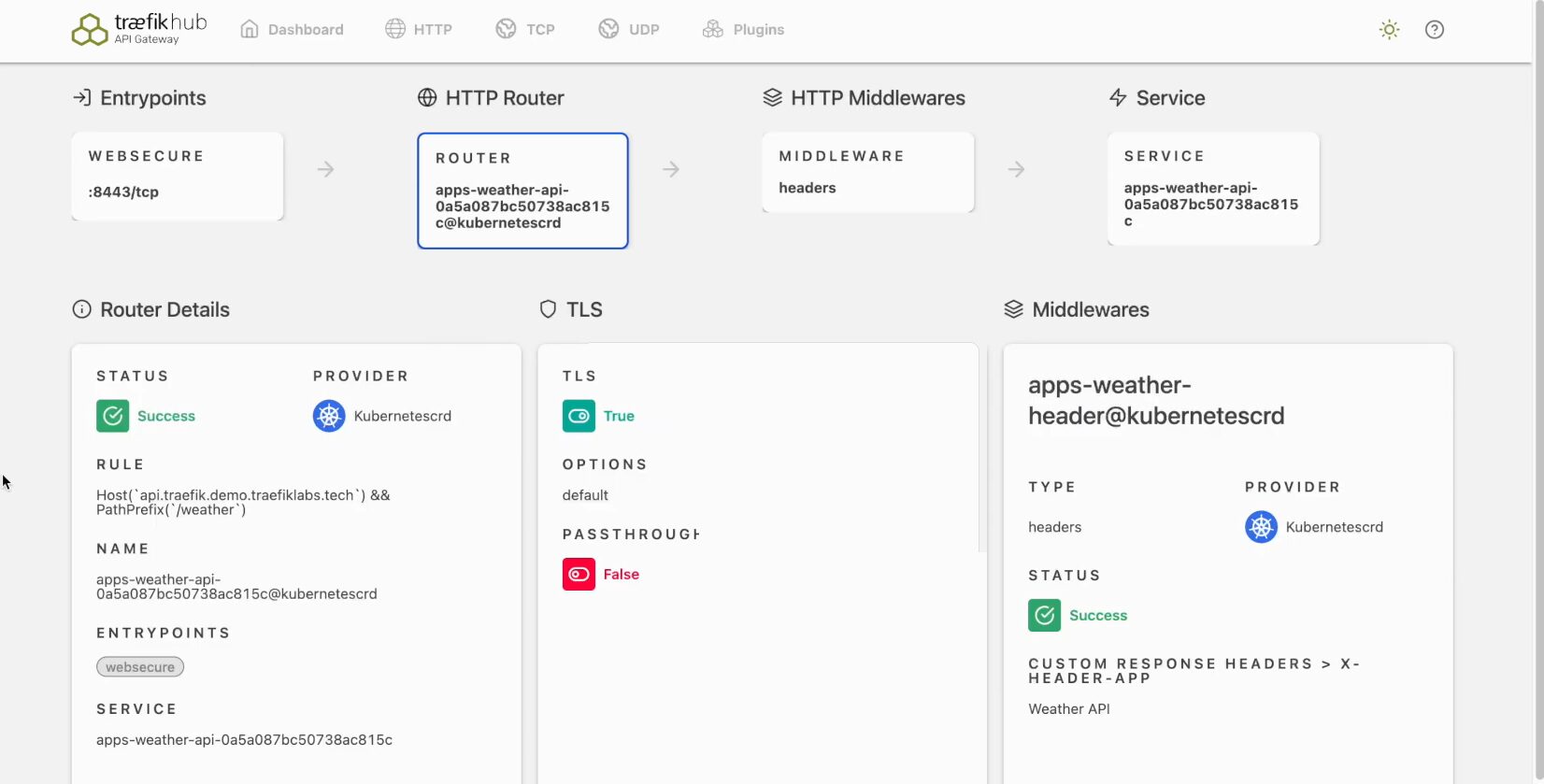
The request path is mapped from the entry point through routing and middleware to the backend service. The same view also exposes TLS settings, routing rules, service mappings, and Kubernetes-based configuration, making the gateway’s traffic flow easy to inspect.
Key features
- Automatic service discovery: Traefik reads service and routing information from Kubernetes, Docker, Consul, and other supported providers.
- Kubernetes-native configuration: It supports Kubernetes Ingress, Traefik custom resources, and the Kubernetes Gateway API.
- Automatic TLS: Traefik can request and renew TLS certificates through ACME providers such as Let’s Encrypt.
- Middleware: Requests can be modified using redirects, header rules, authentication, retries, rate limiting, and other middleware.
- Dynamic routing: Configuration changes can be applied as services change without repeatedly restarting the proxy.
- Commercial API management: Traefik Hub adds distributed security controls, stronger access management, API discovery, and developer-facing management.
Best for: Kubernetes-first and container-heavy teams that want routing to follow changes in their infrastructure automatically.
Weak spots: Traefik Proxy does not include the same range of open-source API management features as Kong, Tyk, or Gravitee. Teams needing a full developer portal, advanced governance, or enterprise security may have to move to a commercial Traefik product.
Pricing: Traefik Proxy is free and open source. Traefik Hub API Gateway, API Management, and enterprise products use commercial pricing.
NGINX and NGINX Plus
NGINX is a widely used web server, reverse proxy, and load balancer that can also serve as a lightweight API gateway. It works best when a team needs fast, predictable traffic handling and already has the skills and infrastructure required to operate NGINX.
NGINX Plus adds commercial features such as active health checks, advanced monitoring, dynamic upstream configuration, and enterprise support.
Key features
- Reverse proxying: NGINX can route HTTP, HTTPS, TCP, and UDP traffic to backend services.
- Load balancing: Requests can be distributed using round robin, least connections, hashing, and other algorithms.
- TLS termination: NGINX can manage encrypted client connections before forwarding requests to backend services.
- Rate limiting: Teams can restrict requests or connections based on an IP address, key, header, or other request value.
- Caching: Frequently requested responses can be served without sending every request to the origin.
- NGINX Plus features: The paid edition adds active health checks, advanced session persistence, expanded monitoring, and dynamic configuration.
Best for: Teams that already use NGINX and need a lightweight, high-performance traffic layer for relatively straightforward gateway requirements.
Weak spots: NGINX was not built as a full API management platform. Developer portals, API products, consumer onboarding, monetization, and detailed API analytics require additional tools.
Pricing: NGINX Open Source is free. NGINX Plus and related NGINX One capabilities require a paid subscription.
Tyk
Tyk is an open-source API gateway written in Go, with a strong focus on self-hosting and multi-protocol API traffic. Unlike gateways built on NGINX or OpenResty, Tyk uses its own gateway runtime and only requires Redis for distributed rate-limiting and token storage. Its open-source gateway is positioned as a batteries-included product rather than a deliberately restricted community edition.
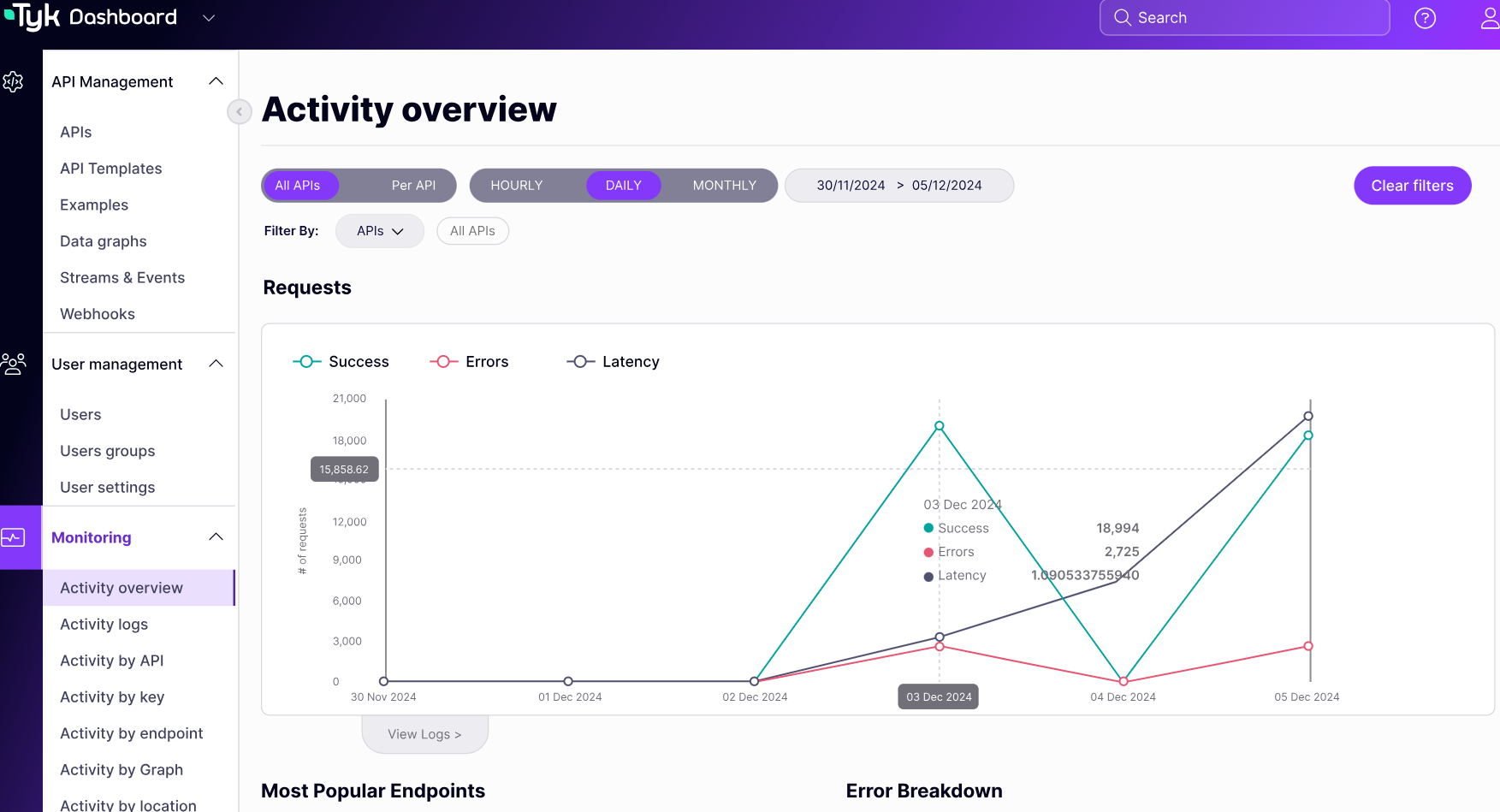
Tyk’s monitoring dashboard tracks request volume, errors, and latency across APIs, with additional breakdowns by key, endpoint, graph, and location. This gives teams a practical view of gateway health and API usage, although configuration details such as authentication and rate limits are managed elsewhere in the platform.
Key features
- Native GraphQL support: Tyk can proxy and secure GraphQL APIs or combine multiple data sources through Universal Data Graph.
- Multi-protocol gateway: It supports REST, GraphQL, gRPC, TCP, and SOAP-based services.
- Authentication and key management: Available methods include JWT, OIDC, bearer tokens, basic authentication, HMAC, and client certificates.
- Traffic controls: Teams can configure rate limits, quotas, caching, versioning, transformations, and access policies.
- OpenAPI support: OpenAPI documents can be imported and used as the source for gateway configuration.
- Developer portal and analytics: These are included in Tyk’s paid API management platform rather than the standalone open-source gateway.
Best for: Teams that want a feature-rich open-source gateway, particularly when GraphQL or self-hosted deployment is a priority.
Weak spots: Tyk has a smaller community and plugin ecosystem than Kong. The dashboard, centralized analytics, and developer portal require the commercial platform.
Pricing: Tyk Gateway is free and open source. Paid Core, Professional, and Enterprise plans support cloud, hybrid, and self-managed deployments; the Core plan is usage-based, while Professional uses flat pricing with unlimited API requests.
Gravitee
Gravitee is an open-source, event-native API management platform with a significant European presence. Unlike gateways that focus mainly on REST traffic, Gravitee is designed to manage synchronous APIs and asynchronous messaging through the same platform.
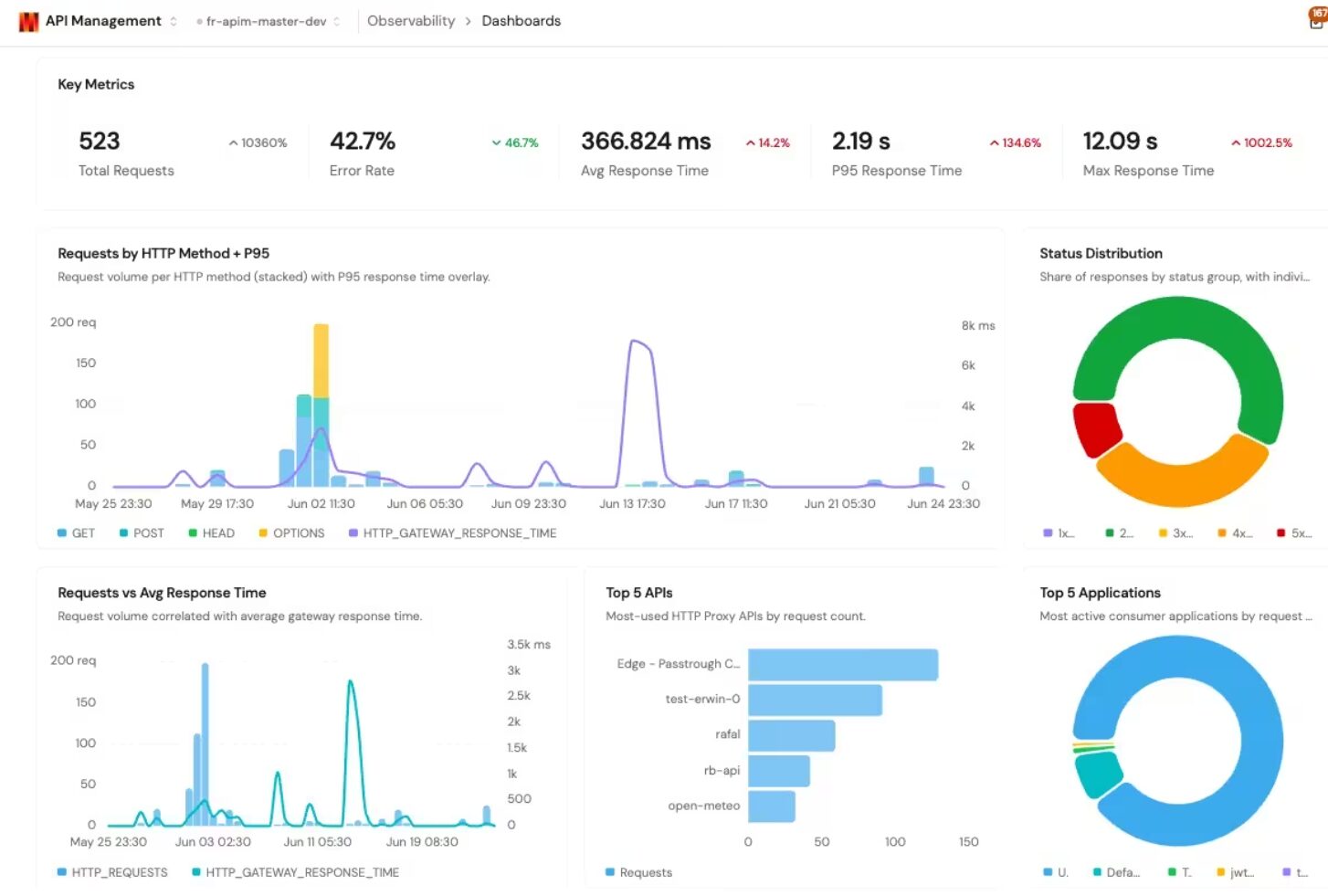
Gravitee’s observability dashboard shows request volume, error rates, response times, status codes, and API usage into one view. Teams can quickly identify slow or failing APIs and see which services and consumer applications generate the most traffic.
Key features
- API Designer: Teams can design and document APIs before publishing them through the gateway.
- Event-native gateway: Gravitee applies gateway policies to asynchronous messages as well as conventional HTTP requests.
- Protocol mediation: Kafka, MQTT, Solace, RabbitMQ, and other message backends can be exposed through REST, WebSocket, webhook, or server-sent event APIs.
- Native Kafka support: The Kafka Gateway can place policies directly in front of Kafka traffic without forcing clients to use HTTP.
- Access management: Gravitee provides identity, authentication, and authorization capabilities alongside its API management platform.
- Developer portal: API consumers can discover services, subscribe to plans, obtain credentials, and access documentation.
Best for: Teams building event-driven or asynchronous APIs alongside REST services, especially those using Kafka, MQTT, WebSocket, webhook, or SSE.
Weak spots: Gravitee has less community content, fewer third-party tutorials, and fewer integrations than Kong. Some of its more advanced event-native capabilities are limited to commercial editions.
Pricing: Gravitee offers Community and Enterprise editions as well as managed cloud deployment. Its commercial plans use a fixed-price model with unlimited API calls and events rather than charging for every request.
Cloudflare API Gateway
Cloudflare API Gateway is an edge-native API security and monitoring service within Cloudflare API Shield. It places API discovery and security controls on Cloudflare’s global network, allowing invalid or malicious requests to be stopped before they reach the origin.
The edge location is its main advantage. Requests are inspected at a nearby Cloudflare point of presence rather than being sent first to a gateway in one central cloud region.
Key features
- API discovery: Cloudflare identifies active and potentially undocumented endpoints from production traffic.
- Schema validation: Incoming requests can be checked against an OpenAPI schema and either logged or blocked when they do not match.
- Mutual TLS: Client certificates can be used to authenticate machines and services before requests reach the origin.
- JWT validation: Cloudflare verifies token signatures, expiry, and validity at the edge.
- WAF and DDoS protection: API traffic benefits from Cloudflare’s wider application security and network protection services.
- Rate limiting and sequence protection: Teams can restrict abusive traffic and detect invalid or suspicious API request sequences.
- Edge routing and caching: API traffic can be combined with Cloudflare’s wider routing and cache controls, although these are platform capabilities rather than features exclusive to API Gateway.
Best for: Teams already using Cloudflare that want API discovery, DDoS protection, schema enforcement, and authentication checks at the edge.
Weak spots: Cloudflare API Gateway is not a complete API lifecycle management platform. Its developer portal, API product, monetization, transformation, and backend orchestration capabilities are limited compared with Apigee, Kong, or Azure API Management.
Pricing: Endpoint Management and schema validation are available with different limits on Free, Pro, Business, and Enterprise plans. The full API Shield suite requires an Enterprise plan and an additional API Shield subscription.
Apache APISIX
Apache APISIX is an open-source, cloud-native API gateway built on NGINX, OpenResty, and Lua. It uses etcd for dynamic configuration, allowing routes, upstreams, and plugins to be changed without restarting the gateway. Its open-source plugin set is one of the broadest in this category.
Key features
- Dynamic configuration: Routes, upstream services, certificates, and plugins can be updated through the Admin API without a gateway restart.
- Open-source plugins: APISIX includes plugins for authentication, rate limiting, traffic splitting, transformations, observability, serverless workloads, and AI traffic.
- Kubernetes support: It can be deployed using Helm and managed through APISIX custom resources or the Kubernetes Gateway API.
- Service discovery: APISIX can find changing backend services through Kubernetes and other supported discovery systems.
- Declarative operation: Standalone deployment mode allows teams to manage configuration through YAML without using etcd.
- External plugin runners: Custom plugins can be written in languages such as Java, Go, Python, and JavaScript rather than only Lua.
Best for: Teams that want a dynamic, Kubernetes-friendly, open-source gateway with a broad collection of free plugins.
Weak spots: APISIX requires teams to manage the gateway, etcd or standalone configuration, monitoring, availability, and upgrades. It also lacks the polished developer portal and business-facing API product features found in larger enterprise platforms.
Pricing: Apache APISIX is free and open source. Infrastructure, internal operations, commercial support, and third-party managed distributions are separate costs.
Other API Gateways Worth Considering

Boomi

MuleSoft

WSO2

Fusio

KrakenD

Kgateway

Ocelot
API Gateway Winners
| Use Case | Recommended Tool |
|---|---|
| Best overall / most flexible | Kong Gateway |
| Best for AWS stacks | AWS API Gateway |
| Best for enterprise + analytics | Apigee or MuleSoft |
| Best for Azure stacks | Azure API Management |
| Best for Kubernetes | Traefik |
| Best lightweight gateway for performance | NGINX |
| Best open-source with portal | Tyk |
| Best for async / event-driven APIs | Gravitee |
| Best for edge + security | Cloudflare API Gateway |
These recommendations should be treated as starting points. For example, Kong may still suit a Kubernetes environment better than Traefik when plugins and API management are more important than automatic discovery.
API Gateway Pricing Breakdown
Open-source gateways remove software licensing costs, but they are not free to operate. You still pay for:
- Compute and networking
- High availability and scaling
- Monitoring and logging
- Security updates and upgrades
- Configuration storage and backups
- Engineering and support time
Some open-source products also reserve developer portals, analytics, dashboards, enterprise authentication, or official support for paid editions.
Managed gateways reduce operational work but introduce consumption charges. Costs may depend on:
- API requests
- Payload size
- Data transfer
- Cache capacity
- Logging and analytics
- Deployment regions
- Security add-ons
- Development and test environments
Model Costs at 10x Traffic
API gateway costs do not always rise in direct proportion to traffic. Consider this simplified Apigee pay-as-you-go example.
Current usage: 10 million calls per month
- API calls: 10 million × $20 per million = $200
- One base environment: 730 hours × $0.50 per hour = $365
- Estimated monthly cost: $200 + $365 = $565
At 10x traffic: 100 million calls per month
Assume the growing application now requires two comprehensive environments for multi-region availability and the API Analytics add-on.
- API calls
- First 50 million × $20 per million = $1,000
- Next 50 million × $16 per million = $800
- Total API call cost = $1,800
- Two comprehensive environments: 730 hours × $4.70 per hour × 2 regions = $6,862
- API Analytics: 100 million × $20 per million = $2,000
- Estimated monthly cost: $1,800 + $6,862 + $2,000 = $10,662
What changed?
| Current usage | At 10x traffic | |
|---|---|---|
| API calls | 10 million | 100 million |
| Estimated cost | $565/month | $10,662/month |
| Increase | — | 18.9× |
Traffic increased by 10×, but the estimated bill increased by almost 19× because the larger deployment added multiple regions, a higher-capacity environment, and analytics, not merely more API calls. Apigee’s current pay-as-you-go rates charge separately for API calls, environment usage by region, deployment capacity, analytics, security add-ons, and networking.
This is an illustrative scenario, not a prediction of every Apigee bill. If traffic increased while the deployment remained on the same environment without additional services, volume discounts could make the increase less than tenfold.
Which API Gateway Should You Choose?
There is no single API gateway that fits every architecture. Kong is a strong all-round choice when flexibility and plugins matter. AWS API Gateway and Azure API Management make more sense when the rest of the stack already depends on those clouds. Apigee is better suited to large API programs that need analytics, developer onboarding, and monetization, while Traefik and Apache APISIX are stronger fits for cloud-native and Kubernetes-heavy environments.
The final choice should come down to deployment model, security needs, operational effort, and cost at scale. Shortlist two or three gateways, test them with your actual policies and traffic patterns, and include the commercial features you are likely to need later—not just the free or entry-level setup.
Also consider how difficult it would be to leave the platform. Routing rules, authentication policies, plugins, analytics, and developer workflows can create more lock-in than the gateway itself. A good choice should work for your current architecture without making the next stage of growth unnecessarily expensive or difficult.






