



Modern applications rarely run as one large system. An app calls multiple services for login, payments, user profiles, search, notifications, analytics, and internal business logic.
In cloud-native and microservices architectures, that creates a problem: every client should not have to know where every service lives, how each service is secured, or what rules apply before a request is accepted.
An API gateway solves this problem. It acts as the controlled entry point between API consumers and backend services. Instead of exposing every microservice, external API traffic is routed through a gateway that can handle request routing, authentication, rate limiting, protocol translation, monitoring, etc.
An API gateway is actually much more than a traffic router. In many distributed systems, it becomes the place where API policy is enforced before requests reach the application layer. It helps keep backend services focused on business logic while the gateway handles the repeated operational concerns around access, security, reliability, and visibility.
In this guide, we’ll explain what an API gateway is, how an API gateway works, where it fits in microservices, how it differs from a load balancer, and the main API gateway benefits for modern application teams.
Looking for tool recommendations? See our separate guide: Best API Gateway Tools.
What is an API Gateway?
An API gateway is a server that acts as the single entry point for client requests to backend services.
It sits between API consumers and backend systems. The API consumers may be web apps, mobile apps, internal tools, or third-party integrations. The backend may include services for authentication, users, payments, orders, search, notifications, or analytics.
Instead of exposing each backend service directly, API calls are directed through the gateway. The gateway receives the request, checks the rules, and forwards it to the right service.
For example, a mobile app may call one endpoint such as /account. The gateway can route that request to identity, subscription, and billing services.
The API gateway decides which requests are allowed, where they should go, how much traffic is permitted, and how responses should be returned.
In microservices, this becomes important because the client need not understand the internal service structure. The backend can change, split, or scale without forcing every client to change with it.
The Problems API Gateways Solve
In a monolithic application, most functions sit behind one backend. The client calls the application, and the application handles the rest internally.
But when teams move to microservices, those functions split into separate services: user management, payments, inventory, search, notifications, reporting, and more. These distributed systems created a messy client-to-service problem.
Without an API gateway, clients may end up calling these services directly. That creates several problems.
- Authentication logic gets repeated across services.
- Rate limits are applied inconsistently.
- Logging and monitoring become scattered.
- Versioning becomes difficult to manage.
- Even basic browser concerns such as CORS can turn into a recurring issue across multiple APIs.
When every service becomes its own public entry point, the API surface grows quickly. Each service now needs to handle not only its business function but also access control, traffic rules, observability, and client-facing behavior.
API gateways sit between clients and microservices. They give dev teams one place to manage the API boundary while allowing backend services to remain separate and focused.
How does an API gateway work?
An API gateway works by handling the request before it reaches the backend service.
When a client sends an API request, the request first reaches the gateway. This client could be a browser, mobile app, internal dashboard, partner application, or another service.
The gateway then applies the rules configured for that API. It may verify an API key, validate a JWT, check an OAuth token, or confirm that the request is coming from an allowed client.
Next, it can apply traffic controls such as rate limiting and throttling. Rate limiting controls how many requests a client can make in a given time window. Throttling slows down or rejects excess traffic when usage crosses the allowed limit.
Once the request is accepted, the gateway routes it to the correct backend service. For example, a request to /payments may go to the payments service, while a request to /users may go to the user service.
Some gateways also transform requests or responses. They may rewrite headers, convert payload formats, remove internal fields, add metadata, or combine responses from multiple services before sending data back to the client.
Finally, the backend service processes the request and returns a response through the gateway. The gateway may apply final policies, log the transaction, and return the response to the client.
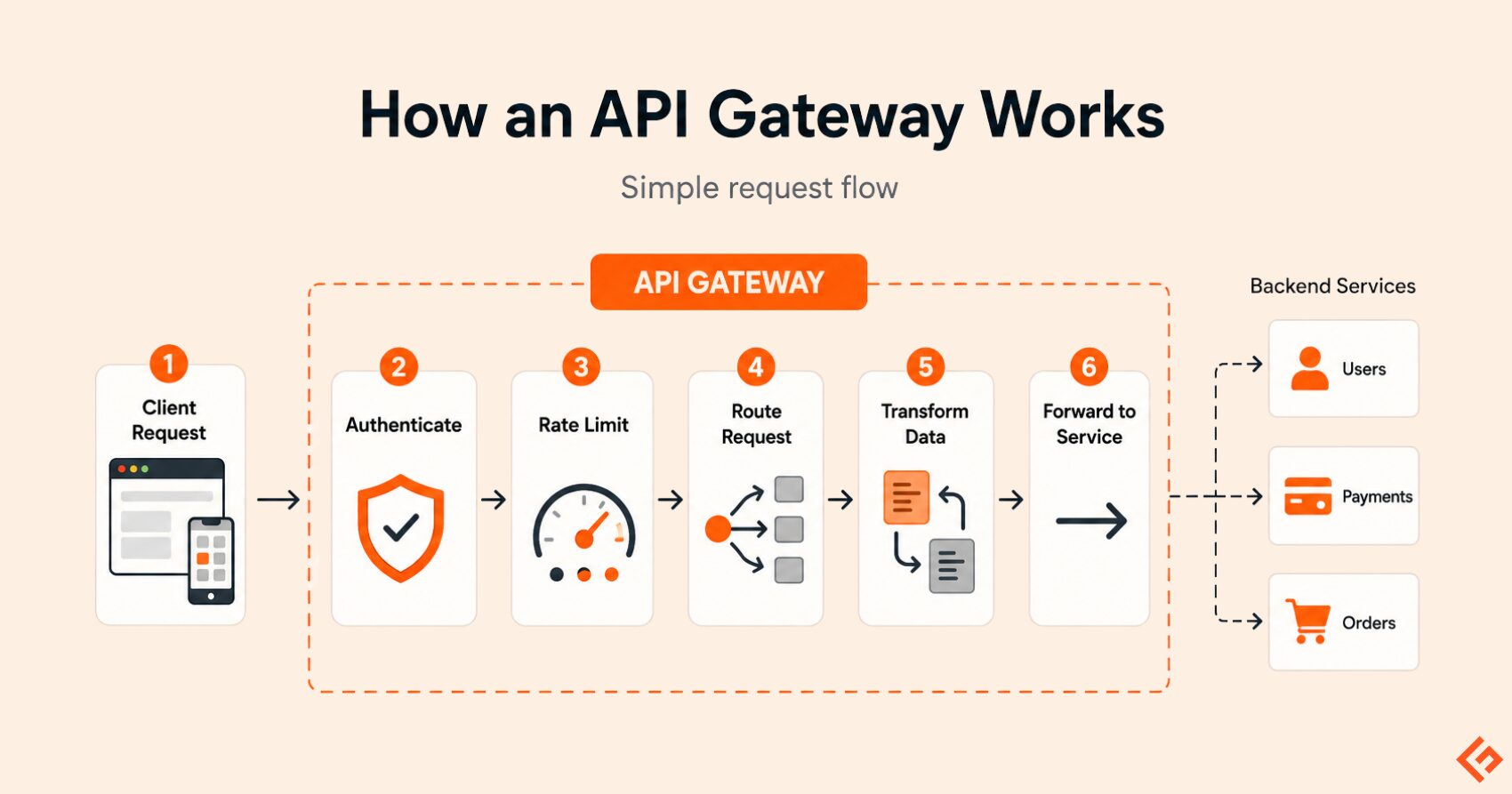
Core Functions of an API Gateway
An API gateway acts as a policy enforcement layer for API traffic. Instead of repeating the same controls inside every backend service, teams can manage them at the gateway.
Request routing
The gateway maps incoming API requests to the right backend service.
For example, requests to /users may go to the user service, while requests to /payments may go to the payment service. This lets clients use a consistent API structure even when the backend is split into multiple services.
Authentication and authorization
The gateway can validate API keys, access tokens, JWTs, or OAuth tokens before a request reaches the backend.
Authentication confirms who is making the request. Authorization checks what that user, app, or service is allowed to access. Handling this at the gateway reduces the chance of every service implementing access rules differently.
Rate limiting and throttling
Rate limiting controls how many requests a client can make in a fixed period. Throttling slows or rejects traffic when usage crosses the allowed limit.
This protects backend services from abuse, traffic spikes, faulty scripts, and accidental overload.
Load balancing
An API gateway can distribute requests across multiple instances of the same service.
If the payment service runs on three instances, the gateway can spread traffic between them instead of sending every request to one instance. This improves availability and prevents one backend from becoming overloaded.
SSL termination
SSL termination means the gateway handles HTTPS encryption and decryption at the edge.
The client connects securely to the gateway, and the gateway manages the TLS/SSL work before passing traffic to internal services. This reduces the certificate and encryption burden on individual backend services.
Request and response transformation
An API gateway can modify requests or responses when the client and backend do not use the same format.
For example, it may rename fields, add headers, remove internal data, convert XML to JSON, or reshape a response for a mobile app. This is useful when backend services are not designed exactly the way clients need to consume them.
Caching
The gateway can cache repeated responses and serve them without calling the backend every time.
This works well for data that does not change frequently, such as product categories, public configuration, documentation metadata, or location lists. Caching reduces backend load and can improve response time.
Logging and observability
Because API traffic passes through the gateway, it becomes a central place to collect logs, metrics, traces, and error information.
Teams can monitor request volume, latency, failed requests, blocked traffic, and service-level issues from this one layer.
API Gateway vs. Similar Concepts
| Concept | What it does | How it differs from a gateway |
|---|---|---|
| Load balancer | Distributes traffic across instances | No auth, routing logic, or transformation |
| Reverse proxy | Forwards requests on behalf of servers | Simpler; no API-specific features |
| Service mesh | Handles service-to-service communication | East-west traffic vs. gateway’s north-south |
| CDN | Caches and delivers static content globally | Not designed for dynamic API traffic |
API Gateway Patterns
The API gateway design pattern depends on the number of clients, the complexity of backend services, and how much logic the gateway needs to handle. Below are the common API gateway patterns.
Single gateway
A single gateway pattern uses one API gateway for all clients and backend services.
This is the simplest setup. It works well when the application is small to medium in size, the client types are similar, and the gateway rules are not too complex. Many teams start here because it gives them one entry point for routing, authentication, rate limiting, and monitoring.
The risk is that the gateway can become too large if every client and service starts adding custom rules to the same layer.
Gateway aggregation
Gateway aggregation combines data from multiple backend services and returns one response to the client.
For example, a dashboard may need user details, billing status, recent activity, and support tickets. Instead of making the client call four services separately, the gateway can collect the data and send back one combined response.
Use this pattern when clients need data from multiple services for a single screen or workflow. It reduces client-side complexity and network calls, but the gateway should not become a place for heavy business logic.
Gateway offloading
Gateway offloading involves moving repeated infrastructure tasks out of backend services and into the gateway.
These tasks may include authentication, SSL termination, rate limiting, logging, caching, request validation, and header management. The backend services can then focus more on their own business function.
Use this pattern when the same control is being repeated across many services. It improves consistency, but teams should still keep service-level security where needed instead of treating the gateway as the only protection layer.
Backend for Frontend (BFF)
The Backend for Frontend pattern uses separate gateways for different client types.
For example, a mobile app, web app, admin dashboard, and partner API may each have different data needs. A mobile gateway may return lighter responses, while an admin gateway may expose more operational data.
Use BFF when different clients need different API shapes, payload sizes, authentication flows, or release cycles. It avoids forcing every client through the same generic API, but it does add more gateway components to manage.
Most real-world teams often combine these patterns. A system may use gateway offloading for common policies, aggregation for specific screens, and BFF gateways for client-specific experiences.
When Do You Actually Need an API Gateway?
Not every application needs an API gateway. If you have a simple monolithic application with one frontend and one backend, adding a gateway may create more moving parts than value. An API gateway makes sense when the API surface grows.
Conclusion
You may need an API Gateway if you have:
Five or more microservices that clients need to access
Multiple client types, such as web, mobile, internal tools, and third-party integrations
Centralized authentication and authorization requirements
Rate limiting or throttling needs across APIs
A public API exposed to customers, partners, or developers
Consistent logging and monitoring requirements across services
Different backend services with different protocols or response formats
You may not need one if you have:
A simple monolith with one frontend
A small internal app used by a limited team
An early-stage prototype where the speed of development matters more than architecture
Only one or two backend services with minimal client-facing complexity
No public API exposure and no strong need for centralized traffic control






