



75% of customers are frustrated by long waiting times, and 52% believe companies intentionally complicate the support process.
But here’s what really hurts, the average customer abandons a support queue after just 8 minutes, costing U.S. businesses an estimated $130 billion annually in lost revenue per ScanQueue report.
Why do customers dread contacting support? The usual suspects:
- Endless IVR menus and confusing navigation
- Hold music, marketing messages, and zero transparency
- Agents who can’t resolve issues on the first attempt
Do you want your brand associated with that experience?
In 2026, customer expectations have shifted. Mobile-first interactions, AI-powered responses, and real-time transparency aren’t nice-to-haves but they’re basic requirements.
Customer service software help you efficiently assist customers, response to queries on customer’s channel which eventually leads to higher satisfaction ratings and better customer retention.
Top Customer Service Software
Here is a quick overview of software which I’ll be reviewing in detail below.
| Software | Best For | Standout Feature | Starting Price | Free Trial |
|---|---|---|---|---|
| Tidio | Small to Medium Businesses | Lyro AI agent | $29/mo (Starter) | Free plan |
| Freshdesk | AI-powered Customer Service Suite | Freddy AI | $19/agent/mo (Growth) | 14 days |
| Nextiva | Voice-First Omnichannel Support | Native phone + contact center with AI | $15/agent/mo | No |
| Zendesk | SaaS Customer Support | 1,000+ app marketplace | $19/agent/mo (Support Team) | Yes |
| Salesforce Agentforce Service | Enterprises | Agentforce AI agents | ~$25/user/mo | 30 days |
| HubSpot Service Hub | B2B Business Support | Native HubSpot CRM integration | $7/mo (Starter) | Free plan |
| Help Scout | Small Businesses | Shared inbox + Beacon live chat widget | $25/user/mo (Standard) | No |
| Zoho Desk | Self-Service & Ticket Management | Zia AI + Answer Bot | $7/user/mo | 15 days |
| Intercom | AI-first Customer Service Platform | Fin AI Agent | $19/seat/mo (Essential) | 14 days |
| Front | Shared Inbox Management | Autopilot AI agent | $25/seat/mo (Starter) | 14 days |
| Hiver | Email Support Management | AI Agents + Copilot, built into Gmail | $25/user/mo (Growth) | 7 days |
| Gorgias | E-commerce Customer Support | AI Agent priced per resolution | $10/mo (Helpdesk) | 7 days |
Next, let’s go through each in detail.
Tidio
Best for Small to Medium Businesses
Tidio is a customer service stack made to improve customer service, offer live support, and configure a ticketing system. I found the Lyro AI agent excellent as it reduces the time spent on handling customer-related tasks.
The service suite also makes it easy to streamline the whole process with the help of
- Help Desk: a centralized place to handle all customer queries
- Live Chat: real-time customer handling with sales-driven automated flows
- Flows: Sales-focused response to improve conversions
- Lyro AI agent: reduce overall time spent by the team by handling repetitive tasks
All these, in return, let you handle customer support with the added benefit of generating leads and improving sales.
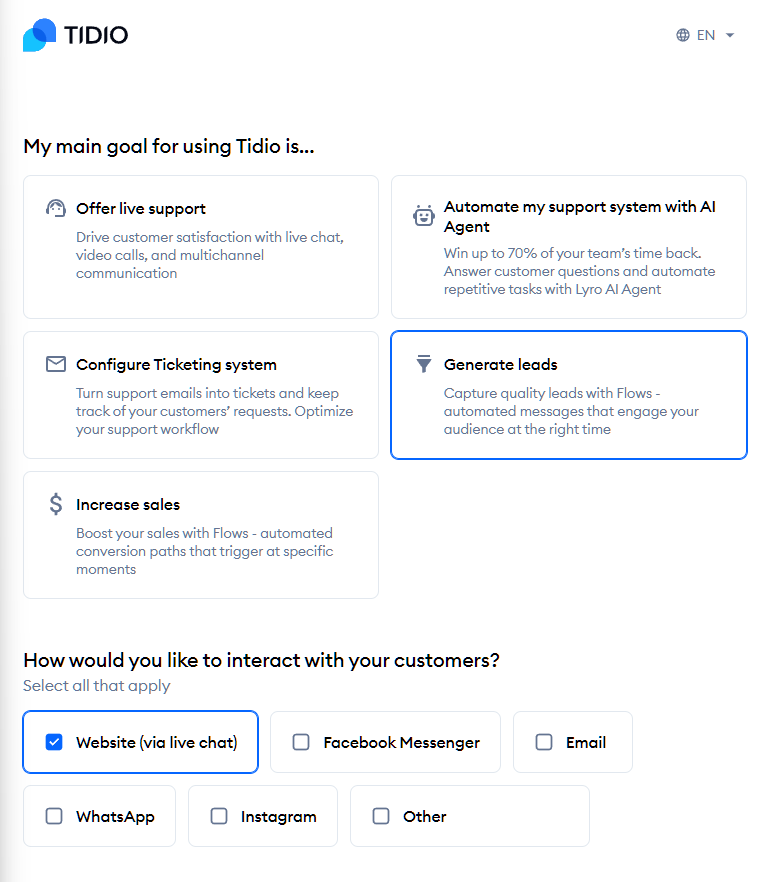
I liked the onboarding as it asks key questions, analyzes your content, and understands your product and services.
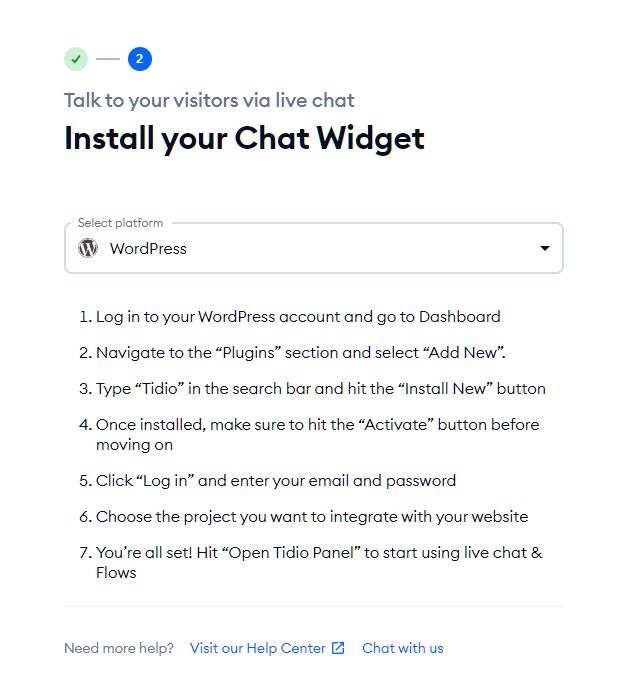
To start using it, you need to install it on your site via different available methods, including code insertion, widget, or plugin installation. For example, as I use WordPress, it asked me to install the Chat Widget.
Once you connect your site, you’ll need to connect your mailbox provider for seamless customer handling.
With the free plan, you can get started with Tidio and even use its 50 free Lyro AI conversations that reply automatically to customer queries.
That’s how the Tidio dashboard looks after setup. It opens up in the Tidio own web page rather than inside your site’s dashboard. It is easy to use and intuitive, with all the key features accessible from the sidebar.
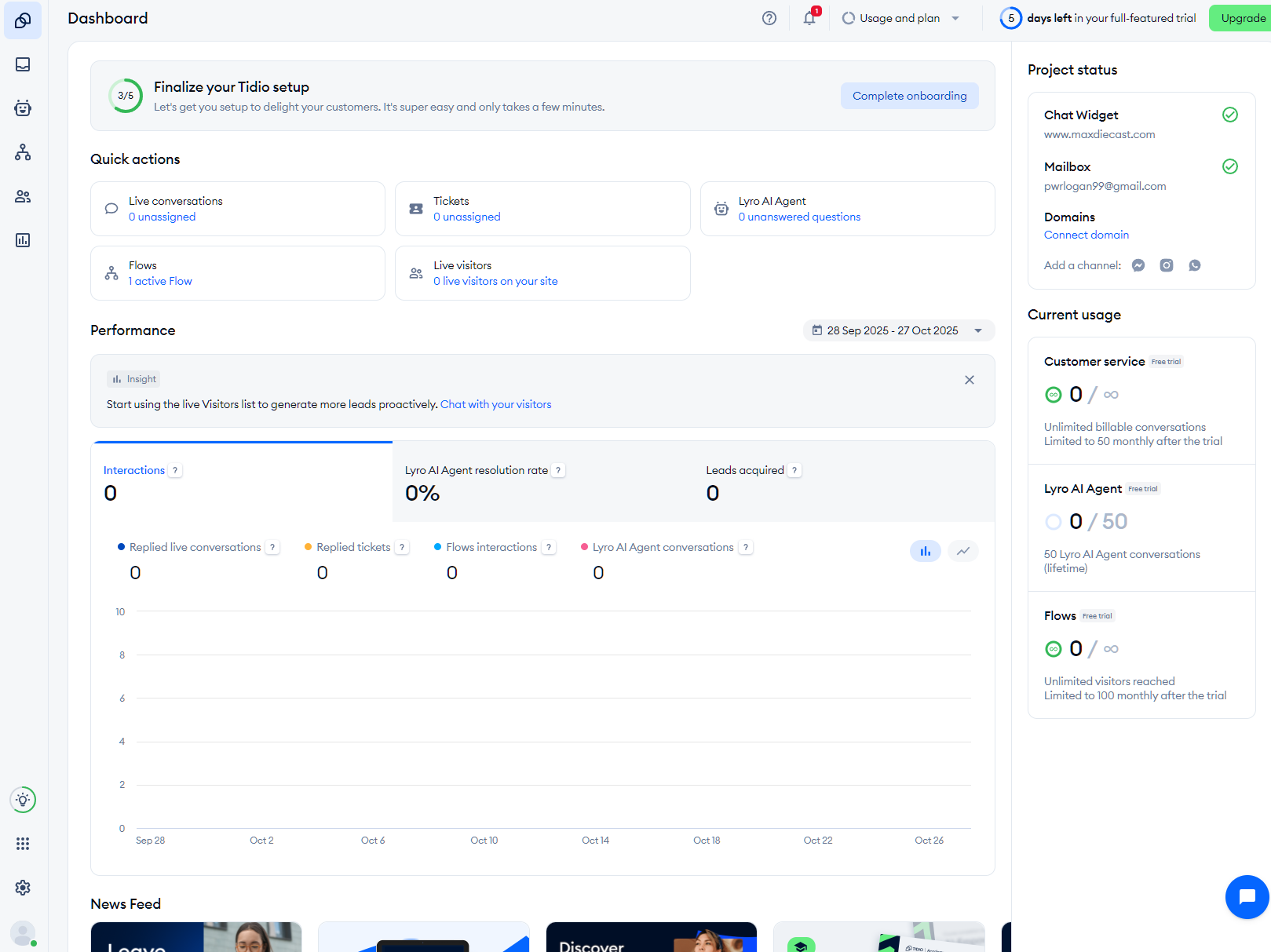
I liked how they offer a detailed tour of all the key features.
On the social channels integration aspect, it lets you accumulate all your social media conversations in one place. You can integrate WhatsApp, Instagram, Facebook Messenger, and email. It also supports 120+ tools integration, including Mailchimp, Shopify, Squarespace, and others.
As for the AI responses, it is human-like and capable of aligning responses based on brand voice. However, its aim is not to completely automate customer support, but to aid them in handling repetitive tasks.
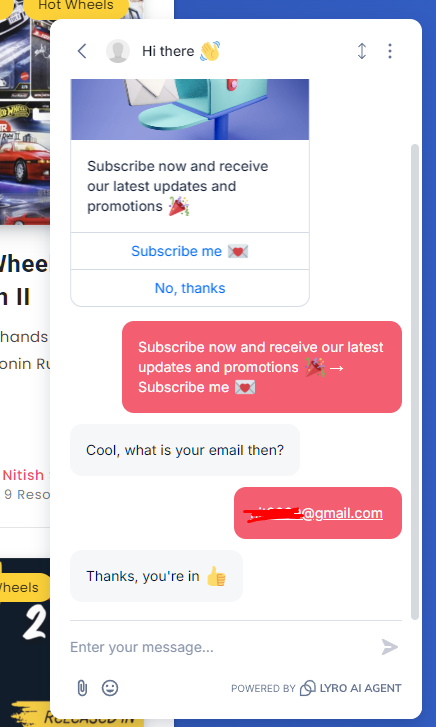
By default, the Lyro AI agent subscribes new users (doesn’t count as an AI agent). Now, if you want to create tasks, you can do so by using available task templates, such as return policy, offer discount codes, exchange policy, etc., or create tasks from scratch via its drag-and-drop editor.
You can use triggers, conditions, and actions to create a custom response. It is also highly configurable.
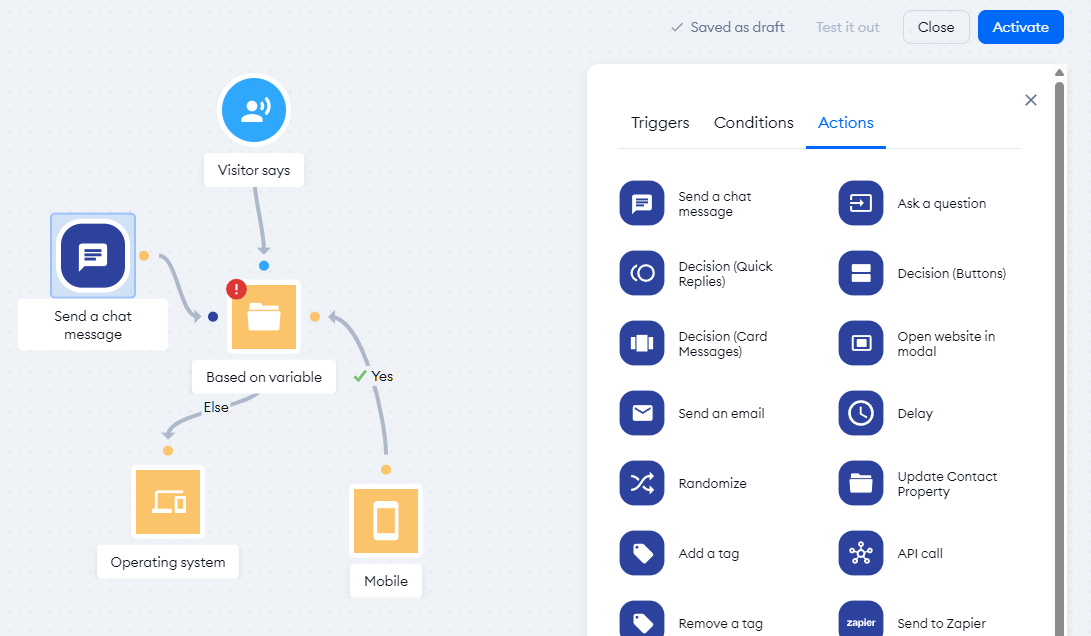
Overall, Tidio impressed with its wide range of features and AI integration. It does an excellent job in customer service handling with a focus on automation and customizability.
Tidio Features
- AI-powered human-like response
- Centralized help desk
- Offers flow to optimize SDR sales
- Highly configurable
- Automated ticket routing
- Supports multiple social platforms
Pros & Cons
PROS
CONS
Pricing
Tidio has shifted to conversation-based pricing in 2026.
- Starter – $29/mo
- Growth – $59/mo
- Plus – $300/mo
They also offer add-ons for:
- Lyro AI agent – $39/mo
- Flows – $29/mo
Resolve up to 70%
According to Tidio, Lyro can resolve up to 70% of common support queries without human intervention, learning from your help center content and FAQs to provide conversational, natural responses.
The free plan includes limited conversations to get started.
Freshdesk
Affordable AI-powered Customer Service Suite
Freshworks has its own multichannel customer support software, Freshdesk Omni. The unified agent dashboard enables easy monitoring for all customer support channels. Moreover, it is powered by Freddy AI to drive an extensive array of advanced functions, such as customized wait queue behavior, bot building, bot retraining, and more.
With the built-in AI, agents can personalize the content and tone of their responses to ensure that every customer gets the help they need. Moreover, Freddy Self Service learns from the organization’s knowledge base to offer intelligent responses 24×7 through chatbots.
Freshdesk Omni also enables agent training with Freddy Insights, which offers root-cause analysis to rapidly recommend solutions that optimize CSAT.
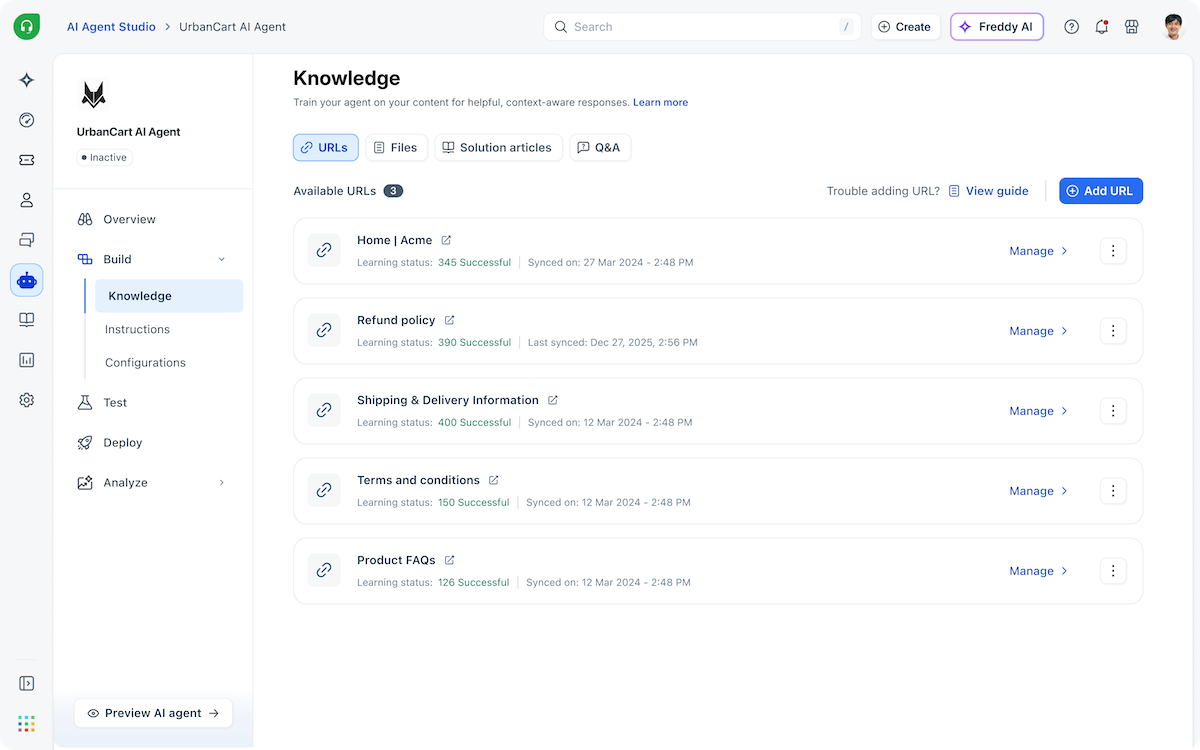
This Freshdesk dashboard makes keeps conversations, customer details, and ticket statuses all in one place. I like how you can quickly reply, add notes, merge, or forward tickets, making collaboration smooth and reducing back-and-forth. The built-in status tracking and priority settings help ensure every issue gets handled on time without anything slipping through the cracks.
Features
- Smart ticketing with fully integrated AI to summarize conversations and suggest next steps
- Ready-to-use connectors and templates for fast-tracked custom integrations
- 1000+ integrations on the Freshworks Marketplace
- Trusted by 60000+ brands worldwide
- 225% average three-year ROI and 30% reduction in average handling time
Pros & Cons
PROS
CONS
Pricing
Freshdesk has three main plans (annual billing). All plans come with a 14-day free trial.
- Growth — $19 per agent per month
- Pro — $55 per agent per month
- Enterprise — $89 per agent month
Freddy AI Copilot is available as an add-on for $29 per agent per month.
Nextiva
Best for Omnichannel Contact Center with AI
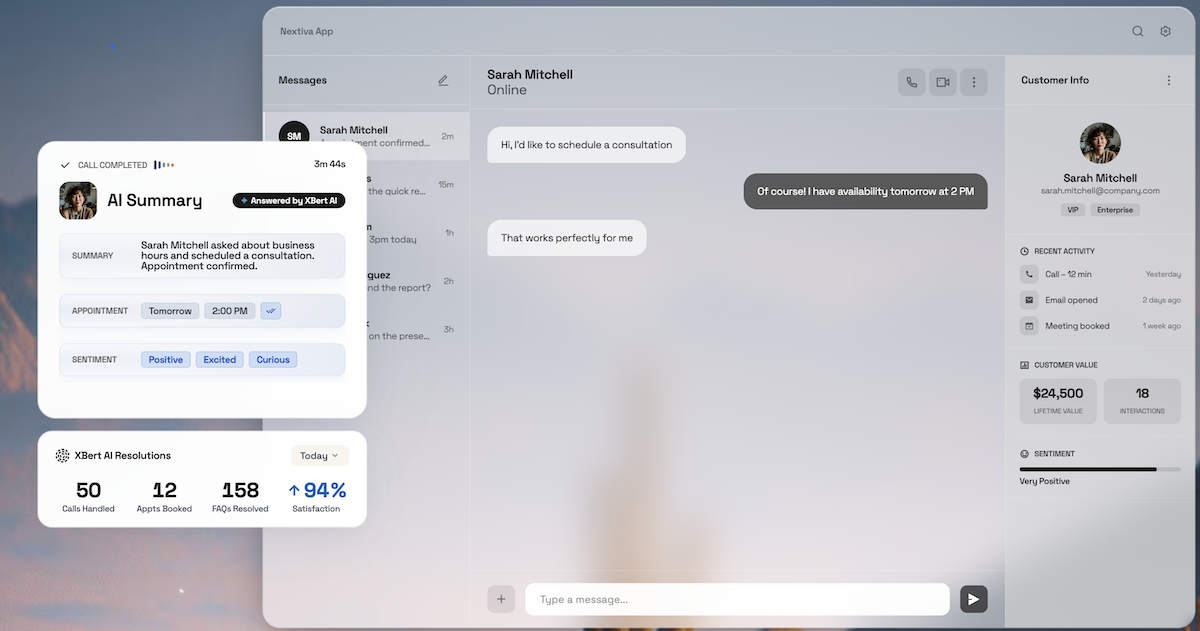
Nextiva is an AI-powered omnichannel contact center solution that combines voice, video, SMS, team messaging, and advanced AI capabilities into a unified platform. It is ideal for call center management and customer journey orchestration.
The platform stands out with its AI Employee (XBert) integration which provides handoffs between AI and human agents. When a customer interaction transfers from XBert to a live agent, the agent receives the conversation transcript plus a real-time summary of the customer’s issue.
Features
- Support across voice, chat, email, and social channels
- Speech IVR and AI virtual agents
- Advanced call routing and queue management
- Live chat on website
- Auto-attendant and voicemail-to-email functionality
Nextiva’s contact center solution is for customer journey orchestration, helping teams manage customer interactions across multiple touchpoints. The platform emphasizes reliability and robust AI features.
Pros & Cons
PROS
CONS
Pricing
Nextiva for small business has three main plans.
- Core – $15/user/mo, billed yearly
- Engage – $25/user/mo, billed yearly
- Scale – $75/user/mo, billed yearly
Zendesk
Popular for SaaS Customer Support
Zendesk is among the most popular names in the customer service management industry, and for good reason. With AI-powered support for phone, email, live chat, social media, and self-service, Zendesk is ideal for teams seeking to offer comprehensive support at all stages of the customer journey.
Zendesk offers a unified workspace for all support channels, enabling agents to quickly pull up profile information for each customer and switch between channels as needed. They can get live updates on when a customer is typing a new message or responding on WhatsApp, while the Side Conversations feature helps them loop in other teams without leaving the main customer conversation.
Moreover, agents can customize their workflow by choosing from hundreds of apps on the Zendesk Marketplace and adding them with drag and drop. Small wonder that the Zendesk service tool has won multiple awards, including Top 50 AI Products of 2024 and Top 50 Customer Service Products of 2024.
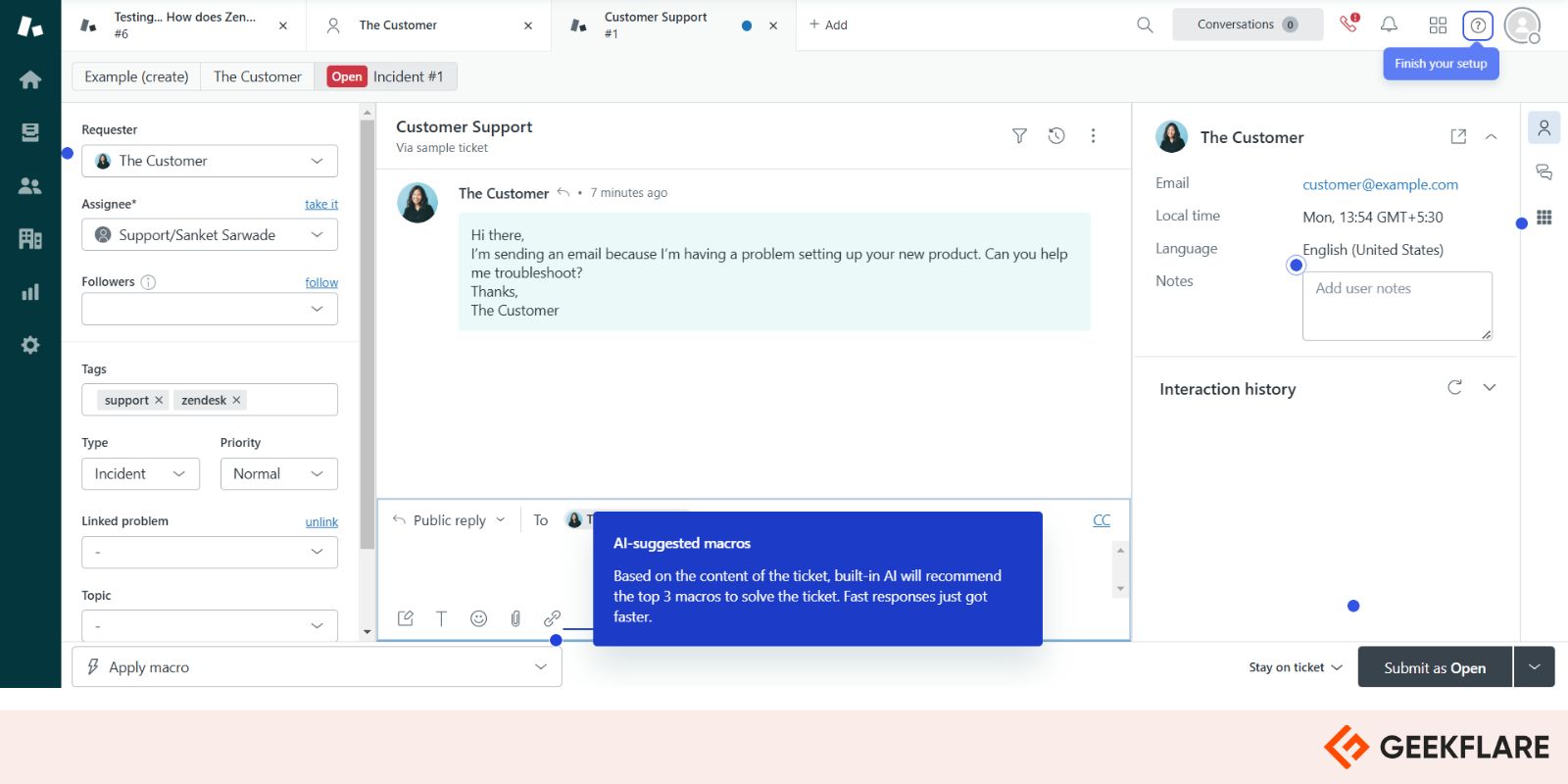
Zendesk’s support agent interface makes handling customer queries so much easier. The AI-suggested macros read the ticket and suggests the best replies, so you’re not wasting time typing out the same responses over and over.
Features
- Centralized hub with a 360-degree view of each customer
- AI agents to automate customer interaction and improve agent productivity
- Pre-configured business rules, as well as the option to build custom triggers and automations
- Pre-defined responses for routine queries
- 1000+ apps and integrations for no-code customization
Pros & Cons
PROS
CONS
Pricing
Zendesk pricing for customer service:
- Support Team — starts at $19 per agent per month
- Suite Team — starts at $55 per agent per month
- Suite Professional — starts at $115 per agent per month
Zendesk offer 14-day free trial.
Salesforce Agentforce Service
Salesforce offers an AI-powered customer service workspace that’s ideal for large enterprises. It includes 360-degree views of each customer and enables easy access to all incident and customer data, allowing agents to collaborate on open tickets much faster. With Einstein Service Replies, agents can generate intelligent responses in a fraction of the time, speeding up issue resolution.
Agentforce Service (earlier known as Salesforce Service Cloud) is natively integrated with the Salesforce CRM Platform. This means that agents can use trusted CRM data to personalize every customer interaction in the most meaningful fashion, enhancing the support experience. Service Cloud can also be integrated with the company’s knowledge base, allowing quick access to help docs for both agents and end customers.
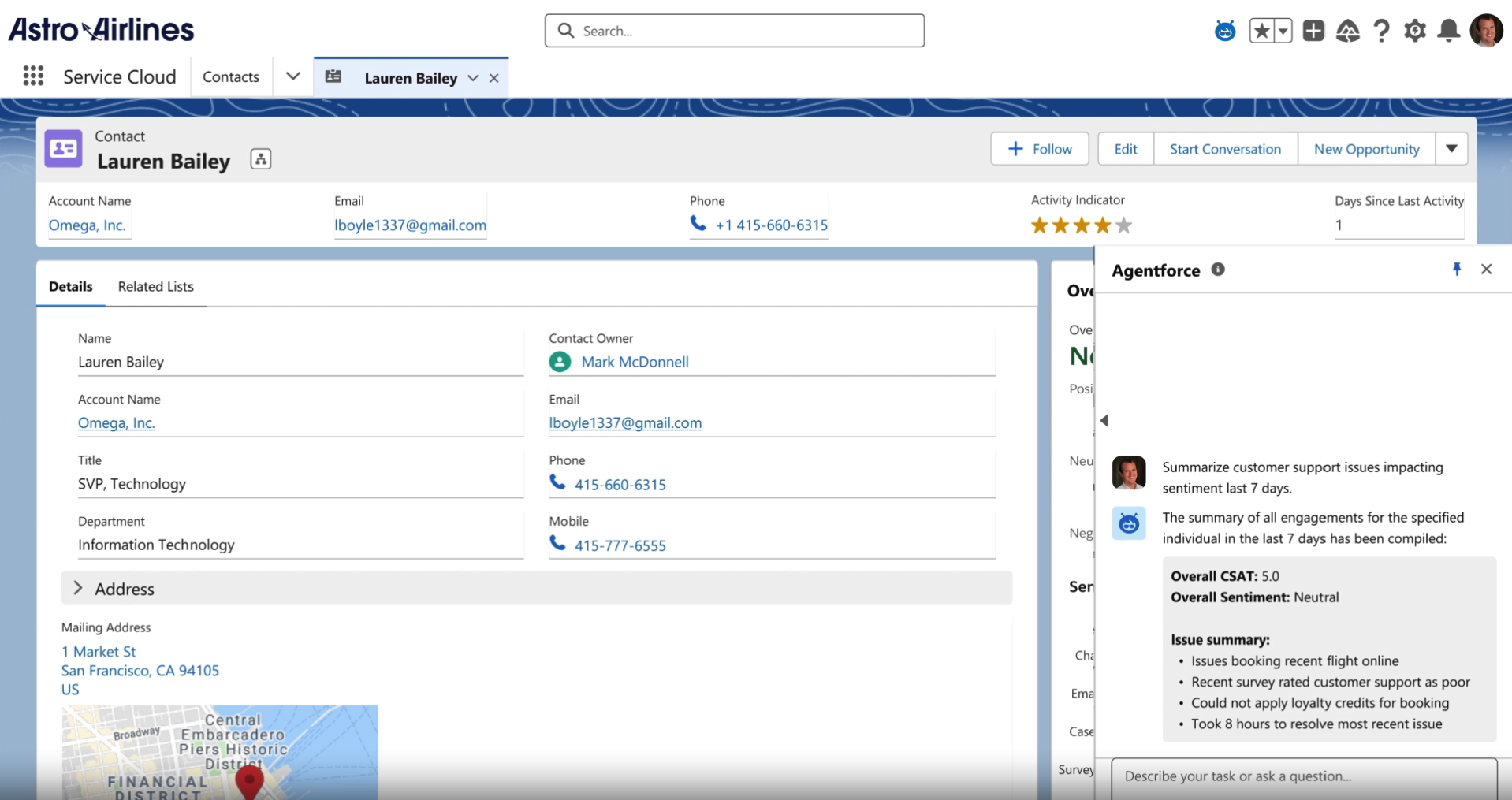
The customer service dashboard brings everything about a customer into one screen—contact details, past interactions, and account ownership—so there’s no digging around for info.
The built-in AI assistant, Agentforce, is a game changer, summarizing recent customer issues and sentiment in seconds. Instead of reading through multiple tickets, I can see key pain points and overall CSAT scores right away, making follow-ups much more effective.
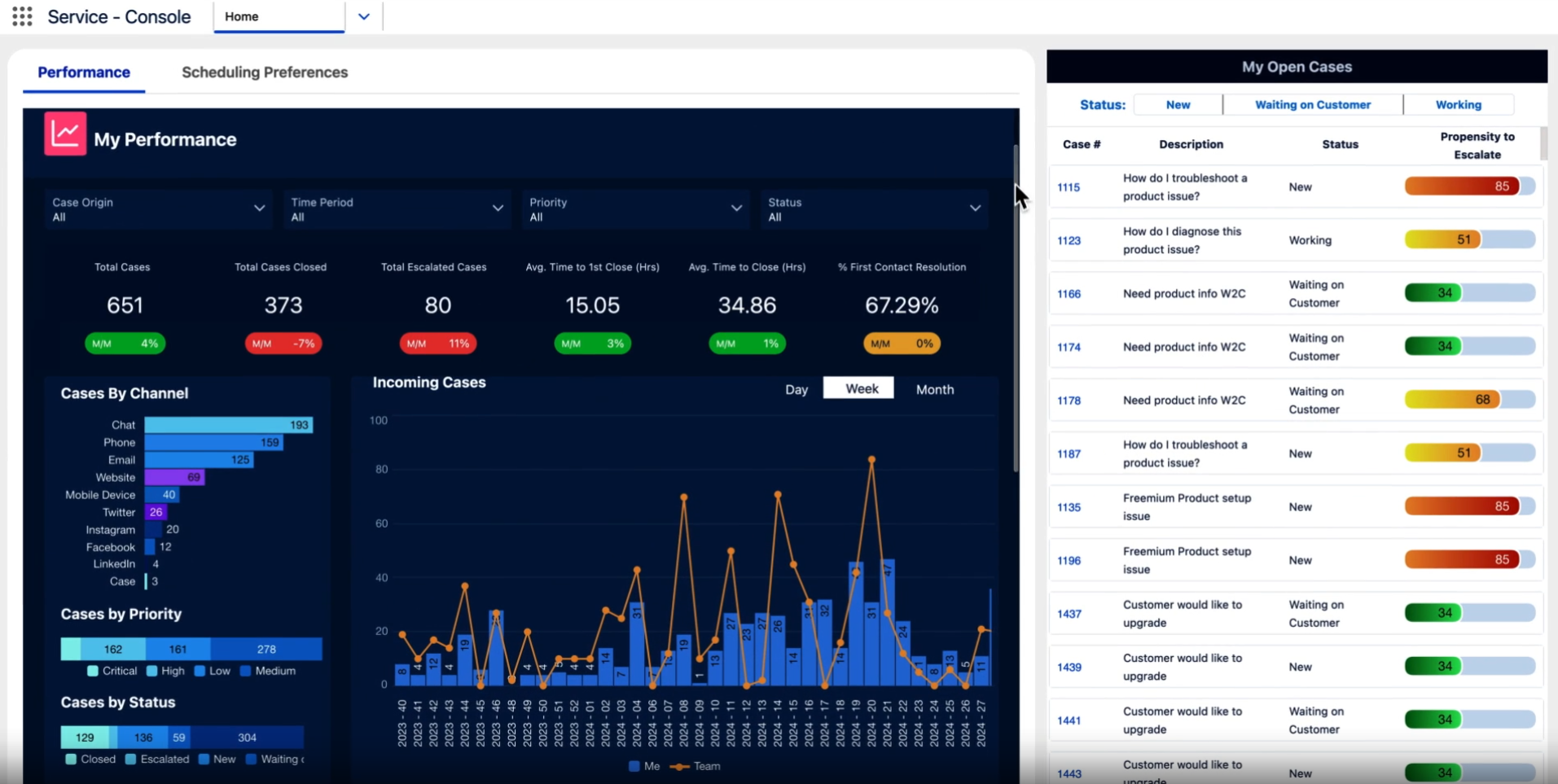
Salesforce Service Cloud’s performance dashboard gives a clear breakdown of the support agent’s performance, showing case volume, resolution times, and escalation trends at a glance. The propensity to escalate score is a great metric. It helps spot which cases might need extra attention before they become bigger problems.
Plus, seeing cases by channel, priority, and status in one place makes it easy to track where the workload is coming from and where improvements are needed.
Features
- Omnichannel engagement center to handle interactions on one platform
- Built-in automations for simplified workflows and increased efficiency
- AI-powered chatbots to handle routine queries
- Native Slack integration for easy agent collaboration
- AI team member to provide human-like interactions
Pricing
Salesforce Service pricing starts from $25/user/month and offer 30-day free trial.
HubSpot service Hub
HubSpot is one of the best-known names in B2B marketing, and its customer service tools live up to that reputation. Service Hub offers AI-powered omnichannel support integrated with the sales and marketing data on HubSpot CRM. This enables agents to respond proactively to customer queries with rich insights, driving higher customer retention.
Service Hub comes with automation features that speed up workflows and allow agents to easily hand off tickets to other agents with full visibility. It also includes a knowledge base library and a customer portal for end customers to manage their support queries. The AI agent, moreover, can be trained in minutes using existing content to offer smart customer responses round the clock. With Service Hub, organizations can benefit from up to 32% higher ticket closure rate and 13x faster resolution time.
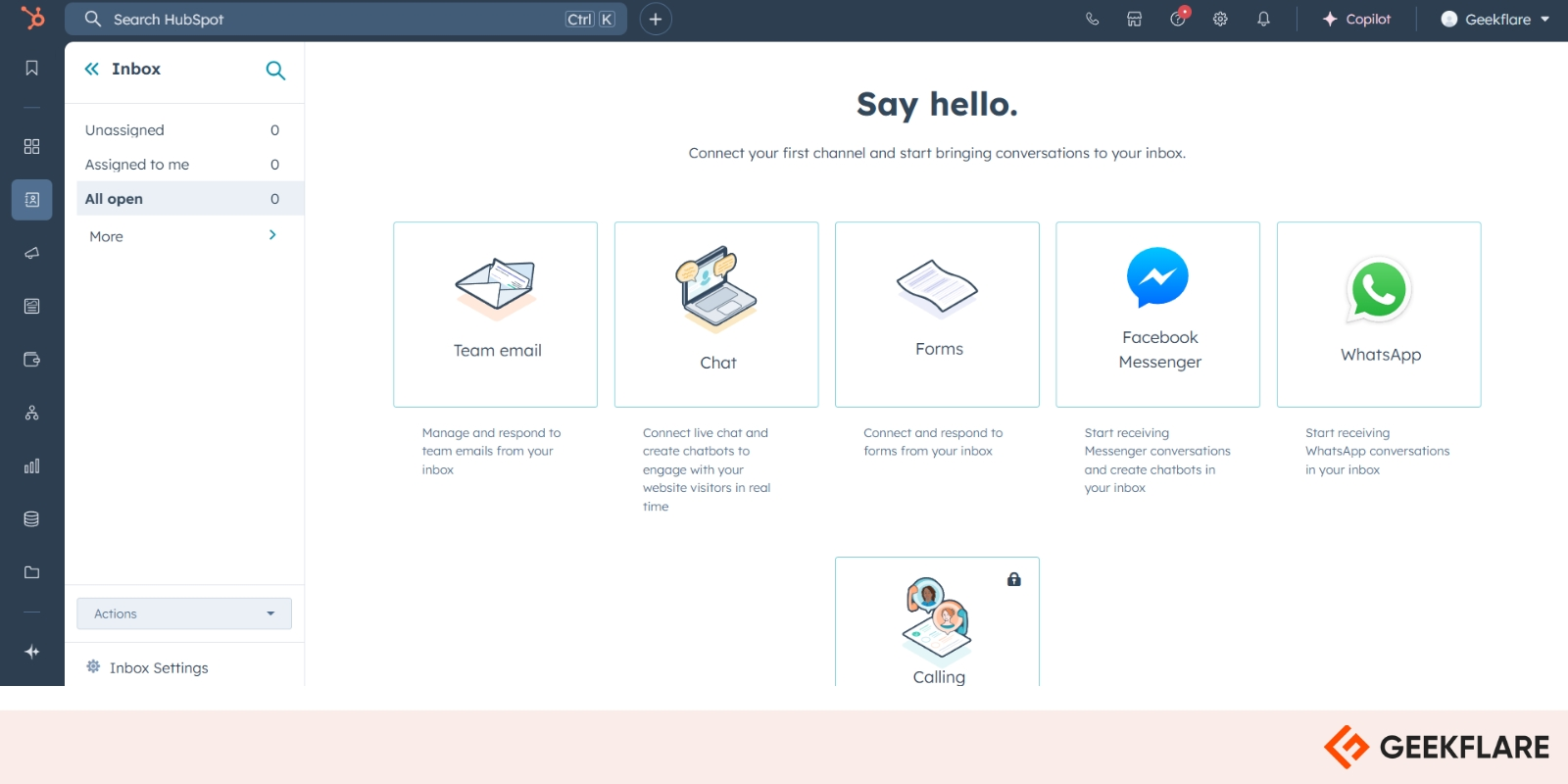
HubSpot Service Hub lets you connect all customer communication channels in one inbox. You can link team emails, live chat, forms, and even WhatsApp or Facebook Messenger, so every conversation is in one place instead of scattered across different platforms. This setup helps avoid missed messages and keeps responses organized, whether they come from a chatbot, email, or social media.
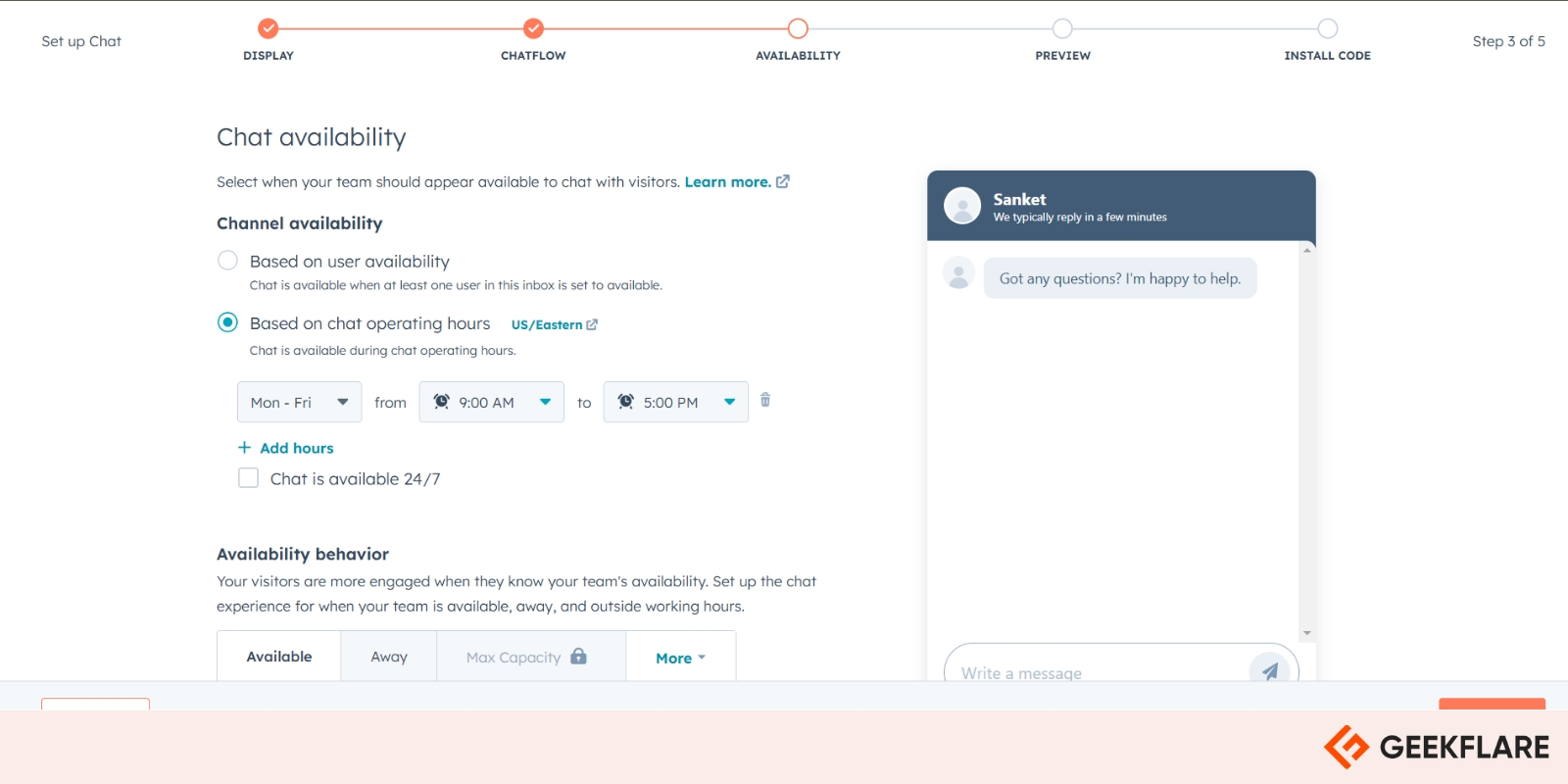
Setting up chat availability in HubSpot is refreshingly simple, with options to schedule operating hours or keep chat open when at least one team member is available. I like that you can fine-tune availability behavior, so customers always know whether support is online, away, or at capacity. It’s a small but powerful way to manage expectations and ensure chats don’t pile up when no one is around to answer.
Pros & Cons
PROS
CONS
Pricing
HubSpot Service pricing starts from $7/seat/month. You can get started with free plan and upgrade as you scale.
- Starter – $7/seat/mo
- Professional – $90/seat/mo
- Enterprise – $150/seat/mo
As you can see the jump from Starter and Professional plan is huge, it can get really expensive for small businesses.
Help Scout
Best for Small and Growing Support Teams
Help Scout offers shared inboxes, live chat, messaging, knowledge bases and AI tools in one workspace. Its straightforward interface makes it suitable for smaller teams that want to organise customer conversations.
Agents can collaborate using internal notes and mentions, view customer profiles and conversation histories, and automate assignment and repetitive tasks with workflows. Help Scout also supports multiple inboxes, saved replies, tags, routing and service-level agreement policies.
For self-service, Help Scout provides Docs for creating branded knowledge bases and Beacon for embedding help articles, contact forms and live chat into a website. AI Answers uses knowledge-base content and other configured sources to resolve customer questions, while AI Assist, AI Drafts and AI Summarize help agents compose, edit and understand responses more efficiently.
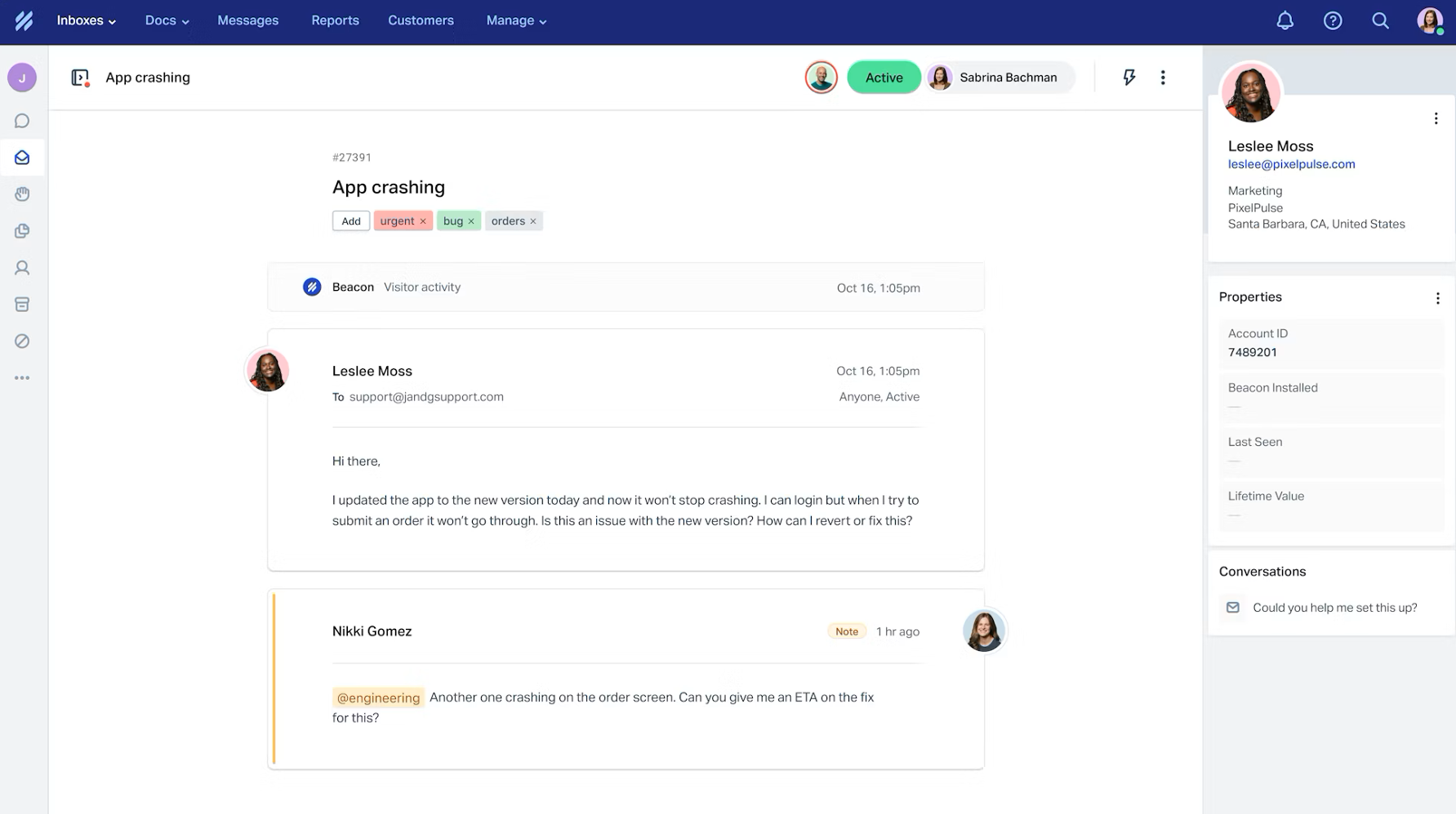
Help Scout has expanded beyond its shared inbox tool. Teams can manage email, live chat, SMS, WhatsApp, Instagram and Messenger conversations. Higher plans add features such as advanced workflows, customer portals, additional routing methods, SSO/SAML and expanded security controls.
Pros & Cons
PROS
CONS
Pricing
Help Scout offer free plan for 5 users, 1 inbox and 1 Docs. Paid plan starts from $25/user/mo on yearly billing.
- Standard – $25/user/mo, annual billing
- Plus – $45/user/mo, annual billing
- Pro – $75/user/mo, annual billing
AI Answers is add-on which is $0.75 per resolution.
Zoho Desk
Best Affordable Self-Service Software
Zoho Desk has many features to power omnichannel ticket resolution, including customizable workflows and round-robin assignments. With the Zoho CRM integration, both sales and support teams can collaborate on customer tickets.
With Zoho Desk, agents can take full control of customer query resolution. Thanks to features like multiple ticket views, ticket tags, and agent collision detection. Moreover, the Advanced Response Editor comes with intuitive keyboard shortcuts (Snippets) to offer tailored responses much faster.
The tracking dashboard also helps keep track of agent time devoted to each ticket, helping them improve their productivity and bill customers for the exact effort put in.
Zoho Desk has also built out its AI layer, with Zia AI, an Answer Bot that pulls replies from the knowledge base, and AI Agents that can be deployed using Zoho’s own LLM.
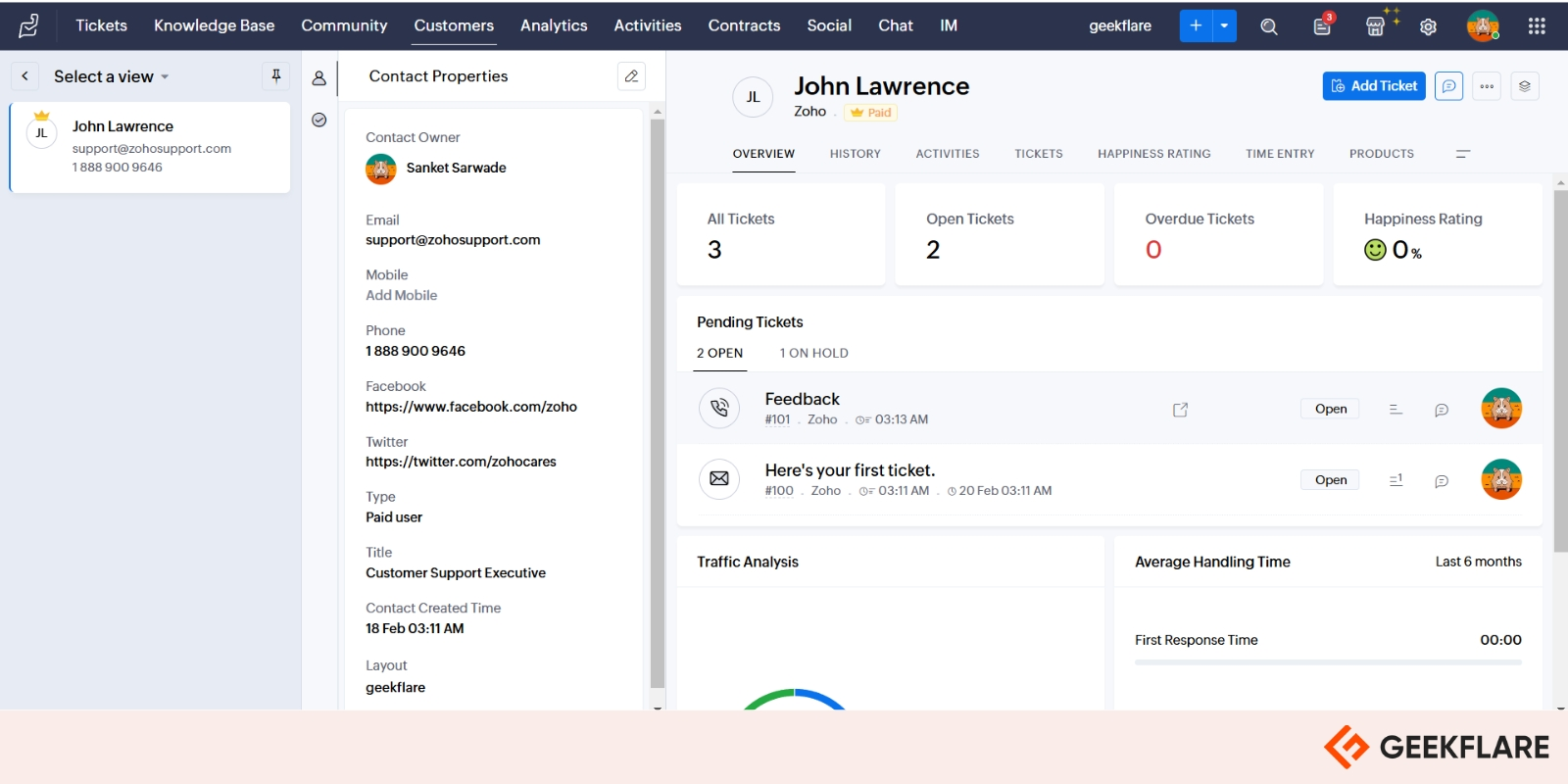
Zoho Desk makes it easy to track tickets, customer details, and response times all in one view. You can quickly see how many tickets are open, pending, or overdue, which helps in prioritizing what needs attention first.
Pros & Cons
PROS
CONS
Pricing
You can start with Zoho Desk free plan or free trial and upgrade to below plan as required.
- Express starts at $7 per user per month
- Standard starts at $14 per user per month
- Professional starts at $23 per user per month
- Enterprise starts at $40 per user per month
All plans come with a 15-day free trial.
Intercom
AI-first Customer Service Platform
Intercom pairs its helpdesk with Fin, an integrated AI Agent for a human-plus-AI support system. Customer support agents get access to an AI-powered inbox with a built-in phone for omnichannel management.
Fin AI Agent resolves customer queries across chat, email, and phone, while Copilot a separate agent-assist add-on gives human reps step-by-step guidance, drafting help, and real-time translation inside the inbox.
Fin’s AI Chatbot resolves routine queries while rerouting complex queries to the right agents. Intercom’s AI-driven reporting capabilities offer deep insights into agent and Fin performance to spot content gaps and continuously retrain Fin to improve results over time.
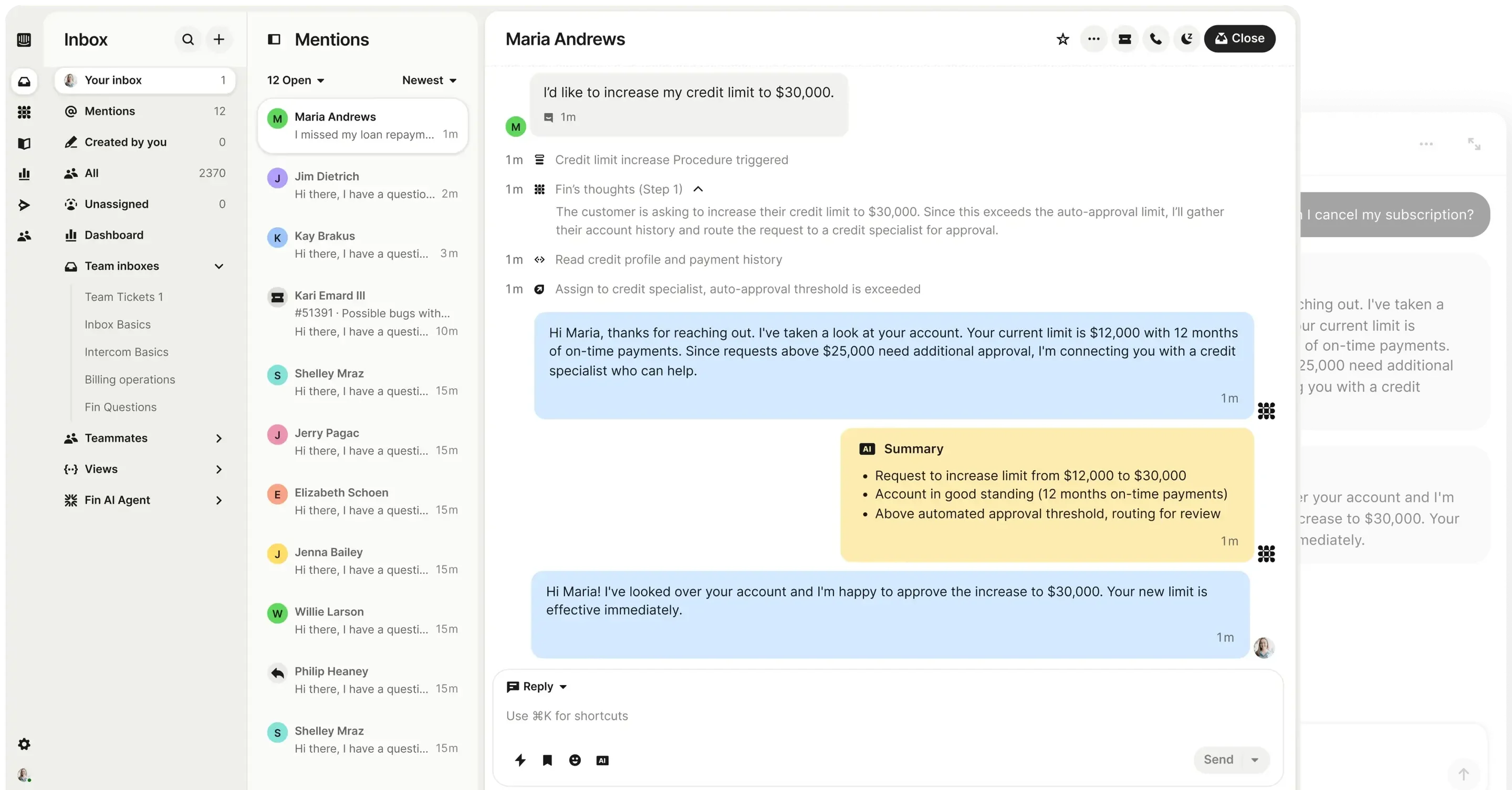
With Intercom’s AI chatbot setup, you can decide how your bot interacts with customers. You can tweak the tone of voice to aligns with your brand. You can also control over response length.
Pros & Cons
PROS
CONS
Pricing
Intercom doesn’t have free plan but offers 14-day free trial. The paid plans are below.
- Essential starts from $19/seat/mo
- Advanced from $85/seat/mo
- Expert from $132/seat/mo
If you are startup, you can get up to 93% off plus a year of Fin free through Intercom’s Early Stage program.
Front
Best for Shared Inboxes and Ticketing
Front is a shared inbox and customer operations software with a AI product line to help agents work across channels. With streamlined distribution lists, agents can quickly respond to high volumes of messages across channels while collaborating with humans on complex issues.
Front’s AI lineup now spans several tools:
- AI Topics surfaces the most common reasons customers reach out
- Copilot gives agents real-time drafting and next-step suggestions
- Smart QA automates quality scoring
- Smart CSAT infers satisfaction without surveys
- Autopilot is a full omnichannel AI agent that can resolve customer work end-to-end.
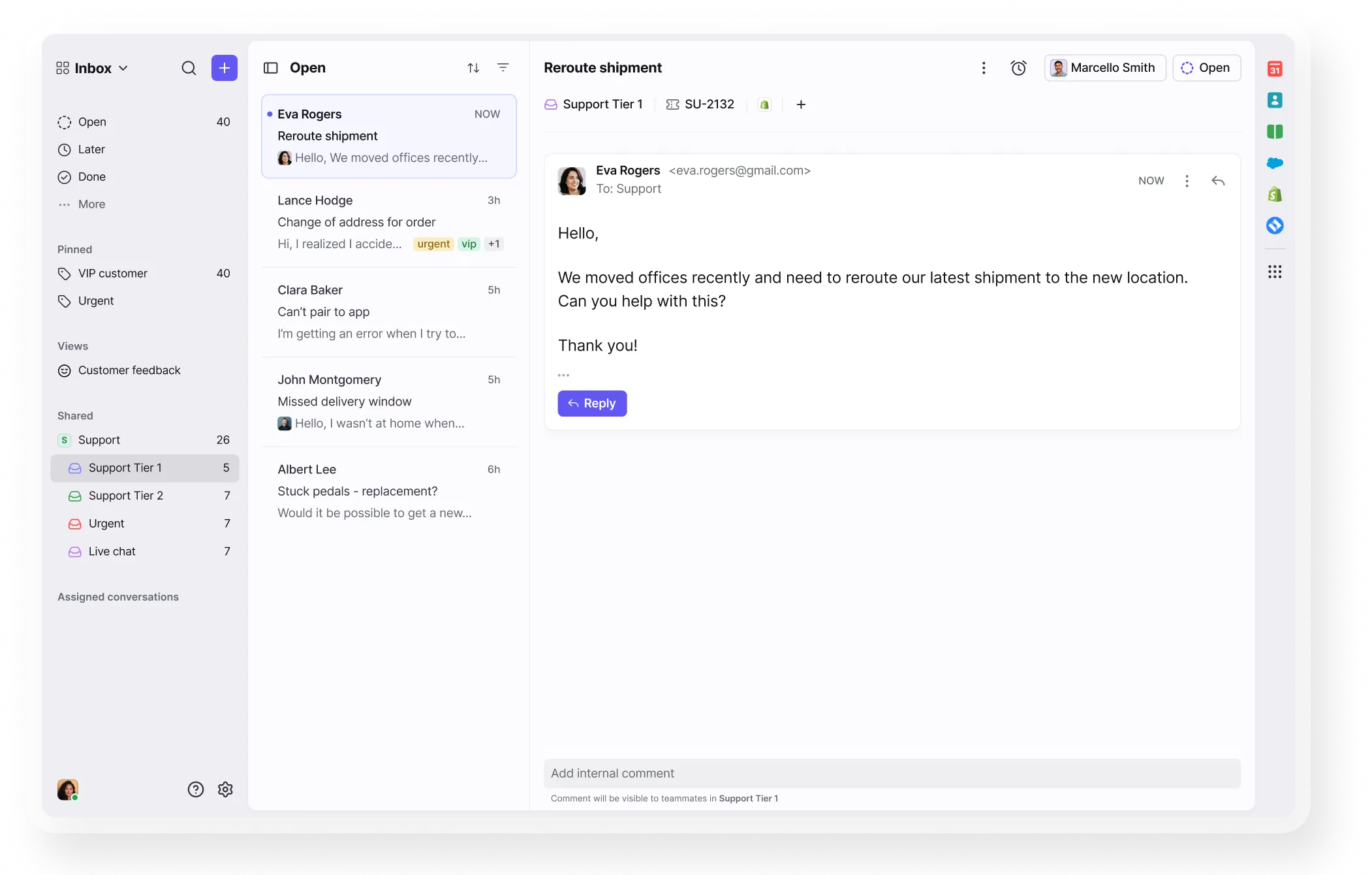
With Front, setting up a chatbot isn’t just about automating replies. You can collect customer details and route conversations. You can configure the bot to answer questions using AI. You can test and refine the chat flow, so you can make sure the bot sounds helpful and natural before it goes live.
Pros & Cons
PROS
CONS
Pricing
Front doesn’t have free plan and pricing starts from $25/month.
- Starter from $25/seat/mo
- Professional from $65/seat/mo
- Enterprise from $105/seat/mo
All plans come with a 14-day free trial.
Hiver
Best for Email Support Management
Hiver now allows you to manage and automate queries across all support channels, right from their inbox, using an agentic layer of AI that can both assist agents and autonomously resolve common issues.
Hiver comes in two editions:
- Hiver in Gmail, a Chrome extension that lives inside your Google Workspace account.
- Hiver Omni, a standalone omnichannel platform that also works with Outlook and other providers across email, live chat, Slack, voice, WhatsApp, and social.
The collaboration feature lets team members loop in other agents with mentions in Hiver Notes so they can collaborate privately on customer tickets.
For customers seeking self-service, teams can set up 24×7 AI agents and chatbots, backed by an AI-powered knowledge base to answer the customers’ queries.
It offers advanced reporting and AI insights, dynamic dashboards, and automated QA scoring to study real-time customer service metrics and agent performance.
With the Hiver Chrome extension, you can still handle customer emails inside Gmail without switching to another tool, while AI Copilot helps draft contextual replies, summarize long threads, and suggest next best actions.
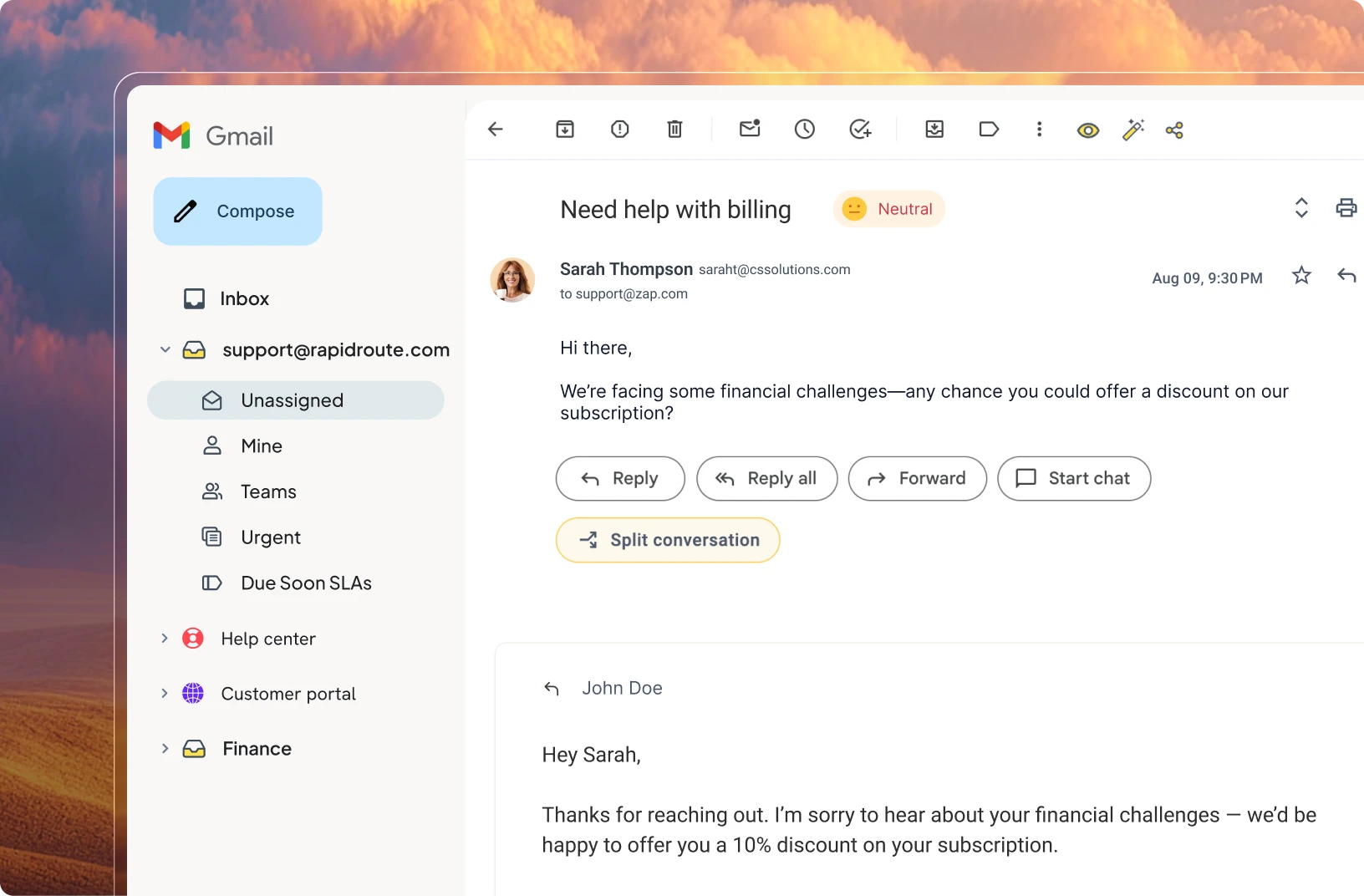
The shared inbox lets you assign conversations, track their status, and automate tasks like tagging, assigning tickets, and triggering AI-powered workflows. If you find yourself repeating the same responses, the email template and AI Suggested Responses features help you drop in pre-written or AI-generated replies with a click.
Pros & Cons
PROS
CONS
Pricing
Hiver doesn’t offer a free plan and paid plan starts from $25/user/month. Pricing is common for Hiver in Gmail and Hiver Omni.
The free trial is just for 7 days.
Gorgias
Best for E-commerce Customer Support
Gorgias focuses on conversational AI and multichannel customer support for e-commerce companies. It connects with Shopify, WooCommerce, BigCommerce, Magento, and PrestaShop, enabling agents to pull up shopper history from their helpdesk to share what’s in stock, issue refunds, and update/cancel orders.
You can set up AI-powered workflows to route tickets or write personalized responses based on variables like sentiment.
The Gorgias AI Agent can also be trained to set up a knowledge center and a storefront chat widget to reduce the number of helpdesk tickets by up to 50%.
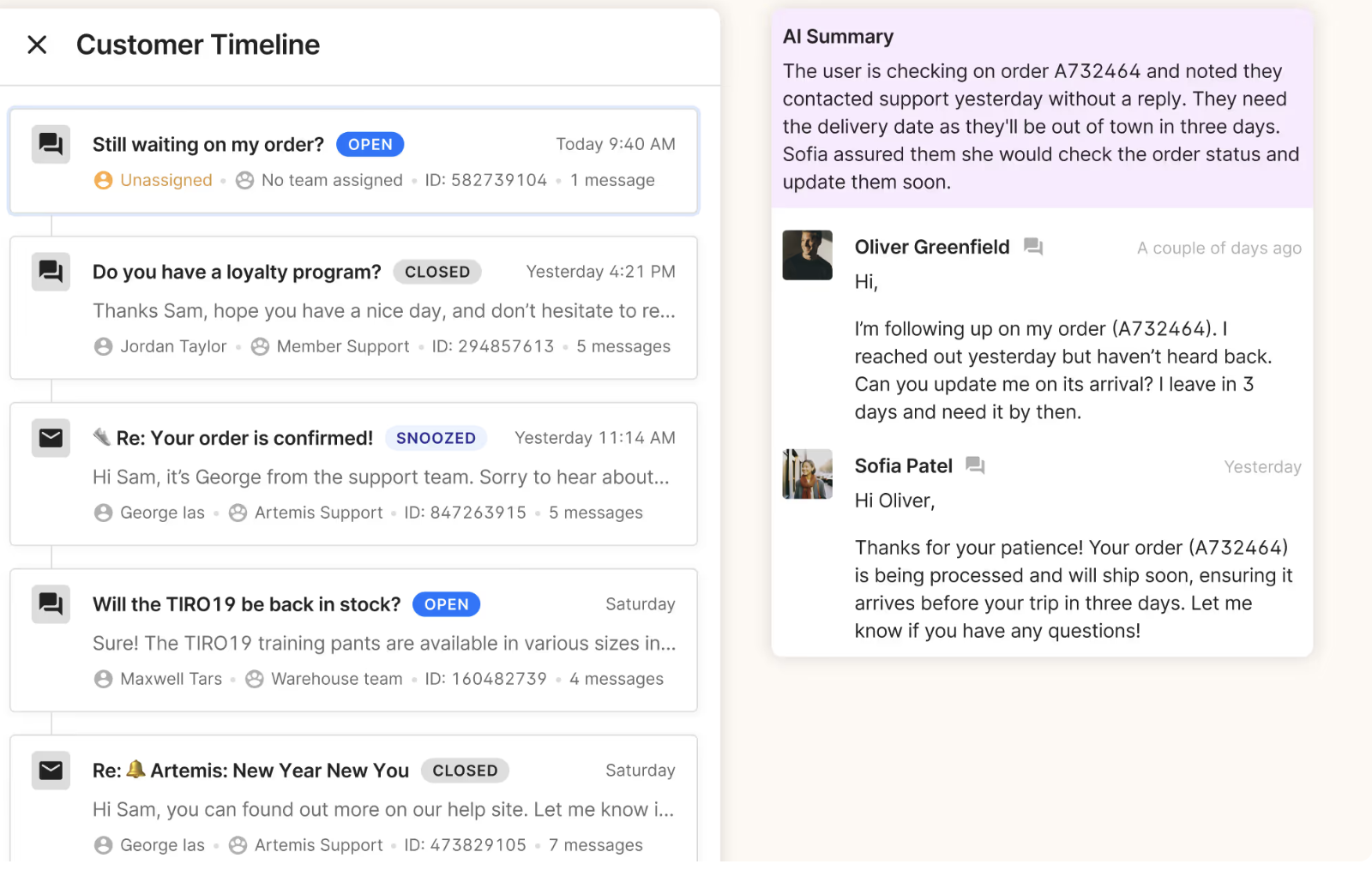
Pros & Cons
PROS
CONS
Pricing
Gorgias doesn’t offer free plan and paid plan start from $10/months. Adding AI agent cost extra and each plan is capped at tickets per month. Ex – Starter plan at $10 includes 50 tickets/mo.
A 7-day free trial is available, no credit card required.
Honorable Mentions

Sprinklr Service

Happy Fox
Which Customer Service Software is Good for a Small Business?
→ Help Scout is ideal for small businesses for email communications.
→ Zoho Desk’s Express plan also stands out as an affordable option for small teams.
→ Tidio is another strong fit for budget-conscious small businesses.
→ Finally, Freshdesk Omni offers a higher-priced but feature-rich option.
Key Takeaways
- Many leading customer service platforms now integrate AI to automate responses, summarize conversations, and assist agents in real-time.
- Different platforms cater to different industries. Zendesk and Freshdesk are great for SaaS, Gorgias is tailored for e-commerce, and Salesforce Agentforce Service is ideal for enterprises.
- The best customer service platforms consolidate communication across email, chat, phone, and social media, ensuring customers can reach support through their preferred channels.
- Many platforms, like Tidio and Zoho Desk, focus on self-service options with knowledge bases and chatbots.
- A growing number of platforms now charge separately for what their AI actually resolves. Intercom bills $0.99 per Fin outcome, Front charges $0.05 per Autopilot conversation, and Gorgias charges roughly $0.90–$1.00 per AI-resolved conversation.
Customer Service Software Trends
With customer expectations higher than ever, the customer service software sector is developing new ways to meet those expectations. Among the biggest trends to shape the industry is the integration of AI. Many customer service tools are looking to adopt AI Copilot, which serves as an intelligent assistant at every step of the customer query resolution journey.
Other trends include:
- Personalization: Brands are investing in the power of AI and data analysis to craft hyper-personalized responses.
- Omnichannel support: Modern customer service tools enable agents to have conversations on whichever channel the customer is present and to switch between channels as needed.
- Outcome-based AI pricing: Vendors are moving away from flat, seat-only pricing toward usage-based fees tied to what their AI actually resolves.
- Data transparency: With increasing concerns about data privacy, brands are being more open about how they use customer data, especially when training AI models.






