




Pipedrive
One of the easiest CRMs to learn, built around a visual pipeline that sales teams actually use. Email sync and automations now start on the $39 Growth plan, so the $14 Lite plan is best for simple pipeline tracking.
Large enterprises with complex processes, or teams that need advanced marketing automation built in.
Pipedrive is a sales CRM for fast-moving sales and marketing teams. Beyond managing deals, it can handle email campaigns, projects, and quotes through built-in features and add-ons, which makes it a strong all-round choice for growing businesses.
In this Pipedrive review, I’ll walk through the platform’s features, pricing, benefits, and use cases so you can decide whether it’s the right sales CRM for you.
How we tested Pipedrive
Geekflare tested Pipedrive for managing sales pipelines, automating workflows, and analyzing reports. We evaluated its ease of use, customization, and performance, combining hands-on testing with user feedback. Pricing and plan details were rechecked on Pipedrive’s website in October 2026.
What Is Pipedrive CRM?
Pipedrive is a sales pipeline management platform that works as a central sales hub. It helps you communicate with prospects, close deals, improve sales processes, collaborate with teammates, and forecast sales. Its interface is intuitive and easy to pick up, so there’s very little learning curve.
Pipedrive is aimed at small and medium-sized businesses (SMBs), and it’s widely used by sales teams, marketers, and business owners. The company was founded in 2010 in Estonia, has a team of 850+ people across eight countries, and says more than 100,000 companies use its CRM.
What Pipedrive Does Well
Pipedrive is a sales CRM first, but it goes beyond that. You can run email marketing from the same platform, manage projects, generate leads, and use ready-made workflow templates. Here are the features that stood out in testing.
Visual sales pipeline
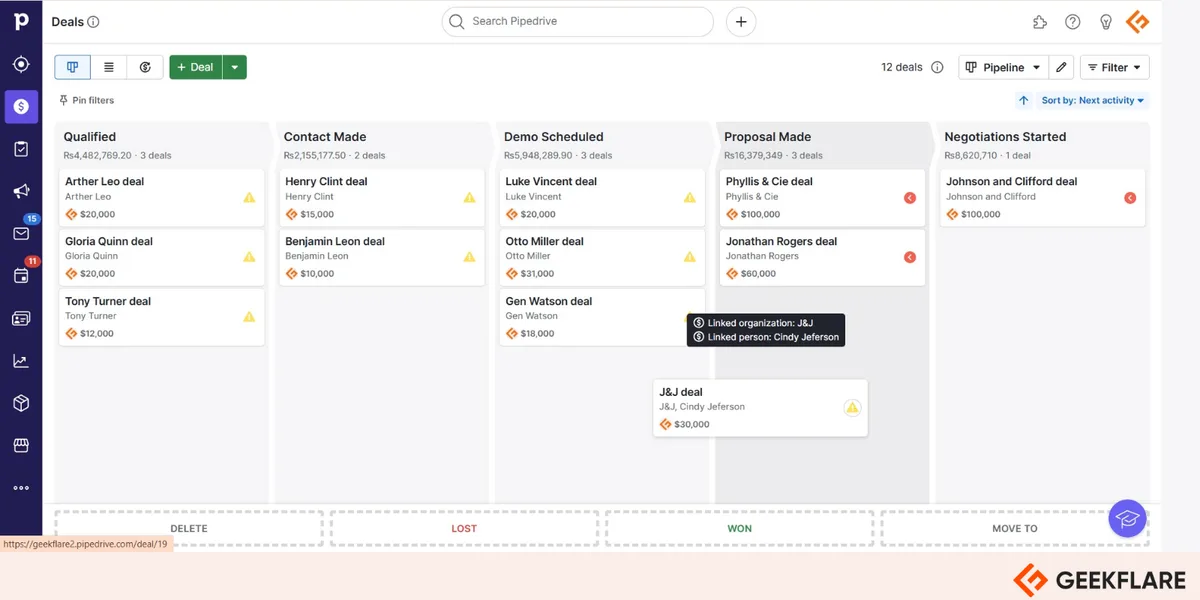
Pipedrive’s visual pipeline gives you a clear view of the buyer’s journey across the sales cycle. It keeps prospects organized through even a complex sales process and lets you see every stage at a glance, so you stay in control of your sales activities.
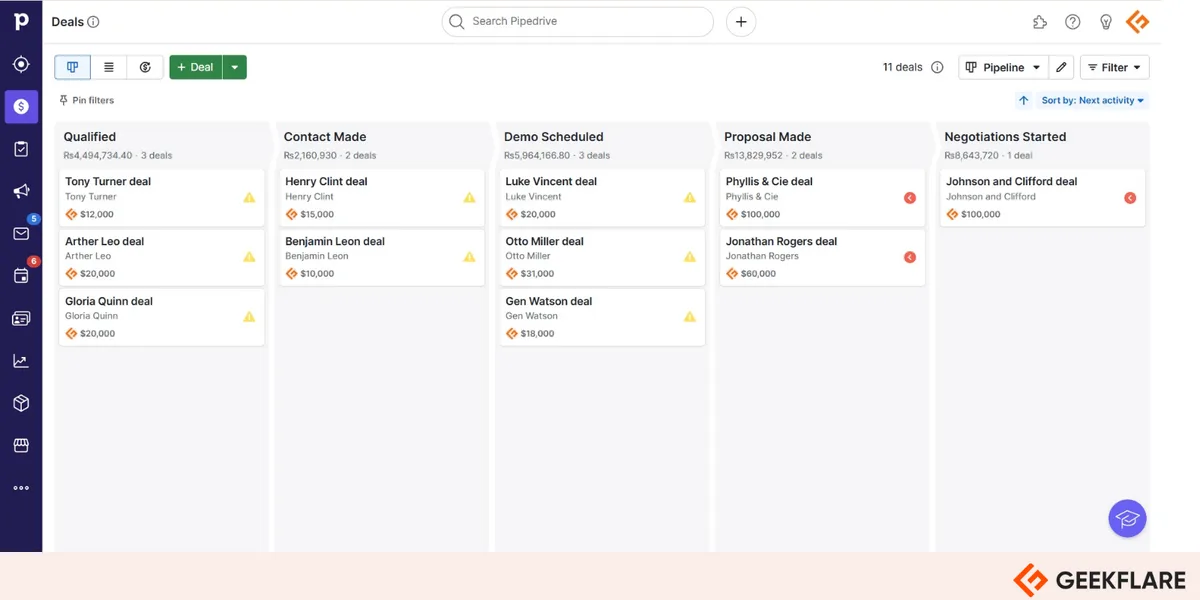
You can customize the pipeline with custom fields and add as many stages as you need. It helps you visualize revenue, projects, deal status, and communication status, and pipeline insights are available in real time as reports and dashboards.
Workflow automation
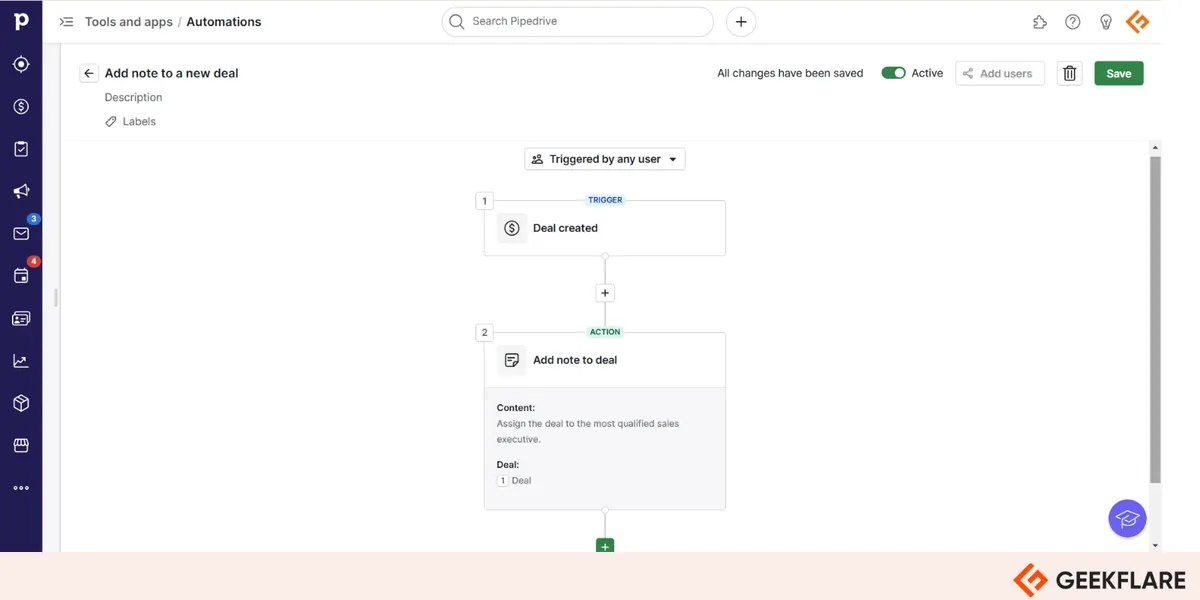
Sales teams have a lot on their plate, and Pipedrive reduces the workload by automating routine admin work around deals. It offers ready-made automation templates for leads, deals, activities, and external apps, and you can also build your own workflows from a list of triggers and actions. Automations are available from the Growth plan up.
For example, I wanted to activate an automation that sends an email to prospects, so I had to enable email sync first.
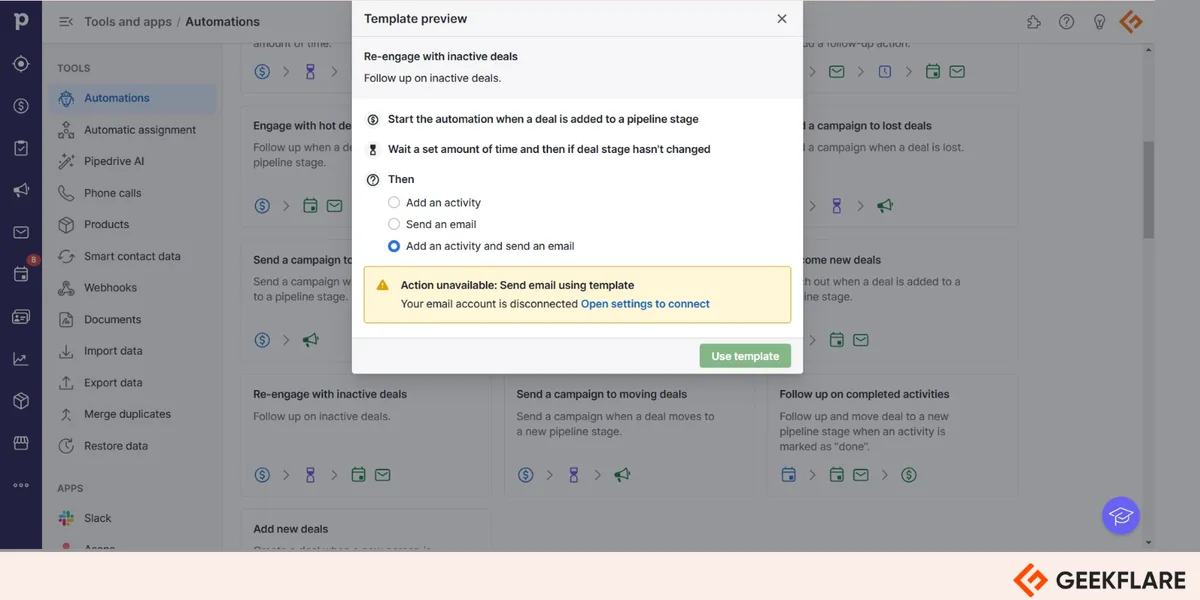
It took me a few minutes to understand the process, and from then on it was smooth sailing.
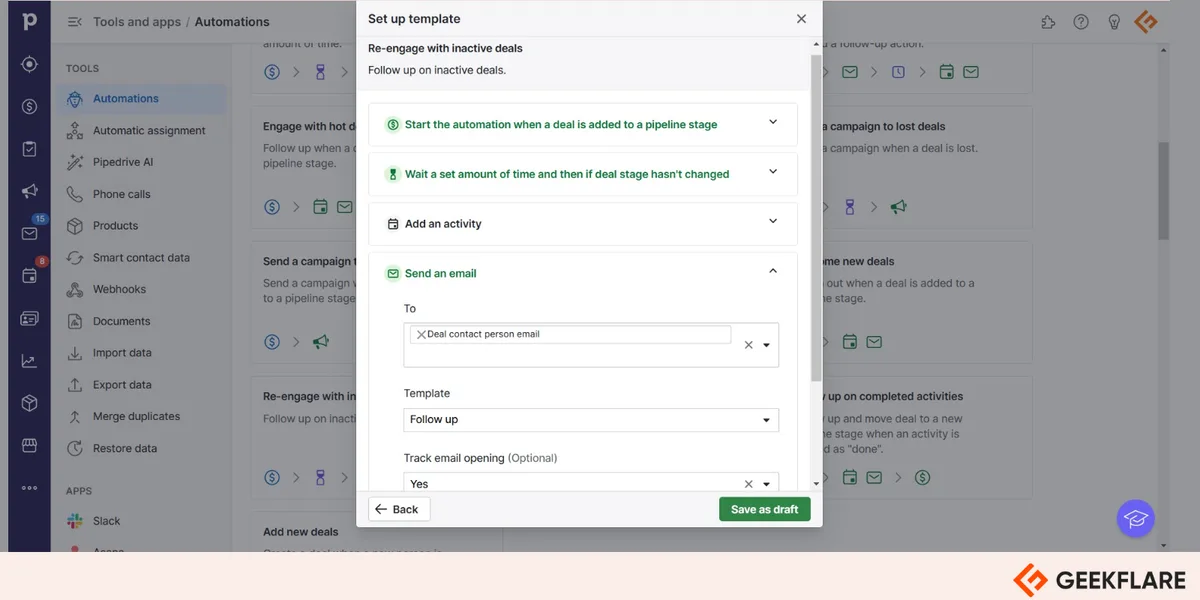
Pipedrive lets you access automations created by you or anyone else in your organization. You can switch them on or off as needed and check the history of each workflow.
Email integration and tracking
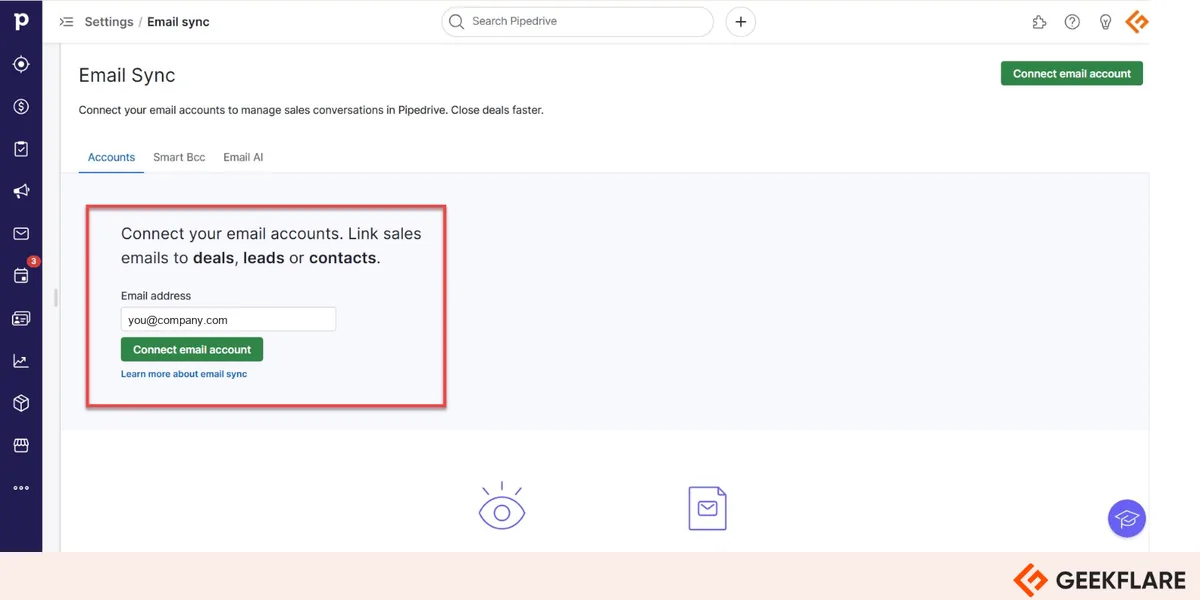
Pipedrive’s email sync lets you connect Gmail, Outlook, or your company email, send bulk emails, and track opens and link clicks without leaving the CRM. Full email sync with tracking is included from the Growth plan. To sync an email account, click Sales Inbox and then select the Settings icon on the right of the screen.
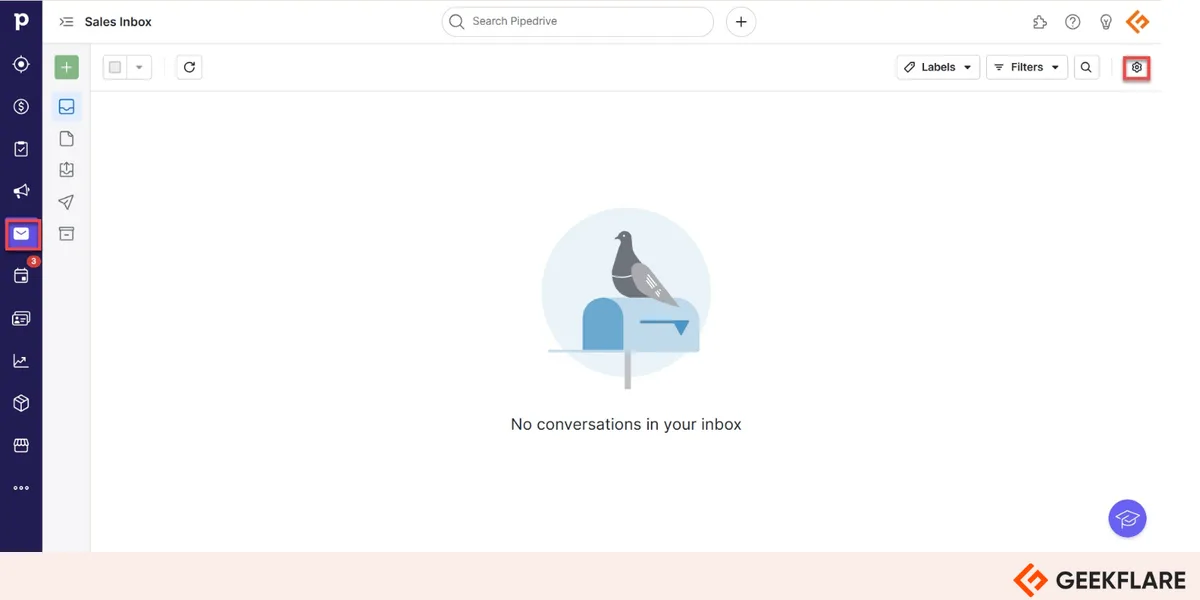
The Email Sync page opens. Enter your email address and follow the prompts to give Pipedrive the permissions it needs. Once it’s added, you can choose the date from which to sync emails and turn on tracking for opens and link clicks.
Lead management
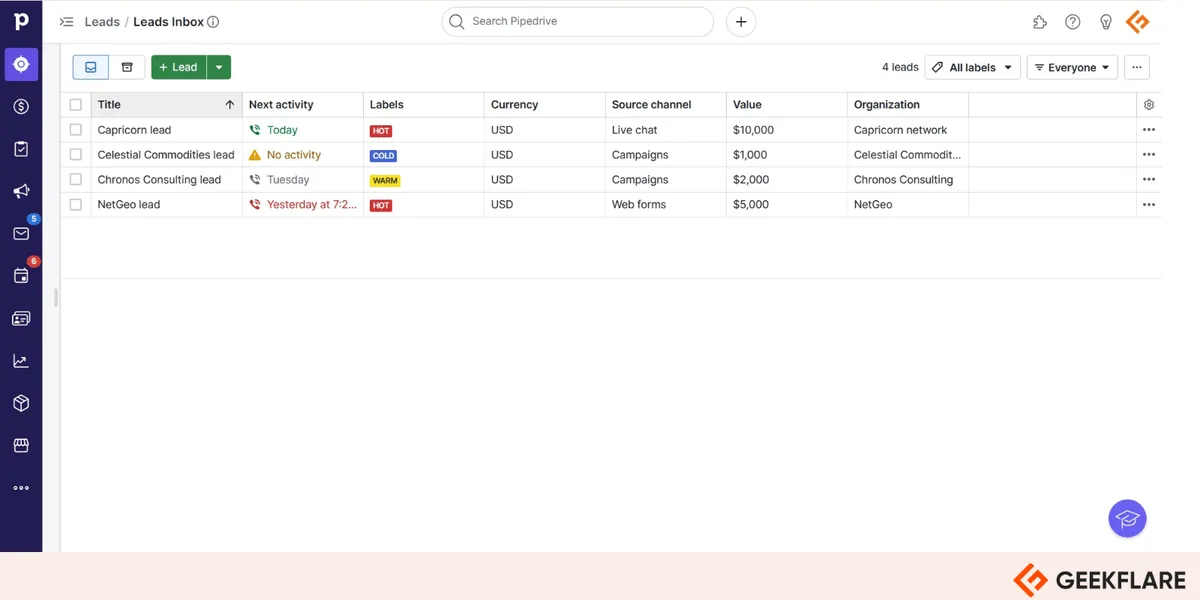
Pipedrive’s lead management keeps the first stage of your pipeline from getting clogged. The Leads Inbox stores all your leads, where you can edit, filter, and sort them. It also supports pre-sales conversations with prospects before you qualify them as deals. On the Premium plan, Lead Booster captures inbound and outbound leads and routes them to the right reps automatically.
Reporting and analytics
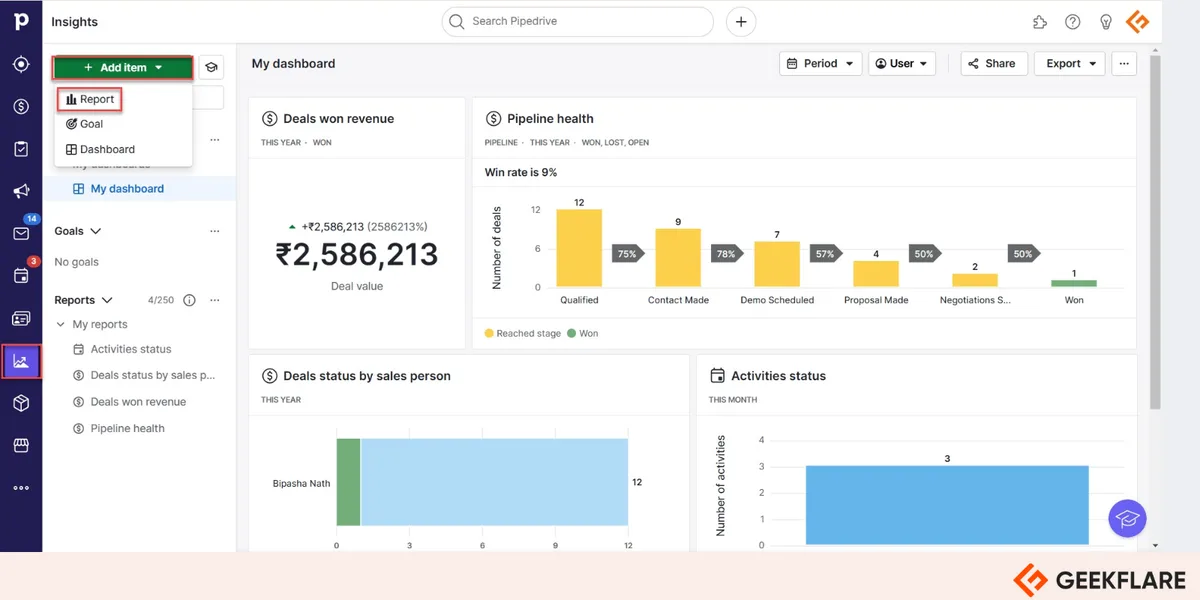
Pipedrive’s customizable reports track new deals, recurring revenue, and any custom metrics you care about. You can filter and group results for a clear visual summary of sales performance, and popular reports include lead reports, revenue forecasts, and activity tracking. You can also create reports by typing what you want in plain language, using its AI-powered report creation.
With the Campaigns add-on, Pipedrive also tracks email performance over time and by location, shows delivery and bounce rates, and reveals who engaged most with your messages.
To generate a report, select the Insights icon from the left menu and click Add item. Choose Report, then pick the entity and report type. The report is generated instantly, and you can export it.
Customizable dashboards
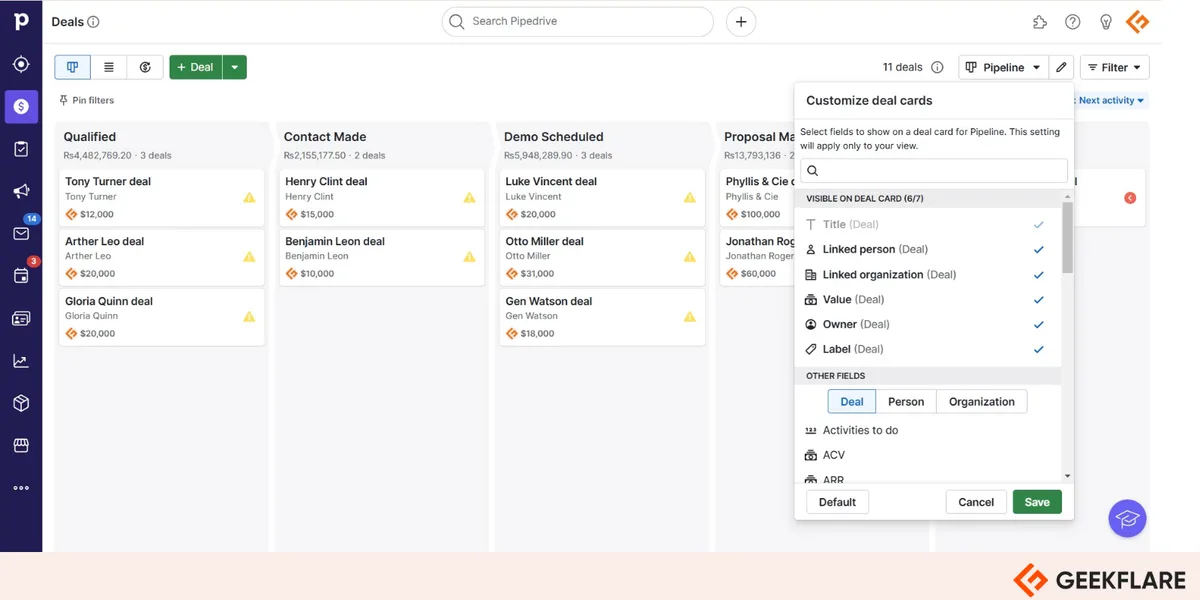
Pipedrive’s kanban-style board makes your pipeline easy to scan. You can drag and drop deals as they progress, adjust stages to match your sales process, and customize deal cards with the fields that matter to you.
Mobile apps
Pipedrive’s Android and iOS apps put your leads, contacts, and deals in your pocket. You can take notes during meetings and calls, call contacts directly from the app, and schedule activities even when you’re offline.
Integrations
Pipedrive integrates with 500+ apps across every stage of the sales process. Notable ones include Zapier, Zoom, Lemlist, Surfe, Jotform, Microsoft Teams, Mailchimp, DocuSign, Google Meet, and Slack.
With these integrations, you can capture leads from different channels, research and qualify them, track their behavior, automate sales processes, and build reports, all while keeping your data in one place.
Pipedrive AI
Pipedrive has added AI across the product to save time on admin and surface insights:
- Pipedrive Nova (meeting intelligence): Gives you a brief before each meeting, a transcript of every call, and ready-to-approve CRM updates afterward. It’s included from the Lite plan.
- AI Sales Assistant: Analyzes your deals, contacts, and emails to summarize deals, compare team performance against goals, and point out winning patterns and reasons for lost deals.
- AI report creation: Builds reports from a text prompt or pre-written prompts.
- AI email tools: Write, summarize, and reply to emails with AI. You choose the type, tone, and length, and it drafts the message for you. The full AI-powered multi-email tools are part of the Premium plan.
How Does Pipedrive CRM Work?
Getting started with Pipedrive takes a few minutes.
Step 1: Set up an account
Start a free trial on your preferred plan. Go to the Pipedrive website and click Try it free to open the sign-up screen. The trial lasts 14 days and doesn’t need a credit card.
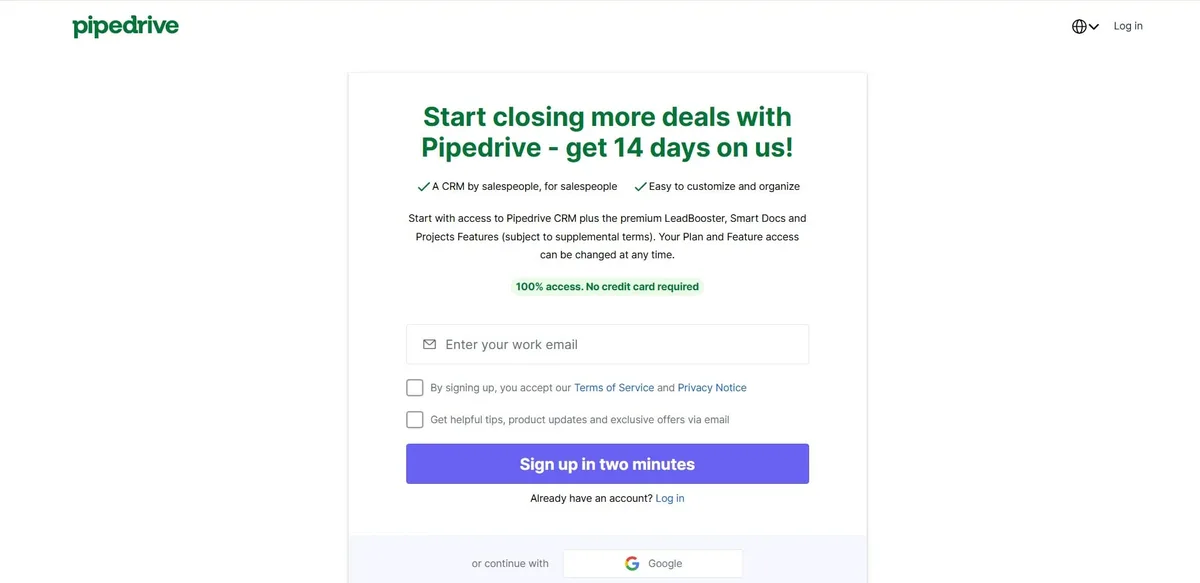
You can sign up with your work email or a Google account. I used Google, chose my account, and accepted the terms. Pipedrive then opened its interface, ready to use.
Step 2: Customize your sales pipeline
Your new account includes sample data in a customizable pipeline. Click the + icon to create a new deal at any stage by adding the necessary details.
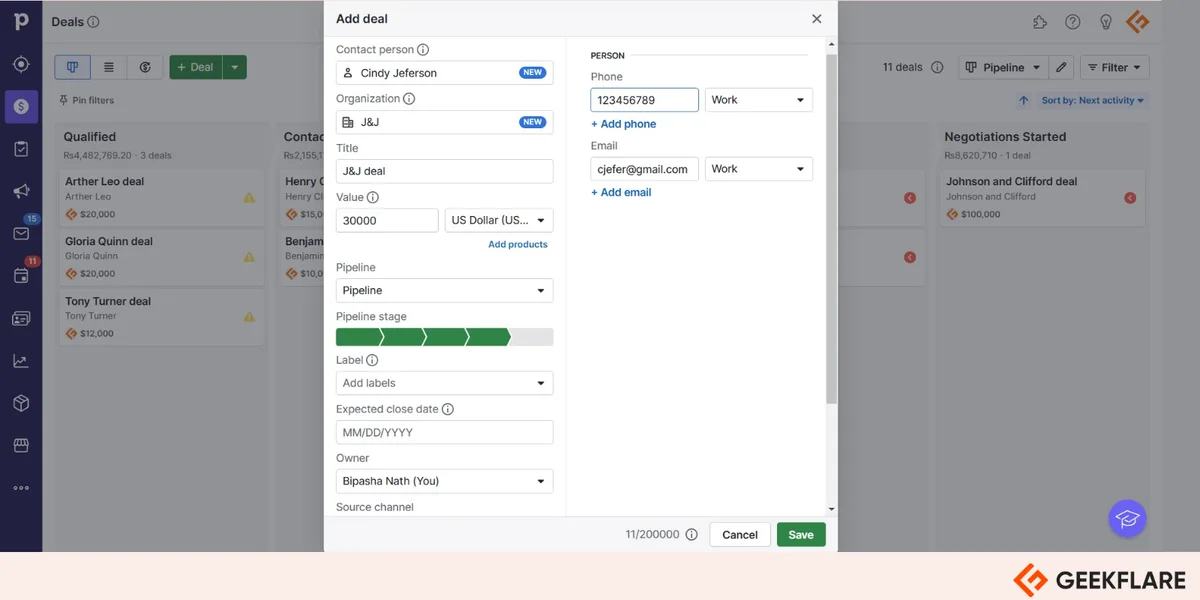
As deals progress, you can drag them to another stage, mark them as won or lost, or delete them.
Step 3: Manage your leads
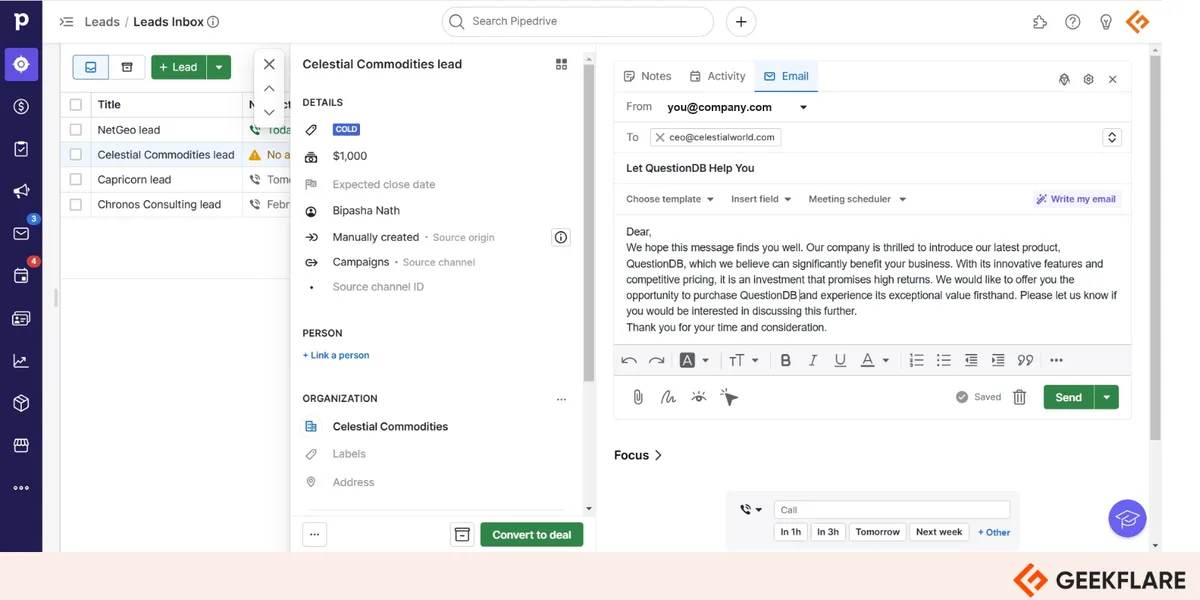
To add a lead manually, click + Lead. You can also click the arrow next to the button to import leads from Excel or CSV files.
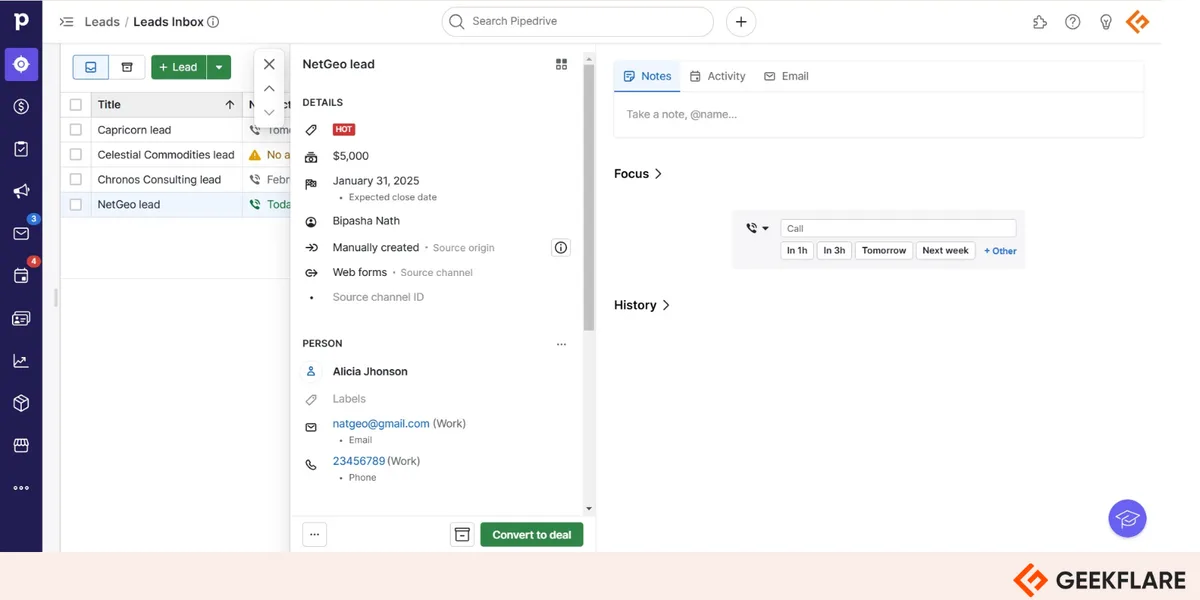
You can email or call leads to nurture them, and Pipedrive reminds you of upcoming activities so nothing slips. When writing an email, describe what it’s about and the AI writer drafts it in your preferred tone and length.
Step 4: Use automations
Automation is a feature worth setting up for your business. From the left menu, click the three dots and select Automations. You’ll find templates for emails, campaigns, leads, activities, and deals, and if none fit, you can build a workflow from scratch.
Pipedrive Use Cases
Sales teams. Pipedrive was designed for sales teams. Seeing the whole pipeline, from first contact to closed deal, helps reps track progress and prioritize the right deals. By automating data entry, scheduling, and activity reminders, it frees reps to focus on building relationships and closing.
Small businesses. Pipedrive centralizes customer interactions on one platform, so small businesses can track leads and nurture relationships without a big setup. Automated email sequences and personal communication tools help them respond to inquiries quickly and professionally.
Marketing teams. With the Campaigns add-on and integrations with email marketing platforms, marketers can create targeted campaigns, track email engagement, and monitor click-through rates inside the CRM. Lead scoring on higher plans helps identify the most promising prospects.
Benefits of Pipedrive CRM
- Simple pipeline management: The visual pipeline makes it easy to track deals, spot bottlenecks, and prioritize high-value opportunities.
- Time-saving automation: Automate repetitive tasks such as creating deals, assigning leads, running email sequences, and sending Slack notifications.
- Easy collaboration: Shared pipelines, team dashboards, mentions, and activity tracking keep everyone aligned.
- Data-driven decisions: Reports on team performance, lead-to-deal conversion, deal velocity, and revenue forecasts help you refine your sales strategy.
- Room to grow: You can add users or move to a higher plan as your team and needs grow.
Pros & Cons
PROS
CONS
Pipedrive Pricing
Pipedrive has four plans, starting at $14 per seat per month billed annually. Monthly billing costs more, and Pipedrive says annual billing saves up to 42%. Every plan comes with a 14-day free trial with no credit card required.
| Plan | Price (seat/month, billed annually) | Key features |
|---|---|---|
| Lite | $14 | Lead, calendar, and pipeline management, AI-powered report creation, meeting intelligence, 500+ integrations |
| Growth | $39 | Lite plus full email sync with tracking, automations and email sequences, subscriptions and forecast reports, meeting scheduler |
| Premium | $59 | Growth plus lead generation and routing, custom lead scoring and data enrichment, AI multi-email tools, contracts and e-signatures, advanced permissions |
| Ultimate | $79 | Premium plus account security rules and alerts, phone and email data enrichment, sandbox account, extended phone support |
Add-ons such as Lead Booster, Projects, Campaigns, Web Visitors, and Smart Docs cost extra. Prices exclude VAT.
Pipedrive Support
Pipedrive offers help through its Knowledge Base, the Pipedrive Academy, a community forum, and contact options from inside the app. The Ultimate plan adds extended phone support, with calls available Monday to Friday from 7:00 am to 11:00 pm CET.
How Pipedrive Compares
Pipedrive is an intuitive sales CRM, but it isn’t the best fit for every company. This is how it stacks up against popular alternatives.
| Pipedrive | Close | HubSpot CRM | Zoho CRM | Salesforce | |
|---|---|---|---|---|---|
| Key features | Visual pipeline, workflow automation, meeting intelligence | Built-in calling, email, SMS, power and predictive dialers, automation, and AI agents | Free CRM, pipeline and contact management, AI tools | Sales automation, process management, analytics | Sales, service, and analytics on one platform |
| Ideal for | SMB sales teams | Growing sales teams that rely on conversations to drive revenue. | Teams aligning sales, marketing, and service | Growing companies on a budget | Large enterprises |
| Free option | 14-day trial | Free trial | Free plan | Free plan | 30-day trial |
| Starting price | $14/seat/month | $9/user/month | $20/seat/month | $14/user/month | $25/user/month |
| Visit | Pipedrive | Close | HubSpot | Zoho CRM | Salesforce |
Close is worth a look for growing businesses that want to sell more without adding complexity. It brings calling, email, SMS, advanced dialers, automation, and AI agents in one CRM, helping sales teams reach more leads, have more conversations, and close more deals. It’s built to support sophisticated sales processes without the complexity of traditional CRM platforms.
Who Should Use Pipedrive?
Pipedrive is an excellent choice for small and medium-sized businesses focused on sales growth. If your sales team wants an intuitive CRM with AI tools, it’s a strong fit, and startups benefit from its lead management features.
It works well for real estate, B2B, travel, nonprofit, and media businesses, and for global teams that need a multilingual, multi-currency CRM.
It’s less suitable for large enterprises with complex sales processes or heavy customization needs, companies that rely on niche software without an integration, and teams that need advanced marketing automation and reporting built into the CRM.
Pipedrive Ratings
- G2: 4.2 out of 5
- Capterra: 4.5 out of 5
Ratings as shown on Pipedrive’s pricing page in October 2026.
Final Verdict
Pipedrive is a user-friendly sales CRM for SMBs, startups, and sales-focused organizations. You can store contacts and see the whole lifecycle of leads and deals at a glance, and in my experience, learning to use it takes very little time. Companies that don’t want a tool with a steep learning curve should shortlist it.
Its AI features, from meeting intelligence to the email writer, save real time. Just budget for the Growth plan if you need email sync and automations. Pipedrive receives the Geekflare Innovation Award for its unique features and ease of use.
FAQ
How much does Pipedrive cost?
Pipedrive costs $14, $39, $59, or $79 per seat per month for the Lite, Growth, Premium, and Ultimate plans when billed annually. Monthly billing costs more, and every plan has a 14-day free trial.
Does Pipedrive have a free plan?
No. Pipedrive doesn’t offer a free plan, but you can try any plan free for 14 days without a credit card.
Is Pipedrive good for small businesses?
Yes. Pipedrive is built for small and medium-sized businesses. It’s quick to set up, easy to learn, and its visual pipeline helps small sales teams track and close deals.
What is the difference between Pipedrive and HubSpot?
Pipedrive focuses on sales pipeline management and is quick to learn, while HubSpot offers a free CRM plus connected marketing, sales, and service tools. HubSpot suits teams that want everything in one platform, and Pipedrive suits sales-led teams that want simplicity.
Does Pipedrive have AI features?
Yes. Pipedrive includes meeting intelligence through Pipedrive Nova, an AI Sales Assistant, AI-powered report creation, and AI email writing tools, with some features limited to higher plans.






