



Companies are now hiring globally, and it is no surprise that most use remote work settings with cloud apps to work and communicate.
This approach is feasible and cost-effective, considering most critical business apps, such as Google Workspace, Microsoft 365, Salesforce, etc., now run in the browser.
But it does have security implications, especially when using a consumer browser. They lack IT control of business needs, including policy enforcement, built-in data loss prevention (DLP), granular file control, and so on. In fact, 95% of the organizations have faced browser-based attacks, which means that a better alternative is a must.
To solve this, you need enterprise browsers. They provide endpoint security and reduce dependency on the more traditional approach of using VPNs and firewalls.
With enterprise browsers, your business can set up and manage centralized policy, provide data protection, and ensure session-level security controls.
In this guide, we’ll review the top enterprise browsers. These will help leaders and business owners choose the right fit.
What is an Enterprise Browser?
An enterprise browser is a web browser that is managed by an organization’s IT department. It allows IT admins to control browser sessions and use it as a control point for SaaS access and data movement.
This works differently compared to consumer browsers such as Google Chrome and Microsoft Edge. Most consumer browsers offer usability at their core and hence don’t offer any way or form of control inside sessions.
An enterprise browser, on the other hand, offers enterprise-related control features, including:
- Centralized policy management where admins can set access limits, policies, and extension use. It works well on all devices, including BYOD (Bring Your Own Device).
- Data loss prevention helps control data movement, such as downloads, copy-paste, and screenshots (vital). It helps leak sensitive information.
- Advanced telemetry, which offers full visibility of user actions. It helps build audit logs for compliance and proactively find risky user and extension behaviours.
Overall, with enterprise browsers, businesses get an integrated security stack with complete end-to-end monitoring via browser sessions.
Even with these benefits, the adoption of enterprise browsers is still in its infancy, with less than 10% of businesses using enterprise browsers. However, it is speculated to hit 25% by 2028, according to Garnter.
Key Features to Look for in a Business Browser
Before we get to the list of top enterprise browsers, let’s take a look at the key features to look for when choosing one.
Security & Phishing Protection
The enterprise browser must offer security and phishing protection, which includes access to features such as sandboxing, zero-trust integration, and malicious site blocking.
Browser sandboxing is vital as it isolates web sessions, thus protecting them from malware attacks.
Additionally, browser security protection must also offer:
- Real-time URL analysis
- Session hijacking
- Identify verification for every session, a must for a zero-trust environment
- Ability to set a conditional access policy
IT Admin & Control
An enterprise browser should offer proper IT admin and control. With a centralized console, admins can manage policies and users.
They can easily set policy at scale with access permissions, extensions control, and any related browser behavior.
Additionally, there should be a provision for remote access, including:
- Remote wipe of browsing data or sessions
- Ability to terminate compromised users’ sessions
Complete control ensures safety and visibility even across BYOD devices.
Data Loss Prevention (DLP)
Data loss prevention (DLP) can help teams in different ways, including:
- Control over user actions, such as copy/paste
- Screen capture
- Or carry out unauthorized downloads
All of this is possible due to better security provided by enterprise browsers. It helps keep sensitive data safe from unauthorized access and ensures that the business follows industry standards and regulations.
App Integration
Apart from security and control features, the enterprise browser should also integrate well with your existing SaaS tools and services. For example, they should work with the likes of Google Workspace, Microsoft 365, and Salesforce.
For seamless integration, there should be proper single sign-on (SSO) login options and complete protection.
Furthermore, it would be a great add-on feature for enterprise browsers to have legacy web app support, as it can help run internal tools.
The Best Enterprise Browsers in 2026
Google Chrome Enterprise
Best for organizations already using Google Workspace.
Google Chrome Enterprise (GCE) is the best choice for organizations already using Google Workspace. It is built on top of the most popular consumer browser, Chrome, and offers enterprise-grade features.
This popularity helps with easy adoption. The Chrome Enterprise version has a no-cost Core edition, which offers most features. Their Premium version starts at $6 per user per month with additional features like:
- Malware deep scanning
- Data loss prevention
- Context-aware access
- URL filtering
- Evident locker
The key USP for Google Chrome Enterprise is its seamless Google Workspace integration. In my research, I also found that it offers good productivity features such as built-in generative AI, AI-powered search, and a customized Chrome Web Store, which gives limited access to specific extensions. Another aspect that makes it a desirable pick is its free tier (Core).
As per our criteria, GCE offers an all-around offering:
- Security → strong security features, including real-time phishing and malware detection with built-in sandboxing.
- IT Admin & Control → Offers a centralized cloud-based tool for easy browser management with remote-wipe and session termination controls.
- Data Loss Prevention (DLP) → Offered in a premium tier that ensures no data leaks by controlling users’ actions such as copying/pasting, printing, etc.
- App Integration → Offers native app integration with Google Workspace. Also supports Single Sign-On (SSO).
Pros & Cons
PROS
CONS
Pricing
Google Chrome Enterprise offers both free and paid plans. Their paid (premium) version pricing starts at $6 per user per month with exclusive features such as DLP and malware scanning.
NordLayer Browser
Best for SMEs
NordLayer Browser is a top pick for enterprise browsers, especially for small to medium-sized businesses. It offers browser-native protection, making it enterprise-ready as well, with easy administrative controls. But it has no free version similar to Google Chrome Enterprise.
NordLayer Browser is built by the team behind NordVPN, which is a popular VPN that is part of their security platform. However, it is a new offering, released in April 2026. Under the hood, NordLayer Browser is Chromium-based, customized specifically to meet SMEs’ needs.
As for its key USPs, NordLayer Browser offers overall end-to-end browser security. It gives teams the ability to access management and control. It fills the gap for an enterprise-ready browser for small to medium-scale businesses. We recommend it to companies with 200 employees or fewer.
Criteria-wise, it does well, including:
- Security → offers built-in protection with real-time threat detection.
- Shadow IT exposure → helps detect unsanctioned web apps and mitigate risks from employee-adopted tools outside IT oversight.
- IT Admin & Control → Full control over web activity and data movement; offers a clean dashboard and BYOD device support.
- Data Loss Prevention → Ability to restrict users from carrying out data-related tasks that can compromise the company, including downloads, copy-paste, or even camera restrictions.
- App Integration → Offers SSO and MFA support for secure sign-ins; Integrates well with Google Workspace, Okta, Amazon AWS, and so on.
Pros & Cons
PROS
CONS
Pricing
NordLayer Browser has no free plans. Its paid plan starts at $3 per user per month. All plans come with a 14-day money-back guarantee.
Microsoft Edge for Business
Best for companies with a Microsoft 365 ecosystem
Microsoft Edge for Business is Microsoft’s take on an enterprise browser and is a great pick for companies already invested in the Microsoft 365 ecosystem. It offers a secure environment to carry out enterprise work with no extra deployment required to use it, as it is baked into the default installed Edge browser on Windows. To activate it, the user needs to log in via Microsoft Entra ID (formerly known as Azure Active Directory).
Microsoft Edge for Business is also AI-powered without compromising any form of security (with zero trust integration and proper policy and DLP support).
However, the best part about the enterprise browser from Microsoft is that it is free (with Microsoft 365 plans). This is also one of its strongest USP, making it a great pick for businesses already using a Microsoft subscription and don’t want to pay extra for an enterprise browser.
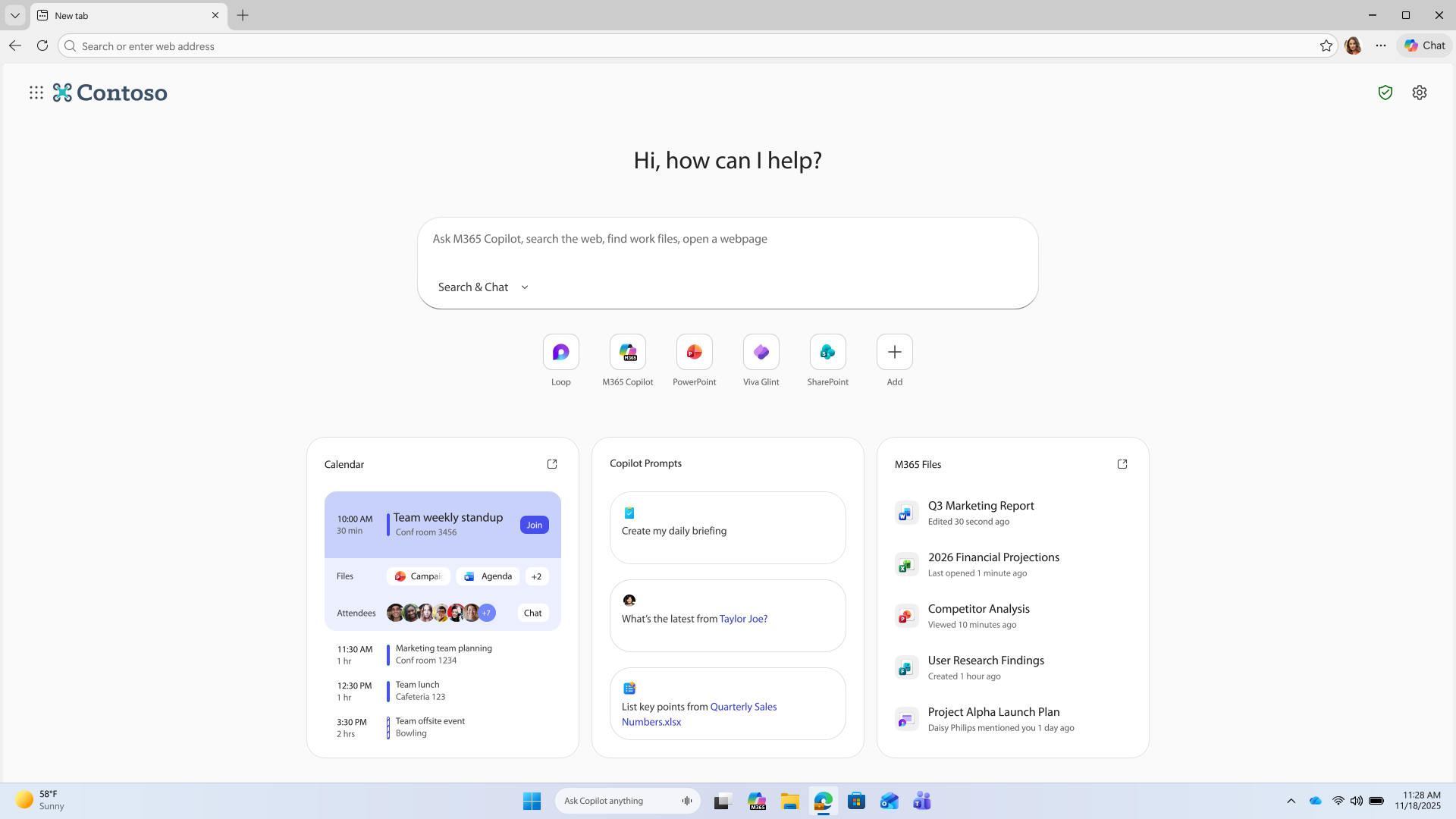
It fits perfectly for enterprise needs.
- Security: Enterprise-grade security with zero trust access and native access to Microsoft security tools such as Entra, Purview, and Microsoft Defender InTune.
- IT Admin & Control: Complete management with the ability to set policies via the Microsoft 365 admin center. Offers remote management via Intune and works with both BYOD and managed devices.
- Data Loss Prevention (DLP): Offers deep DLP functionalities to ensure the protection of sensitive data in real time. Blocks sharing details with LLMs and ensure no copy-paste of data outside approved destinations.
- App Integration → integrates well with Microsoft ecosystem apps with support of Single Sign-On via Entra ID. Offers AI-native productivity features via Copilot.
Pros & Cons
PROS
CONS
Pricing
The Microsoft Edge for Businesses is included within the Microsoft 365 plan at no additional cost.
Island Enterprise Browser
Best for companies needing extreme data control
If your company needs extreme data control, then pick Island Enterprise Browser (IEB). It is a fully built enterprise browser that excels at data security. It offers full policy control to admins so that they can control devices, locations, networks, and apps that run on the browser.
Under the hood, Island uses the Chromium framework, which most users are familiar with. So it helps maintain productivity while not compromising on security. The browser is widely available across major platforms, including Windows, MacOS, ChromeOS, etc.
Island Enterprise Browser provides full control to administrators to control every aspect of the browser experience. This USP is what makes it an ideal pick for teams that need extreme data control and visibility. Additionally, it is a well-funded project, backed by the likes of Stripes, Insight Partners, and Sequoia Capital.
In our criteria, IEB excels in each of the following:
- Security → end-to-end protection with complete protection; zero-trust network access and real-time detection.
- IT Admin & Control → Granular control over every aspect of browsing experience with remote device management and monitoring. Offers a full API for automation.
- Data Loss Prevention → Best-in-class DLP capabilities with contextual DLP controls and offering data loss prevention.
- App integration → Offers single sign-on for easy sign-in; integrates well with popular PPS, including IDP, SIEM, and security tools.
Pros & Cons
PROS
CONS
Pricing
Island Enterprise Browser has no public pricing available. To know more about pricing, contact their sales team.
Firefox for Enterprise
Best for privacy-conscious businesses
Firefox is a popular browser that also offers an enterprise version that focuses on privacy and security. It is open-source driven, which ensures transparency and the ability to customize as per organizational needs. If an organization needs it, they offer support plans that provide various benefits, including issue triage, custom development, and much more.
Firefox for Enterprise’s USP is its overall package. It brings security with enhanced tracking protection over HTTPS. Its non-profit approach ensures trust among enterprises as they know that Firefox focuses on internet health and privacy.
Brave is a great alternative to Firefox’s privacy-focused approach. Check out the alternatives if you’re looking for a more private browser, like Brave.
Based on our criteria, Firefox is a great pick:
- Security → strong security as it comes with Enhanced Tracking Protection (ETP) and Total Cookie Protection (TCP). Also offers ETP blocking.
- IT admin & Control → Offers centralized configuration and policy management, which can be delivered via platform-native tooling.
- Data Loss Prevention → Limited native DLP, but good enough for small businesses. It can be worked around via third-party DLP solutions.
- App integration → great integration with multi-device support; SSO support.
Pros & Cons
PROS
CONS
Pricing
Firefox for Enterprise is completely free to use. They offer premium support for custom development and other benefits, such as issue triage.
Prisma Access Browser
Best for large organizations
Prisma Access Browser is perfect for large organizations with modern requirements. It works with Agentic AI while offering a secure environment. The enterprise browser is highly secure, which offers proper safeguards against malware, usage control, and compliance.
The key USP of Prisma Access Browser is its best-in-class Palo Alto Networks, which offers Cloud-Delivered Security Services(CDSS). Admins get advanced data control and ensure that each browser session follows strict policy without compromising any data or related processes.
Based on our criteria, Prisma Access Browser does well:
- Security → Strong security powered by Palo Alto Networks, Precision AI, and WildFire (file-scanning engine).
- IT admin & Control → Offers comprehensive SASE-integrated management with centralized policy management.
- Data Loss Prevention → Comes with advanced enterprise DLP integration that guards against sensitive data exposure.
- App integration → Offers SASE-native integration with other Prisma solutions; SSO integration and native RDP and SSH.
Pros & Cons
PROS
CONS
Pricing
Prisma Access Browser has no public pricing. For more details, contact their sales group.
HERE
Best for financial institutions
HERE enterprise browser is the best pick for financial institutions as it has been developed over the years in collaboration with leading financial services. The team behind HERE browser is OpenFin, which offers powerful features for productivity and a secure workplace with unified workflow.
The main USP of the HERE enterprise browser is its ability to improve workflow with reduced app toggling. It creates an optimized balance between security and productivity, and makes sure that the user’s experience is not hampered.
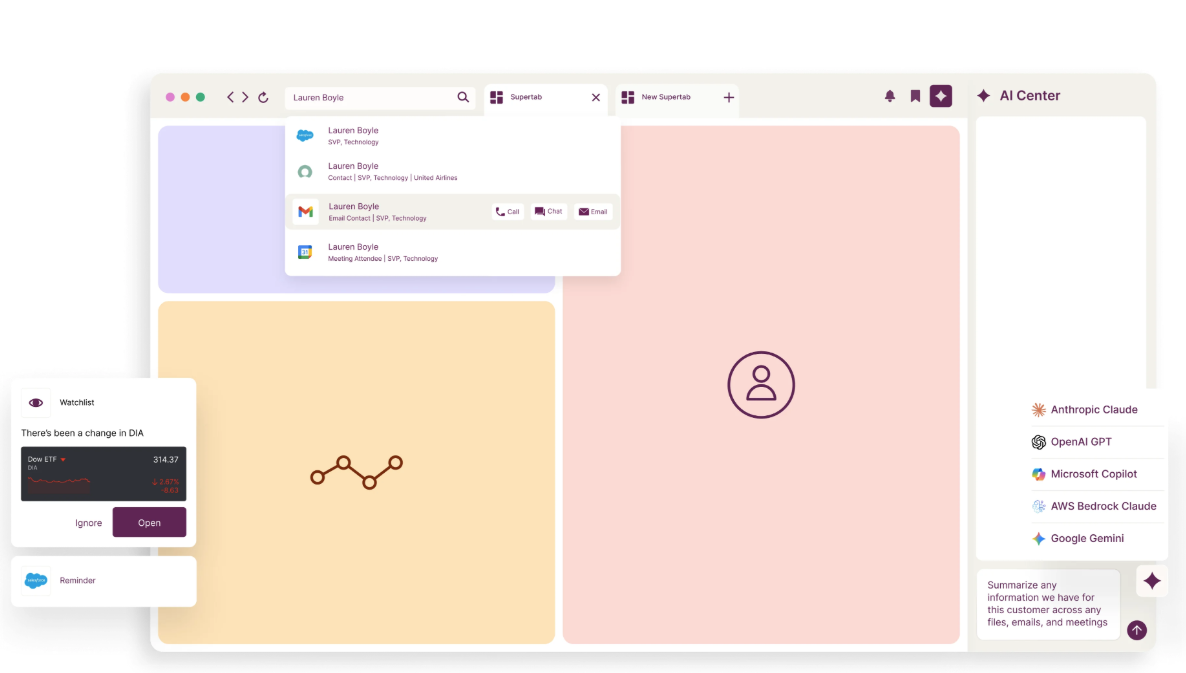
It performs well in four key aspects, just like other enterprise browsers:
- Security → Zero-trust architecture with a focus on meeting financial industry security standards. Offers security features such as browser isolation, secure authentication process, and protection against malware.
- IT admin & Control → Full centralized control with granular DLP permissions and single sign-on option. The admin console is robust and offers all major identity and authentication providers.
- Data Loss Prevention → Zero trust access protocols with robust data security, including advanced DLP. It ensures no leaks happen with limitations on screen sharing, copy-paste, and related user actions. It offers granular rules via DLP and complies with financial services regulations.
- App integration → Excellent interoperability as it offers integration with Amazon API Gateway, Salesforce, and other SaaS platforms. It also supports legacy desktop apps.
Pros & Cons
PROS
CONS
Pricing
HERE has no public pricing. For more information, you need to contact their sales team.
More Browsers for Businesses
Below are some more enterprise browsers that deserve mention.

Surf Enterprise Browser

Menlo Security

Citrix Enterprise Browser
How to Choose the Right Browser for Your Team
Choosing the right browser requires careful evaluation of your requirements and the available options.
It’s best to start by assessing your current tech stack and checking if your present browser meets the requirement. Most modern enterprise browsers support all major platforms, be it MacOS, Windows, iOS, Android, Linux, and so on. However, the key consideration is your work requirement. It’s best to ask questions such as:
- Does the enterprise browser support BYOD devices?
- Does it offer single sign-on for easy login?
- Does it fit our mobile workforce?
- Does it have solid administrative control?
Out of these, the biggest question is security. Always check whether the enterprise browser offers proper compliance based on your industry requirements (finance, healthcare, government, etc.). Make sure it offers basic security features such as DLP support, zero-trust architecture, a proper DNS filtering solution, BYOD support, and so on.
Lastly, consider user friction before making a choice. It’s crucial to know which browser your team prefers. It can be Chromium-based or any natively built browser that meets the other ecosystem tools/apps and services.
In short, we recommend the following based on different requirements:
- Chrome Enterprise – if you’re heavily invested in the Google Workspace ecosystem or want a Chromium-based enterprise browser with a free tier to get started.
- Island – For granular control over user sessions with enterprise-grade security
- Firefox for enterprise: A free-to-use enterprise browser that is privacy-focused.
Why can’t my business just use standard Chrome or Edge?
Normal browsers are limited when it comes to enterprise needs. They lack the IT control required for safe usage, with no feature to protect sensitive information (lack of DLP features). Additionally, there is no centralized policy management, making it very hard for admins to enforce proper security policies. All of these are covered by enterprise browsers such as Firefox for Enterprise, Google Chrome Enterprise, and others.
Are enterprise browsers free?
Not every enterprise browser is free. Some are free and part of a subscription, while others are truly free. However, most enterprise browsers come with a fee.
– If you’re looking for a free browser, pick Microsoft Edge, which has its enterprise version included in the Microsoft 365 enterprise subscription
– If you’re looking for a completely free version, pick Google Chrome Enterprise Core, which requires no paid subscription.
Some of the paid options include:
– Chrome Enterprise Premium at $6/user/month
– NordLayer Browser at $8-$14/user/month
Do enterprise browsers track employee history?
Yes, enterprise browsers track employee history. It is important to do so to ensure proper security and visibility over users’ actions during a work session. Admins can change what and when to track, which includes:
– File uploads/downloads
– Web domains visited during work sessions
– Copy/paste activities
– Application usage
If you’re an employee and want to know how you’re being tracked, it’s best to contact your administrator.






