



A reliable Search Engine Results Page (SERP) API is a fundamental tool for any serious SEO undertaking. As an SEO, you need structured, programmatic access to rankings, featured snippets, and SERP features in real time, across locations.
Whether you’re running an agency that tracks hundreds of client keywords, building a rank-tracking SaaS product, or benchmarking competitors across multiple markets, manually pulling search engine data requires a lot of effort.
In 2026, the SERP API market has split into two distinct categories:
- Traditional SERP scrapers built for SEO and rank tracking
- AI-native search APIs optimized for LLM pipelines
This guide focuses on the first category, tools that parse search engine results pages for SEO metrics like organic rankings, featured snippets, and local pack data. If you need to feed real-time search data into an LLM, this SERP API list isn’t for you. Instead, check out the Geekflare Search API or our guide to the best search APIs for AI.
How We Evaluated the Best SERP APIs
Not every SERP API is built the same. Some are fast. Others are geographically limited. Others offer rich data outputs but charge a premium.
I tested and researched 11 of the best SERP APIs available today, looking at parsing accuracy, geotargeting precision, speed, reliability, and pricing. By the end, you’ll know exactly which one fits your workflow.
- Parsing Accuracy (HTML vs. JSON outputs): I looked at whether each tool delivers clean, structured JSON outputs or raw HTML that requires additional parsing on your end. Tools that return well-structured JSON with clearly labeled fields for organic results, ads, featured snippets, and local packs scored higher here.
- Geotargeting Capabilities: Rank tracking means nothing if the results don’t reflect the right location. I evaluated whether each API supports city-level and coordinate-level targeting, not just country-level, since that’s what agencies managing local SEO campaigns actually need.
- Speed, Success Rates, and Proxy Management: Slow response times and frequent failures break automated workflows. I looked at each API’s advertised success rates, average response times, and whether it handles proxy rotation and CAPTCHA itself or requires you to handle them yourself.
- Cost-Effectiveness: I compared starting prices against what you actually get: how many searches are included, whether there’s a free tier or trial, and how pricing scales as your volume grows.
SERP APIs Comparison
Below is a quick comparison table of the SERP APIs.
| SERP API | Type | Best for | Search engines | Starting price | Geo-targeting | Free plan | Link |
|---|---|---|---|---|---|---|---|
| 01 Geekflare | Google SERP API | Developers who want Google results as JSON at a low cost per search | $19/month (~5,000 searches) | City level | Yes, 500 credits/month (~250 searches) | Visit | |
| 02 Bright Data | Proxy-backed SERP API | High-volume tracking with premium proxies | Google, Yandex, Baidu, DuckDuckGo, Bing, Naver | $1.50/1K results | City level | No, 1-day free trial | Visit |
| 03 DataForSEO | SEO data API suite | Enterprise SEO agencies | Google, YouTube, Baidu, Yahoo, Bing, Naver | $0.0006/request | Country level | No, free trial with $1 credit | Visit |
| 04 SerpApi | Multi-engine SERP API | Results that match what users see in a browser | Google, Yandex, Bing, Yahoo, DuckDuckGo, Brave, Naver | $25/month | City level | Yes, 250 searches/month | Visit |
| 05 Oxylabs | Web scraper API | An all-in-one data collection solution | Google, Baidu, Yandex, Bing | $0.50/1K results | Country level | No, free trial up to 2,000 results | Visit |
| 06 Decodo | Scraping API | Flexible output formats | Google, Bing, Yahoo, Baidu | $19/month (38K requests) | Country level | Yes, 2,000 requests | Visit |
| 07 SearchApi | Multi-engine SERP API | Precise geo-targeting | Google, Bing, Yahoo, Baidu, Yandex, DuckDuckGo | $4 per 1,000 searches | Coordinate and city level | Yes, 100 free requests | Visit |
| 08 Zenserp | Lightweight SERP API | A lightweight SERP API | Google, DuckDuckGo, Bing, Yandex | $49.99/month | Country level | Yes, 50 searches | Visit |
| 09 Apify | Scraper marketplace | Teams that integrate with multiple tools | Google, Perplexity, ChatGPT, Gemini, Copilot | $1.80/1K result pages | Country level | Yes, $5 in credits | Visit |
| 10 Serper | Google search API | A fast and affordable Google SERP API | $50 for 50K credits | Country level | Yes, 2,500 credits | Visit | |
| 11 cloro | SERP and AI answers API | Tracking Google rankings and AI answers in one API | Google, Google News, ChatGPT, Perplexity, Gemini, Copilot, Grok, AI Overview, AI Mode | $30/month (37,500 credits) | City level | Yes, 500 credits/month | Visit |
Best SERP APIs
The 11 tools below represent the best options available in 2026 across different use cases, budgets, and scale requirements. Whether you’re an independent developer, a mid-sized agency, or an enterprise SEO team, there’s a fit on this list. I’ll cover each tool’s standout features, who it is best for, pricing, and pros and cons.
01. Geekflare
Google SERP APIDevelopers who want Google results as JSON at a low cost per search
Geekflare SERP API returns Google’s first results page as structured JSON with a single parameter. You send a query to the Search API with serp: true, and every section Google shows comes back as its own field with ranks intact, including organic results, ads, AI Overviews, People Also Ask, related searches, and pagination.
Each organic result carries its rank, title, link, displayed URL, source, and snippet, ready to store and compare between runs.
Geo-targeting is built in at no extra cost. The location parameter takes an ISO country code, and city narrows results to one of 65,000+ supported cities, so you don’t need to buy or rotate proxies for local rank tracking. You can also add a time filter and include or exclude specific domains.
Credits are shared with Geekflare’s other APIs, such as web scraping and screenshots, and failed requests cost nothing.
I tested Geekflare SERP API with query “business saving accounts”
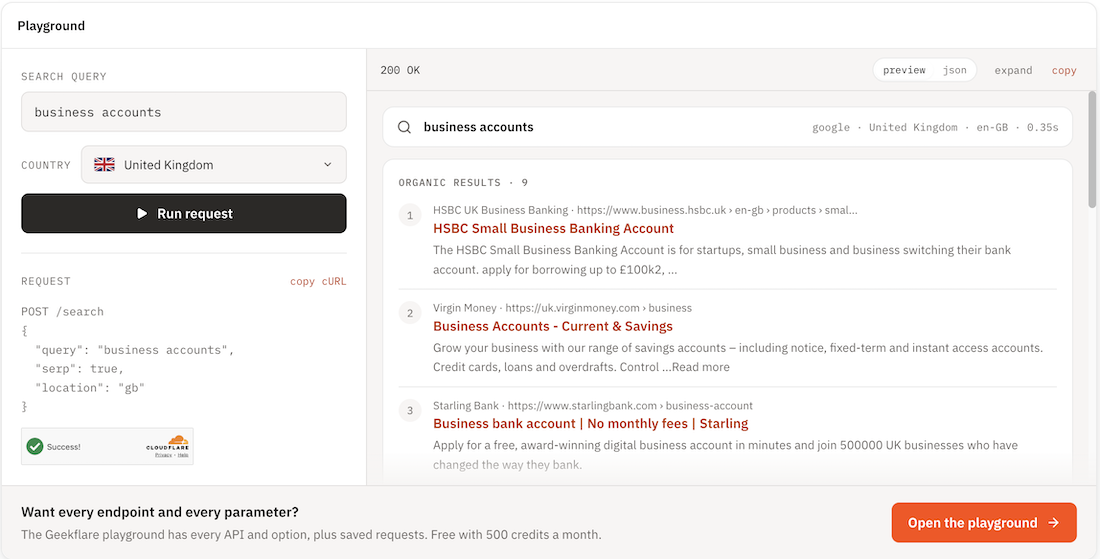
The results came in less than 1 second and close to Google Search with organic, AI overview, related searches, etc. The above output is from product page and Playground has all the parameters for you to try.
Pros & Cons
PROS
CONS
Pricing
- Each search costs 2 credits. The free plan includes 500 credits a month with no card required.
- Starter costs $19/month for 10,000 credits (about 5,000 searches)
- Growth $69/month for 100,000 credits (about 50,000 searches
- Business $349/month for 1 million credits.
- Credit packs start at $10.
02. Bright Data
Proxy-backed SERP APIHigh-volume tracking with premium proxies
Brightdata SERP API delivers real-time search results with response times under one second. It covers all 195 countries and allows city-level geo-targeting at no extra cost. For SEO teams tracking rankings across multiple markets simultaneously, that combination of speed and geographic precision is hard to match.
Brightdata SERP API returns results in structured JSON, HTML, or Markdown that you can readily feed into rank-tracking dashboards or reporting pipelines. The API supports the major search engines, Google, Bing, DuckDuckGo, and Yandex, all through the same infrastructure, with the same reliable geo-targeting and pay-only-for-success pricing model.
I tested Brightdata SERP API’s geo-targeting as follows: my search query was “free AI courses”, selected my search engine as Google, country as Kenya, language as English, and search type as News. These were my results:
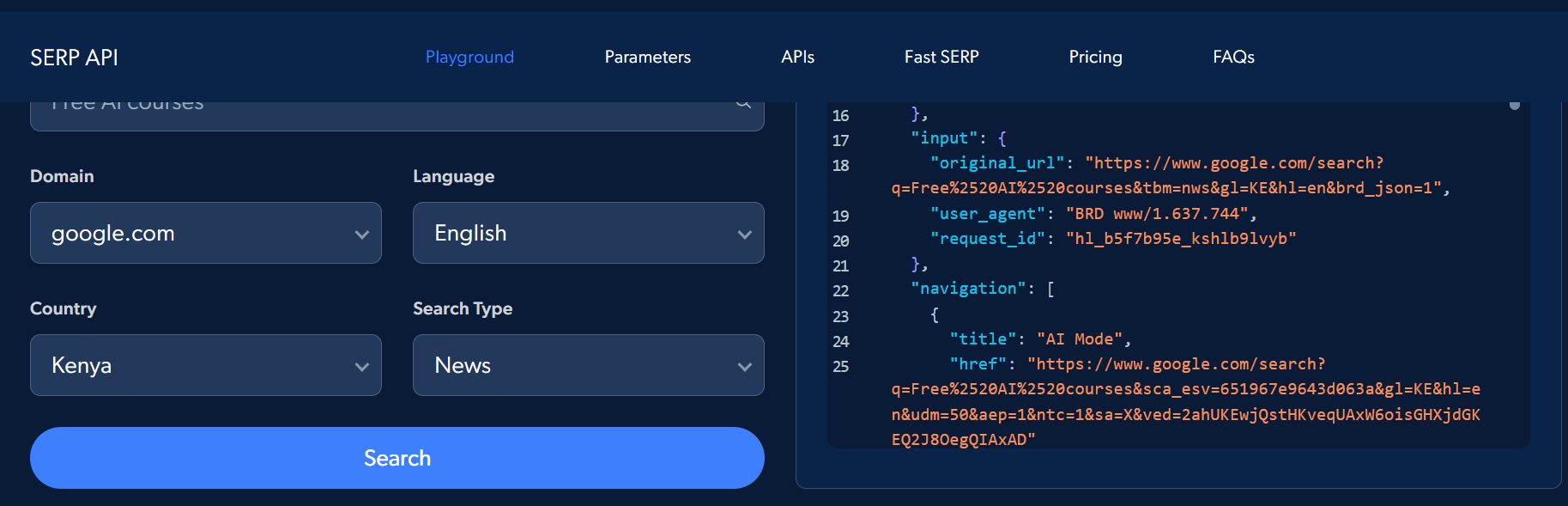
Bright Data returned Google News results for the query “free AI courses” in English in Kenya. The JSON output was also well-structured and readable, making it easy to pull specific SERP elements into a reporting workflow.
Pros & Cons
PROS
CONS
Pricing
Brightdata SERP API does not offer a free plan but includes a day trial. Paid plans are on a pay-as-you-go model and start at $1.5/1K Results. You can also opt for monthly options, starting from $1.3/1K results ($499 billed monthly)
03. DataForSEO
SEO data API suiteEnterprise SEO agencies
DataForSEO is an API for SERP feature monitoring, AI Mode search insights, competitive analysis, keyword research, and rank tracking. It covers the entire Google SERP, from Google Images to Google Organic, Google Autocomplete, Google News, and more. The platform presents convenient output formats such as AI-generated summaries and screenshots from raw HTML or parsed JSON.
DataForSEO’s keyword research helps users understand user intent. You can use the Ranking Keywords dashboard to get a detailed overview of the keywords that a website is ranking for, its estimated search engine visibility, and its estimated online presence. You can also use the SERP API to get an overview of a search query in a certain location.
I tested DataForSEO for keyword research. My search query was “web hosting”, and I chose my location as Kenya. These were my results:
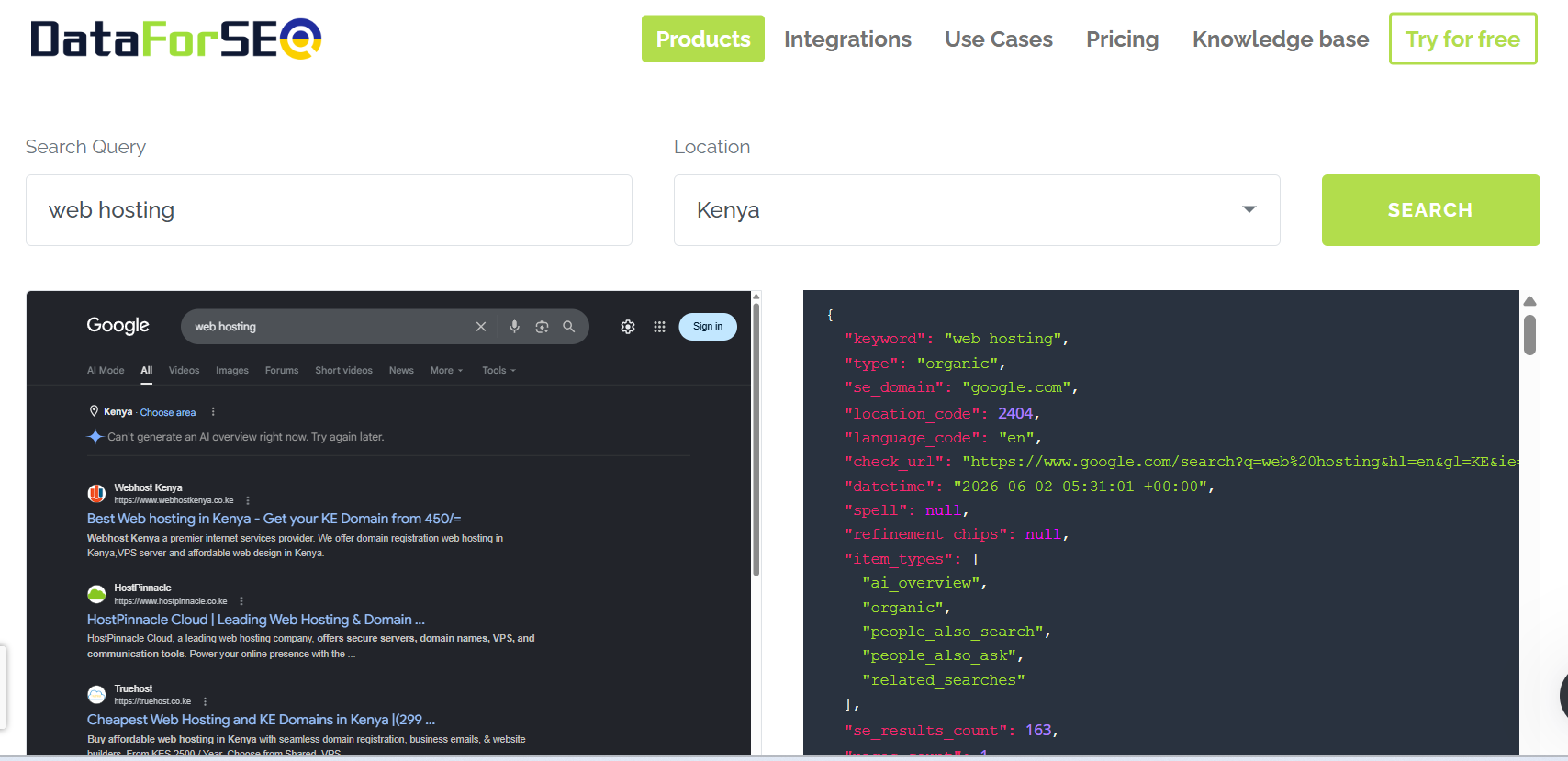
The top results were Kenyan hosting providers rather than global brands, meaning geo-targeting was on point. The API also detected multiple SERP features, such as People Also Ask, related searches, and AI Overview data, beyond standard organic listings, which is useful for tracking modern Google result pages.
Pros & Cons
PROS
CONS
Pricing
DataForSEO has a pay-as-you-go pricing model, and the minimum payment amount you can load is $50. However, the exact pricing will depend on the tool you select. For instance, you can pay around $0.0006/request on the Google Ads Advertisers SERP API and $0.01/request on the Clickstream Data API.
04. SerpApi
Multi-engine SERP APIResults that match what users see in a browser
SerpApi is a real-time tool in which each request runs in a full browser to mimic how humans browse. It generates outputs in JSON format where you get regular organic results as well as Shopping, Direct Answer, Maps, Knowledge Graph, and Stories. This API produces structured data in the form of links, tweets, prices, rich snippets, reviews, ratings, and so much more.
SerpAPI has various use cases. For instance, it can track domain rankings using its organic results APIs for Yandex, Baidu, Bing, Yahoo, and Google. The position tracking feature allows you to monitor how a website performs across different devices, such as smartphones, tablets, and desktops, and across locations. Its Google Sheets extension extracts crucial data from search engines for easier reporting and decision-making.
I tested SerpAPI for keyword research using the query “hosting” and the specific location “Ruiru, Kiambu County, Kenya”. These were the results as shown in the screenshot:
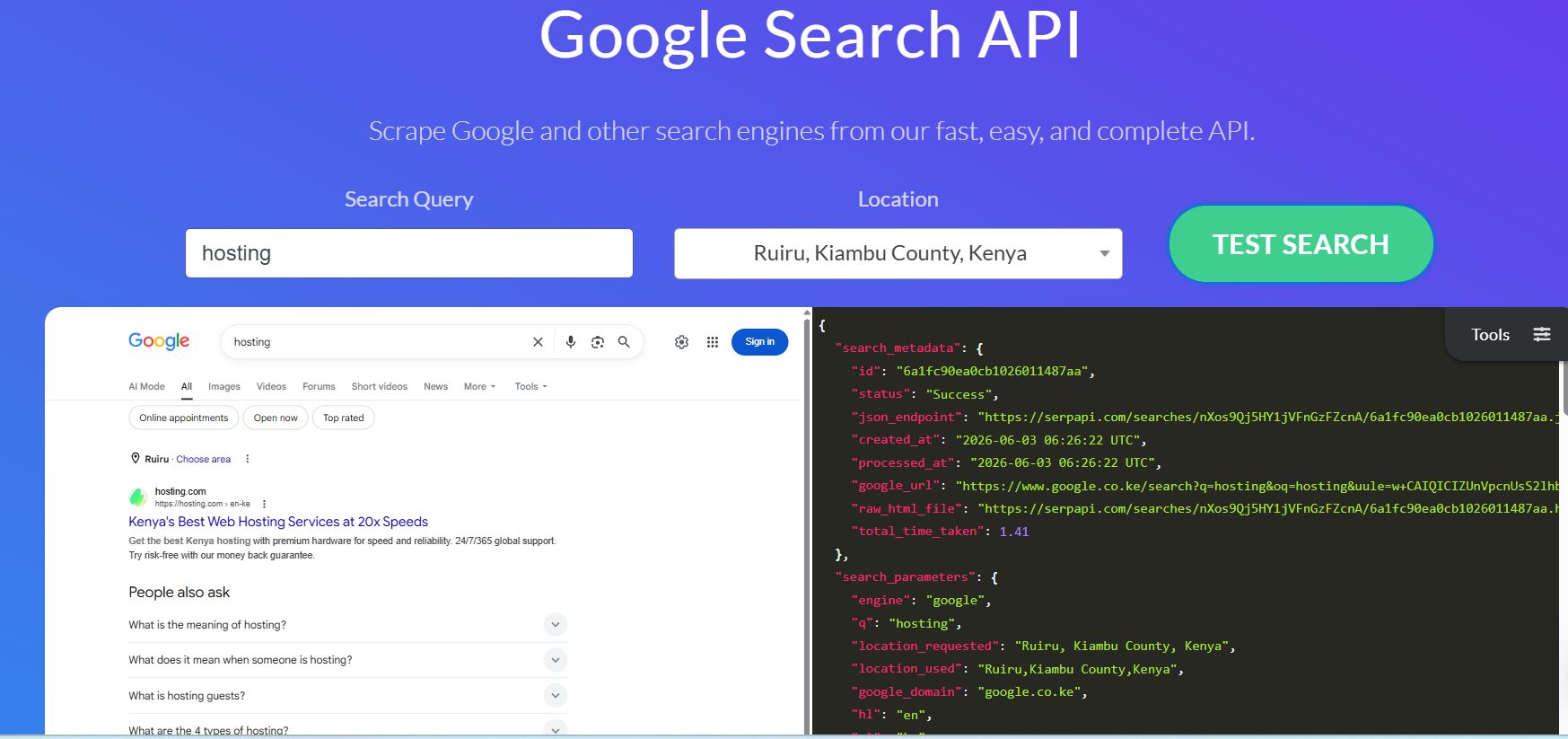
The geo-targeting worked well in my test as the results were clearly localized, with a Kenyan hosting provider appearing in the top position and Google using the google.co.ke domain. The API also returned the search metadata and structured JSON in about 1.4 seconds, which is quite fast.
Pros & Cons
PROS
CONS
Pricing
SerpApi has a free-forever plan that supports 50 searches per hour and 250 searches per month. Paid plans with higher limits start at $25/month.
05. Oxylabs
Web scraper APIAn all-in-one data collection solution
Oxylabs Google Search Scraper API lets users extract real-time data from Google search results. Its ML-powered e-commerce data infrastructure eliminates the need to build or maintain scrapers from scratch. Google Search Scraper API also handles anti-scraping systems and CAPTCHAs.
You can also use XPath or CSS selectors to define parsing logic and enjoy self-healing presets that automatically adapt when a web app changes. You can also schedule scraping jobs to improve accuracy and send the data to Alibaba Cloud OSS, Amazon S3, or GCS.
Oxylabs features OxyCopilot, an AI-powered assistant that lets you enter a prompt in natural language and generates scraping and parsing code. I tested OxyCopilot by prompting it to create a scraper for the Geekflare AI page. These were my results:
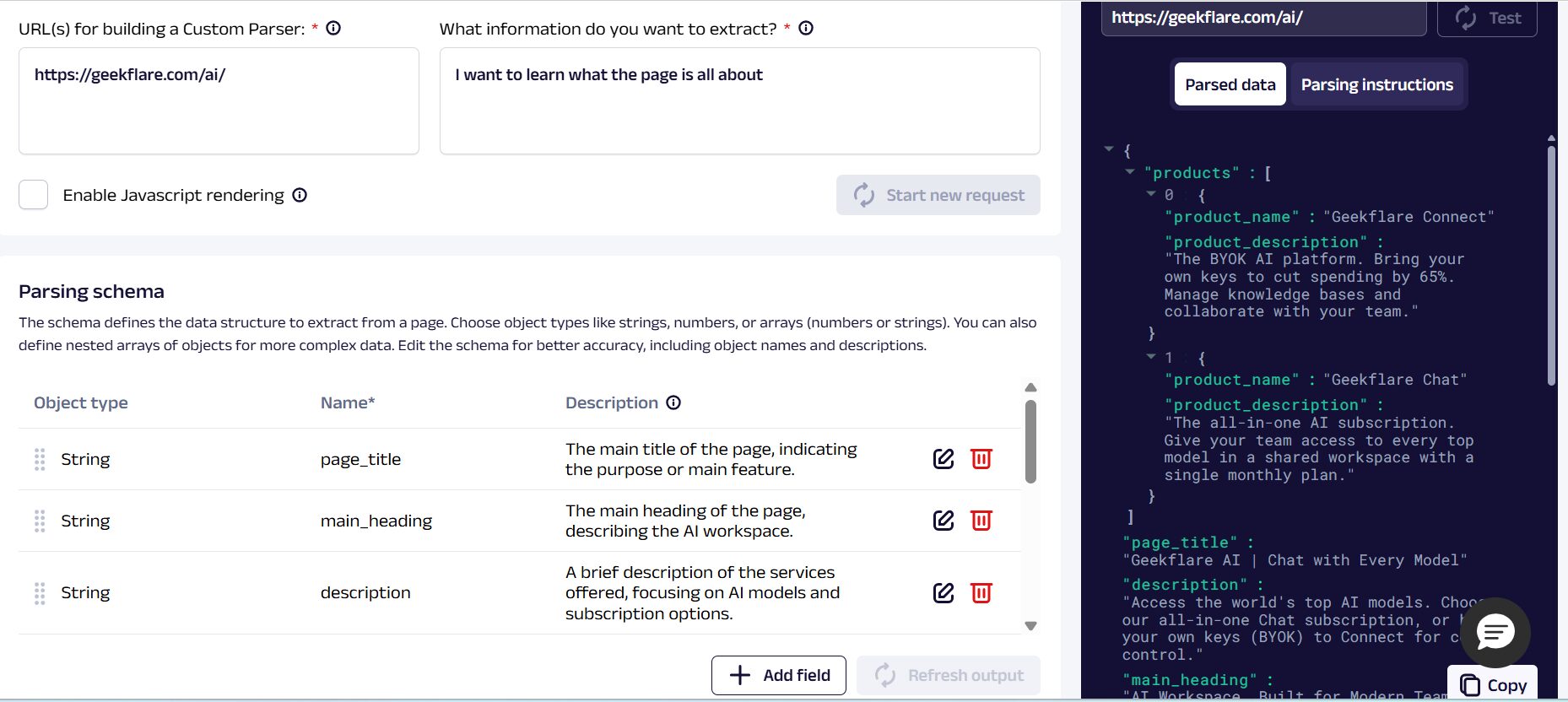
OxyCopilot parsed the Geekflare AI page accurately, returning a clean JSON structure with product names, descriptions, a page title, and a main heading. I used a natural language prompt and didn’t code the scraper from scratch but still got a well-organized schema ready for immediate use. This demonstrates how OxyCopilot lowers the technical barrier for building custom scrapers without sacrificing output quality.
Pros & Cons
PROS
CONS
Pricing
Oxylabs Google Search Scraper API doesn’t have a free-forever plan, but it offers a free trial for up to 2,000 results. You also don’t need a credit card for the free trial. Pricing on paid plans depends on the platform you want to scrape, with plans starting at $0.50/1K results for Amazon, $1.00/1K results on Google, and $1.15/1K results for others.
06. Decodo
Scraping APIFlexible output formats
Decodo SERP Scraper API allows users to access real-time structured data in various formats such as HTML, Markdown, XHR, PNG, CSV, and JSON. The platform offers 100+ pre-built templates you can edit to suit your needs, saving time. This API supports geo-targeting, which minimizes blockages and also handles CAPTCHAs on its own. It also works seamlessly across major browsers such as Google, Bing, Yahoo, and Baidu.
Decodo SERP Scraper API is easy to integrate with code samples on GitHub, extensive quick-start guides, and Postman collections. Its automated proxy rotation ensures a seamless scraping experience without blockages.
It also features a built-in headless browser, enabling scraping of data from dynamic and JavaScript-heavy websites. The error detection and automatic retries features minimize manual interventions.
During my test, I instructed the Decodo SERP Scraper API to scrap data using “gaming laptop” as my search query. I chose the UK as my location, English as my preferred language, and to present all data in a table. These were my results:
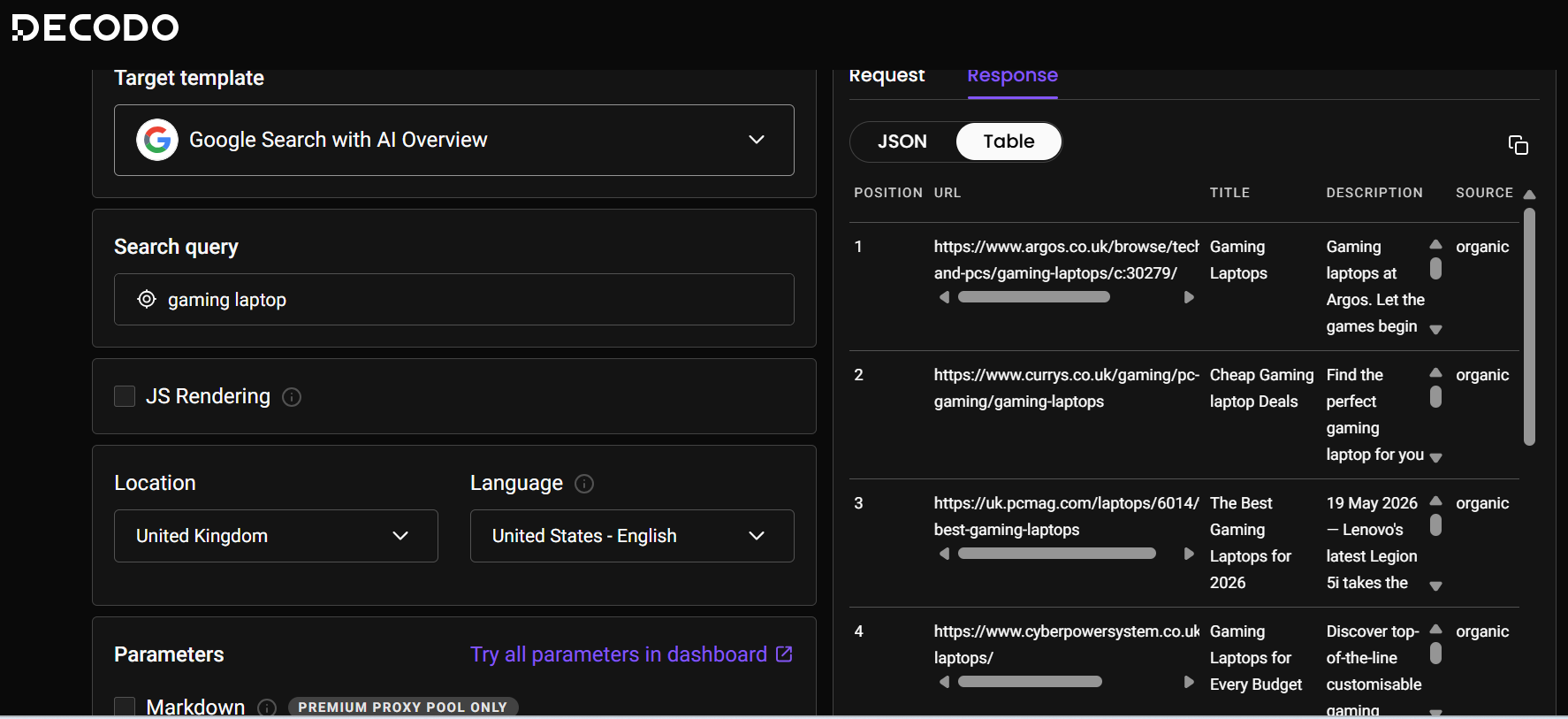
The results came back in a clean table format with position, URL, title, description, and source clearly laid out. The top results were all highly relevant UK sites, such as Argos, Currys, and PCMag UK, indicating the geo-targeting was on point.
Pros & Cons
PROS
CONS
Pricing
Decodo SERP Scraper API has a free plan. Paid plans are charged on a per-1k-requests basis, starting from $19/month. You can also select the type of proxies to use. For instance, Standard proxies cost $0.50 for 38K requests while Premium Proxies + JS give 12K results for $1.50.
07. SearchApi
Multi-engine SERP APIPrecise geo-targeting
SearchApi is an all-in-one platform that users can use to generate rich snippets, site links, nested results, ranking positions, and much more. Its precise coordinate-level geo-targeting ensures you get accurate results and reduces instances of browser blocking. In addition to organic results, SearchApi scrapes ads and displays data about their positions on the search results page.
SearchApi has a built-in proxy rotator with a global network of 100M+ proxies to minimize blockages. This API also mimics real human behavior with its JavaScript rendering, full browser rendering, and CAPTCHA solving. You can extend the functionality by integrating with popular open-source tools such as Haystack, Dify, LangChain, and Flowise. It also features all the frequently searched questions related to the search query.
I put SearchApi’s Google Search API to the test. I provided a URL where I wanted to see all the ranking pages. These were my results:
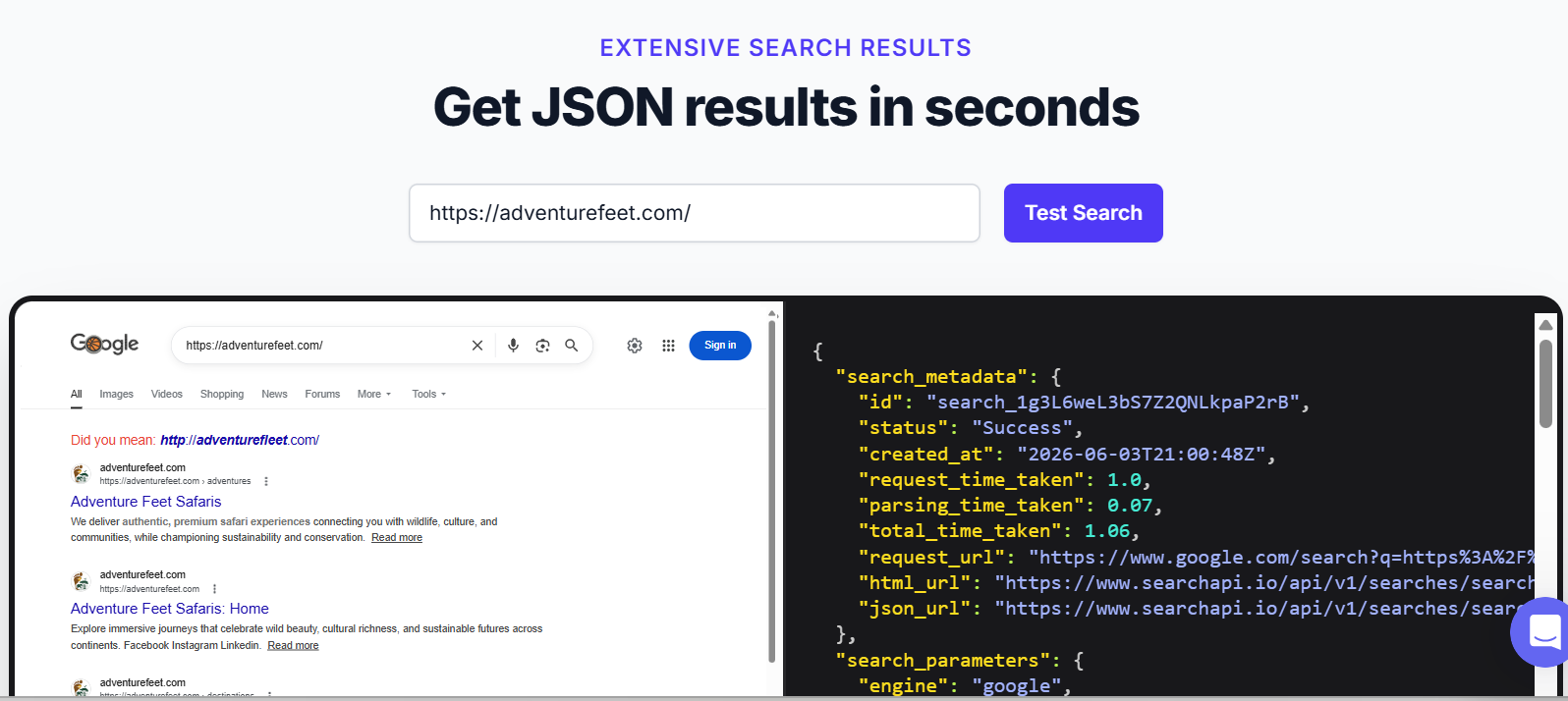
SearchApi returned both the live SERP view and a clean JSON response side by side, making it easy to validate parsing accuracy against actual Google results. The speed was good as response metadata took about 1.06s. The structured fields (search parameters, metadata, URLs) are clearly organized, and the geo-targeting capabilities are impressive.
Pros & Cons
PROS
CONS
Pricing
SearchApi has a free plan that includes 100 free requests, no credit card required. Paid plans start at $4 per 1,000 searches or $40/month for standard scraping speed, and at $4 per 1,000 searches or $80/month for enhanced scraping speed.
08. Zenserp
Lightweight SERP APIA lightweight SERP API
Zenserp API allows scraping on the most popular browsers such as Google, Bing, Yandex, and DuckDuckGo. You can scrape data on Google, YouTube, and shopping results with a few steps and get data in easy-to-read JSON format. You can refine your search to suit your needs using the various settings and filters this API provides.
Zenserp API covers both organic and paid results. One organic search can return over 400 results with pagination and up to 100 without. You can also scrape for all types of paid Google ads with their search position on the search results. Zenserp is quite flexible as it supports all the major programming languages.
I tested the Zenserp API as follows: My search query was “Gaming laptop”; I chose YouTube search as my endpoint, English as the language, and the United Kingdom as the country. These were my results:
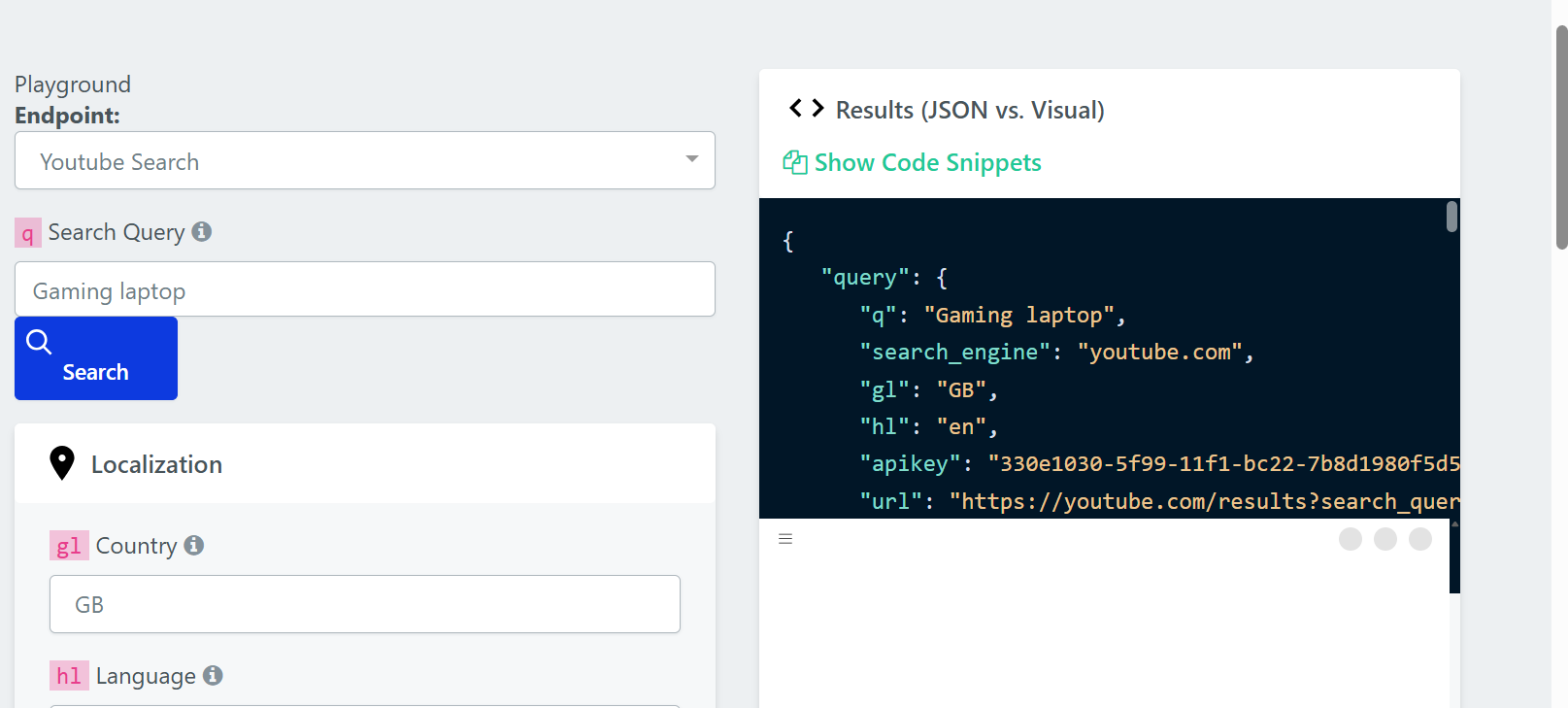
The results came back as clean, well-structured JSON. The output clearly matched my query parameters, such as the search engine, country, language, and the constructed YouTube URL. The playground also has a side-by-side JSON vs. Visual toggle, making it suitable for less technical users who want visual results without dealing with a lot of raw data.
Pros & Cons
PROS
CONS
Pricing
Zenserp API has a free plan that includes 50 searches per month. Paid plans that include up to 25,000 searches/month start at $49.99 /month.
09. Apify
Scraper marketplaceTeams that integrate with multiple tools
Apify Google Search scraper and SERP API let users extract organic and paid results, reviews, AI Mode, queries, AI overviews, People Also Ask, and prices from Google. It is a flexible tool, as you can run the scraper via scheduled runs, its API, or by integrating it with other tools. You can choose from various export formats such as HTML, JSON, CSV, or Excel.
You can also use the Apify Google Search scraper and SERP API to improve AEO and GEO results, as it supports Gemini search, Perplexity AI search, Google AI Mode, ChatGPT search, and Copilot search add-ons. It has a highly configurable scraper that lets you specify settings such as query phrases, language, target geolocation, desktop or mobile version, search domain, and number of results per page.
I tested the Apify Google Search scraper and SERP API by using “What are the top AI image generation tools” as my search query. I set the location to the UK, the language to English, and the device to desktop. These were my results:
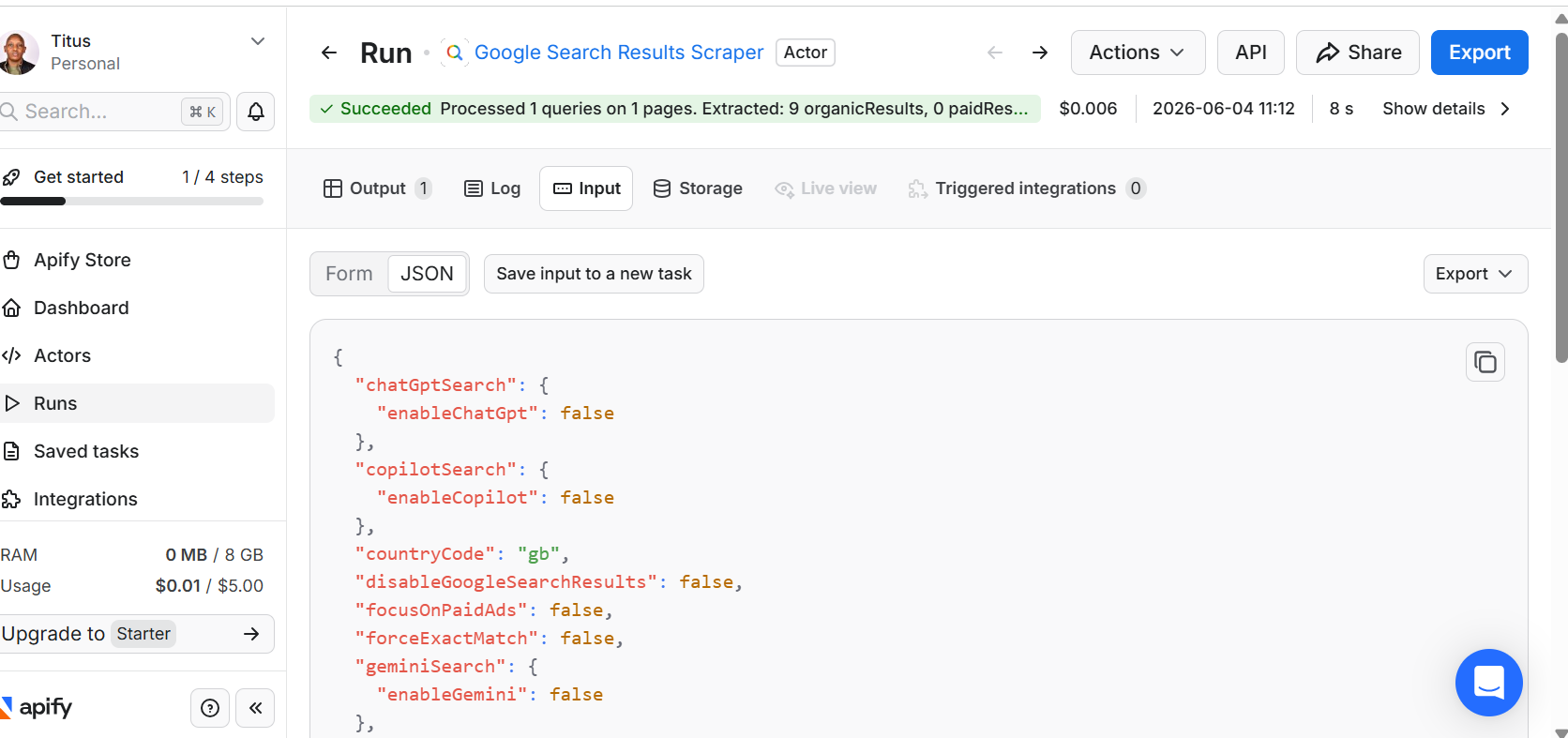
My run succeeded in just 8 seconds at a cost of $0.006, processing one query and extracting 9 organic results with zero paid results. The output was clean. I particularly loved the JSON input panel with fine-grained control over the scrape, with toggles for ChatGPT, Copilot, and Gemini search integrations.
Pros & Cons
PROS
CONS
Pricing
Apify’s Google Search scraper and SERP API offer a free plan that includes $5 in credits. You don’t need a credit card to start using the free plan. For paid plans, Apify offers monthly and pay-as-you-go models. Plans start at $29/month, plus pay-as-you-go, with $29 to spend on the Apify Store.
10. Serper
Google search APIA fast and affordable Google SERP API
Serper positions itself as the world’s fastest and cheapest Google Search API, delivering results in 1-2 seconds and charging $1.00/1k credits. The Ultimate plan has a limit of up to 300 queries per second, meaning you can perform 15,000 to 18,000 searches in 1 minute. You can also specify the country and language of your search before scraping.
All the data that Serper displays is real-time, as the API queries Google directly every time a user calls it. You can extend Serper’s functionality by integrating it with other platforms such as LangChain, CrewAI, Jan AI, and Haystack. For instance, LangChain integration gives users access to 1000+ integrations, including AI models from OpenAI, Anthropic, and Google.
I tested Serper’s Google Search API for keyword research. My search query was “best video editing laptops 2026”. I selected the country as the United States, selected the language as English, and the date range as the last year. This is what I got:
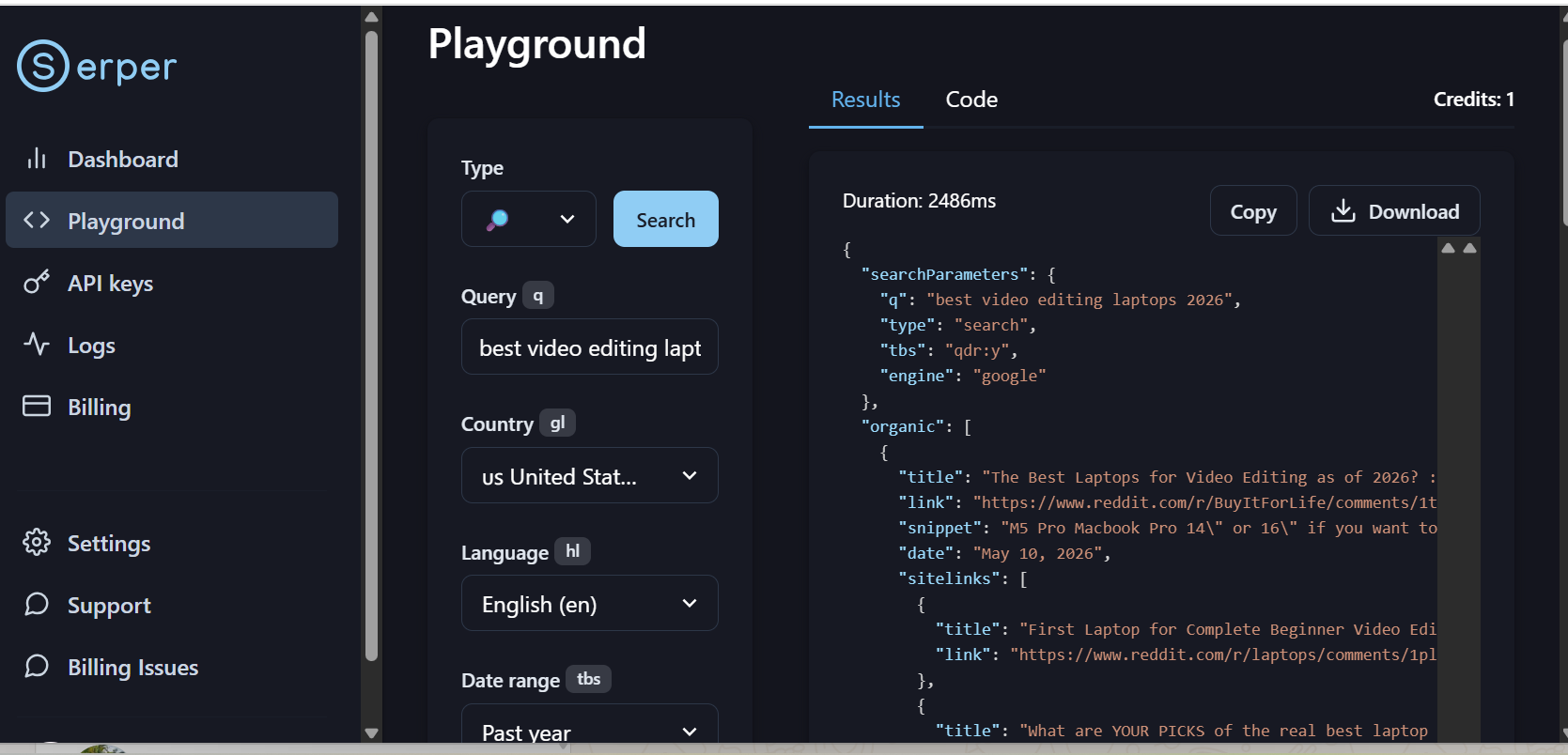
Serper presented clean, structured JSON output with clearly labeled fields, such as query parameters, organic results, and metadata. The response time (2.4s) is reasonably fast for real-time scraping. Additionally, I was pleased by the ability to specify the country, language, and date range directly, enabling practical geo-targeting and filtering for rank tracking.
Pros & Cons
PROS
CONS
Pricing
Serper offers a free plan that lets users run up to 2,500 queries. You don’t need a credit card for the free tier. Paid plans are on a credit basis, starting at $50 for 50k credits ($1.00/1k). All credits are valid for 6 months from the day of purchase.
11. cloro
SERP and AI answers APITracking Google rankings and AI answers in one API
cloro is a REST API that returns structured results from Google Search and Google News alongside the AI answer engines like ChatGPT, Perplexity, Gemini, Copilot, Grok, Google AI Overview, and Google AI Mode. Every response comes back as JSON or markdown with the sources and citations the engine used, so the same integration that tracks a keyword position also tells you which pages an AI answer quoted for it.
Geo-targeting runs to city level on Google Search and the AI surfaces through a location parameter that takes Google’s canonical location names, with country-level targeting via ISO 3166-1 alpha-2 codes. Google News is country-level only. Requests can be sync or async with webhook delivery for batch jobs, and billing is success-only.
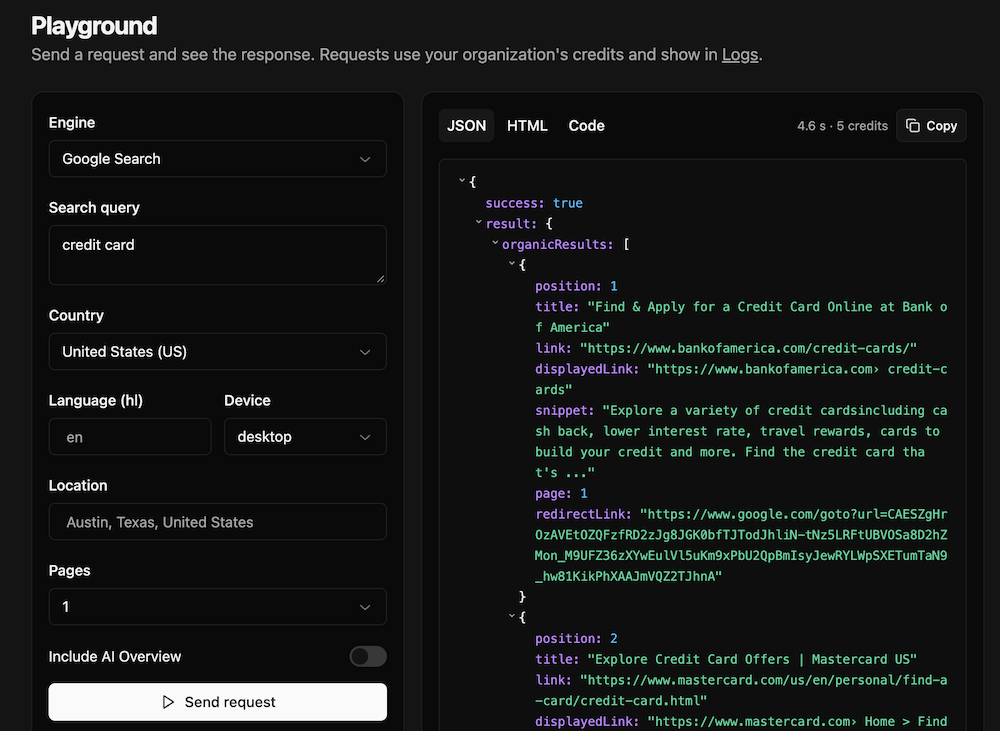
I did a quick test for “credit card” query from United States and result came clean in 4.6 seconds and costed 5 credits.
Pros & Cons
PROS
CONS
Pricing
cloro is credit-based, and each call costs a different number of credits. The free tier includes 500 credits a month. Lite is $30/month for 37,500 credits, Hobby $100/month for 250,000, and plans scale through Starter ($250), Growth ($500), and Business ($1,000/month for 2.8 million credits), with enterprise plans from $2,000.
Honorable Mentions
A budget-friendly API covering Google, Bing, DuckDuckGo, and Brave, with city-level targeting and JSON or raw HTML output.
Includes a dedicated Google Rank Checker API, which suits position tracking, plus city-level locations and a Bing SERP API.
VALUE SERP is a low-cost Google API with JSON, HTML, or CSV output from $50/month billed yearly. SerpWow adds Bing, Yahoo, Baidu, Yandex, and Naver with ZIP-level targeting. Traject Data is now part of ScraperAPI.
Its Search endpoint returns up to 100 results in one call and charges less for pages 2 to 10, which helps when tracking deeper rankings.
Covers Google, Bing, and Yahoo with targeting down to city level and JSON or HTML output.
Traditional SEO SERP APIs vs. AI Search APIs
Not all search APIs serve the same purpose. Thus, picking the wrong category can be an expensive mistake. What you’re actually trying to do with the data should guide you when selecting a tool.
Traditional SEO SERP APIs focus on exact organic positions, the line between sponsored and organic results, rich snippet types, local pack data, and historical ranking changes. These datasets are what SEO teams, agencies, and rank-tracking platforms rely on.
A traditional SERP API can help you figure out why your website dropped from position 3 to position 17 on a specific keyword in Chicago.
AI Search APIs are built for a different job entirely. They strip away ads, aggregate and summarize content, and return clean text optimized for low latency. This is because LLMs and AI agents need fast, readable input rather than structured SERP data. This means position tracking, sponsored differentiation, and rich snippet extraction are irrelevant in that context.
Nine of the 11 tools covered in this guide fall into the first category. They are purpose-built for SEO data extraction, not LLM pipelines. Two cover both. Geekflare’s SERP API is a mode of the same Search API built for LLM pipelines, and cloro returns both traditional SERP data and AI engine answers with their citations, a category that has only recently become its own.
Key Features to Look for in an SEO Rank Tracking API
If you type the keywords “SEO ranking API” into any browser, you will get hundreds of tools claiming to be the best. It can be confusing. These are some of the features to look out for:
Mobile vs. Desktop SERP Extraction
Google displays different results depending on the device. For instance, a keyword ranking at position 2 on desktop may rank at position 5 on mobile. This is especially true for local queries where Google’s mobile SERP layout gives more space to map packs and ads.
As such, the ideal SERP API needs to support switching between mobile and desktop user-agents per request. Meaning you can track both desktop and mobile independently without running two separate integrations.
Automatic CAPTCHA Handling and IP Ban Management
Scraping search engines at volume triggers anti-bot systems. If your API doesn’t handle CAPTCHA solving, proxy rotation, and IP ban recovery automatically, it means your engineering team will have to handle them manually.
Look for tools that manage this infrastructure entirely on their end and publish success rate figures you can hold them to.
Support for Localized Search Engines
Google dominates globally, but it doesn’t dominate everywhere. If your clients operate in Russia, China, Japan, or South Korea, Yandex, Baidu, Naver, and Yahoo are the key sources of organic traffic that need separate rank tracking.
An API that only supports Google will not give you the full picture if you have a client with a meaningful presence in those markets.
Good to know
What’s the difference between a SERP scraper and a SERP API?
A SERP scraper is code you build and run yourself, usually with Selenium or Playwright. A SERP API is a hosted service you call over HTTP(s) that returns the same data without you managing browsers, proxies, or CAPTCHAs. Every tool in this guide is the second kind.
Is there a free SERP API?
Geekflare, SerpApi, Decodo, SearchApi, Zenserp, Apify, Serper, and cloro all offer some free allowance. DataForSEO and Oxylabs offer free trial credit instead of an ongoing free plan.
SerpApi vs Bright Data’s SERP API, which one should I pick?
SerpApi is priced for lower volume and includes a real free tier, which suits smaller projects and testing. Bright Data’s SERP API is built for high-volume, sub-second requests across 195 countries, which suits agencies and platforms tracking large keyword sets. Pick based on volume, not features. Both cover the same core engines.
Which SERP API supports Naver?
SerpApi, Bright Data, and DataForSEO all support Naver SERP scraping.
I just want AI-ready search results, not rank tracking. Do I still need one of these tools?
No. The above-listed tools are built for SEO metrics like position tracking and rich snippet extraction. If you’re feeding search results into an LLM or AI agent instead, use the Geekflare Search API, which returns search results, scraped page content, and grounded answers.






