



Billions of posts, comments, and profile updates are made across different social media platforms every day. This is a lot of data with real business value. For instance, marketers can use it for sentiment analysis, sales teams can mine it for lead generation, and analysts rely on it for competitor tracking.
Demand for this data has never been higher. However, getting it is also becoming harder every day, with platforms such as Instagram, LinkedIn, and X aggressively raising their defenses. If you want to do raw scraping today, you have to navigate through CAPTCHAs, TLS fingerprinting, behavior analysis, and aggressive rate limiting that can block your IP before you even pull a dozen records. Also, most official APIs have paywalls.
Luckily, we have purpose-built social media scraping tools, as this guide covers the best social media scraping APIs for developers. It also has no-code tools for marketers and researchers. Meaning you can pull the data you need without building and maintaining a scraping stack from scratch.
If you’re looking for a broader solution, check out this list of web scraping APIs for general-purpose options. However, if you need social media scraping tools, then this is the guide to follow.
Social Media Scraping Tools at a Glance
| Tool | Type | Free option | Starting price |
|---|---|---|---|
| Bright Data | Scraping API and no-code scrapers | 5K records/month | $1.50 per 1K records |
| Apify | Scraper marketplace (Actors) | $5 monthly credit | $19/month |
| Decodo | Scraping API | 10 requests/second | $19/month |
| Zyte | Scraping API and managed data | $5 credit for 30 days | $0.13 per 1K responses |
| Scrape Creators | Social media API | 100 credits | $47 for 25K credits |
| SignalQub | Social and web scraping API | 100 credits | $19 for 5,500 credits |
| PhantomBuster | No-code automation | 14-day trial | $56/month (billed annually) |
| Octoparse | No-code scraper | Free plan | $69/month (billed annually) |
| Dripify | LinkedIn outreach | 7-day trial | $59/user/month (billed annually) |
| Evaboot | Sales Navigator export | None listed | $29/month |
| Octopus CRM | LinkedIn automation | 7-day trial | $6.99/month (billed annually) |
| STACKED | LinkedIn automation | None listed | $41.25/seat/month (billed annually) |
The Ethical and Legal Issues of Social Media Scraping
Which sort of data is legal to scrape on social media? Publicly accessible content like posts, profile bios, follower counts, and engagement metrics visible without logging in is generally safe to scrape. However, private messages, content behind login walls, and data from minors are off-limits, both ethically and legally.
The key legal reference for social media scraping is hiQ Labs v. LinkedIn. The US Ninth Circuit Court of Appeals ruled that scraping publicly available data does not violate the Computer Fraud and Abuse Act (CFAA). However, hiQ ultimately paid damages and destroyed all scraped data after using fake accounts and breaching LinkedIn’s terms of service. Always stay within platform terms.
GDPR and CCPA treat personally identifiable information (PII) as protected data, even when it is technically public. Names, email addresses, IP addresses, and similar identifiers cannot be collected or stored without a lawful basis. Thus, strip any PII from your pipelines before storage, collect only what your use case requires, and stay within each platform’s terms of service.
Based on target users, social media scraping tools fall into two main categories: for developers and non-developers (no-code platforms)
Social Media Scraping APIs for Developers
Bright Data Social Media Scraper
Bright Data Social Media Scraper is a collection of tools that helps users scrape data from platforms such as Facebook, Twitter, Instagram, TikTok, and YouTube. This API supports various programming languages, such as Python, Node.js, and cURL. Bright Data automatically handles proxy management and solves CAPTCHAs, so you only need to enter the target URL.
Bright Data Social Media Scraper is suitable for bulk scraping, as you can add multiple URLs at once. You can also narrow down the type of data that you can scrape. For instance, you can use the “Instagram – Posts” API to collect all posts from a certain Instagram profile. The “Instagram – Profiles” API, on the other hand, collects data such as account ID, post count, followers, and so much more.
I tested one of the LinkedIn scrapers, the “Discover by company url”, and the data was available for download in under one minute. These were my results:
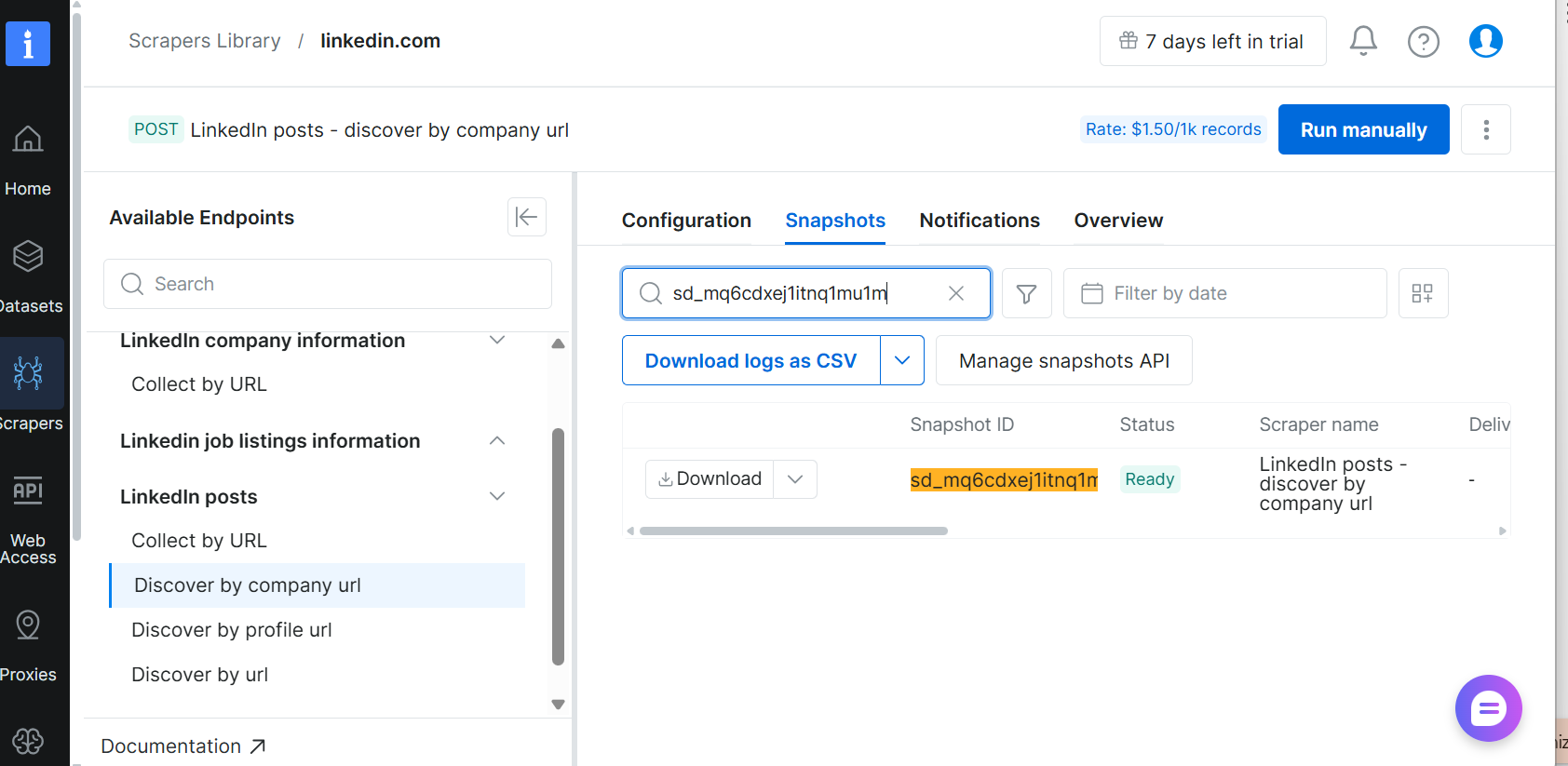
Bright Data returned clean, structured data that I could download as either a CSV or a JSON table. The data had important details such as the date posted, the number of comments, and the number of likes.
Pros & Cons
PROS
CONS
Pricing
Bright Data paid plans can be on a pay-as-you-go model at $1.50 per 1,000 records, or on the Scale plan at $499/month, which includes 384,000 records and charges $1.30 per 1,000 additional records.
Apify Social Media Scrapers
Apify social media scrapers is a web scraping marketplace with 30,000 pre-built Actors that pull real-time public data from social media platforms like Instagram, TikTok, LinkedIn, Facebook, X, YouTube, and Reddit. To get structured data, such as posts, comments, followers, engagement metrics, timestamps, and images, simply pick an Actor and input a profile URL or hashtag.
Apify also allows you to create and deploy a custom social media scraper if the available Actors don’t fit your needs using Crawlee, its open-source Node.js and TypeScript library.
You also don’t have to worry about how data is stored, as Apify comes with built-in storage for all datasets, key-value stores, and request queues. This means the scraped data is ready to be exported as JSON, CSV, or Excel.
I tested Apify’s YouTube Channel Scraper on Geekflare’s YouTube channel. I also instructed the tool to scrape only 50 videos.
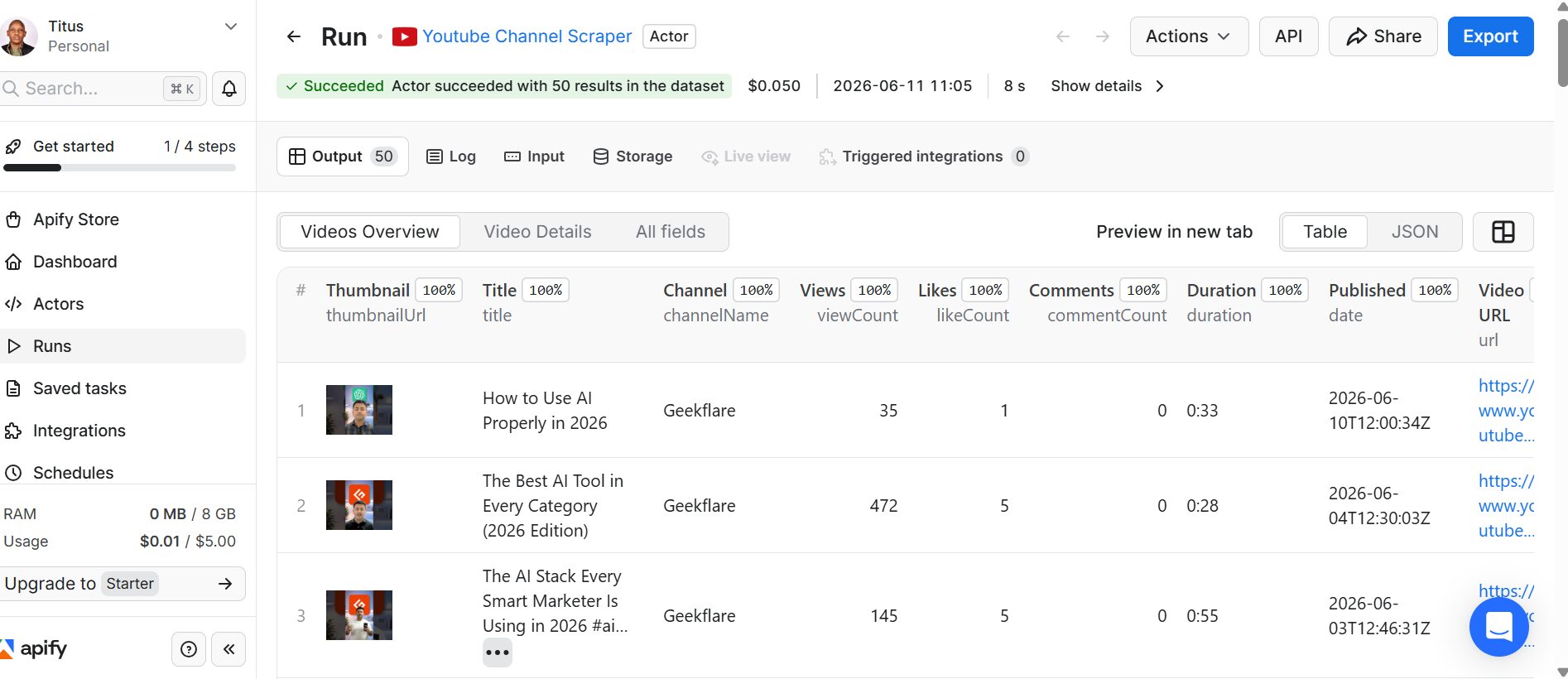
I was impressed with the results, as the scraper returned structured data for the first 50 videos. It took just 8 seconds to retrieve the thumbnail URL, video title, view count, like count, comments, duration, publication date, video URL, and other important details. Apify’s YouTube Channel Scraper also allowed me to export the data as a table or in JSON format.
Pricing
Apify offers a free tier with $5 in monthly platform credit. You don’t need a credit card for this package, but unused credits expire at the end of each billing cycle. The paid plans are:
- Starter plan: $19/month
- Scale: $199/month
- Business: $999/month
Decodo
Decodo Web Data API is a collection of tools within its Web Scraping API suite. This API is built for developers, with ready-made code samples available on GitHub and quick-start guides for Node.js, Python, and cURL. It is one of the most flexible APIs out there, supporting various output formats such as HTML, JSON, PNG, CSV, Markdown, and XHR.
Decodo Web Data API offers advanced anti-bot protection by integrating browser fingerprints for seamless data collection. Sometimes developers don’t have to create scrapers from scratch, as the platform has ready-made scraping templates for different social platforms. This API supports global location targeting, made possible by its 125M+ IPs. Users can choose between on-demand and real-time results by switching between synchronous and asynchronous modes.
I tested the “Reddit User” scraper with the following parameters: Language-English, Location-United States, and Target Specific-New.
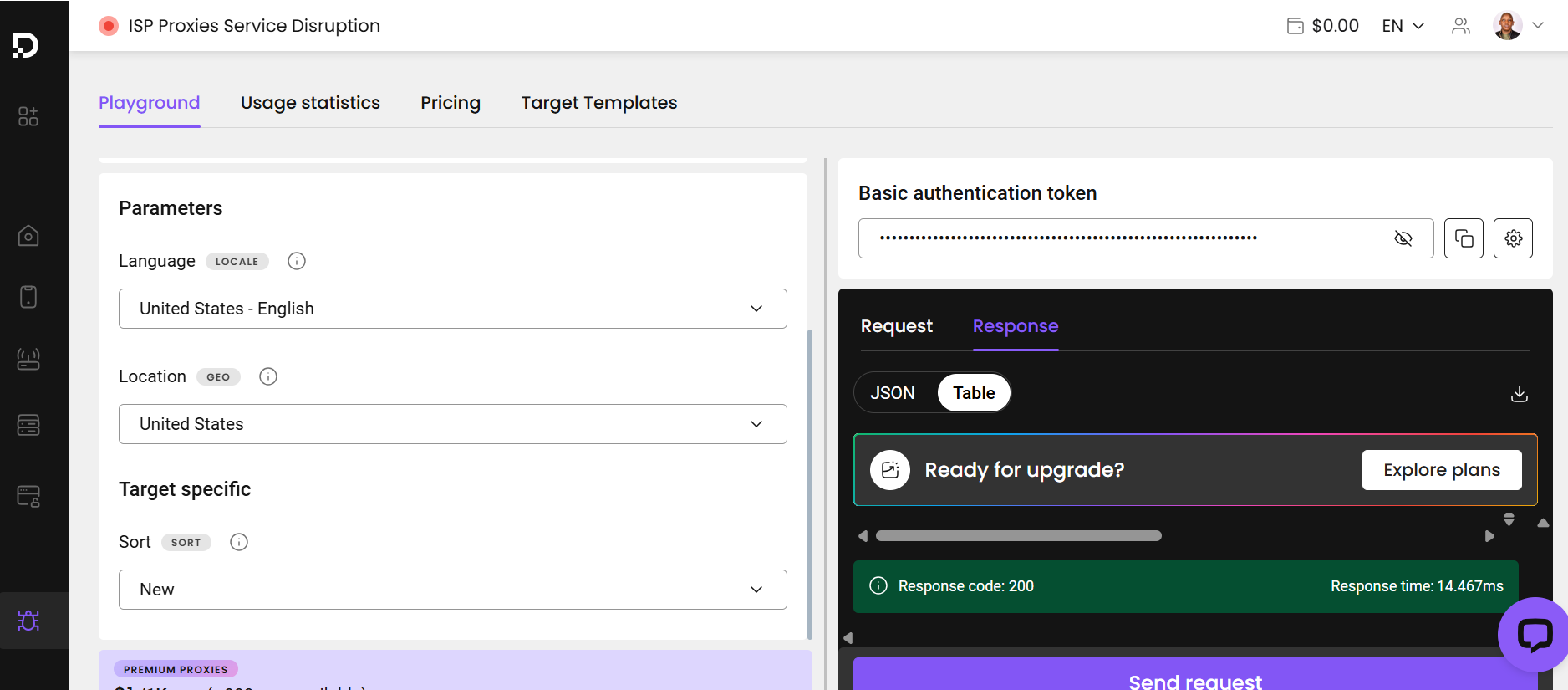
I scraped the data in 14.467ms and downloaded it as JSON. The table included details such as the username, the date the account was created, and the number of posts.
Pros & Cons
PROS
CONS
Pricing
Decodo Web Data API has a free plan with a limit of 10 requests/second and up to 10K pages scraped.
Paid plans are billed monthly: $19 for 38K pages, $49 for 122K pages, $99 for 330K pages, and $249 for 1.2M pages, with higher request rates on bigger plans.
Zyte Social Media Scraping
Zyte Social Media Scraping has two approaches: as a managed service and a self-serve API.
The managed service is presented through Zyte Data, where their team creates custom data pipelines across major social platforms and niche community forums. The output is structured, standardized data delivered at 99.99% accuracy. It is best suited for large enterprises that need social data at scale without having to build or maintain an in-house scraping stack.
For teams that prefer a DIY route, Zyte also offers its general-purpose Zyte API with built-in ban handling, headless browser rendering, CAPTCHA solving, and IP rotation. However, social media scraping is not a dedicated product here. You would need to build and configure your own scrapers on top of the API infrastructure.
I tested Zyte to scrape data on our company’s YouTube channel.
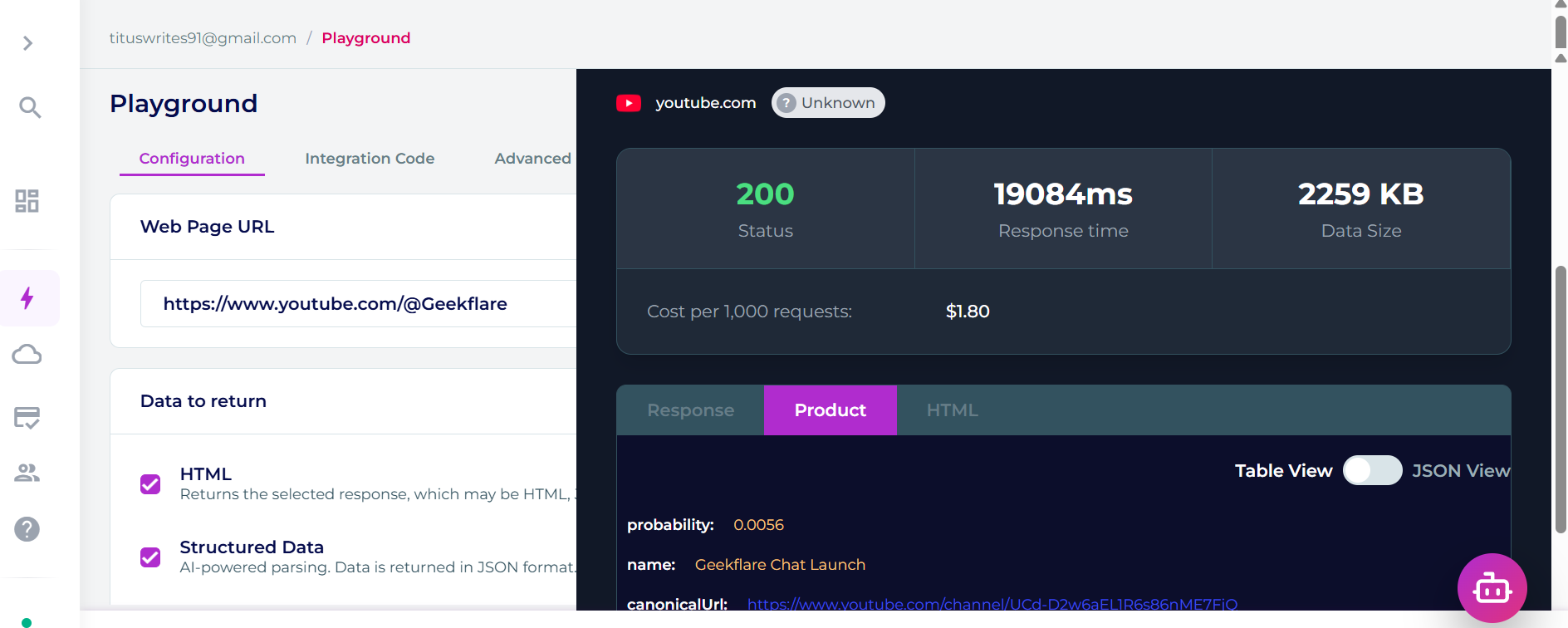
The tool returned a 200 status (successful). It gave me 2,259 KB of structured data with the channel name and canonical URL. The request completed successfully but took 19,084ms, which is noticeably slow for a single URL.
Pros & Cons
PROS
CONS
Pricing
Zyte doesn’t publish pricing for Zyte Data, its managed service. If you go the DIY route, Zyte API offers $5 in free credit and 30 days to try it out.
Pay-as-you-go plans cost $0.13 to $1.27 per 1000 responses for HTTP response body or from $1.01 to $16.08 per 1000 responses for browser-rendered requests. Monthly commitments of $100, $200, or $500 lower the rate to as little as $0.06 per 1,000 successful responses.
Scrape Creators
ScrapeCreators is a social media scraping API built specifically for developers. It provides a single unified API across more than 20 social platforms such as TikTok, Instagram, YouTube, Facebook, X, LinkedIn, Reddit, Pinterest, Threads, and Trust Social. Each platform has dedicated endpoints covering profiles, posts, videos, comments, transcripts, and ad libraries. It delivers real-time data with a 98.2% success rate.
ScrapeCreators is agent-ready, supporting MCP integration, a CLI, and an official Claude Code skill. This makes it easy to plug into AI-powered workflows. The MCP integration provides a single configuration block that enables AI models to interact with external data sources. It also features an analytics dashboard that shows creator metrics, live engagement, and follower growth. Also, the API uses a straightforward single-header authentication model with no SDK or OAuth setup required.
In my test, I ran the LinkedIn scraper that particularly targets posts on a company page. This was my request as shown in this screenshot:
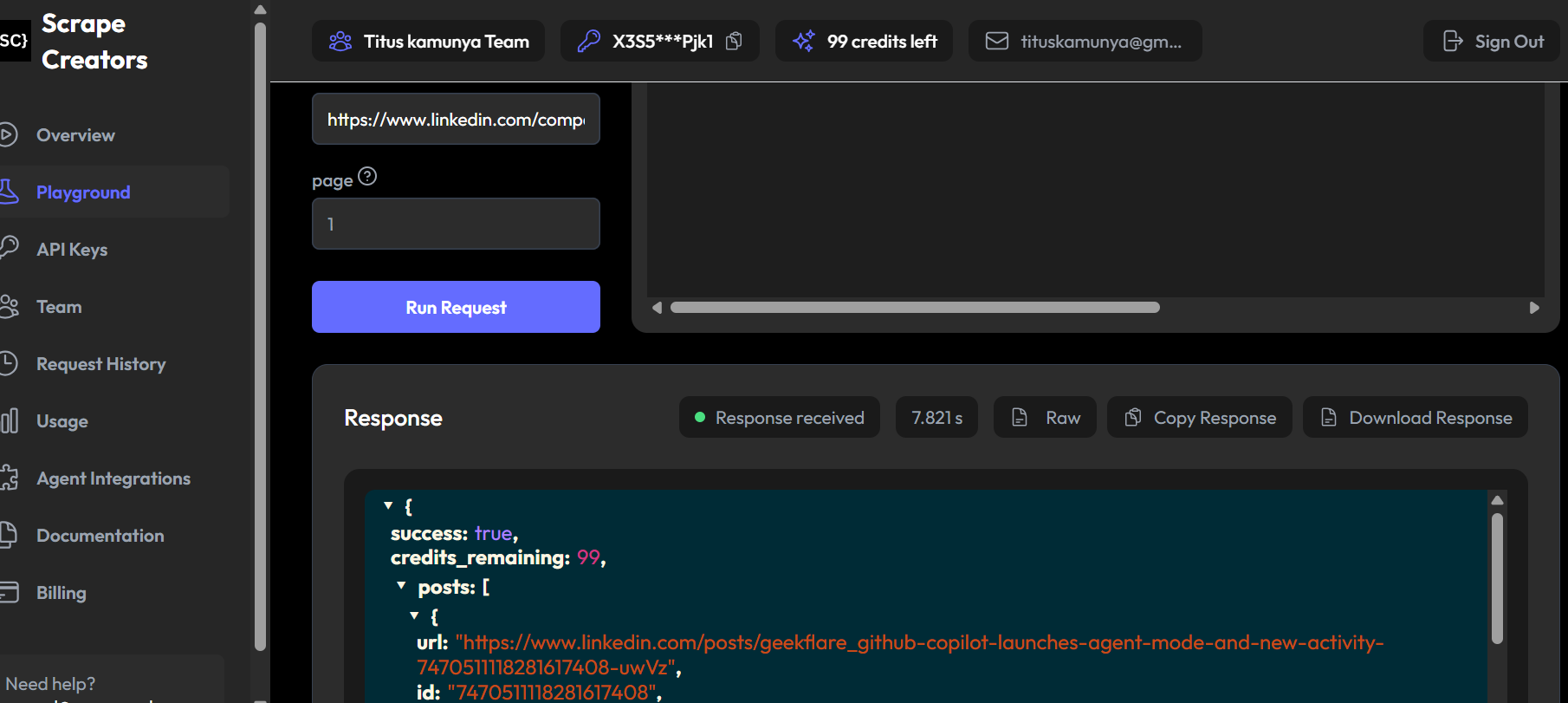
The scraper returned 10 posts from Geekflare’s LinkedIn company page, each with a unique post ID, publication timestamp, URL, and post text. The data came back structured and clean in JSON format, and the response confirmed a successful request.
[
  {
    "url": "https://www.linkedin.com/posts/geekflare_ai-chatgpt-gemini-activity-7454815368419905",
    "id": "745481536841990538",
    "datePublished": "2026-04-28T08:54:47.581Z",
    "text": "Still switching between ChatGPT and Gemini to compare answers?\n\nThat works... until..."
  },
  {
    "url": "https://www.linkedin.com/posts/geekflare_your-browser-has-become-an-ai-parking-lot-a",
    "id": "745390827941761680",
    "datePublished": "2026-04-25T20:50:20.711Z",
    "text": "Your browser has become an AI parking lot.\n\nOne tab for ChatGPT.\n\nOne for Claude."
  }
  // ... remaining 8 results truncated for readability
]
Pros & Cons
PROS
CONS
Pricing
ScrapeCreators offers a free tier with 100 credits (no credit card required). The Freelance plan costs $47 for 25,000 credits at $1.88 per 1,000 requests. The Business plan costs $497 for 500,000 credits at $0.99 per 1,000 requests. Enterprise pricing is available on request for volumes above 1 million credits.
SignalQub
SignalQub is a developer-first social media scraping API with an automatic multi-provider fallback system. Every request starts on SignalQub’s own scraper backend. If that gets blocked , the request fails over to one of backup providers. You don’t manage proxies or headless browsers, and you don’t need login credentials for the social platforms you aim to extract data from.
It offers 78+ endpoints across 18 platforms. Besides Instagram, TikTok, Facebook, YouTube, X, LinkedIn, Reddit, and Threads, it covers hard-to-scrape targets like Google Search, Trustpilot, Facebook Marketplace, Google Maps, Amazon, and Zillow, plus the Facebook and LinkedIn ad libraries. An MCP server, installed with a single npx command, lets Claude Desktop and Cursor call these endpoints directly.
In my test, I used the Playground in the SignalQub, which sends requests with your live API key. I selected the Instagram Profile Scraper and requested NASA’s public profile:
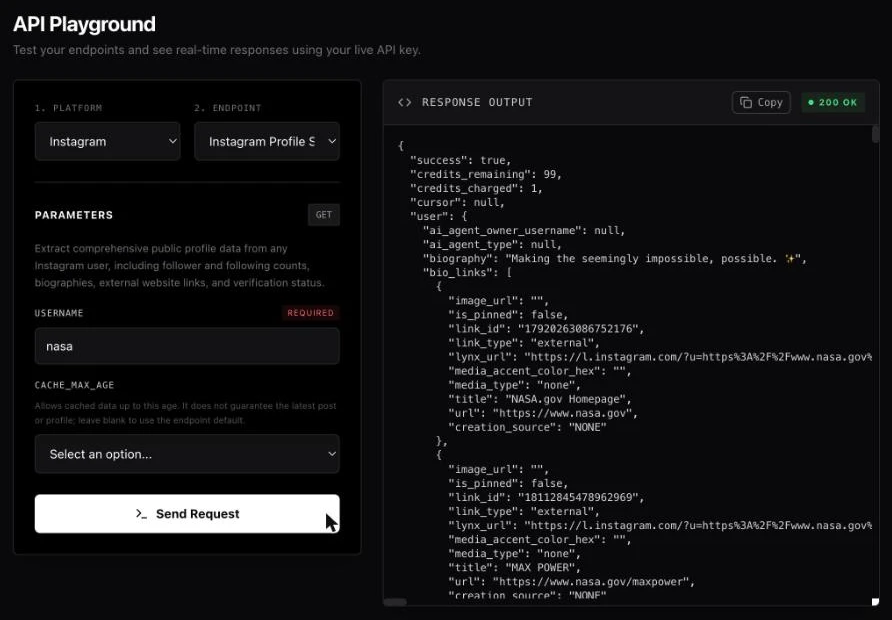
The response came back with 69 profile fields, including the bio, bio links, verification status, follower and following counts, and NASA’s 12 most recent posts with captions, likes, and comments. It cost one credit. My first request, for a different handle, returned a generic server error, and SignalQub didn’t charge a credit for it.
{
  "success": true,
  "credits_remaining": 99,
  "credits_charged": 1,
  "user": {
    "username": "nasa",
    "full_name": "NASA",
    "biography": "Making the seemingly impossible, possible. ✨",
    "is_verified": true,
    "external_url": "https://www.nasa.gov",
    "edge_followed_by": { "count": 104370762 },
    "edge_follow": { "count": 90 },
    "edge_owner_to_timeline_media": { "count": 12, "edges": [ ... ] }
    // ... 60+ more profile fields truncated for readability
  }
}
Pros & Cons
PROS
CONS
Pricing
SignalQub offers 100 free credits with no credit card required.
Paid credit packs are pay-as-you-go:
- Starter costs $19 for 5,500 credits
- Freelance $43 for 20,000 credits
- Business $448 for 350,000 credits
Please Note
We didn’t include ScrapingBee and ScraperAPI because they don’t have dedicated social media scrapers; they offer generic ones that might not work for social media. For general-purpose scraping, try the Geekflare Scraping API.
Best No-Code Social Media Scraping Tools
Not every social media scraping API requires users to learn how to code. The tools on this list suit marketers, researchers, and analysts who need to extract social data through visual interfaces and pre-built automation templates.
PhantomBuster
PhantomBuster is a no-code platform that allows users to monitor real-time activity and capture signal leads from over 15 major social sites. Users can build smarter lists with this tool, which includes 1,000+ live data points covering areas such as profile activity and job changes. It is easy to plug PhantomBuster into existing workflows as it integrates with HubSpot, Salesforce, BetterContact, Hunter, and other tools.
PhantomBuster has a Chrome extension that lets users spot, qualify, and save high-intent leads directly in LinkedIn. This tool will help you extract verified emails and numbers, use enriched behavioral and company data to qualify leads, and save these leads as lists or push them to HubSpot. You get all this information without leaving a LinkedIn profile or switching tabs.
I used the “LinkedIn Connections Export” and instructed it to export data for the most recent 100 connections on my LinkedIn profile.
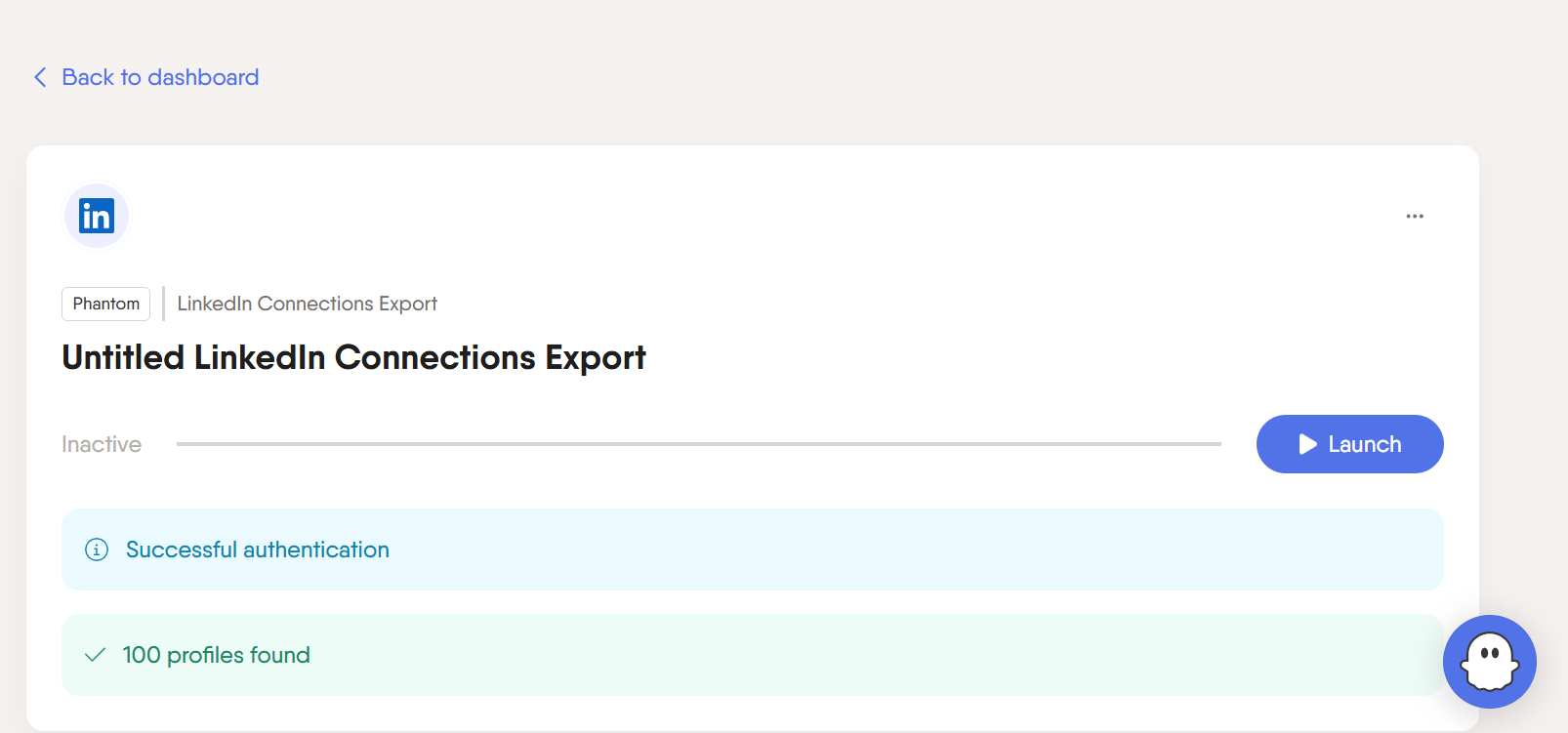
The results were a clean, structured table. I could see details such as profile URL, full name, first name, last name, connection degree, created at, and so much more. I could also choose to generate the data either once or regularly, maybe daily or weekly.
Pros & Cons
PROS
CONS
Pricing
PhantomBuster has a free tier, offered as a 14-day trial with no credit card required. It includes 100 URL finder credits, 50 email credits, 5 automation slots, 1k AI credits, and 2 hours of execution time, but exports are limited to 10 rows.
Paid plans are billed annually. The Start plan costs $56 per month ($672 a year) and includes 5 automation slots and 20 execution hours per month.
The Grow plan costs $128/month ($1,536 a year) with 15 slots and 80 hours, while the Scale plan costs $352/month ($4,224 a year) with 50 slots and 300 hours.
Octoparse
Octoparse is a no-code web scraping tool built for anyone who needs structured data without writing code. It uses an AI-powered auto-detect feature to automatically create scraping workflows, and you can use its drag-and-drop interface to customize them. The tool automates CAPTCHAs management, logins, pagination, and infinite scrolling to ensure you never have to deal with technical stuff.
Octoparse offers pre-built templates for TikTok, Twitter/X, LinkedIn, YouTube, and Reddit. Its “Social Media Finder” scraper is one of the most popular tools for finding public social media profiles across 15 popular platforms by simply entering a website URL or a name/nickname/username. Octoparse allows users to export data in Excel, JSON, or CSV, or integrate with cloud solutions.
I ran the “Social Media Finder” scraper for our brand name: Geekflare
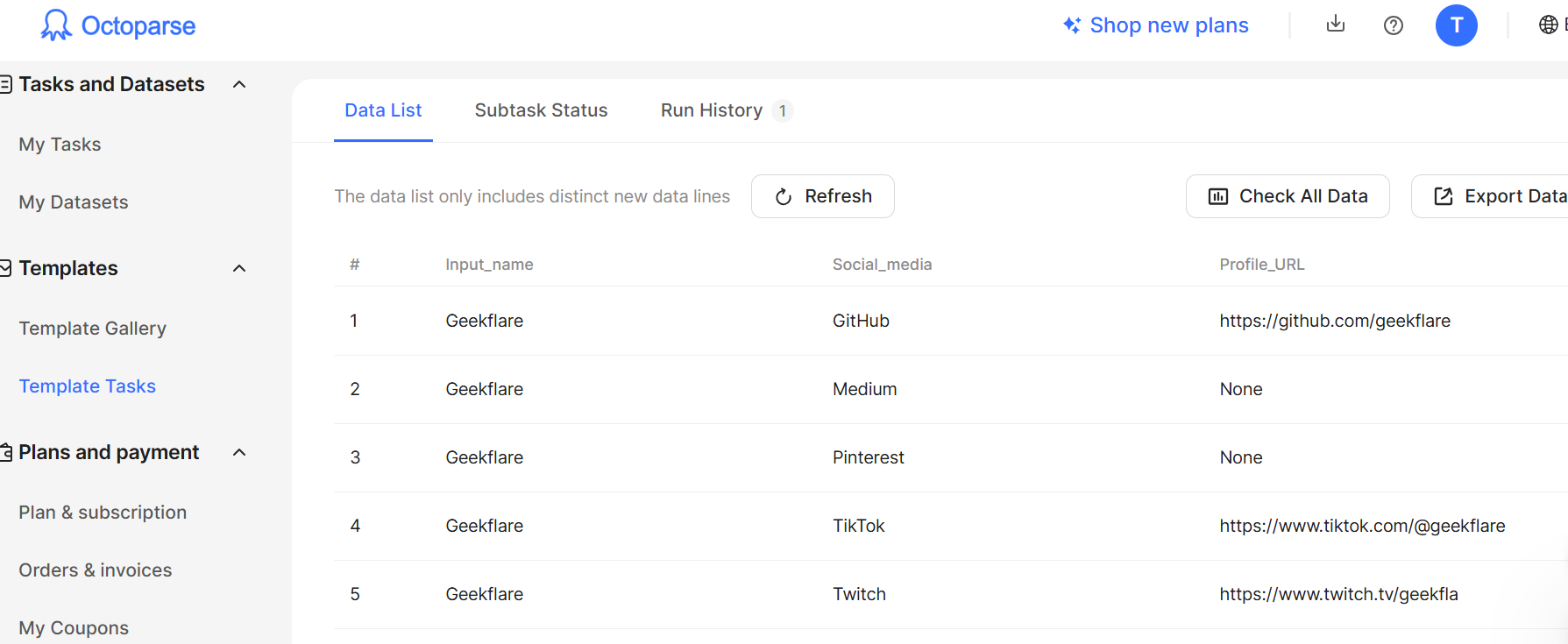
It took 1 minute and 5 seconds to get back my data. Octoparse presented 5 social media profiles. It also had a column for URLs: 2 were valid, 1 was broken, and 2 were blank.
Pros & Cons
PROS
CONS
Pricing
Octoparse has a free-forever plan that includes 10 tasks and 50,000 rows of exported data per month, with no credit card required. The Standard plan costs $69/month billed annually ($83 billed monthly) and includes 500+ scraping templates, 100 tasks, cloud extraction, automatic IP rotation, and CAPTCHA solving. You can apply for a free trial of the paid features, and every plan comes with a 5-day money-back guarantee.
Please Note:
We did not include https://browser.ai/ on our list, though it is a no-code tool. I experimented with its AI agent, which explicitly stated it is “unable to perform live data extractions or access external websites in real-time”.
Best Tools for Scraping LinkedIn Specifically
Several tools above already handle LinkedIn well. Bright Data and Apify both have dedicated LinkedIn scraping Actors for public post and profile data, and PhantomBuster’s Chrome extension covers LinkedIn lead capture and connection exports.
If you specifically need LinkedIn automation for sales prospecting or recruiting, rather than general public-data scraping, these tools are built just for that. Worth knowing, most of these log into your own LinkedIn account to work, which puts your account at risk of a ban if LinkedIn flags the activity.
Dripify
Sales prospecting automation built for LinkedIn. Runs outreach sequences with personalized messages and automated follow-ups, and can flag high-potential leads based on profile activity.
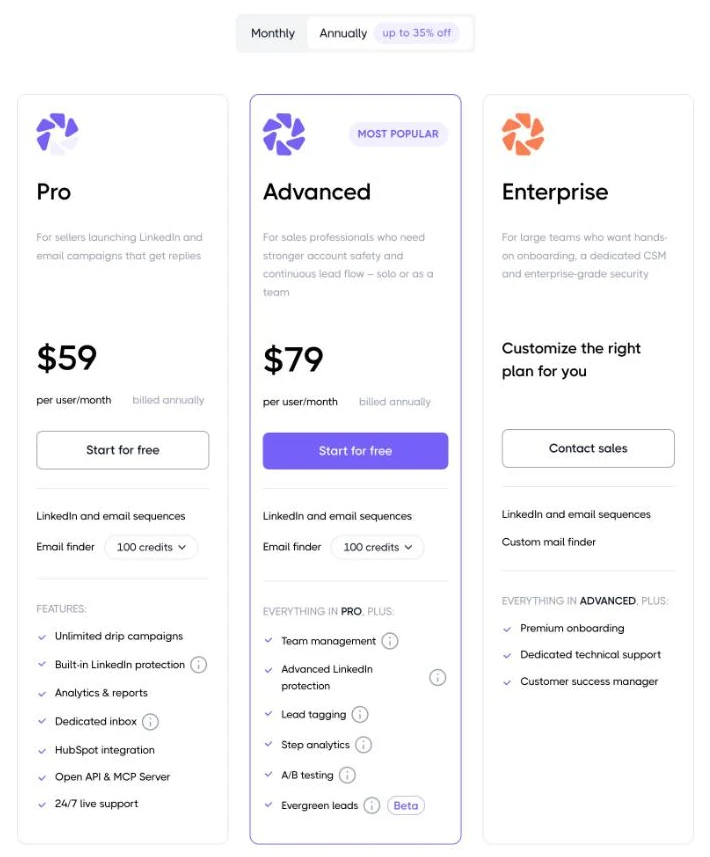
Two published tiers: Pro costs $59/user/month and Advanced $79/user/month billed annually ($79 and $99 billed monthly), plus a custom-priced Enterprise tier. Every plan includes 100 email finder credits/month. 7-day free trial, no credit card required.
Evaboot
A Chrome extension built specifically to clean and export LinkedIn Sales Navigator search results. One-click export pulls verified emails alongside profile data instead of just raw scraped fields.
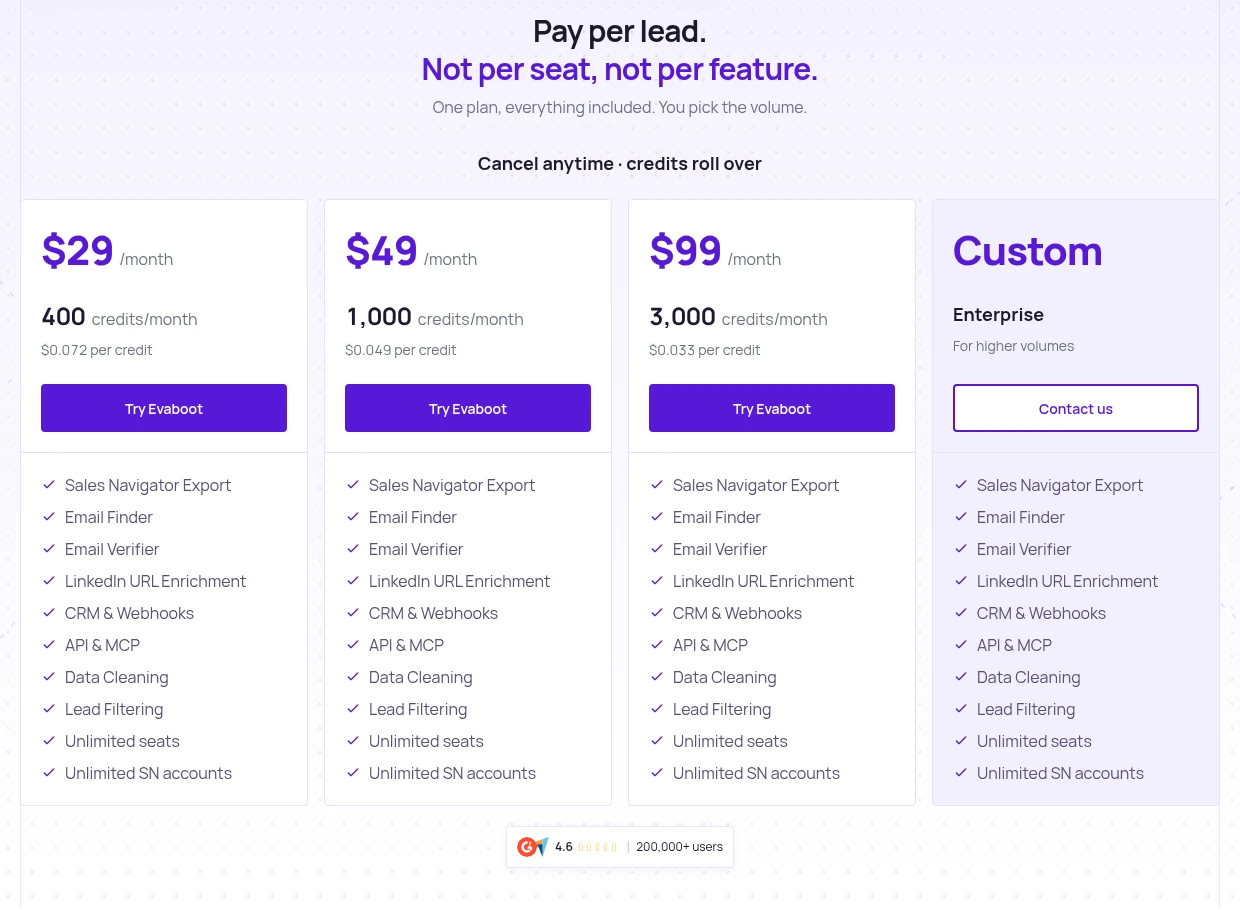
Credit-based pricing starting at $29/month for 400 credits, with plans for 1,000 credits ($49/month) and 3,000 credits ($99/month), plus custom Enterprise pricing. Exporting one lead costs 1 credit, verified email included, and unused credits roll over.
Worth knowing before you sign up: Evaboot only works on top of LinkedIn Sales Navigator, which costs roughly $100/month on its own.
Octopus CRM
All-in-one LinkedIn automation covering profile visits, connection requests, and follow-up sequences.
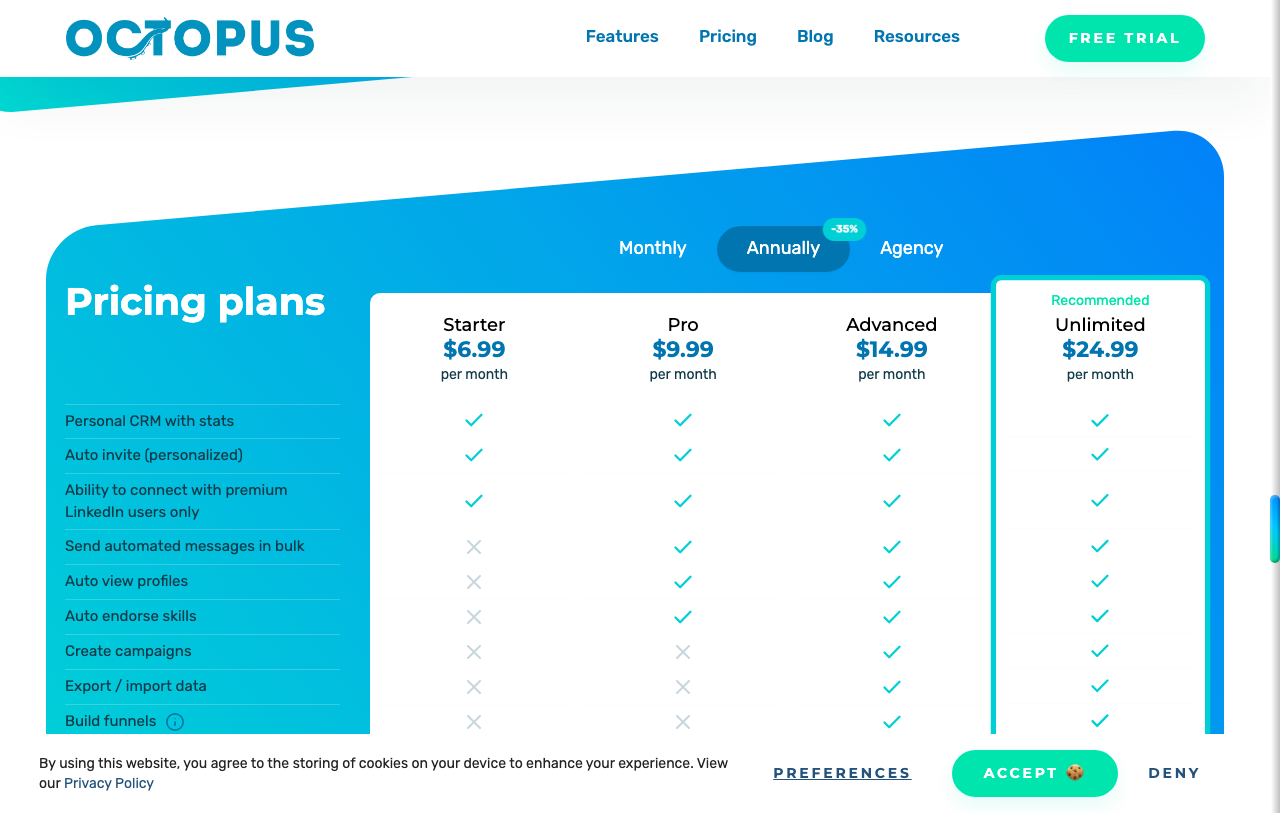
Plans start at $6.99/month billed annually and go up to $24.99/month for the Unlimited plan. Every plan comes with a 7-day free trial, no credit card required. It works with LinkedIn Free, Premium, Sales Navigator, and Recruiter Lite accounts.
Dux-Soup
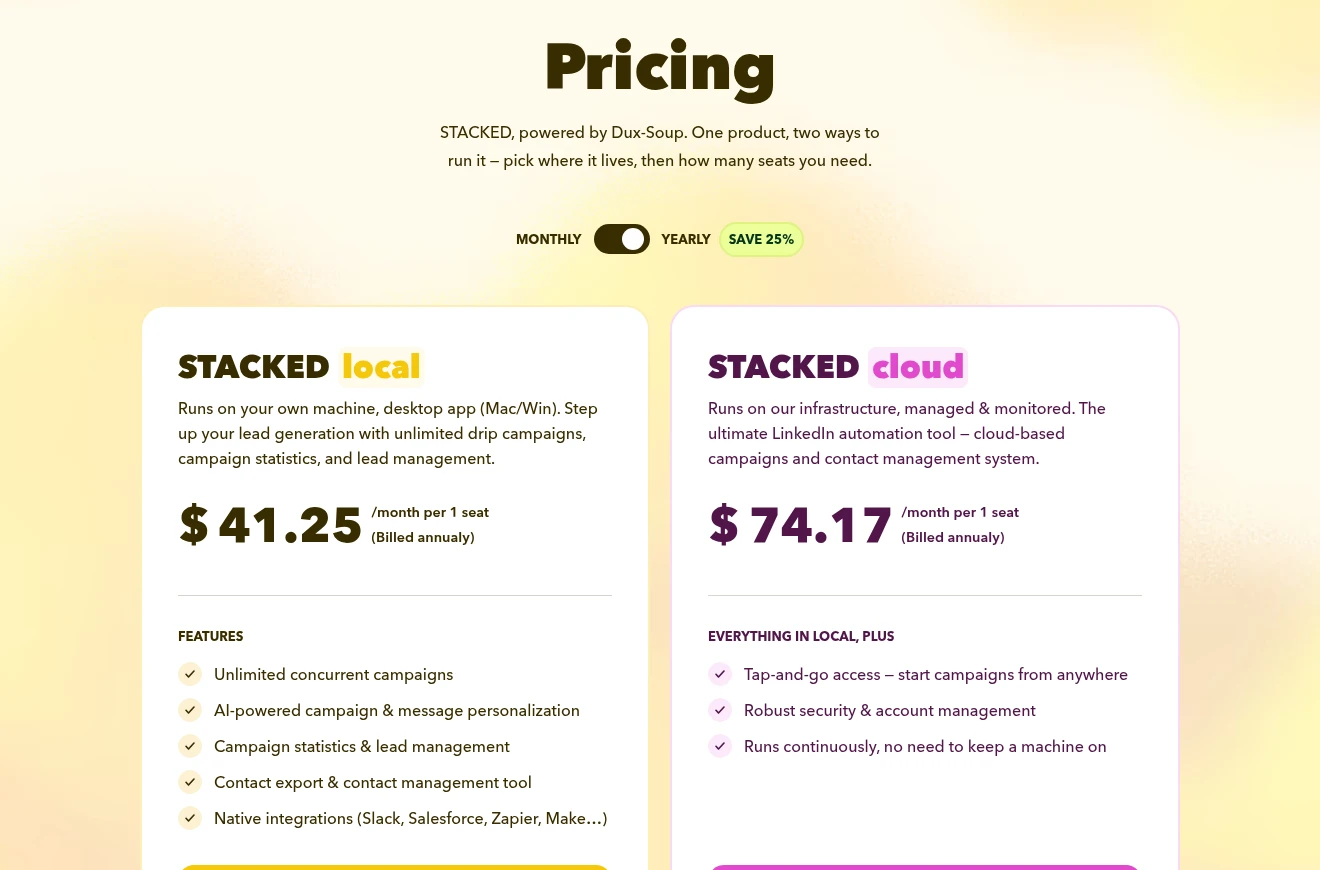
One of the more established LinkedIn automation tools, now sold as STACKED, powered by Dux-Soup. STACKED local runs as a desktop app on Mac or Windows for $41.25 per seat a month billed annually ($55 billed monthly). STACKED cloud runs your campaigns on Dux-Soup’s servers, so you don’t need to keep a computer on, for $74.17 per seat a month billed annually ($99 billed monthly).
How to Choose the Right Scraping Tool for Your Needs
There are many social media scraping tools out there, and you may end up being spoilt for choice. These are some of the tips for selecting the right tool for your needs:
Calculate the cost per 1,000 requests
Some tools advertise low base prices but charge separately for proxies, CAPTCHA solving, and JavaScript rendering. Always check whether these are bundled together or billed as add-ons. A tool priced at $1.50/1K requests, with everything included, will often cost less than one at $0.50/1K that bills separately for proxies, CAPTCHA solving, and JavaScript rendering.
Developer time against ease of use
A scraping API gives developers full control over data pipelines, output formats, and request logic. A no-code tool lets a marketer or researcher collect data in minutes. The wrong choice in either direction costs time. If your team has no developer, a visual tool like Octoparse or Phantombuster will serve you better than an API.
Built-in proxy rotation, fingerprint spoofing, and CAPTCHA solving
Evaluate the anti-blocking stack before committing to any tool. Social media platforms are among the most protected sites. Your scraper needs built-in IP rotation, browser fingerprint spoofing, and CAPTCHA solving to reliably extract data at scale. Tools that leave proxy management to you will lead to additional infrastructure costs and maintenance overhead.
Take advantage of free plans and trials before paying
Most tools on this list offer a free tier or trial period. Use that window to test your real data, not demo data. Check whether the data comes back clean and structured, how the tool handles pagination and dynamic content, and whether the output format fits your workflows.






