
Cloudflare is one of the cheapest places to run a small app. The Workers Paid plan costs $5 a month, includes 10 million requests and 25 billion D1 row reads, and there are no egress fees. No wonder so many vibe-coded apps end up there, you ask an AI to build something, run wrangler deploy, and it’s live.
Everything past the free tier is billed by usage, and Cloudflare has no hard spending cap. A missing index, a crawler walking your filter links, or a logger that records every request can quietly turn a $5 plan into a much bigger bill. It happened to us this month, on a QuestionDB Hub site whose whole database is about 1 MB.
This article covers what we found when we dug into our own invoice, what other developers have run into, and the ten things we’d now do right after deploying any app to Cloudflare.
What Happened to Our Bill
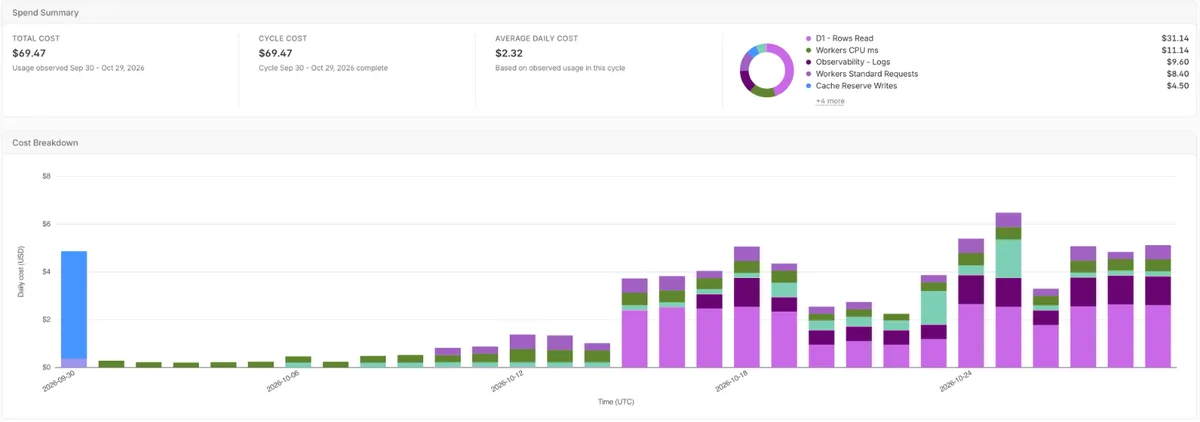
Our Cloudflare invoice came to $89.48. About $20 of that was fixed plans and other $69.47 was usage, and most of it came from one small app, the QuestionDB Hub, built on Astro with Workers and D1.
| Usage line | Used | Included | Billed |
|---|---|---|---|
| D1 rows read | 56.14 billion | 25 billion | $31.14 |
| Workers CPU time | 586.33 million ms | 30 million ms | $11.14 |
| Observability logs | 35.89 million events | 20 million | $9.60 |
| Workers requests | 37.49 million | 10 million | $8.40 |
| Cache Reserve and Argo | $8.86 |
None of these numbers is scary on its own, but they didn’t match the app. The D1 database is 1.04 MB with 17 tables, and it was being read 56 billion rows a month.
Why 1 MB of data cost us 56 billion row reads
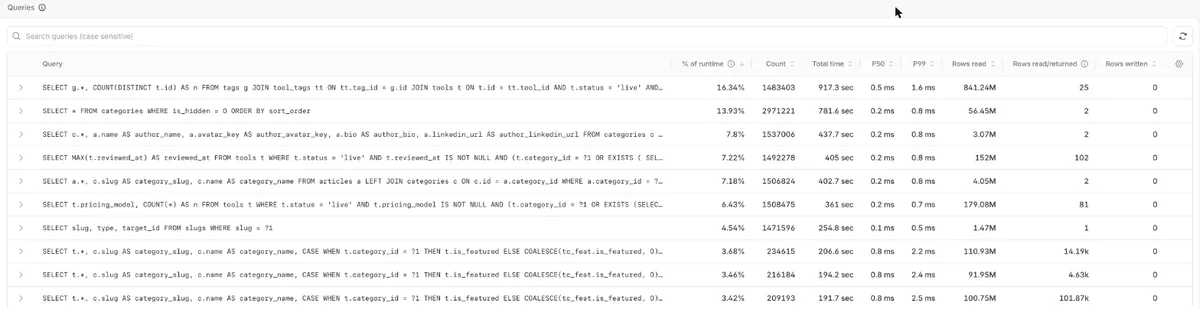
D1 charges for rows read, not rows returned. Every row SQLite scans to answer a query counts, even if it returns one result. D1’s query insights showed the problem immediately. In the last 24 hours before our fix, the database answered 15 million queries and read 3 billion rows.
The most expensive query, a tag count for the filter sidebar, read 841 million rows over 1.48 million runs.
The pages themselves were cached at the edge for 24 hours. But every combination of filters, sort order, and page number is a different URL, and crawlers were following all of them.
Each new combination missed the cache and ran a full set of queries, some reading over 100,000 rows for every row they returned. The security analytics confirmed it: of 11.11 million requests, only 3.32 million were classified as likely human. The rest were bots, verified crawlers, and automated traffic.

Why our logs cost more than our app
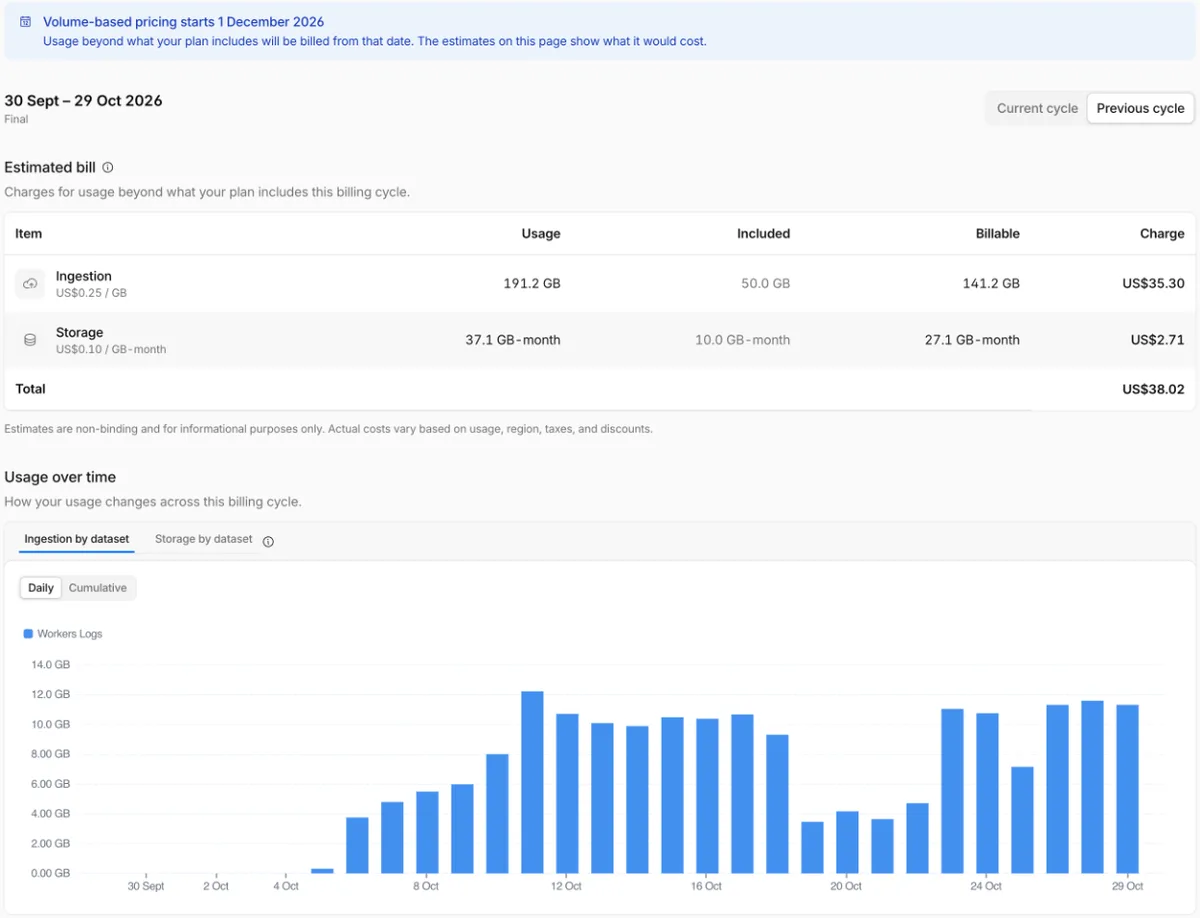
Workers Logs were switched on for the whole app, so every request was stored as a log event. One Worker produced 97% of our log volume with 34.8 million events, averaging 5.3 KB each, or 186 GB in a month.
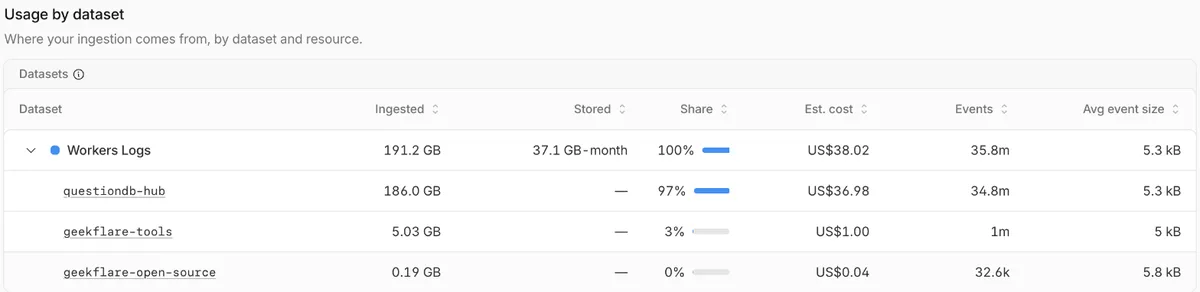
That cost us $9.60, because logs are billed per event. The dashboard estimates that our October logs would have cost $38.02 under the new model, four times more.
What we changed
The fix took less than one hour. We turned Workers Logs off for the app, capped filter URLs so nobody can stack more than three tags or go past page 50, added rel="nofollow" to filter links, and cached the sidebar queries in memory for 60 seconds instead of running them on every request.
We’re Not the Only Ones
Cloudflare’s usage pricing is generous until something goes wrong, and the community is full of people who found out the hard way.
Others have shared similar stories. One developer’s D1 bill hit $134 from 127 billion row reads on a 765,000-row table with no indexes. Another wrote 4.83 billion rows in a month because of two bugs and received a bill of about $4,868 on a $5 account, which Cloudflare eventually waived. And the most common complaint on r/CloudFlare is that there’s still no hard billing cap.
Things to Do After Deploying to Cloudflare
Set a budget alert and usage notifications
Cloudflare doesn’t let you cap spending, so alerts are your safety net.
In the dashboard, go to Manage account > Billing > Billable usage and click Create budget alert to get an email when total spend crosses a dollar amount. Cloudflare is now rolling out default budget alerts to pay-as-you-go accounts, but set your own at a level you’d actually notice, such as $20.
For individual products, add usage-based billing notifications under Notifications.
Check billable usage weekly for the first month
The billable usage page shows daily cost per product. A healthy app has flat bars. If one color starts climbing, as D1 did for us in mid-October, you’ll catch it in days instead of on the invoice.
Index every column you filter, join, or sort on
Missing indexes are the most common cause of runaway D1 bills. Open your D1 database in the dashboard, check the queries table, and look at Rows read/returned. A ratio in the thousands means a full table scan. You can get the same list from the command line:
npx wrangler d1 insights <database-name> --sort-by=reads
npx wrangler d1 execute <database-name> --remote --command "EXPLAIN QUERY PLAN SELECT ..."
If the plan says SCAN instead of SEARCH ... USING INDEX, add an index that covers the WHERE clause, then run ANALYZE so SQLite uses it. Indexes add one extra written row per write, which is a good trade for read-heavy apps.
Avoid queries that scan everything
AI-generated code loves SELECT *, COUNT(*) over a whole table, and LIMIT ... OFFSET pagination.
Each looks harmless, but OFFSET 5000 still reads the 5,000 rows it skips, and a MAX() or COUNT() on an unindexed column scans the whole table on every page load.
Select only the columns you need, paginate by key (WHERE id > ?), and store counts that change rarely instead of recomputing them.
Cache read-heavy queries
Data that’s the same for every visitor, such as navigation, categories, and filter counts, doesn’t need a database query on every request. Cache whole pages with the Workers Cache API, put shared data in KV, or, for small lookups, keep a short in-memory cache in the Worker.
This is the 60-second cache we added:
const memo = new Map();
async function memoized(key, load, ttlMs = 60_000) {
  const hit = memo.get(key);
  if (hit && Date.now() - hit.at < ttlMs) return hit.value;
  const value = await load();
  memo.set(key, { at: Date.now(), value });
  return value;
}
An in-memory cache only lives as long as one Worker instance, so it reduces repeat queries rather than eliminating them. For bigger savings, cache the response or move the data to KV.
Log only what you need
Turning on observability is the right default while you build. In production, every request becomes a stored event, and from December 1, 2026, you pay for its size in GB. In your Wrangler config, either sample requests or turn off invocation logs and keep only your own console logs for errors:
[observability]
enabled = true
head_sampling_rate = 0.05   # keep about 5% of requests

[observability.logs]
invocation_logs = false     # skip the automatic per-request log
Then check Observability > Usage to see which Worker produces the most volume. In our case, one app was 97% of it.
Stop crawlers from multiplying your URLs
Filters, sorting, search, and pagination can create millions of unique URLs, and every one is a cache miss. Add rel="nofollow" to filter and sort links, set a canonical URL, block filter parameters in robots.txt, and reject requests no real visitor would make, such as five stacked filters or page 900, before they reach the database.
Cloudflare’s bot settings and rate limiting rules help too.
Put guardrails on loops, crons, and writes
Write bills come from code that runs more than it should: a cron that re-inserts the same rows, a queue consumer that retries forever, or a Worker that calls itself.
Use INSERT ... ON CONFLICT for upserts, cap retries, and add a simple counter that stops a job when it writes more rows than it should in a run.
Serve static files as assets
Requests to static assets on Workers are free and don’t use CPU time. Make sure images, CSS, JavaScript, and prerendered pages are served as assets or from the cache, so your Worker only runs for requests that need code.
Every request that skips the Worker saves request and CPU charges.
Review the add-ons you’ve switched on
It’s easy to enable paid features while experimenting and forget them. Argo Smart Routing, Cache Reserve, Images, and Stream each cost money every month.
Check Billing > Subscriptions and turn off anything a small app doesn’t need.
Let Your AI Coding Agent Check Your App
If you built the app with Claude Code, Cursor, or another agent, ask it to check its own work before you deploy.
Use this prompt into the project:
Review this Cloudflare Workers project for usage-based billing risks. Check:
1. D1 queries that may scan full tables: missing indexes for WHERE, JOIN, and ORDER BY columns, SELECT *, COUNT(*), MAX(), and OFFSET pagination.
2. Data that is the same for every visitor but queried on every request, and whether it can be cached.
3. The wrangler observability settings, and whether every request is logged.
4. Links that create unbounded URL combinations (filters, sorting, pagination) that crawlers can follow.
5. Loops, crons, queues, and retries that could write to D1, KV, or Durable Objects without a limit.
List each risk with the file, the likely cost driver, and a fix.
Free plan safety net
On the Workers Free plan, D1 stops answering queries when you hit the daily limits of 5 million rows read or 100,000 rows written, and resets at midnight UTC. That’s annoying in production, but it can’t run up a bill. If your app is still an experiment, there’s no need to upgrade.
FAQ
Why is my Cloudflare D1 bill so high?
D1 bills for every row a query scans, not every row it returns. A query without an index on its WHERE clause scans the whole table each time it runs, so a small database can rack up billions of row reads. Check the queries table in the D1 dashboard or run wrangler d1 insights to find the culprit.
How do I reduce Cloudflare Workers costs?
Cache responses and shared data, serve static files as assets, index your D1 queries, sample or turn off request logs, and stop crawlers from generating endless URL combinations. Set a budget alert so you notice problems early.
Is Cloudflare D1 expensive?
Not for most apps. The Workers Paid plan includes 25 billion row reads and 50 million row writes a month, after which reads cost $0.001 per million and writes $1.00 per million. Costs only grow quickly when queries scan whole tables or code writes in a loop.