I know you’ve seen these emails in your inbox hundreds, if not thousands, of times. The ones that start with “I hope this email finds you well.” Then they pivot to “I came across your company and was impressed by your innovative approach to [industry].” And they’d end with something like “I’d love to schedule a quick 15-minute call to explore potential synergies.”
The grammar is extremely clean in these emails, and they are logical too. But the problem is that it’s being used so much now, and with AI, people are using it on a large scale. These emails give a clearly AI-written vibe because they actually are.
I’m not against people using AI to write cold emails, because even I do that. But the problem is using AI badly. They paste “write a cold email to a VP of Marketing at a SaaS company” into ChatGPT, take the first output, and hit send. This is the issue. That result is an email that sounds exactly like every other AI-generated email in that VP’s inbox. And the next action they take is to delete it within two seconds or even mark you as spam.
You don’t need to avoid AI to do this right. You simply need to create a step-by-step workflow to use AI effectively. First, begin by researching the prospect. Draft the email with a model that matches human voice patterns. Next, generate subject lines with a model that excels at short-form copy. And lastly, test out different variations before you send it.
I’m going to walk you through the exact process that I use with cold emails.
The 5-Layer Cold Email Framework
Before we drill down into the AI workflow, you should know about this framework that maps to each step. A majority of cold emails skip at least 2 of these steps, but if you want replies, you should focus on these 5 layers.
Layer 1: Prospect research
Stop with the same “I saw your company” starting. That’s boring, and it clearly shows you have put in no effort. Look for a specific and relevant reason to reach out. It could be anything, like a product launch, a LinkedIn post, a funding round, or even a recent hire. This is what makes the email feel personal rather than a mass outreach.
Layer 2: The opener
Your first two lines will decide the fate of your email. It will determine whether the prospect will continue reading. These need to sound completely human, conversational, specific, and not at all salesy.
Layer 3: Subject line
Write this at last. Don’t make the mistake of taking this up first. The subject line’s job is to pique curiosity or introduce relevance for people to open the email.
Layer 4: The P.S. line
I’ve read tons of email guides, but many skip this step. I’ve analyzed that a well-written P.S. is the second-most-read part of the email, after your subject line. This is where you place social proof, a statistic, or any low-friction CTA.
Layer 5: The follow-up sequence
You will rarely get a reply to the first email, which is why you need a strong follow-up sequence. But I’ve seen the majority of companies either not having a follow-up sequence or they would just send “bumping this to the top of your inbox.”
Now, we are going to walk through each layer in detail using a specific AI model.
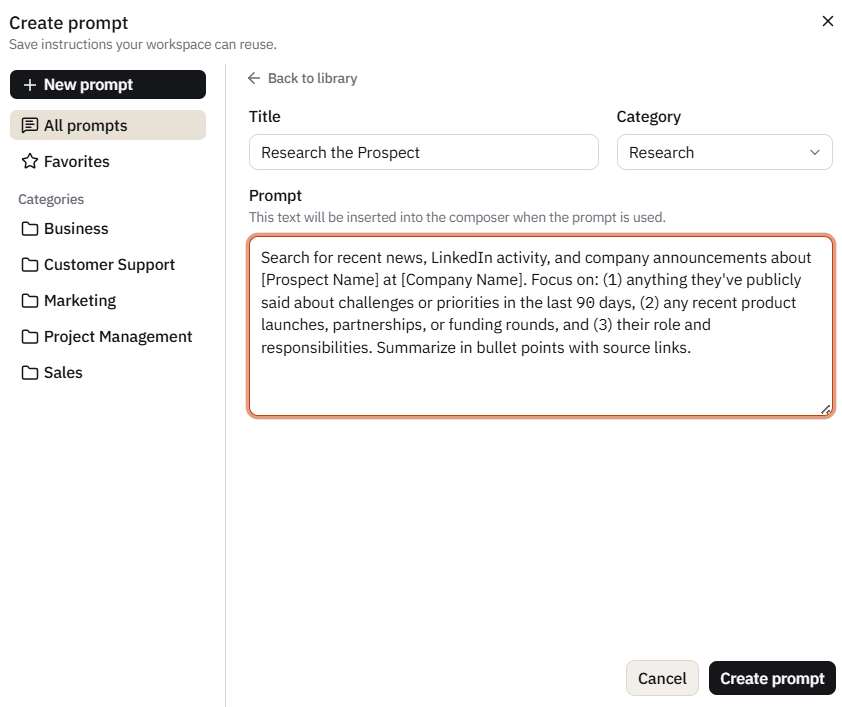
Step 1: Research the Prospect
This step can make or break your entire cold email campaign, yet many people skip it entirely.
Before you get down to writing a single word of email copy, you need some specific details about the prospect. Don’t go for common details like their job title or company name. Find something that shows you have done your homework. It could be details like a recent product launch, a LinkedIn post about a challenge their team is facing, a new market they’ve entered, a conference talk, or anything along these lines.
Open a new conversation in Sparkian. Toggle on web search under the tools menu and run this prompt:
Search for recent news, LinkedIn activity, and company announcements about [Prospect Name] at [Company Name]. Focus on: (1) anything they’ve publicly said about challenges or priorities in the last 90 days, (2) any recent product launches, partnerships, or funding rounds, and (3) their role and responsibilities. Summarize in bullet points with source links.
A majority of models can handle this prompt with web search enabled, but I always go with Gemini 3.1 Pro for this because it tends to surface a wider range of sources. And I’ll highly recommend going with this model. It will pull from news, social, and company pages more broadly than Claude or GPT on research prompts.
The output will give you raw material to work with. From this, identify one specific detail to use as a reference in the opener. It has to be something that makes the prospect think “this person actually looked at what we’re doing.”
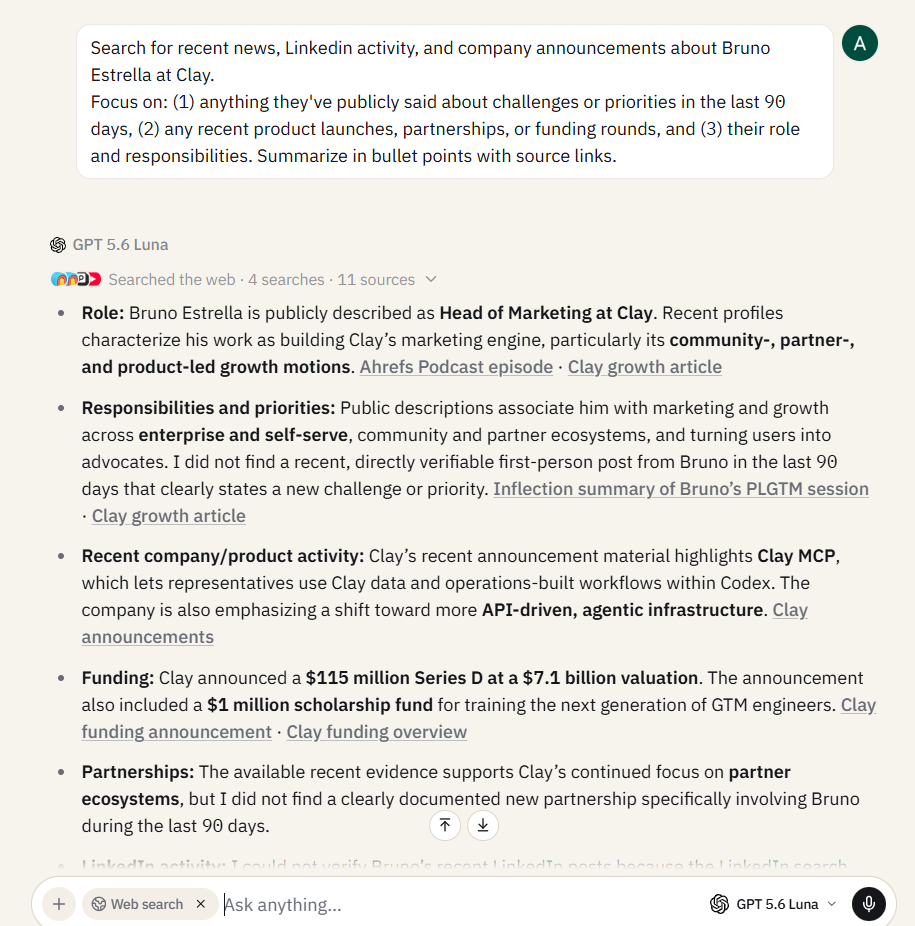
Now, you are going to use this output in the next step, and because Sparkian preserves context across model switches, you can draft the email with a different model without losing the research.
Step 2: Draft the Email Body
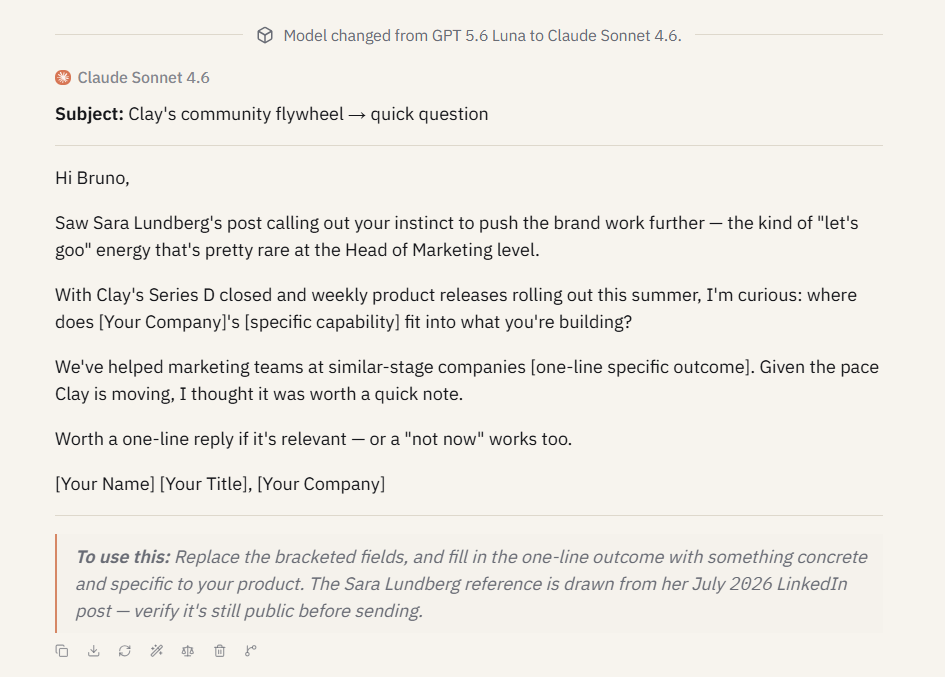
You are now ready to switch models. You have got the prospect research sitting in the conversation from Step 1. Now, switch to Claude Sonnet 4.6 using the model dropdown, and you won’t have to worry because it will carry all your research and full context without pasting it again.
Paste this prompt:
Using the prospect research above, write a cold email to [Prospect Name] from [Your Name], [Your Title] at [Your Company].
Rules:
- Open with a specific reference to something from the research. No generic flattery.
- Keep the entire email under 120 words.
- Write in a conversational tone. It should sound like a real person writing to someone they respect but don’t know yet.
- End with one clear, low-friction ask. Not “schedule a call.” Something easier, like a reply, a reaction, a one-line answer, etc.
- No buzzwords. No “synergies,” “leverage,” “innovative,” “cutting-edge,” or “game-changing.”
I’ve tested the same email prompt across different models of GPT, Gemini, Grok, DeepSeek, and even Mistral. Claude has won every single time against the other models by coming back with outputs that made it look human-written. GPT tends to default to a slightly more formal, structured tone. Gemini sounds conversational but sometimes drifts into longer paragraphs. For the body of a cold email, where sounding human is the entire point, Claude wins on voice.
I have added the banned-word list in the prompt to avoid the same corporate vocabulary that marks an email as AI-generated. Explicitly banning those words forces the model to find alternatives, and the output sounds less templated as a result.
Step 3: Generate Subject Line Variants
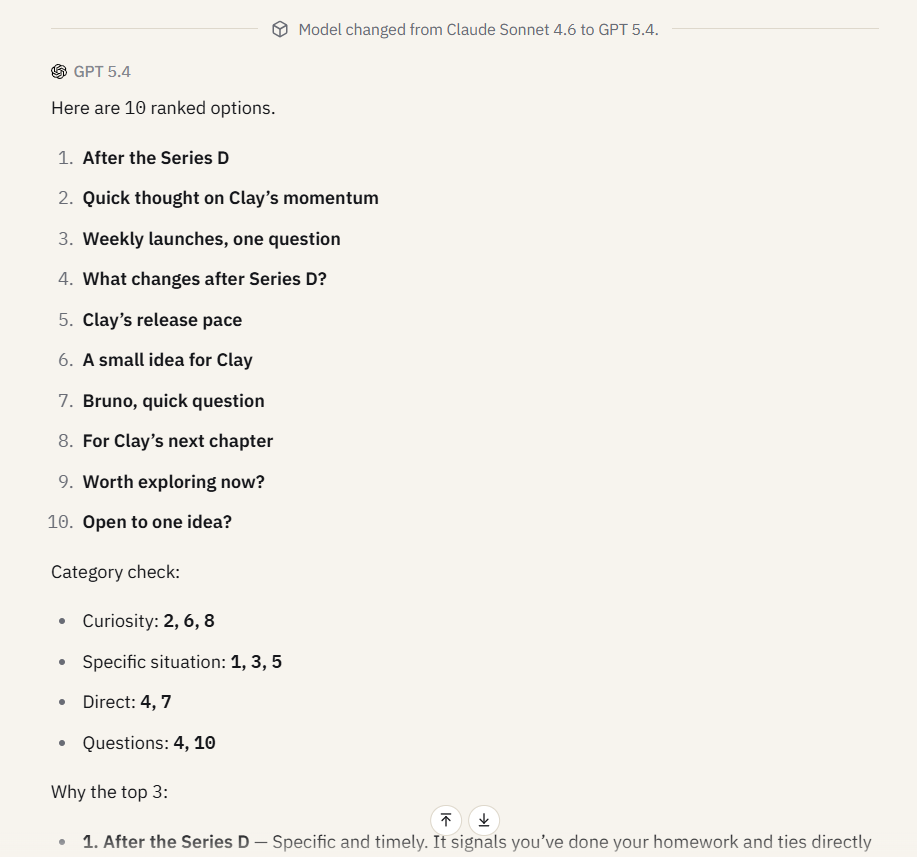
Now, switch to GPT-5.4, while staying in the same conversation thread. Paste the below prompt:
Based on the cold email draft above, generate 10 subject line options.
Rules:
- Each subject line must be under 7 words.
- No clickbait. No ALL CAPS. No emojis.
- 3 should create curiosity (make them want to open without revealing everything).
- 3 should reference the prospect’s specific situation from the research.
- 2 should be direct and straightforward.
- 2 should be questions.
- Rank all 10 from most likely to get opened to least, and explain your reasoning for the top 3.
For this particular task, GPT-5.4 completely outperforms Claude on Gemini because subject lines are constrained. There isn’t a voice problem here. You’re asking the model to generate variations within tight rules and then rank them. GPT handles structured generation and ranking more precisely.
But you need to keep that ranking request in the end, because that is important. Without it, you get 10 subject lines with no guidance on which to use. With this request, the model will provide clear reasoning to help you understand what each subject line is optimized for. GPT also tends to auto-generate a category mapping at the end, sorting which subject lines fall under curiosity, specificity, directness, and questions. That breakdown makes it easier to pick the right type for your prospect.
Step 4: Write the P.S. Line
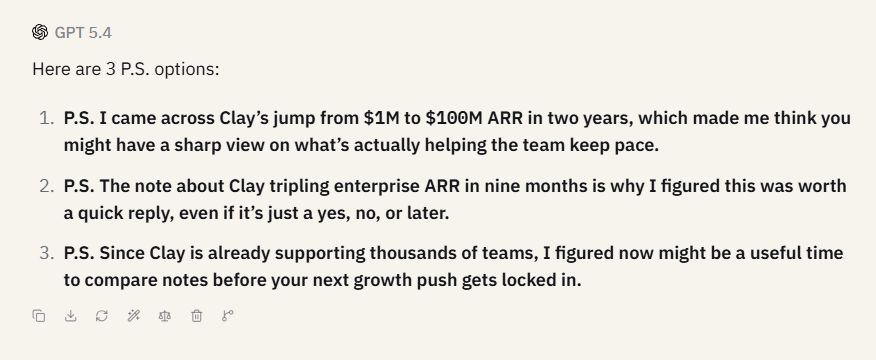
You can use whichever model you want for this task. You can stay with GPT or even switch back to Claude, because both can handle this task well.
Use this prompt:
Write 3 P.S. line options for this cold email. Each one should:
- Be one sentence, maximum two.
- Include one of: a specific result/stat from a relevant case study, a piece of social proof, or a time-sensitive but honest reason to reply soon.
- Not repeat anything already said in the email body.
The P.S. is an important part of the copy because of how people read emails. Most readers will scan the subject line, skim the 1st sentence, and then jump directly to the bottom. Even if people skipped the entire body, the P.S. will catch them. I’ve found P.S. to be the best place to add your strongest piece of social proof without forcing it into the main copy.
Step 5: Build the Follow-Up Sequence
You will rarely get a response with the 1st email, and that’s a reality. You will need at least 2-3 touchpoints to get a response. But this is the step where most of you fall apart. You are either sending “just following up” (which conveys nothing new) or you are resending the original email verbatim (which clearly conveys desperation).
To fix this, stay in the same conversation thread so all 4 steps we need before this stay in context. Next, paste this prompt:
Write a 2-email follow-up sequence for this cold email.
Follow-up 1 (send 3 days after the original):
- Do NOT say “just following up” or “bumping this.”
- Add one new piece of value that could be a relevant insight, a quick tip, or a resource related to the prospect’s situation.
- Keep it under 80 words.
Follow-up 2 (send 5 days after follow-up 1):
- This is the breakup email. Acknowledge that they’re busy.
- Restate the core ask in one sentence.
- Make it easy to say no, because a “no” is better than silence.
- Keep it under 60 words.
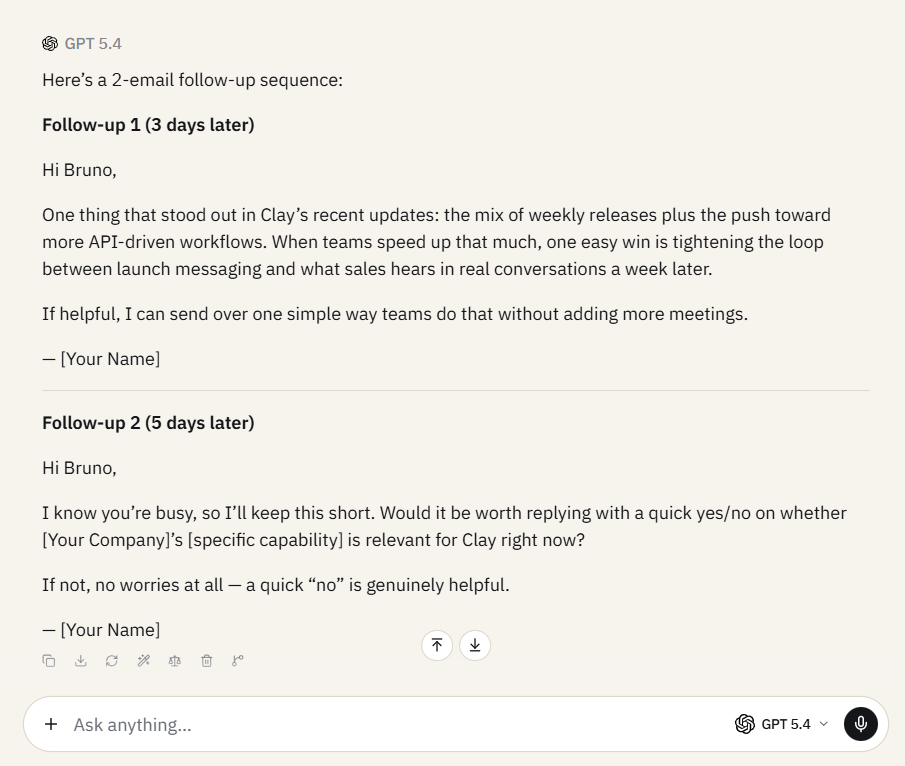
The word count limit is extremely important here because follow-ups must be shorter than the originals. Each successive touch should take less of the prospect’s time, not more. The “breakup” framing in the second follow-up isn’t a copywriting trick. It genuinely works because it removes the social pressure of being chased. People are more likely to reply when they feel permission to say no.\
Now you have a complete sequence that’s ready to ship. The original email, the first follow-up, and the closing email. You can test it for different prospects, where you will have three touchpoints, each with a different angle.
Full Working Example: Before and After
Let me show you the exact difference between using this framework and not using it on a live prospect. We are taking Bruno Estrella (Head of Marketing at Clay) for reference here.
Before (one-shot, no framework)
I asked GPT-5.4 to “write a cold email to a VP of Marketing at Clay” with no research, no constraints, and no framework. Here’s what came back:
Subject: Quick idea to help Clay turn more growth signals into pipeline
Hi Bruno,
I’ve been following Clay and really admire how you’re helping teams turn data into better outbound and growth workflows. Given your role leading growth, I thought this might be relevant: a lot of high-growth SaaS teams have strong signal data, but still struggle to operationalize it into consistent pipeline without adding manual work or bloated tooling.
Followed by a bullet list of generic capabilities and a “Would you be open to a brief 15-minute chat next week?” close. This was over 150 words that any VP is hardly going to read when it’s a cold pitch. “I’ve been following Clay and really admire” is the universal signal that no actual research happened. It would be deleted in seconds.
After (5-layer framework, multi-model workflow)
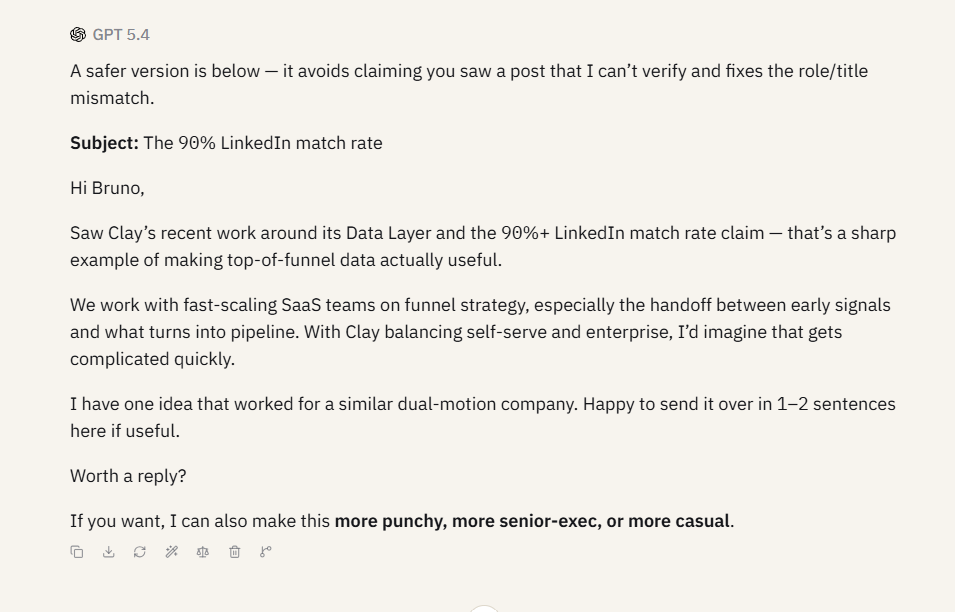
I used the same prospect and ran the full workflow. I’m sure you’ll be surprised with what Claude came back with:
Subject: The 90% LinkedIn match rate
Hey Bruno,
Saw your post about the internal tool you built on top of Clay’s Data Layer — 90%+ match rates on LinkedIn ads is a number most teams only dream about.
We work with fast-scaling SaaS companies on funnel strategy, specifically the hand-off between top-of-funnel signals and what actually converts. Given you’re running both the PLG and enterprise motions at once, I’d imagine that hand-off gets messy fast.
I have one idea that’s worked well for a similar dual-motion company. Happy to share it in a sentence or two — no deck, no call required.
Worth a reply?
In here, the opener actually references a post Bruno published. The body connects to a real challenge that Gemini identified in the research: Clay’s dual motion between PLG and enterprise. Plus, the ask is purposely kept frictionless in this one. Every element traces back to a step in the framework, and the whole email came together in under ten minutes across three models in one conversation thread.
Save It as a Reusable Prompt Chain
Now you have 5 powerful prompts that, when run in this order, produce a complete cold email sequence. Instead of rewriting them every time, save them to your Prompt Library.
Click the Prompts icon in the chat input, create a new custom prompt for each step, and add variables for the parts that change, like [Prospect Name], [Company Name], [Your Company], and [Your Title]. The next time you need a cold email sequence, you only need to open the prompts in order, fill in the variables, and run them. And you will have the research, the draft, the subject line, the P.S., and the follow-ups ready at your fingertips in less than 10 minutes.
If you are on a team plan in Sparkian, you can even share the prompt chain at the workspace level. Every SDR on your team gets the same framework, the same quality floor, and the same multi-model workflow without needing to learn prompt engineering from scratch. The team workspace setup guide covers how to configure shared prompt libraries for your whole organization.