


Whether it’s marketing, designing, or coding, I know most people around me who work with AI every day are paying for more than one model. Someone is using the combo of ChatGPT + Claude, while someone is flexible with Claude + Gemini. The monthly bill adds up, and so does the context-switching, because there are multiple tabs, multiple chat histories, and separate prompt libraries that never quite sync.
Running the same prompt across three tabs is slow, and comparing the outputs side by side in your head is even slower. You end up picking whichever response you happened to read last, or the one that sounded most confident. But to be honest, that’s not how you do a real comparison.
Sparkian fixes this by letting you run one prompt across GPT-5.4, Claude 4.6 Sonnet, and Gemini 3.1 Pro in the same window. Parallel outputs give you one glance to decide which model wins. This walkthrough shows you exactly how to use this feature well, because I want you to get real with these comparisons.
But before we get to the comparisons, let’s first understand why you should compare AI models in the first place.
Why Comparing AI Models Matters (And Why Most People Do It Wrong)
If you’ve used AI tools enough, you’ll know that no AI model wins every task. Claude tends to write with a more natural rhythm. GPT-5.4 handles structured output and multi-step reasoning better. Gemini’s web access brings in current data that the other two AI models can’t match. Every major head-to-head review, whether it’s Tom’s Guide, PCMag, or XDA, ends with some version of “use all three for different things.”
So, comparison isn’t optional, by any chance, if you want to get the best out of AI. The question comes down to how you do it.
And that’s where most people go wrong. This is how they compare the wrong way:
Sequential tab-hopping with drifting prompts
You ask ChatGPT a question, read the answer, then open Claude and type the “same” question that’s phrased slightly differently or with a detail you forgot the first time. By the time you’re on tab three, you’re comparing three different prompts and three different answers. The comparison tells you nothing about the models, because it’s only a comparison of your typing.
Picking the response that sounds better
Two AI outputs on your screen, and your brain defaults to “which one reads more smoothly?” That’s not a useful signal. A confident, well-structured response with a fabricated statistic loses to a hedged, awkward response that gets the facts right. But “sounds better” is how almost everyone actually picks, and it’s the reason people walk away from comparisons with the wrong model as their favorite.
Testing on generic prompts instead of real work
“Write me a poem about the ocean” tells you nothing about which model will handle your Monday morning client email. The only comparisons worth running are on prompts you’d actually send. Generic benchmarks make for shareable Twitter posts and bad tool decisions.
The rest of this post is built around fixing all three. A cleaner mechanic, a sharper reading framework, and five scenarios drawn from real work, not benchmark prompts.
Enabling Side-by-Side Mode in Sparkian
You only need 5 seconds to turn on side-by-side mode once you know where to look. Here’s the exact flow of it:
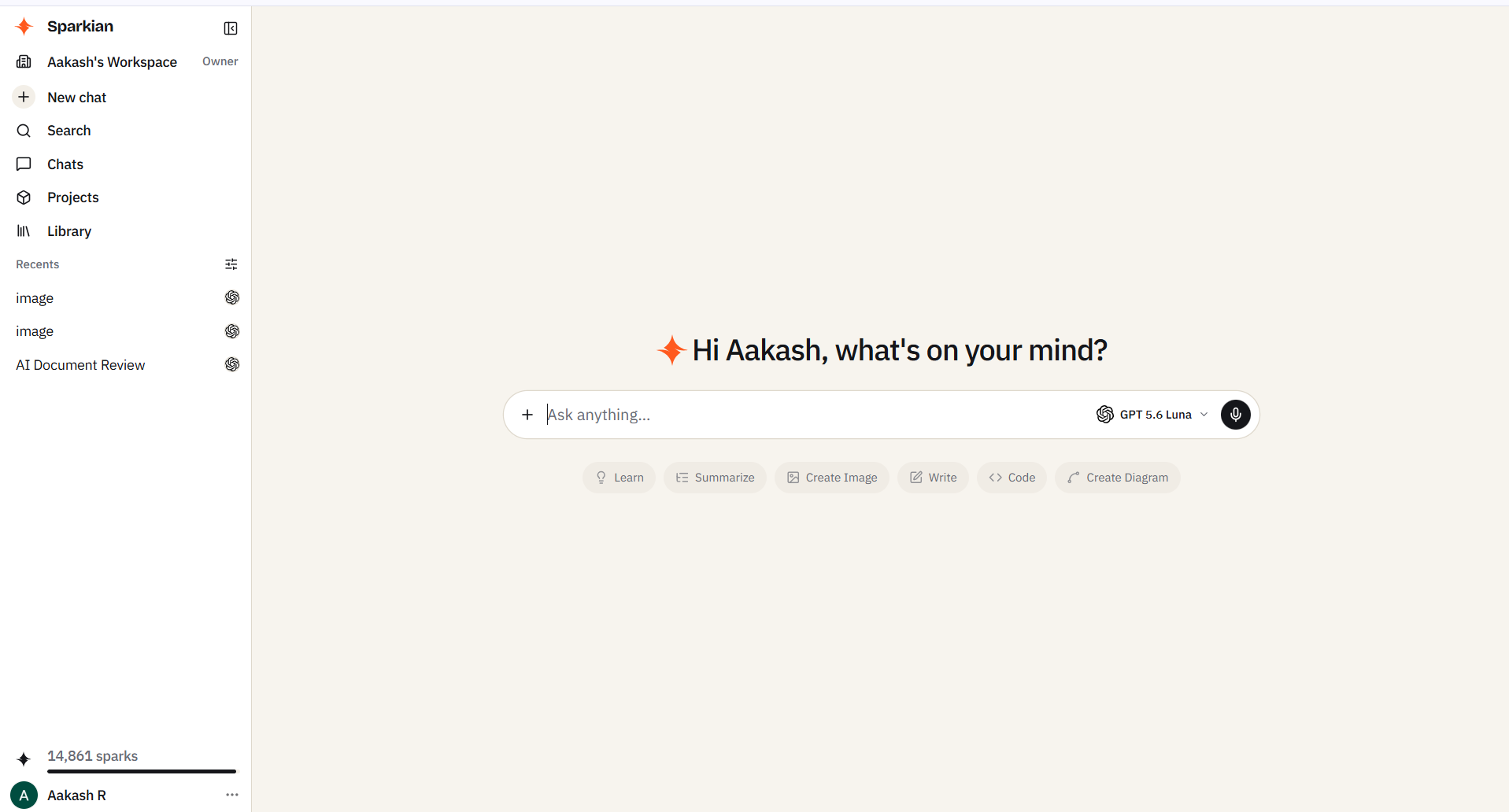
Step 1: Open a new chat
Side-by-side works for both fresh and existing chats. Since this is your first run, it’s better to start from scratch so you don’t have to juggle prior context.
Step 2: Find the chat model dropdown
The chat model dropdown sits in the text window where you can enter your prompts. Click on the chat model dropdown.
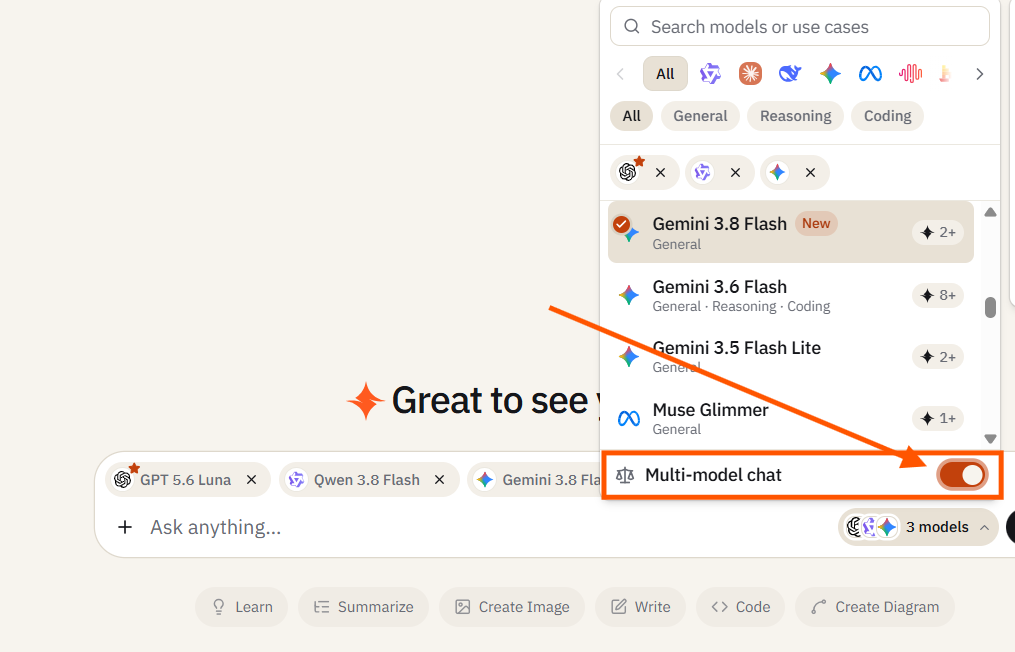
Step 3: Find the Multi Chat Mode toggle in the dropdown
At the top of the dropdown, you’ll find a multi-chat mode toggle that you need to turn on.
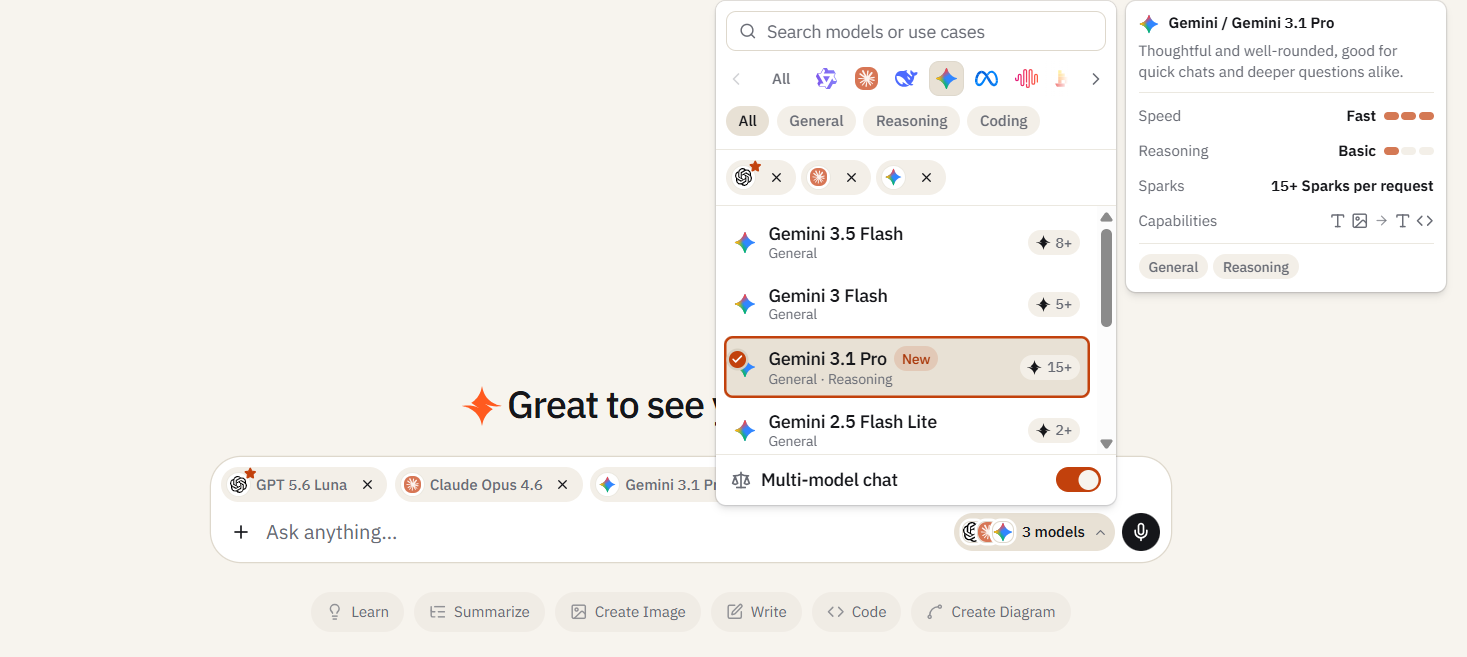
Step 4: Select the models you want to compare
You can pick up to five models for comparison. For most real comparisons, two models are enough. Three or more models are useful when you genuinely don’t know which family will win (creative tasks, open-ended ideation) and want to see the variance.
Step 4: Type your prompt
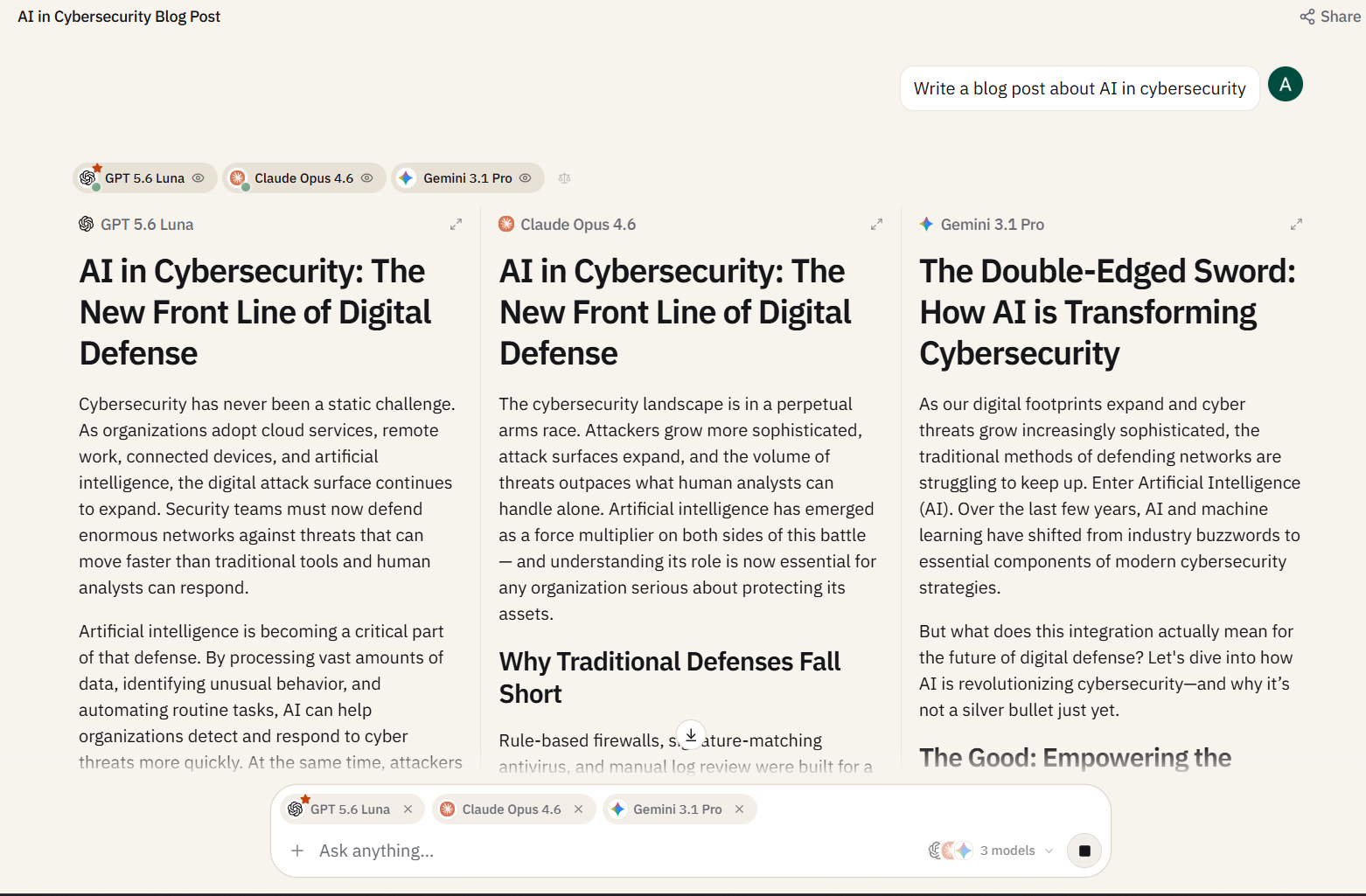
You only have to enter one prompt in the input box. The same prompt will fire off to every model you have selected, and the responses stream in parallel.
Step 5: Read the responses in their columns
Each model’s output lives in its own column, labeled with the model name at the top. Scroll independently within each column if one response is longer than the other.
Pro Tip
Pin your two most-used models as a default pair in the model picker under settings. If you mostly compare Claude 4.6 Sonnet against GPT-5.4, saving that pairing turns a three-click flow into a one-click flow. You can find that setting in your workspace preferences.
How to Read a Side-by-Side Comparison
When there are two or more responses in front of people, most of them take a glance at the responses, feel a pull toward one, and then go with it. But the pull won’t always be right. Usually, this is driven by surface fluency and how smoothly the writing reads. This is the one thing that most modern AI tools excel at. Judging on fluency alone means you’re throwing out the signal and keeping the noise.
So, I ended up creating a checklist to help you look through the right things in the right priority order:
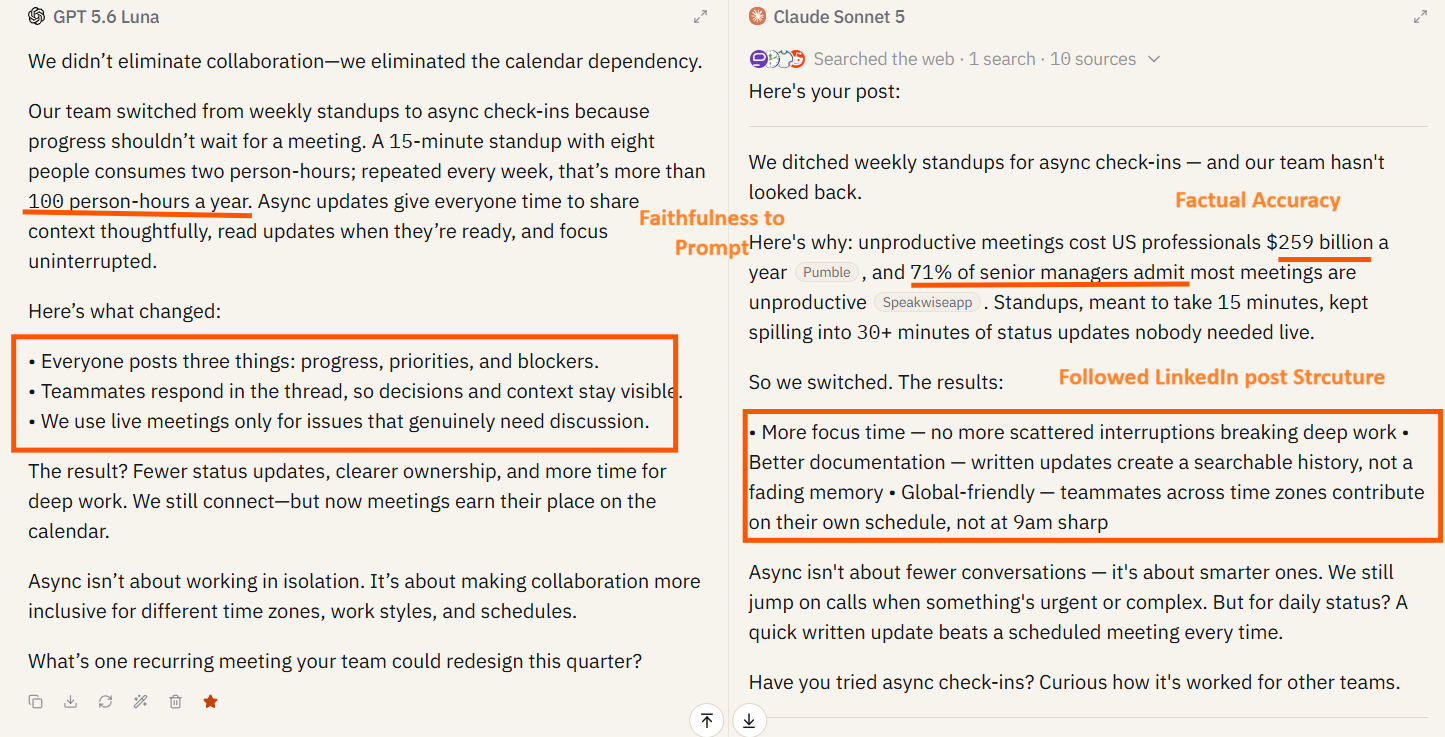
1. Factual Accuracy
Look for anything with numbers, dates, names, or current events. If one response says the company was founded in 2012 and the other says 2014, it’s clear that one of them is wrong. This is the first blunder to compare. This sounds obvious, but it’s the step most readers skip because it requires leaving the chat window and doing five seconds of Googling. Skipping it is how fabrications become decisions.
2. Faithfulness to your Prompt
Did the model actually do what you asked? If you said, “Give me 5 bullet points” and got 4 paragraphs back, then that’s a clear failure regardless of how good the paragraphs are. Prompt drift is one of the sneakier model failure modes, where the response is useful, but it’s not the response you asked for. In a comparison, the model that followed instructions exactly wins over the model that produced something marginally more polished.
3. Tone & Voice Match
Tonality is where you can best differentiate each model. Claude tends to produce writing with more natural rhythm and less AI sheen. GPT tends to be more structured and slightly more formal. Neither is “better” in the abstract. What matters is which one sounds like you or the person you’re writing for.
4. Structure
Check whether it produced the format you needed or not. A response in bullets when you wanted prose isn’t considered useful, even if every bullet is correct. Structure failures are easy to miss when the content is strong, but you will immediately notice them when you try to paste the output somewhere and see that it doesn’t fit.
5. Length Calibration
Some models over-explain, while others undershoot and leave out the reasoning you needed. The output length matters less than the first four criteria, but it’s the perfect tie-breaker when two responses are otherwise equal.
Pro Tip
Before you read either response, write down exactly what you are looking for. Even a single sentence like “I need a short, confident opener with no hedging.” Pre-committing to the criteria stops you from backfilling reasons for whichever response you liked first. It’s the difference between running a comparison and rationalizing a preference.
5 Real Comparison Scenarios
Everything up to this point has been the setup for these scenarios. This section will be the actual work of comparing 5 prompts, and you won’t be running benchmark tests anymore. Each scenario includes the exact prompt, which models to run it against, what to look for, and the pattern I’ve seen emerge from running these comparisons myself.
A note before you start: my “expected winner” for each scenario is a pattern, not a prediction. Run the comparison yourself with your own prompts, and the winner might flip. That’s the whole point, because comparisons tell you which model fits your work, not which model is universally best.
#1. Brand Voice Matching
Task: Writing a LinkedIn post in your voice
Models to run: GPT-5.4 vs. Claude 4.6 Sonnet
The prompt:
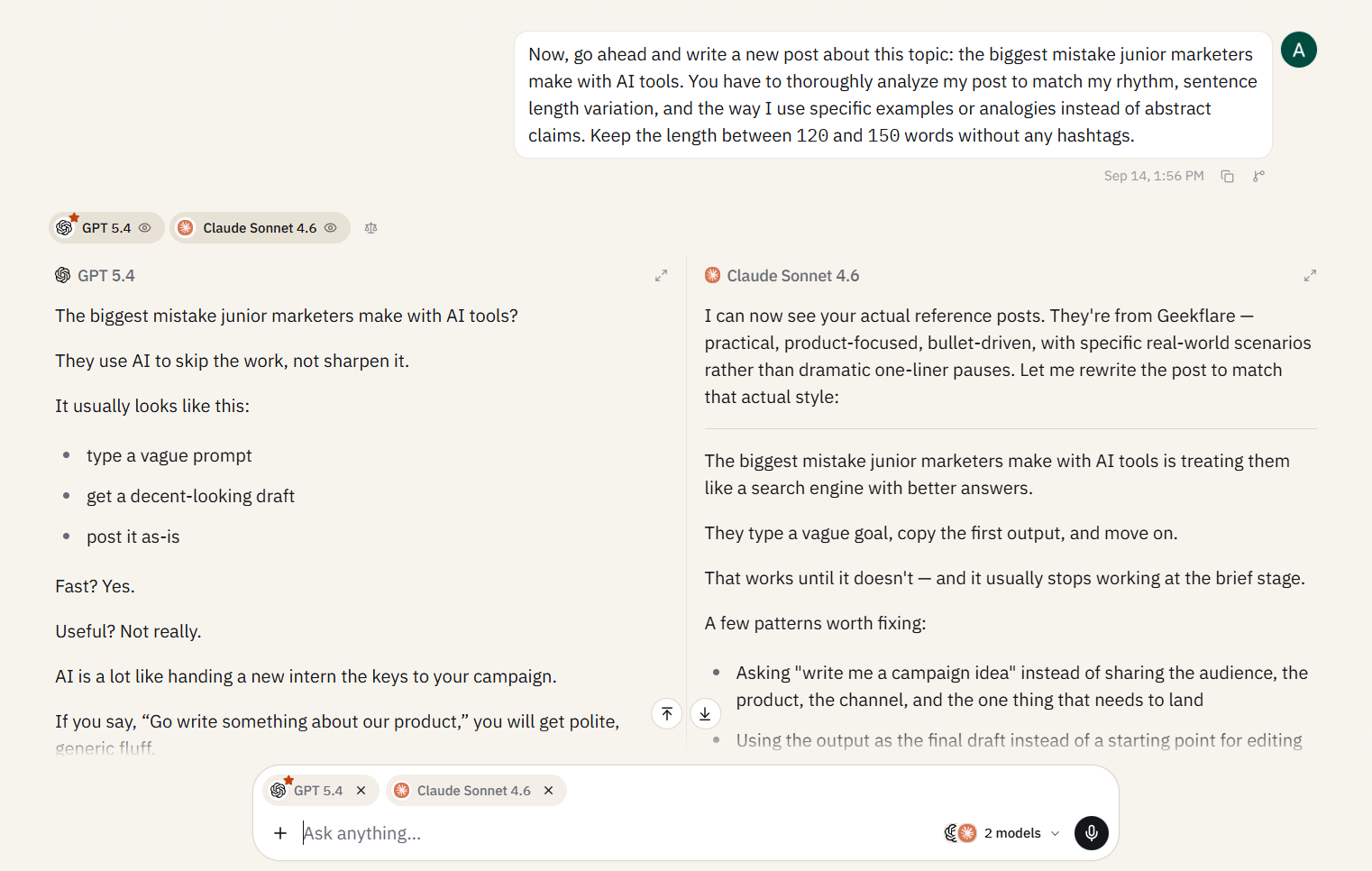
Act as a LinkedIn ghostwriting expert, and you have to write a LinkedIn post in the voice of the reference posts I give you. Here are 3 of my recent posts for reference: [paste 3 posts]. Now, go ahead and write a new post about this topic: the biggest mistake junior marketers make with AI tools. You have to thoroughly analyze my post to match my rhythm, sentence length variation, and the way I use specific examples or analogies instead of abstract claims. Keep the length between 120 and 150 words without any hashtags.What to look for: Firstly, keep an eye on rhythm and sentence-length variation. Does it sound like you, or does it sound like an AI imitating you? Look for “AI tells” as em dashes (—) in places you wouldn’t use them, words like leverage, delve, or dive into, and parallel structures that feel too symmetrical. The response that sounds least like AI is the one that nailed your voice.
The pattern: Claude usually wins this one for me. It picks up rhythm cues faster than GPT does, and its default register is closer to how experienced writers actually write on LinkedIn. However, GPT-5.4 wins for voices that lean more towards the structured or corporate side. If your LinkedIn style is closer to a McKinsey partner than a solo operator, run it and see.
For more prompts designed for marketing workflows, our 15 prompts for marketers covers content, ads, SEO, and more.
#2. Fact-Checking a Claim
Task: Verifying a statistic that you are about to cite in a report or blog post
Models to run: GPT-5.4 and Gemini 3.1 Pro (both with web access enabled)
The prompt:
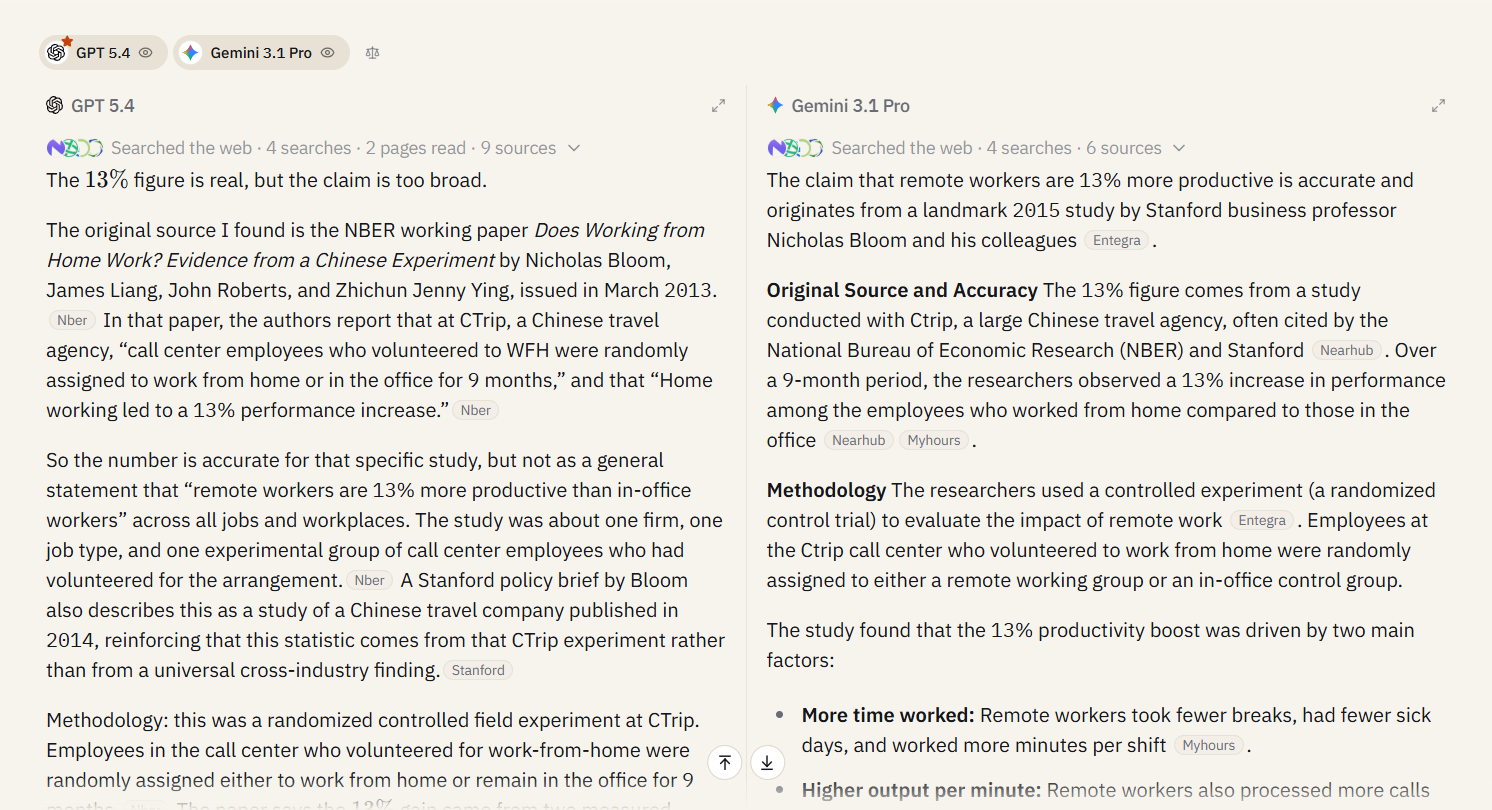
Fact-check this claim: "Remote workers are 13% more productive than in-office workers." Find the original source, confirm whether that number is accurate, and tell me what methodology the study used. Cite your sources.What to look for: Look for 3 things here.
- Are the cited sources actually real (AI models have been known to fabricate citations)?
- Are the sources recent enough to matter?
- Does the model flag caveats, like sample size, study limitations, whether the finding has been replicated, or does it just confirm the claim?
The pattern: You’ll see Gemini usually winning fact-checking tasks because its web integration is tighter and it’s less prone to citing nonexistent studies. GPT-5.4 with web access is strong on the synthesis layer but occasionally hallucinates URLs when the underlying source is weak. Go and run both. If they disagree on the source, trust neither and go check yourself.
#3. Code Generation for a Specific Framework
Task: Writing a non-trivial function in a framework where small mistakes break things
Models to run: Claude 4.6 Sonnet vs. GPT-5.4
The prompt:
Write a React component that fetches a paginated list of users from /api/users, displays them in a table, handles loading and error states, and includes a search input that filters users client-side as the user types. Use TypeScript. Use Tailwind for styling. Don't use any external libraries beyond React.What to look for: Does the code actually run? Does it handle the edge cases the prompt called for, including loading, error, and empty states? Are the types correct? Most important: Does it follow current best practices, or is it writing in patterns that were idiomatic three years ago?
The pattern: Claude has proven to be strong at code generation in the last year, and it usually produces cleaner, more idiomatic output on the first try. GPT-5.4 is competitive and sometimes wins on frameworks where its training data is heavier (older JavaScript, Python data science). But if we talk about modern TypeScript and React, Claude is the safer default.
#4. Long-form Structured Output
Task: Turning a messy meeting transcript into clean action items
Models to run: Claude 4.6 Sonnet vs. GPT-5.4
The prompt:
Below is a transcript of a 45-minute product meeting. You have to extract:

A 3-sentence summary of what was decided

A list of action items with the owner and deadline

A list of open questions that weren't resolved

A list of things that were discussed but explicitly not decided

Don't invent owners or deadlines that weren't stated in the meeting. If the transcript doesn't assign an owner or deadline to something, you have to leave those fields blank..

[Paste transcript]
What to look for: Faithfulness is everything in this scenario. Did the model invent action items that weren’t actually assigned? Did it assign owners that weren’t named? The instruction to leave fields blank when not specified is a trap, because the “helpful” move is to fill them in, and that’s the failure mode you need to catch. Compare the two outputs against the transcript and look for anything that’s not actually there.
The pattern: Claude typically wins this one by a clear margin. It’s better at respecting negative constraints (“don’t invent”) and is more willing to leave things blank. GPT-5.4 sometimes fills in plausible-sounding owners or deadlines because it was trained on meeting notes where those fields were filled. For anything where hallucination is unacceptable, like legal, financial, or operational, Claude needs to be your default choice.
#5. Creative Ideation with Constraints
Task: Generating a range of ideas where variance is the point
Models to run: GPT-5.4, Claude 4.6 Sonnet, and Gemini 3.1 Pro. This is the one scenario where three columns are more beneficial.
The prompt:
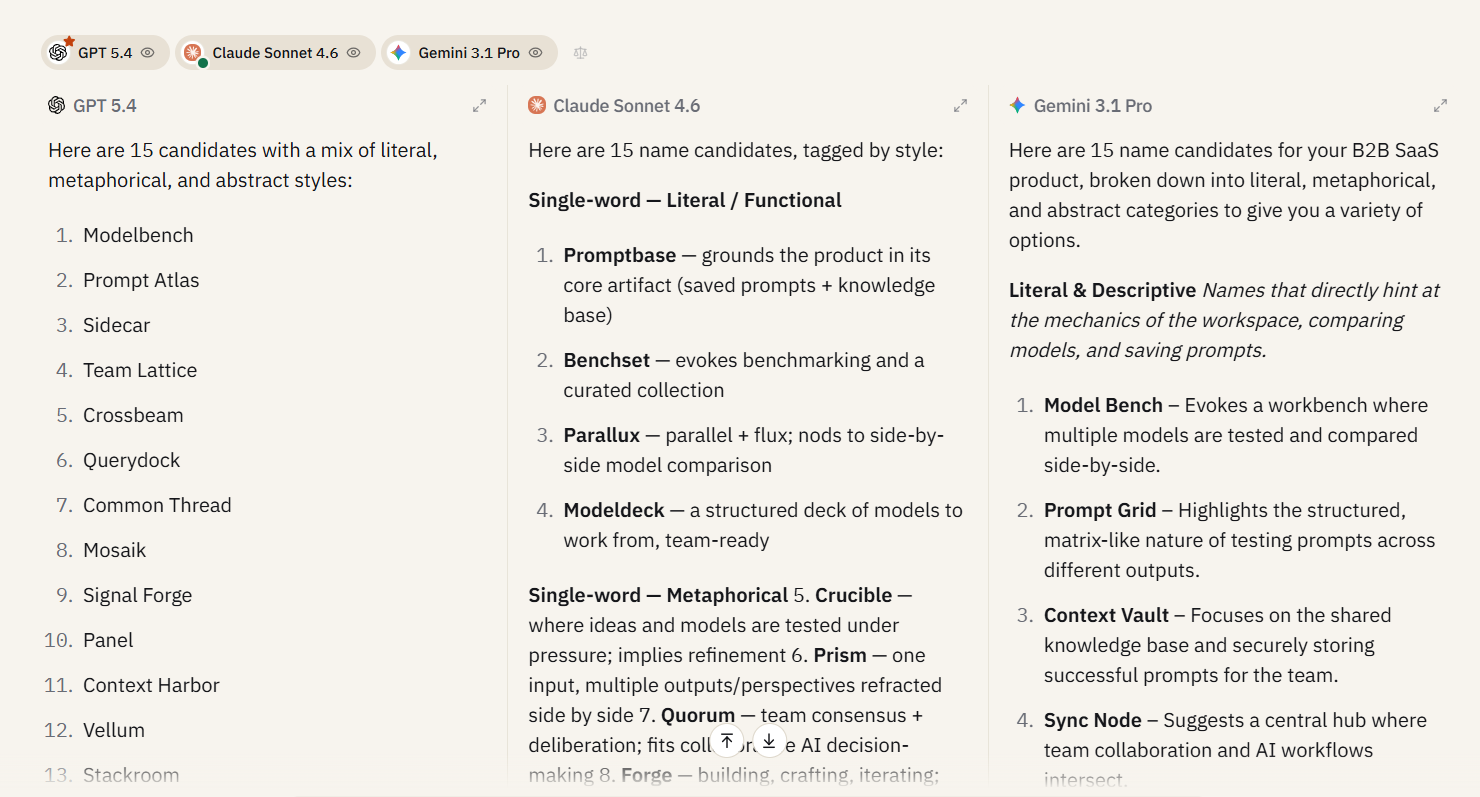
I'm working on a new B2B SaaS product and want a name for it. It's a team-based AI workspace that lets you compare multiple AI models side-by-side, save prompts, and build a shared knowledge base. Generate 15 name candidates. Avoid names that end in -ly, -ify, or -.ai. Avoid generic AI-prefixed names (e.g., AIFlow, AIStack). Mix short single-word names with short two-word names. Give me a mix of literal, metaphorical, and abstract.What to look for: On creative ideation, the goal isn’t “which model wrote the best name,” it’s “which model gave me the widest spread of useful directions to explore.” A model that produces 15 variations of the same idea loses to a model that produces 15 genuinely different ideas, even if individual names are weaker.
The pattern: No single winner here, and that’s the point. Running three models in parallel on creative tasks isn’t about finding the best output, but it’s about seeing where the models’ defaults differ and then picking the direction you didn’t think of. I’ve done this for naming, headline variants, positioning statements, and pricing page copy. In every case, the value was in the variance, not the individual outputs.
Ready to run these yourself? The Free plan gives you 100 Sparks per month, enough to try these comparison scenarios. Start free → No credit card is required.
When NOT to use Side-by-Side Mode?
You don’t have to use side-by-side mode for everything. Let me give you 3 cases where single-model chat is much faster, cheaper, or just better.
#1. Quick, low-stakes tasks
If you only want to reword a sentence, summarize a short email, or pull bullet points out of a paragraph, then any competent model will handle these identically, and running two in parallel doubles the Spark usage.
#2. Long iterative conversations
If you’re 20 messages deep into refining a strategy doc with one model, comparison becomes less useful. Context has compounded in this case, because the model knows what you’ve already rejected, what direction you’re heading, and what constraints matter. Introducing a second model mid-conversation means starting from scratch on context, while the first model keeps its advantage.
#3. Credit-conservation mode
While running two or three models, you are also doubling and tripling the Spark usage. If you’re on the Free plan’s 100 sparks and burning through them fast, side-by-side is the first feature to pull back on. Save comparisons for the decisions that actually matter, like brand voice tests, fact-checks, and important drafts, and run single-model for the rest.
Being honest about when not to use a feature is how you end up using it well when it counts.
Frequently Asked Questions
How many models can I compare side-by-side at once?
You can compare 3 models on the Free plan, and up to 5 models on the Pro and Business plans. Usually, two models are enough for comparisons. But 3-5 models tend to work well for creative or open-ended tasks, where you want to see the variance across different model families.
Does running comparisons cost more credits?
Yes. Each model you run uses its own credits, so a two-model comparison costs roughly twice what a single-model chat costs, and three models triple the cost. Factor this in if you’re on the Free plan, because 100 Sparks go faster when every prompt fires three times.
Can I compare models across different chats, or only within a single chat?
Side-by-side comparisons run within a single chat thread. If you want to compare how different models handled a prompt you ran days ago in separate chats, you’d need to re-run the prompt in a new side-by-side thread.
Can I save the winning response to my prompt library?
The Prompt Library stores prompts, not responses. But you can save the prompt that produced the winning response, tag it with the model that worked best, and reuse it. For team workspaces on the Business plan, saved prompts sync across your whole team.
Does side-by-side mode work on the Free plan?
Yes, limited to 3 models at a time. The feature isn’t locked behind a paywall, but the option to compare more than 3 models is reserved for paid plans.
Side-by-side comparison is one of Sparkian’s most-used features on the Pro plans, and the Free plan gives you enough credits to run a few comparisons. [Start free →] No credit card required.





