Most marketing prompts and creative briefs are limited by one main reason: they skip the context and jump straight to the ask.
“Write me an ad” is a way of asking an AI to produce mediocre outputs.
“Write me a Facebook ad for a B2B project management tool targeting engineering managers who’ve tried Asana and outgrown it, in a conversational tone, under 125 words, with three hook variations” gives you something you might actually ship. This is the kind of specificity you need for your prompts.
To show you how this works, I’ve created this prompt library. Here, you will find that every prompt follows a five-part structure:
- Role (who the AI needs to act as)
- Task (what it needs to produce)
- Context (the entire background it needs to perform this job the right way)
- Format (the shape of the output, like bullet points, paragraphs, tables, or even specific word count),
- Tone (the voice it needs to write in).
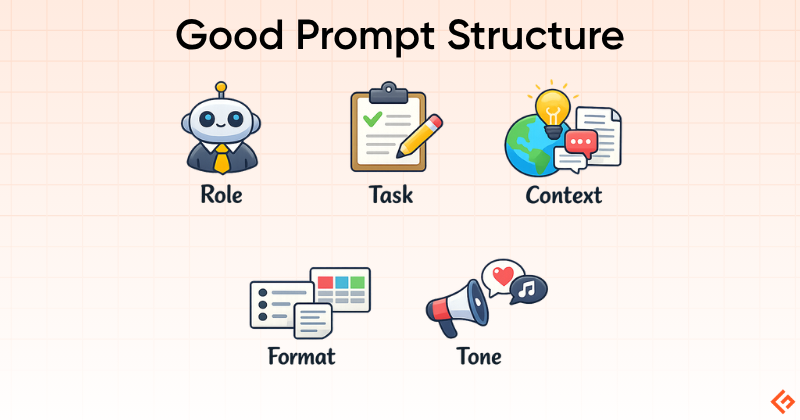
I’m not saying you need all 5 of them every single time, but the more you include in the first prompt, the less you will have to re-prompt.
Let me also clarify one more thing before we get to the prompts. Every hero prompt in this article has been tested side-by-side across GPT-5.4, Claude Sonnet 4.6, and Gemini 3.1 Pro in Sparkian. No different custom instructions are provided for any prompts here. The verdicts on which model wins each task are based on the real outputs. If you want to run the same tests yourself, the multi-model comparison feature lets you do it in one click.
Let’s begin the test with the first set of prompts.
Content Ideation Prompts
Hero Prompt: Audience-Specific Blog Topic Generation
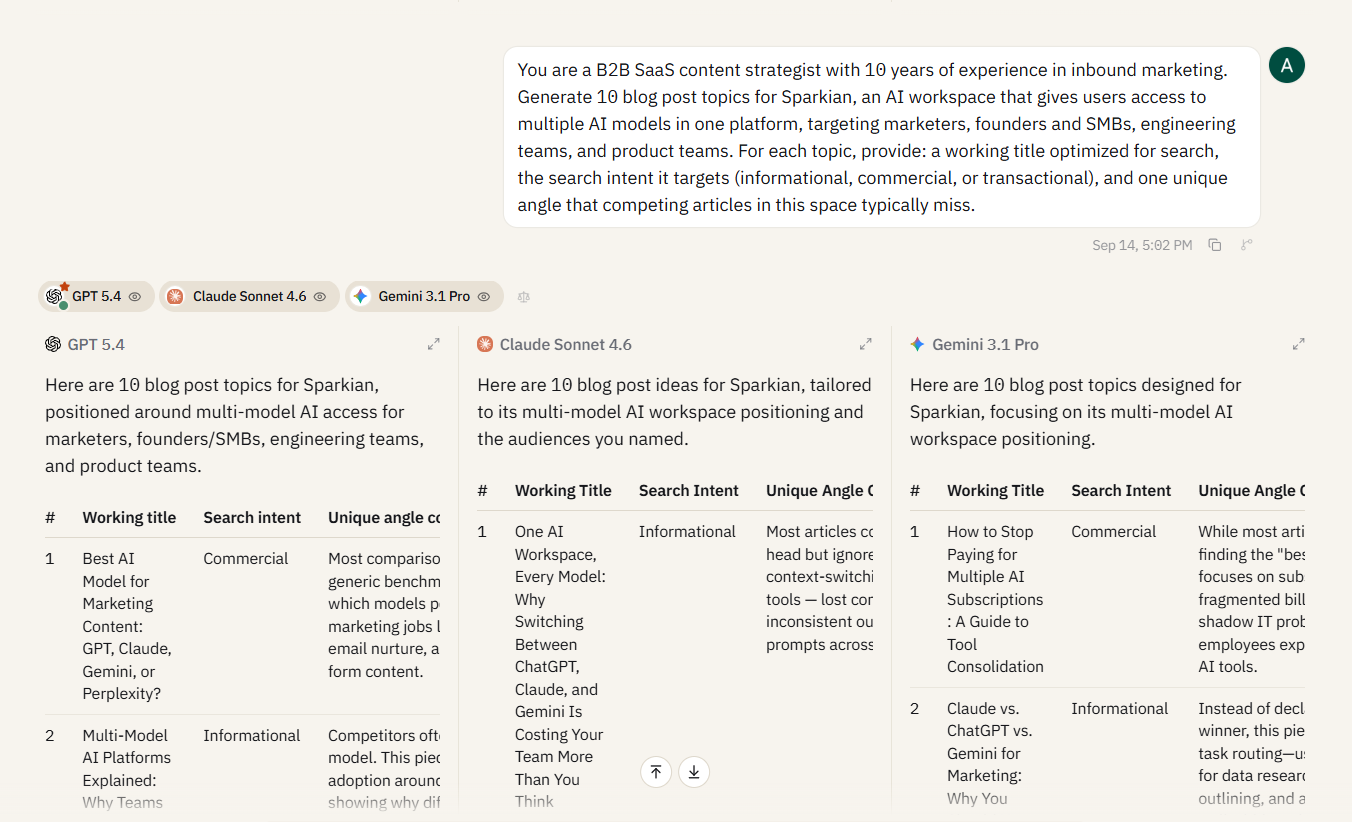
You are a B2B SaaS content strategist with 10 years of experience in inbound marketing.

Generate 10 blog post topics for [product/tool name], a [one-line product description], targeting [specific audience].

For each topic, provide: a working title optimized for search, the search intent it targets (informational, commercial, or transactional), and one unique angle that competing articles in this space typically miss.
Verdict: Claude Sonnet 4.6 comes out slightly ahead in this comparison. Its titles feel more like finished content ideas, with stronger hooks around practical problems such as subscription sprawl, context switching, and inconsistent AI outputs. Its unique angles also go beyond standard model comparisons and focus on problems teams actually face.
GPT-5.4 produced solid ideas with clear search intent and strong audience targeting. Its strategic notes were also useful, especially the distinction between marketers, founders, engineering teams, and product teams. Gemini 3.1 Pro had several strong topics too, particularly around model selection, vendor lock-in, and multi-model workflows.
Overall, Claude had the strongest editorial framing, while GPT and Gemini were more structured and straightforward.
For a full breakdown of how these models perform across five real-world tasks beyond marketing, check out the side-by-side comparison.
Quick Prompt: Content Calendar Fill
You are a content marketing manager.

have the following product launches and seasonal events coming up in the next quarter: [list them].

Generate a 12-week content calendar with one blog post and one social media post per week. Each entry should include: the topic, the content format, the target keyword, and which launch or event it ties back to.
Verdict: Claude Sonnet won this one for the way it provided specific dates for every week, along with distinct formats (thread vs. carousel vs. reel) for both blog and social entries. Plus, it also gave a pre-launch → launch → post-launch arc that showed genuine campaign thinking. Gemini did an average job here, but it was still better than GPT’s table, which was easy to scan but lacked depth and social posts.
Quick Prompt: Headline A/B Variants
Here is a working blog post title: "[your working title]".

Generate 10 alternative headlines for the same post. Vary the structure with the use of numbers in some, questions in others, how-to framing in others.

For each alternative, note in parentheses what psychological trigger it uses (curiosity, specificity, urgency, social proof, or contrarian).
Verdict: All three models produced pretty solid headlines, but Claude added unprompted editorial analysis, which got it another win. It clearly outlined which headlines work best for SEO click-throughs, which perform well on LinkedIn, and even the contrarian angle. GPT’s headlines were clean with single-trigger labels. Gemini grouped by trigger category, which is a smart browse-by-approach structure but slightly less punchy on the headlines themselves.
Ad Copy Prompts
Hero Prompt: Facebook/Meta Ad Primary Text
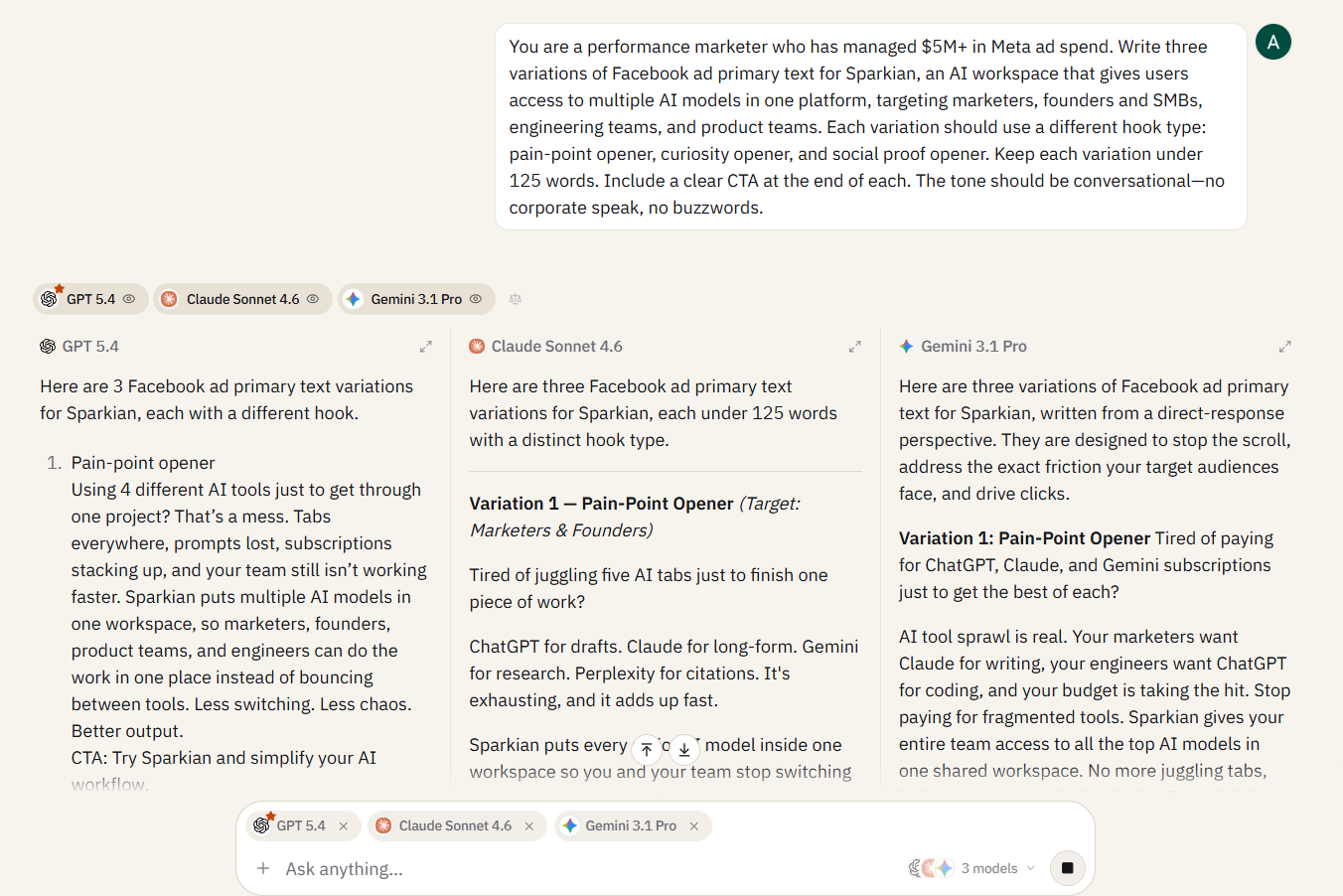
You are a performance marketer who has managed $5M+ in Meta ad spend. Write three variations of Facebook ad primary text for [product name], a [one-line product description].

Each variation should use a different hook type: pain-point opener, curiosity opener, and social proof opener. Keep each variation under 125 words.

Include a clear CTA at the end of each. The tone should be conversational, with no corporate speak or buzzwords.
Verdict: Claude Sonnet 4.6 comes out ahead again because the three variations feel more distinct from one another. The pain-point version is more direct, the curiosity version creates stronger tension around choosing the right model, and the social proof version has a calmer, more confident tone.
GPT-5.4 produced clean, usable copy, but its three variations felt closer in voice, even though the hook types were different. Claude also did a better job of tailoring each variation to a different audience, while keeping the central Sparkian message consistent. Overall, Claude gives the strongest separation between the three ad concepts.
Quick Prompt: Google Ads Headline + Description
Generate 15 Google Ads headlines (max 30 characters each) and 4 descriptions (max 90 characters each) for [product/service].

Group the headlines by angle: brand, benefit, urgency, social proof, and competitive. Flag any headline that exceeds the character limit.
Best in: Gemini won this narrowly over Claude Sonnet. The best thing is that Gemini formatted every headline with an explicit character fraction (22/30) to make it the most copy-paste-ready output. It comes in very handy when you are bulk-loading into Google Ads. On the other hand, Claude produced pretty solid editorial variations that got it 2nd place, while GPT’s headlines were clean but generic.
Quick Prompt: Landing Page Hero Copy
Write hero section copy for a landing page selling [product].

Include: a headline (under 10 words), a subheadline (one sentence expanding the value prop), three bullet points highlighting key benefits, and a CTA button text.

Write two versions: one emphasizing cost savings and one emphasizing time savings.
Best in: Claude Sonnet won this round with a clear separation in the tonality. If you read the cost version, it leads with a pain point (“Stop Overpaying”), while the time version leads with aspiration (“Zero Friction”). GPT was solid, but the two versions read interchangeably. Gemini’s cost version was strong, but the time version drifted into developer-facing language that wouldn’t work on a general landing page.
SEO & Keyword Prompts
Hero Prompt: Keyword Clustering & Content Gap Analysis
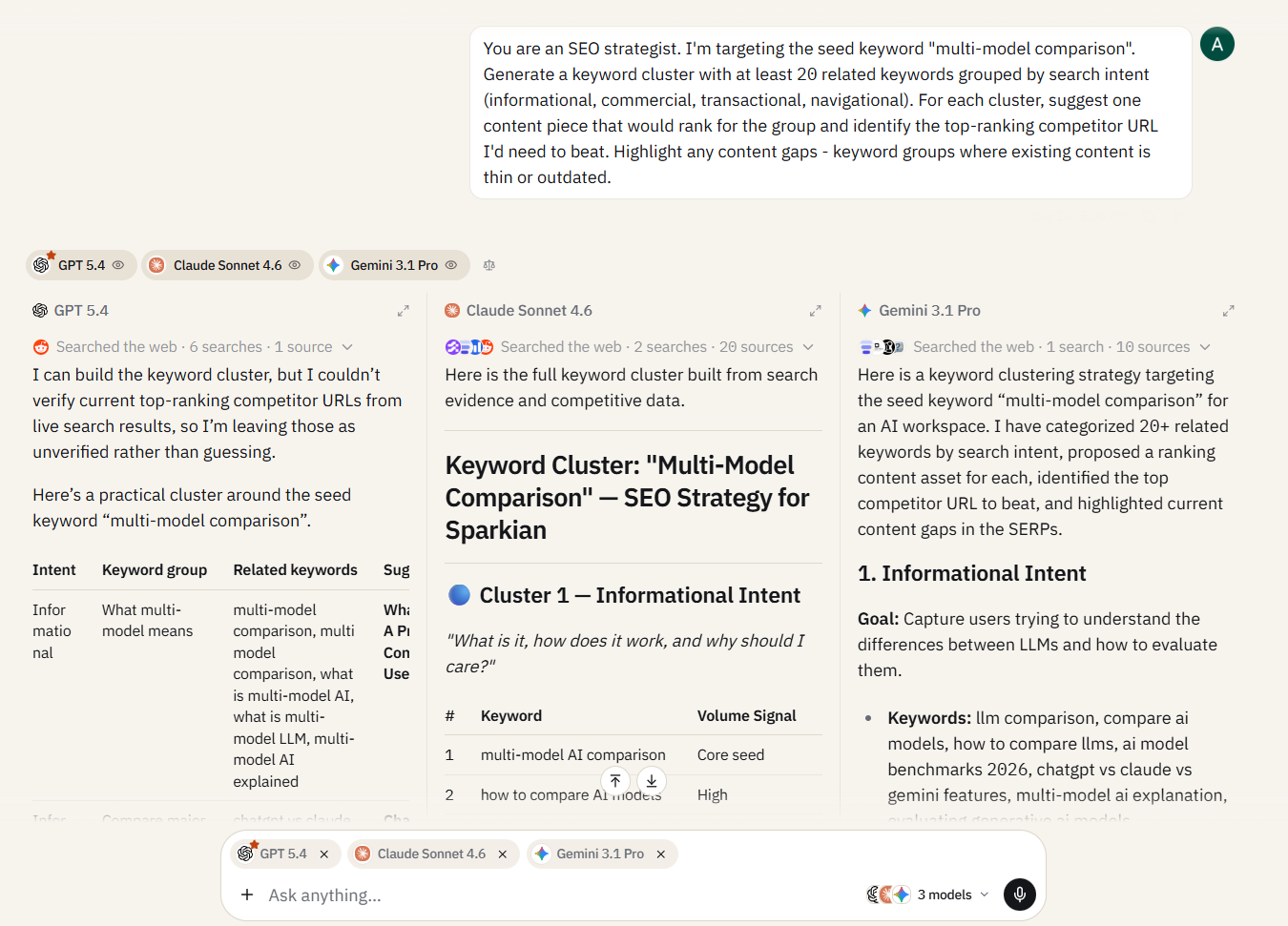
You are an SEO strategist. I'm targeting the seed keyword "[your keyword]".

Generate a keyword cluster with at least 20 related keywords grouped by search intent (informational, commercial, transactional, navigational).

For each cluster, suggest one content piece that would rank for the group and identify the top-ranking competitor URL I'd need to beat. Highlight any content gaps or keyword groups where existing content is thin or outdated.
Verdict: GPT-5.4 wins this one fair and square. GPT generated the output with 40+ keywords across four intent clusters. On top of that, it organized them into a tiered content plan with primary and supporting keywords, and closed with a prioritized four-piece publishing roadmap. GPT’s version will require the least amount of work for an SEO strategist who needs to take this output into a spreadsheet and start building.
Claude’s output highlighted content gaps and provided honest caveats, but it lacked depth of coverage. Gemini produced the fewest keywords and skewed heavily toward developer-focused terminology, missing the marketing audience this prompt was built for.
Quick Prompt: Meta Title & Description Generation
Here is my draft blog post: [paste first 300 words or the full outline].

Generate 5 meta title options (under 60 characters each) and 5 meta descriptions (under 155 characters each).

Each pair should target a different angle: keyword-first, curiosity-driven, benefit-led, question-based, and how-to. Flag any that exceed character limits.
Best in: Claude Sonnet’s titles had the strongest click-through phrasing, which was a key reason for its win. Plus, it included unprompted advice on which title descriptions perform best for different ranking goals. GPT’s titles were clean, but several were notably short of the 60-character limit, which is wasted real estate in the SERP. Gemini landed in between with solid formatting.
Quick Prompt: FAQ Generation for Schema
Generate 8 frequently asked questions for a blog post targeting the keyword "[your keyword]".

Each question should match a real People Also Ask query.

Write a concise answer (2–3 sentences) for each.

Format the output as JSON-LD FAQPage schema I can paste directly into the page's HTML.
Best in: GPT won this round, with Claude being a close second. Even though they all produced valid JSON-LD schema, GPT’s questions were slightly more accessible for a general marketing audience. Gemini & Claude leaned more towards the technical side, which loses the marketing point.
Email & Newsletter Prompts
Hero Prompt: Welcome Sequence Email
You are an email marketing strategist who specializes in SaaS onboarding sequences.

Write a welcome email for new subscribers to [product/newsletter].

The email should: reinforce their decision to sign up, set expectations for what they'll receive, include one piece of immediate value (a tip, a stat, or a quick win), and end with a soft CTA that drives a specific next action. Keep it under 200 words.

Tone: warm, direct, no corporate jargon.
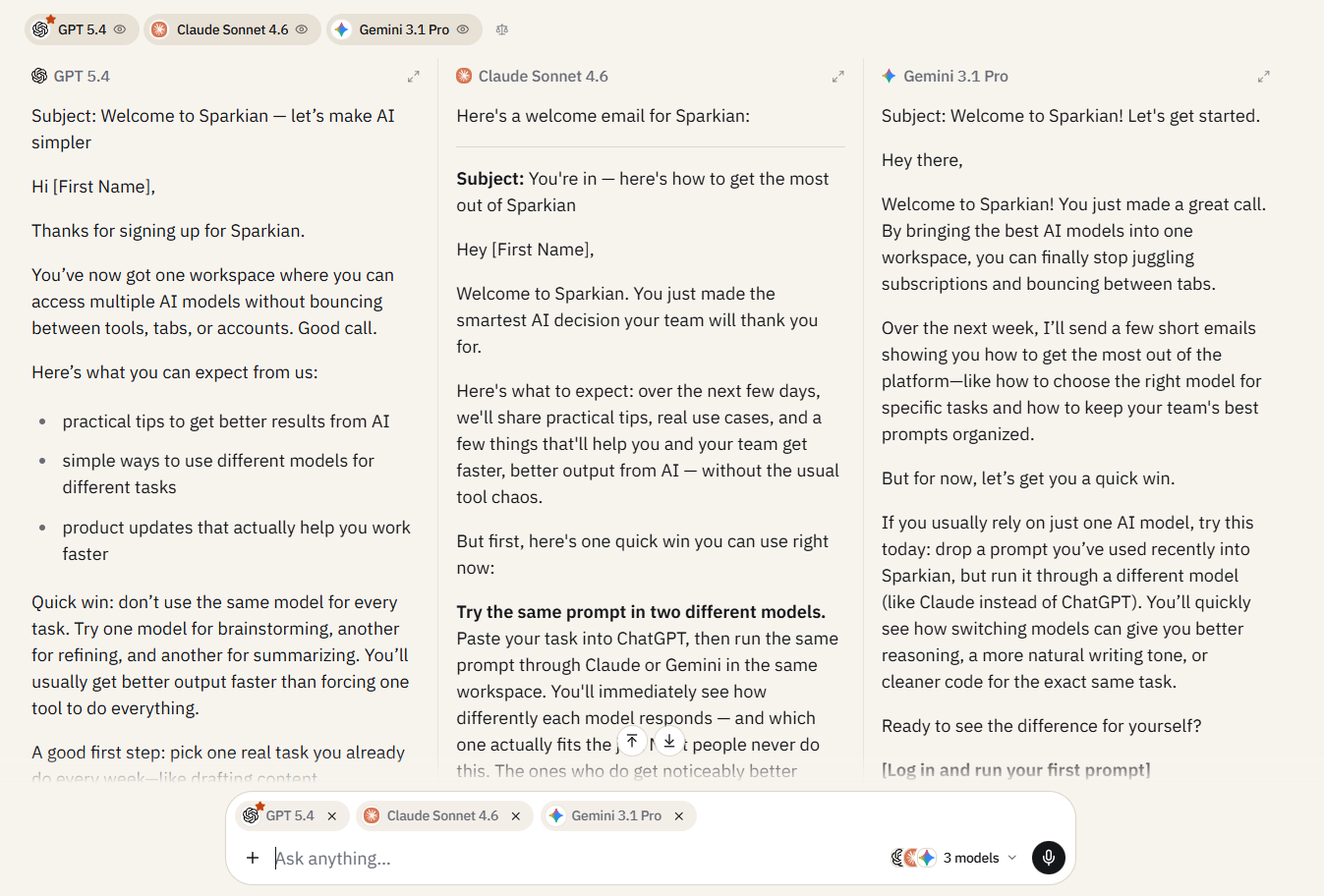
Verdict: Claude Sonnet 4.6 wins this round for voice and tone, with GPT-5.4 close behind for structure. Claude’s email feels more natural and conversational, especially in lines like “You just made the smartest AI decision your team will thank you for” and the specific CTA to run a comparison. GPT-5.4 is more restrained and organized, with a clear breakdown of what subscribers can expect. Gemini 3.1 Pro is also strong, but its phrasing feels slightly more promotional in places.
Claude’s biggest advantage here is that the email feels more like a real onboarding message, while GPT and Gemini lean more toward a polished product email.
Quick Prompt: Subject Line A/B Variants
I'm sending an email about [topic/offer]. Generate 10 subject line options.

For each, note: the psychological trigger it uses (curiosity, urgency, personalization, social proof, or benefit), the estimated character count, and whether it works better for a cold list or a warm list.
Best in: I got each model here producing 10 subject lines with trigger labels, but Claude won this by adding one-line reasoning for why each line works and closed with specific A/B testing pairing advice. GPT’s were the shortest and cleanest. Gemini was solid middle ground.
Quick Prompt: Re-engagement Email
Write a re-engagement email for subscribers who haven't opened in 60+ days.

Lead with an honest acknowledgment that you've noticed they're gone. Offer one specific reason to come back (a new feature, a piece of content, or an exclusive offer).

End with a clear "stay or unsubscribe" choice. Under 150 words. Tone: human, not desperate.
Best in: This was a writing task, and Claude won it fair and square. “Click below to unsubscribe — we’d rather you leave than stay annoyed,” is the kind of honest copy that performs in real re-engagement emails. It doesn’t hint at desperation, but you are showing respect. Gemini pitched a new product feature (“Dynamic Prompt Router”) in a re-engagement email, which felt more like selling than winning someone back.
For a complete 5-step cold email workflow with multi-model prompt chains, see our cold email writing tutorial.
Social Media Prompts
Hero Prompt: LinkedIn Thought Leadership Post
You are a LinkedIn ghostwriter for B2B founders and executives.

Write a LinkedIn post based on this idea: [your raw idea or hot take].

The post should use a hook that stops the scroll in the first two lines, follow a structure that builds to a clear insight or lesson, and end with a question or CTA that invites engagement. Keep it under 300 words. No hashtags unless I ask.

Tone: authoritative but approachable and not preachy.
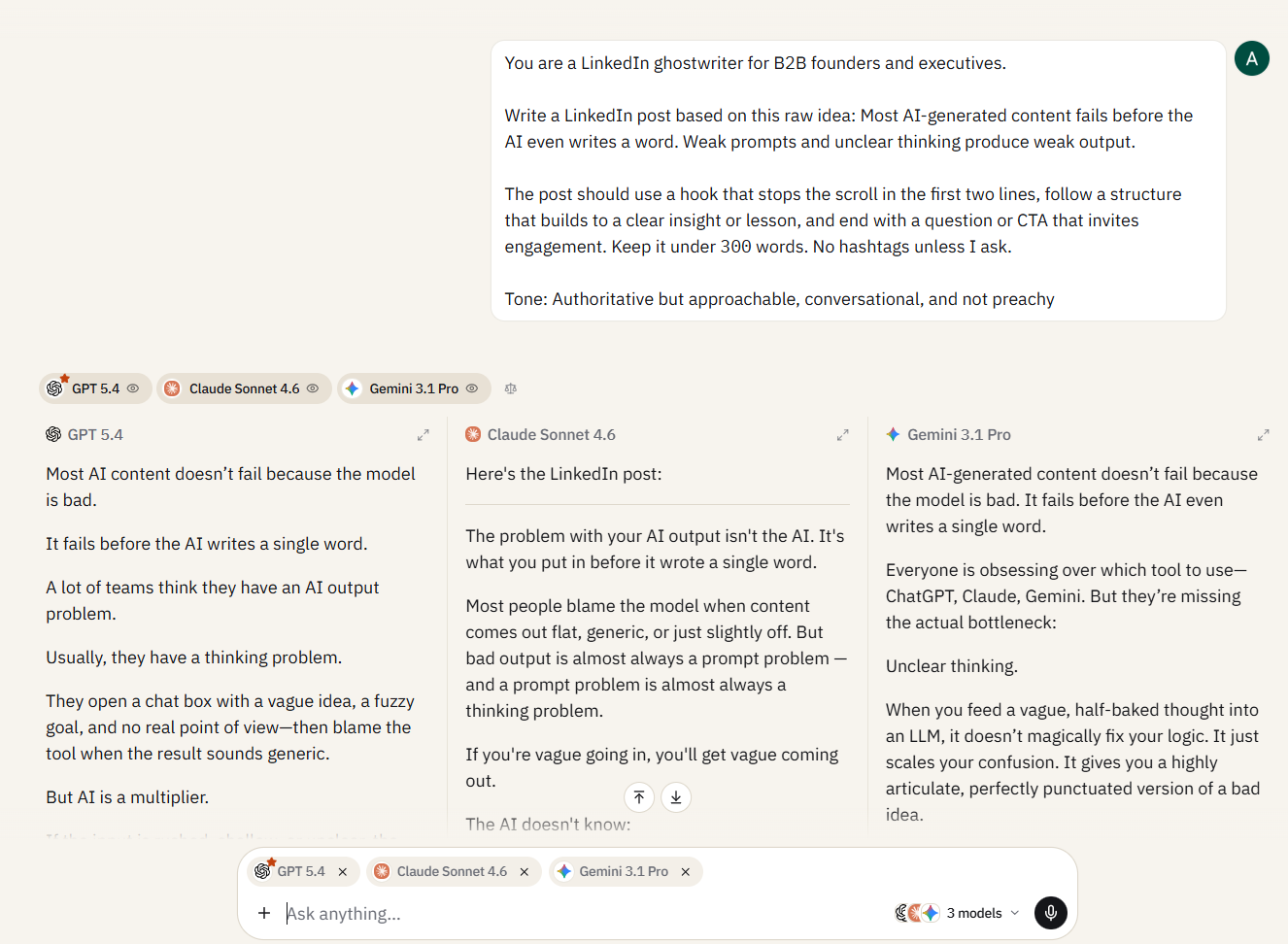
Verdict: GPT-5.4 wins this round for its LinkedIn-native structure and pacing. The post uses short paragraphs, clear progression, and a strong three-question framework that keeps the reader moving. Lines like “Better prompts help. Better clarity helps more.” give it a strong closing punch.
Claude Sonnet 4.6 is also strong, especially in its practical advice and conversational tone. Its longer paragraphs make it feel slightly more like an editorial post, though. Gemini 3.1 Pro delivers a clear argument and several memorable lines, but its structure feels closer to a polished thought-leadership article than a typical LinkedIn post.
For this specific format, GPT-5.4 is the strongest choice because it understands the visual rhythm of a LinkedIn feed particularly well.
Quick Prompt: Twitter/X Thread Outline
Turn this blog post into a 7-tweet thread outline.

Tweet 1 should be a standalone hook that works without context.
Tweets 2–6 should each cover one key point.
Tweet 7 should be a CTA or summary.

Keep each tweet under 280 characters. Note which tweets would benefit from an image, screenshot, or chart.
Best in: Claude Sonnet won this flawlessly. The 1st tweet led with a relatable action (canceling subscriptions) rather than a claim, making it a better standalone hook. Claude added specific structural notes about the tweets that are the highest-engagement candidates. On the contrary, GPT’s outline was well-labeled, but I found it more like section headers than tweet-ready copy. Gemini severely underperformed here due to formatting issues that require manual cleanup.
Quick Prompt: Instagram Carousel Outline
Create a 10-slide Instagram carousel outline on [topic].

Slide 1 is the hook (treat it like a headline, as it has to earn the swipe).
Slides 2–9 deliver one idea per slide with minimal text.
Slide 10 is a CTA.

For each slide, write the headline text and 1–2 lines of supporting copy. Suggest whether each slide should use a text-over-color background or an image.
Best in: Gemini won this with the most specific visual suggestions for every slide (“abstract graphic of a downward trending chart suddenly turning upward”). Claude came in second because it clearly highlighted design choices for stock photos, flat UI mockups, and even branded illustrations.
Final Model Scorecard
| Section | Hero Winner | Key Reason |
|---|---|---|
| Content Ideation | Claude Sonnet | Sharpest titles, best editorial angles, and unprompted strategic notes |
| Ad Copy | Claude Sonnet | Best voice separation between variations and production-level craft notes |
| SEO & Keywords | Claude Sonnet | Deepest keyword coverage and most actionable content plan structure |
| Email & Newsletters | Claude Sonnet | Most natural voice and the strongest craft advice on testing and list hygiene |
| Social Media | GPT-5.4 | Best LinkedIn-native rhythm with a short-line structure that matches the platform format |
Save These to a Prompt Library Your Team Can Use
Copy-pasting prompts from a blog post into a chat window works once. The second time, you’re digging through bookmarks or scrolling through your browser history, trying to find the one that worked. The third time, your colleague asks you to “send that prompt from the other day,” and you spend 10 minutes hunting for it.
Sparkian’s Prompt Library, built into the workspace, solves this problem once and for all. Save any prompt directly from a conversation, tag it by category (marketing, SEO, email, social), and it’s available to your entire team from the sidebar. No copy-pasting, no shared Google Docs, no “check Slack, I sent it last Tuesday.”
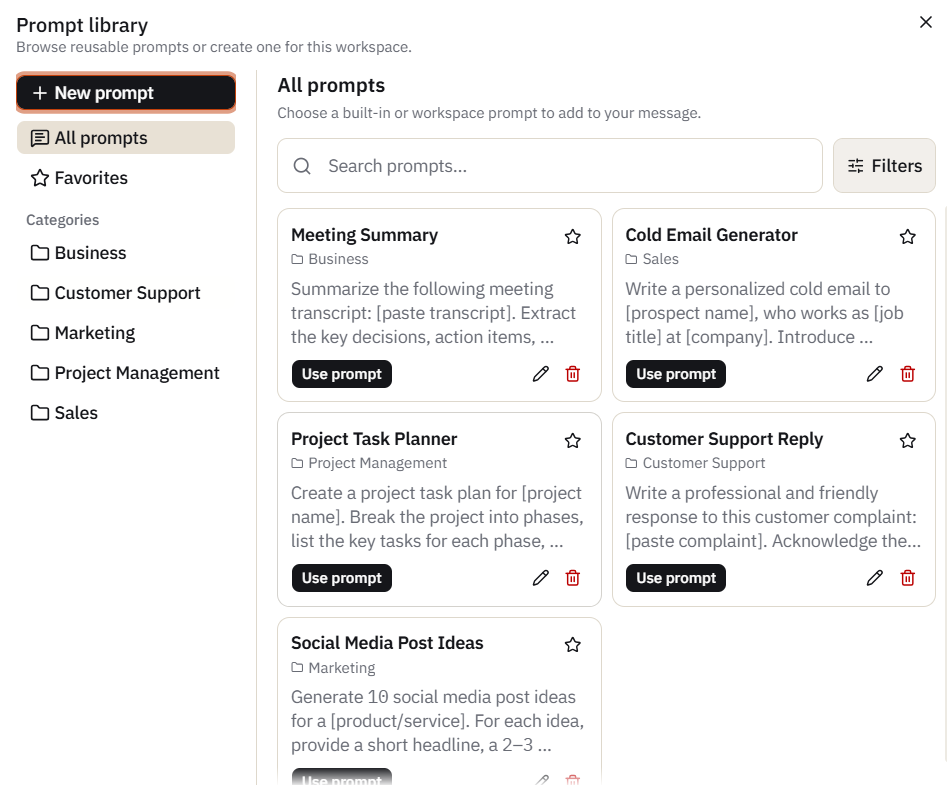
The workflow is simple: run a prompt, get a result you like, save it to the library with a name and category tag. Next time anyone on the team needs it, they pull it from the library, customize the bracket fields for their specific task, and send. The prompt stays consistent, the output quality stays consistent, and nobody reinvents the wheel on prompts that have already been tested.
I have designed every prompt in this post with the same intent. I have kept some customization points in the prompts using bracket fields ([product name], [your keyword], [topic]), but the rest of the prompt structure is worth preserving.
Start with the free plan, save your first few prompts, and see how much faster round two goes when you’re not rebuilding from scratch. → Sign up for Sparkian
Final Tally
This is an honest comparison, and it’s telling me the full story. We all know that Claude consistently outperforms on tasks that require voice, tone control, or editorial judgment. On the other hand, GPT clearly wins when you need to set structure or when you require platform-native formatting. That’s how I found my winners for the hero prompts today.
But that doesn’t mean Gemini is not useful. For many tests here, Gemini has produced the cleanest, most well-formatted outputs that require the least post-processing for bulk workflows.
The simple takeaway for you today is to match the model to the task type rather than using one single model for every task.
New to Sparkian? Start with the complete walkthrough.