




Sparkian Sparks are the usage credits that power your AI interactions on Sparkian. Each plan comes with a set number of Sparks, which are used as you work with different AI models and features.
Sparkian displays the estimated Spark usage for a model before you send a request, helping you understand how your Sparks are being used as you work.
This guide explains how Sparks work, how usage is calculated, and what you need to know when using them on Sparkian.
How Do Sparks Work?
Sparks are used when you send requests to AI models in Sparkian. The number of Sparks required depends on the model you select and the request you send.
When you select a model, Sparkian displays its estimated Spark usage directly in the model selector. For example, Claude Opus 5 shows 25+ Sparks / Request, while other models may have lower or higher starting costs.
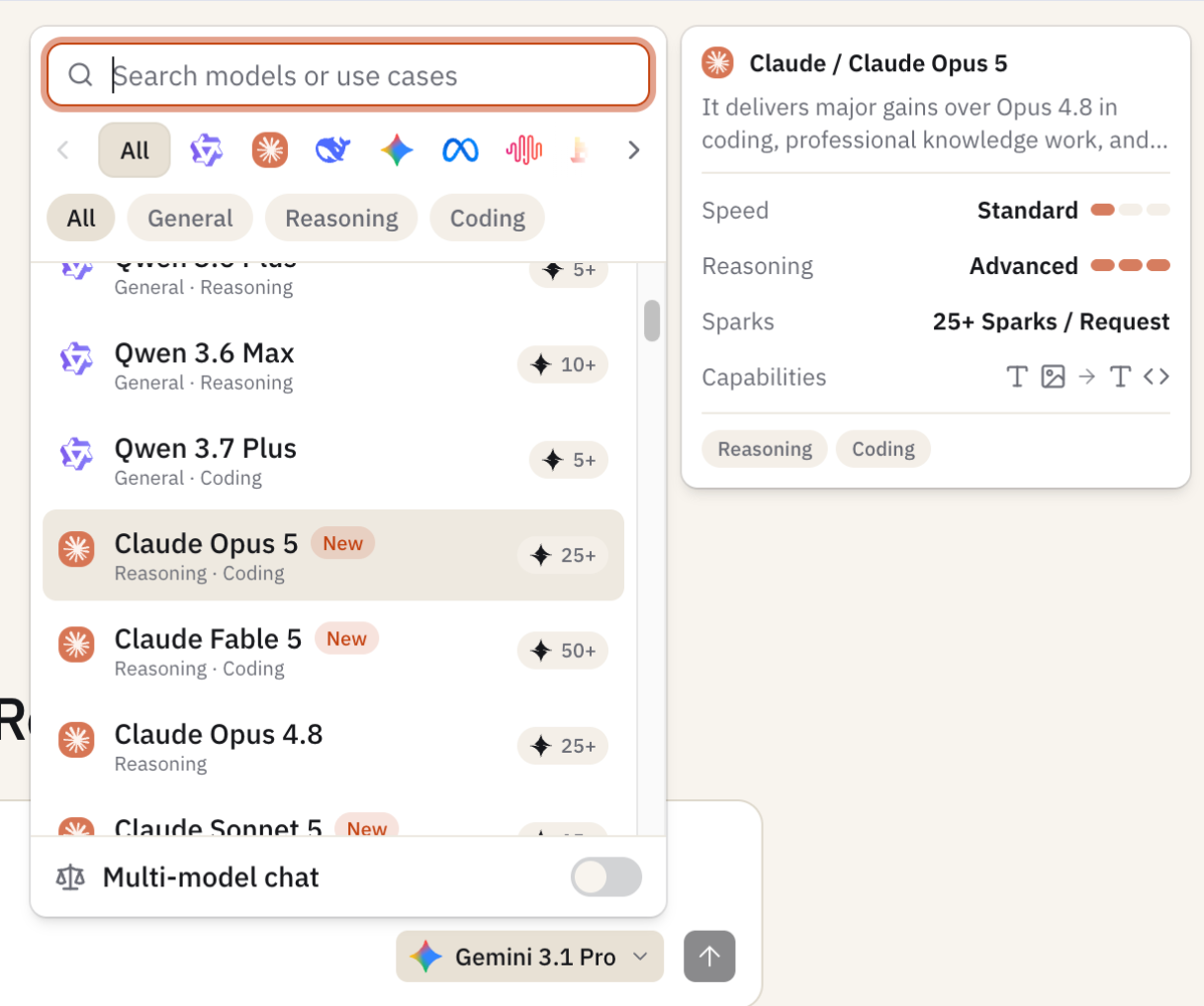
The “+” indicates that the displayed amount is a starting estimate, not a fixed cost for every request. The actual Spark usage depends on the request and the amount of content Sparkian processes.
This gives you a quick way to compare the expected usage of different models before choosing one for your task.
What Affects Spark Usage?
Sparkian does not charge the same number of Sparks for every request. Your usage depends on the model you choose and the amount of content it processes.
A few factors can increase Spark usage:
- AI model: Advanced models require more Sparks per request than lighter models. The model selector shows the starting Spark cost before you send a message.
- Message length: Longer prompts require more processing and can use more Sparks.
- Chat history: Sparkian may process earlier messages from the same conversation to understand the context. A long conversation can therefore use more Sparks than a new chat.
- Attachments: Files and other attachments add to the content the model needs to process, which can increase usage.
- AI response: Longer responses require more processing and can affect the final Spark cost.
For example, a short question sent to a model showing 25+ Sparks / Request may use close to the displayed estimate. A request that contains a long prompt, several previous messages, or a large attachment can consume more Sparks.
The model selector gives you a useful estimate before you send the request, while the final Spark usage depends on the content processed during that interaction.
How Do Attachments and Knowledge Base Files Affect Spark Usage?
Files can affect how many Sparks a request uses. When you attach a file to a chat, Sparkian processes the file along with your prompt and the model’s response. Larger files or requests that require more content to be processed can therefore use more Sparks.
The Knowledge Base works slightly differently. Requests that use files stored in the Knowledge Base have an additional 5-Spark charge per request, added to the model’s Spark usage.
For example, you can attach a document directly when you need Sparkian to analyze it for a specific task. If you frequently work with the same company documents, you can store them in the Knowledge Base and reference them when needed. Each Knowledge Base request carries the additional 5-Spark charge.
The final Spark usage can vary based on the amount of content processed, so the estimate shown for the selected model should be treated as a starting point.
How Does Chat History Affect Sparks?
Sparkian considers the chat history when calculating the Spark cost of a request. A new message can include earlier messages from the same conversation, giving the AI the context it needs to respond.
A short conversation usually adds little extra content to the request. A long conversation can contain much more context, so the same model may use more Sparks for a later message.
For example, a simple question in a new chat may stay close to a model’s displayed estimate. Asking another question after a long conversation can cost more because Sparkian may need to process the earlier messages along with your new request.
If you switch to a completely different topic, starting a new chat can help keep the amount of conversation history sent with the request lower.
How Many Sparks Do You Get?
The number of Sparks you receive depends on your Sparkian plan. Every paid plan comes with a monthly Spark allowance, while the annual billing option offers a lower effective monthly price.
| Plan | Monthly | Annual | Sparks / Month | Seats | Knowledge Base |
|---|---|---|---|---|---|
| Free | Free | — | 100 | 1 | 10 MB |
| Pro | ₹1,499/month | ₹1,250/month | 10,000 | 2 | 100 MB |
| Business | ₹4,499/month | ₹3,750/month | 25,000 | 5 | 250 MB |
| Scale | ₹13,999/month | ₹11,659/month | 75,000 | 20 | 500 MB |
The Free plan provides 100 Sparks every month, one seat, one workspace, and 10 MB of Knowledge Base storage. It also comes with standard AI models, unlimited in-chat web search, and 30-day chat history.
The Pro plan provides 10,000 Sparks every month, two seats, two workspaces, and 100 MB of Knowledge Base storage. It also adds advanced AI models and one-year chat history.
The Business plan gives teams 25,000 Sparks every month across five included seats. It provides five workspaces and 250 MB of Knowledge Base storage.
The Scale plan is designed for larger teams and provides 75,000 Sparks every month, 20 seats, 10 workspaces, and 500 MB of Knowledge Base storage.
For paid plans, you can choose monthly or annual billing. The annual option lowers the effective monthly price, while the Spark allowance remains the same each month.
Additional seats cost ₹399/month per seat on the Pro, Business, and Scale plans.
How Far Can Your Sparks Go?
Your Sparks can cover very different amounts of work depending on the model you choose. Sparkian currently shows starting estimates such as 1+ Sparks / Request for Qwen 3.5 Flash and 25+ Sparks / Request for Claude Opus 5. The actual cost can increase when a request contains more content, chat history, or attachments.
Consider a user with 5,000 Sparks:
Using a lighter model
A model such as Qwen 3.5 Flash starts at 1+ Spark per request.
- 1 simple request → starts at 1 Spark
- 100 simple requests → starts at 100 Sparks
- 1,000 simple requests → starts at 1,000 Sparks
- 5,000 simple requests → starts at 5,000 Sparks
These numbers assume every request stays close to the displayed starting estimate. Longer conversations or attachments can increase the actual cost.
Using an advanced model
Claude Opus 5 starts at 25+ Sparks per request.
- 1 request → starts at 25 Sparks
- 100 requests → starts at 2,500 Sparks
- 200 requests → starts at 5,000 Sparks
A 5,000-Spark balance could therefore cover far fewer requests when you use a higher-cost model.
A more realistic team scenario
Imagine a team uses Sparkian for different types of work:
- Simple questions: A team member uses a lighter model for quick research and short writing tasks.
- Complex analysis: The team switches to an advanced model for coding, reasoning, or detailed analysis.
- Long conversations: A request sent late in a long chat can use more Sparks because earlier messages are part of the context.
- Document analysis: A request with a large attachment can consume more Sparks than a short text request.
- Knowledge Base work: A request using a Knowledge Base adds 5 Sparks on top of the model cost.
The key point is that 5,000 Sparks does not translate into a fixed number of messages. Two users can have the same Spark balance and consume it at very different rates based on their models and the amount of content they process.
For day-to-day work, a practical approach is to use a lighter model for straightforward tasks and reserve higher-cost models for work that calls for their additional capabilities.
How to Get More Sparks
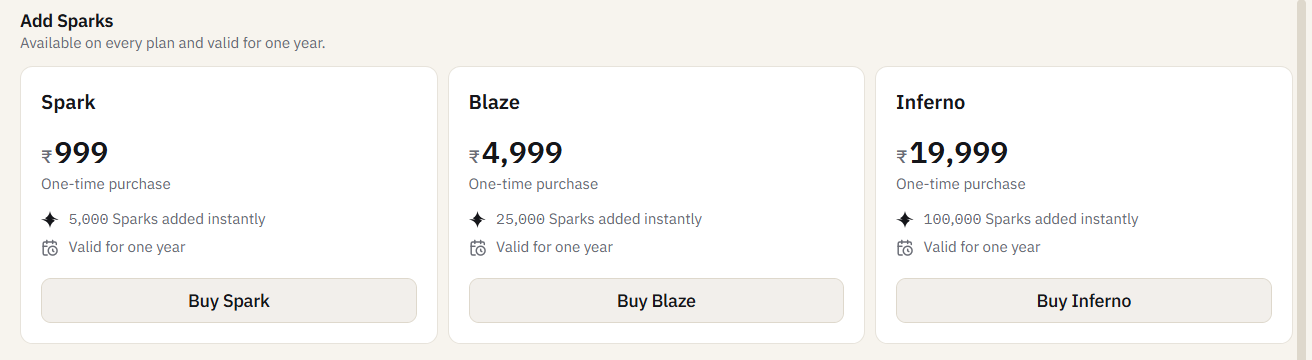
If you use your monthly Sparks faster than expected, Sparkian lets you purchase additional Sparks. These are available as one-time purchases and remain valid for one year.
| Pack | Price | Sparks |
|---|---|---|
| Spark | ₹999 | 5,000 |
| Blaze | ₹4,999 | 25,000 |
| Inferno | ₹19,999 | 100,000 |
You can purchase the pack that suits your usage needs without changing your existing Sparkian plan.
How to Manage Your Spark Usage
You can manage your Sparks effectively by choosing the right model and keeping your conversations focused. A few simple practices can help you get consistent results while using your Sparks wisely.
- Choose the right model: Use a lighter model for simple questions and advanced models for tasks that need deeper reasoning.
- Start a new chat for a new topic: Long conversations can carry previous context into later requests, increasing the amount of content processed.
- Keep prompts focused: Clearly describe the task and provide the information the model needs.
- Use the Knowledge Base thoughtfully: Knowledge Base requests add 5 Sparks, so use it when the stored files are relevant to your task.
- Avoid unnecessary attachments: Attach files when they are required for the task, since larger files can increase the amount of content processed.
These practices help you manage Spark usage while still getting the right model and context for each task.
Frequently Asked Questions
Sparks are Sparkian’s usage credits. They are consumed when you send requests to AI models and use certain features.
No. Each model has its own starting Spark estimate. You may see 1+ Sparks / Request for a lighter model or 25+ Sparks / Request for a more advanced model.
Yes. Longer conversations can require more Sparks because Sparkian may process previous messages as part of the context for a new request.
Yes. A request that uses the Knowledge Base has an additional 5-Spark charge on top of the model’s usage.
Yes. Sparkian offers one-time Spark packs:
Spark: 5,000 Sparks for ₹999
Blaze: 25,000 Sparks for ₹4,999
Inferno: 100,000 Sparks for ₹19,999
All purchased Sparks are valid for one year.





