



Website data extraction is the process of gathering unstructured information from various websites and converting it into an organized spreadsheet or database. Instead of manually sifting through pages, you create an automation that navigates these sites and pulls the relevant data for you to analyze.
For example, if you are looking to buy a home, instead of spending your entire Saturday morning visiting multiple real estate sites and manually noting down addresses and contact info, you automate the process.
The automation runs daily, scans the top listing sites for new properties, and saves the details to a single spreadsheet. On Saturday morning, you simply open that one file, pick the top five properties that meet your criteria, and plan your visits. What would have taken hours of tedious searching now takes only minutes.
Website data extraction is not just collecting information but collecting it repeatedly and consistently. Its value lies in capturing the parts you care about, whether that’s a house listing, the product price, a news headline, or a review score.
Why businesses extract data from websites
Businesses extract data from websites because a large share of useful market information is available on the internet, like pricing, customer opinions, trends, competitors’ new products, breaking news, etc. Extracting this data automatically helps them act faster and make better decisions.
Some common use cases are:
Price tracking (e-commerce): Suppose you are a seller on Amazon. A competitor drops their price. Scraping helps you detect it instantly and respond before losing sales.
Customer sentiment (marketing teams): You can pull reviews from social media pages and forums to understand what customers actually think about your product/service and what their pain points are.
Job and talent insights (HR teams): You can track hiring trends by extracting job postings from company career pages or LinkedIn.
Travel planning (everyday users): Compare flight and hotel prices across multiple travel booking sites to get the best deal.
Content publishers: Monitor what topics competitors are publishing, how often, and what’s trending.
Lead generation (sales teams): Extract business listings, contact info, or directories to build outreach lists.
Different methods to extract data from websites
The right method for extracting data from websites depends on how much data you need, how frequently you need it, and your technical comfort level.
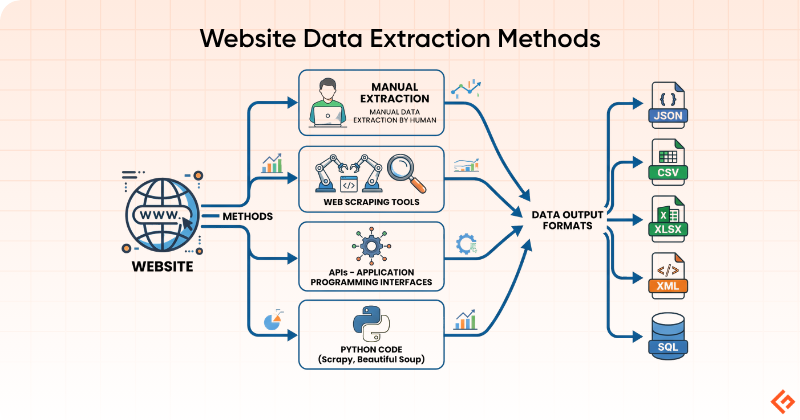
Manual Copy-Paste
This is the most simple, manual way. You open a webpage, select the information you require, copy it, and paste it into a spreadsheet or document. There are no tools, setup, or learning curve involved. This works well when the scope is small.
Manual copy-paste is best for:
- Small one-time tasks
- Quick research
- Validating a source before automating extraction
It is not ideal for:
- Large websites
- Frequently changing data
- Ongoing monitoring
For example, if you want to collect the price of 10 competitor products or contact details from a short directory, manual extraction may be the fastest option.
Browser Developer Tools
Every modern browser, like Chrome, Firefox, and Edge, comes with built-in developer tools that let you inspect the underlying structure of any webpage. When you right-click on any element and select Inspect, you see the raw HTML of the page.
This method is useful when you want to understand how a website’s data is structured before you build a scraper or when you need to extract something specific without writing a full script. For example, you can locate where a price, a product name, or a table is stored in the page’s code and figure out exactly how to target it with a script.
Developer tools are useful for:
- Understanding how a webpage is structured
- Checking whether data is directly visible in the page source
- Identifying tables, tags, classes, and requests behind a webpage
- Troubleshooting why extraction is not working
They are not a full extraction solution by themselves but more as a way to look behind the scenes.
Using AIs
A new way to extract content from any site is using LLM. You can use any AI like ChatGPT, Gemini, Grok, etc. Below you can see I asked to extract pricing on Geekflare Chat, which used the Gemini Lite model with web search and gave me the exact answer I was looking for.
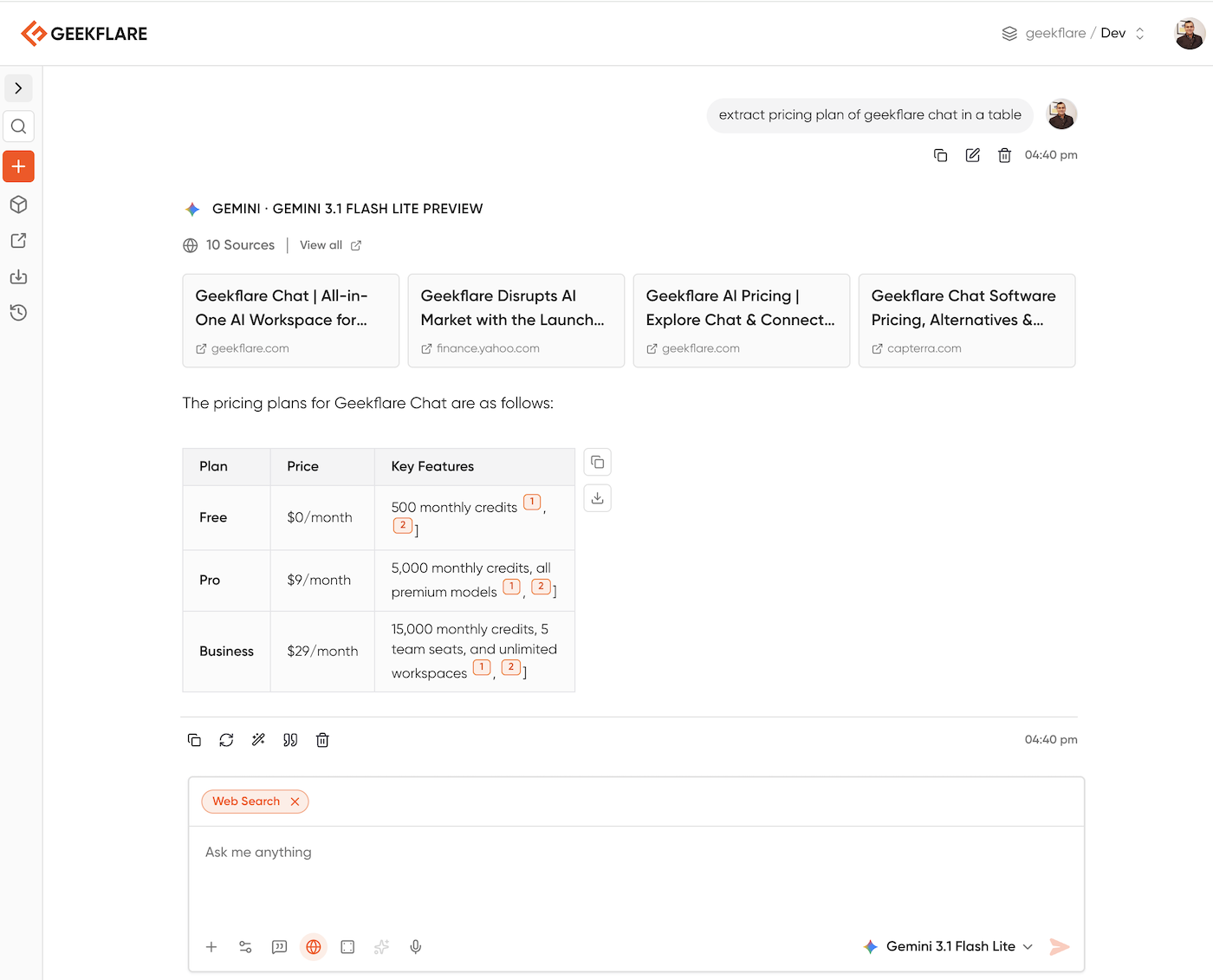
You can tweak the prompt to get the data you want. I’m sharing my 5 favorite prompts to extract data:
Extract all [Item Type, e.g., laptops] from the provided text. Organize the data into a JSON format with keys for [Field 1], [Field 2], and [Field 3]. If any information is missing for a specific item, use "null" as the value.Scan the following webpage content and extract all professional contact details. Create a bulleted list including Company Name, Contact Person, Job Title, Email Address, and LinkedIn URL where available.Analyze the text from this article. Extract the following elements:
Headline
Author and Publication Date
Primary Keywords
A concise summary of the main argument
Any specific dates or locations mentioned in the body textIdentify the product details from this Amazon webpage. Format the output as a table with columns for: Product Name, Price, Rating, Number of Reviews, and a list of Technical Specifications.From the provided service page content, extract the details for all available subscription plans. For each plan, list the Tier Name, Monthly Price, Annual Price, and a comma-separated list of included features. Ensure the output is formatted for easy entry into a spreadsheet.APIs
APIs are the cleanest and most reliable way to get website-related data when they are available. Instead of scraping the visible page, you make a structured request directly to the source and receive data in a clean, organized format, usually JSON, that is ready to use.
For businesses, APIs are usually the preferred option because the data is already formatted and easier to process than scraped page content. The data is more reliable, and the process is less likely to break when the website redesigns its layout.
For example, instead of scraping a travel site’s hotel listings page, a business may use an API to retrieve hotel names, prices, availability, and ratings in a structured response. Instead of copying company information from a public directory page, a team may pull it through an official endpoint. Platforms like LinkedIn, Twitter/X, Google, and Amazon offer APIs to let developers request specific data.
APIs are best when:
The website or platform provides official access
- You need reliable and structured data
- You want to avoid breakages caused by page redesigns
- You are building a repeatable business workflow
However, many websites do not have an official API. In these cases, you can use a third-party API like Geekflare web scraping API.
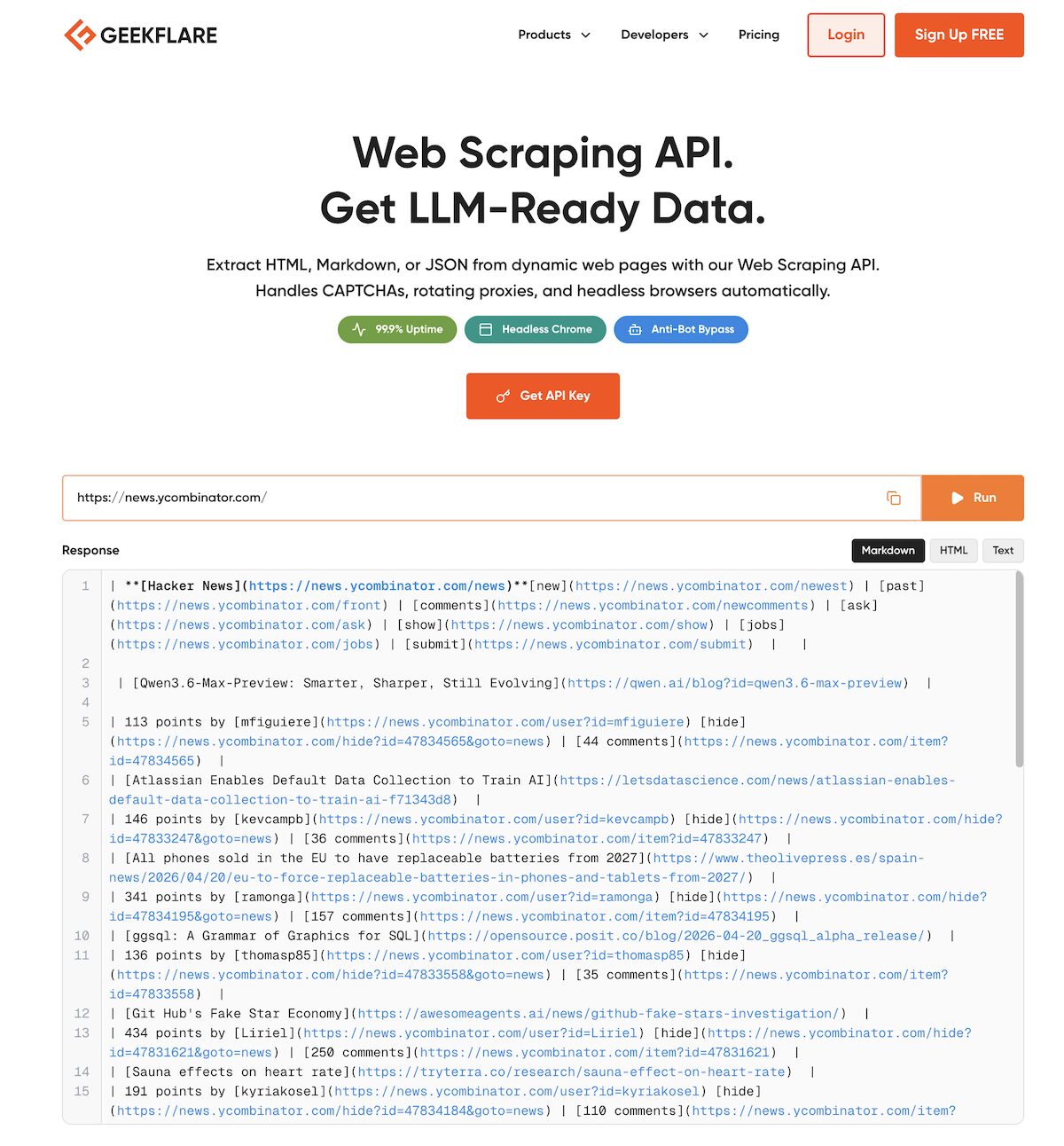
As you can see above, I’ve extracted Hacker News data. Geekflare API allows you to extract the visual data from any webpage in a structured format and also handle technical stuff like CAPTCHAs, rotating proxies, and headless browser rendering.
Web Scraping Tools
Web scraping tools let you extract data from websites without writing code. You can give the page(s) to target, select the data you want, and it collects it for you across as many pages as you need. Most web scraping tools have a visual interface where you click on elements like prices, titles, or table rows, and the tool learns what pattern to follow. They let you export the results into CSV, Excel, JSON, or other formats.
Web scraping tools are a good fit when:
- Volumes are larger than what manual work allows
- The website structure is reasonably consistent
- You want exports without building a custom script
- Non-developers need a faster workflow
The main drawback of these tools is that if the target website redesigns its layout, the scraper will break and need to be reconfigured. It also fails when the data loads dynamically.
Using Python
When businesses need full control over the scraping process, they write custom code. Python is the most widely used language for web scraping, largely because of libraries that make the job easy: BeautifulSoup for parsing HTML, Requests for fetching web pages, or Playwright and Selenium to simulate a real user clicking through complex, JavaScript-heavy websites.
Python comes with a heavy learning curve. It is useful when:
- You need a custom workflow
- The extraction has to run repeatedly
- You need to include data cleaning and transformation within the extraction process
- You want to integrate the extraction into larger systems
Best Tools for Website Data Extraction
There isn’t a single best tool for website data extraction. The right choice depends on what you’re trying to do, how much data you need, how often you need it, and how technical you are. Here’s a simple way to help you decide which one to choose.
- For small, one-time tasks: manual methods or simple tools
- For regular extraction with moderate scale: Use no-code scraping tools
- For complex workflows or integrations, go for Python-based scraping
- When you need reliable, structured data, use the platform’s native API, if available. Or use a third-party web scraping API.
Is Website Data Extraction Legal?
It depends on what you extract and how you extract it. Extracting publicly available data (like product prices, listings, or reviews) is generally legal. But there are boundaries you should not cross.
- Some websites explicitly restrict scraping. In such cases, you need to respect the terms of use and avoid scraping.
- Collecting personal information or sensitive data can cause legal issues.
- Copyrighted content cannot be scraped and used for free.
- Sending too many requests to the website in a short period of time and causing server overload can be treated as abuse.
When in doubt, check the site’s terms or use official APIs.
Common Challenges in Web Data Extraction
Some of the greatest challenges in web data extraction involve the effort required to handle edge cases and keeping the process stable over time.
Scraping JavaScript-heavy pages: Many modern websites don’t load data directly in the HTML. Instead, content appears after the page loads using JavaScript. Here, basic scraping methods won’t work unless you simulate a real browser.
Frequent layout and structure changes: Websites update their design regularly. Even a small change in HTML structure (like a class name or tag) can break your scraper and require additional maintenance effort.
CAPTCHA and bot protection systems: Websites usually try to block automated access. If your scraper looks like a bot, you may encounter CAPTCHAs or get completely blocked.
Rate limiting and IP blocking: Sending too many requests in a short time can trigger rate limits or bans. You will need to manage the frequency of requests and use proxy networks to avoid IP blocking.
Pagination and infinite scrolling: The entire data is rarely on a single page. You often need to navigate through multiple pages or simulate scrolling behavior to extract it.
Inconsistent or messy data: Real-world web data is not clean. It may have missing fields, be formatted differently, or even be duplicated, which requires additional processing after extraction.
Authentication and login barriers: Some sites require you to log in to access the data. This will need session handling, cookies, and authentication. It adds another layer of complexity.
Scalability: What works for 100 records may fail at 100,000 records. Therefore, as your data requirements grow, you need better infrastructure, monitoring, and error handling to ensure the process runs smoothly.
Best Practices for Web Scraping
If you want scraping to work hassle-free for the long term, we recommend these best practices.
- Respect rate limits and don’t overload websites with requests.
- Validate your extraction for a small sample of data before running it at scale.
- Prefer APIs when available, because they are more stable and easier to maintain.
- Include a failure handling mechanism for broken pages and missing data.
- Clean and structure data early in your workflow.
- Monitor your scraper and set alerts when data extraction fails.
- Always comply with legal and ethical boundaries.
Frequently Asked Questions
How can I automatically extract data from a website on a schedule?
Use schedulers like cron jobs (for code-based scraping) or built-in scheduling in scraping tools. Many APIs support periodic data pulls.
How do I extract data from a website into Excel?
Most scraping tools export directly to CSV or Excel. You can use Python libraries like pandas to save extracted data into .xlsx files.
What is the difference between web scraping and data extraction?
Web scraping is one method of data extraction. Data extraction is broader. It includes not just the web but also databases and files not available on the internet.
How do websites detect and block data extraction bots?
Websites detect and block bots by:
– Rate limiting
– CAPTCHAs
– IP blocking
– Browser fingerprinting
– Non-human browsing patterns
Can you extract data from websites that require login?
Yes, but it’s complex. You need to handle authentication (sessions, cookies etc), and you must ensure you’re not violating terms of use.
What file formats can website data be exported to after extraction?
Common formats include:
– CSV
– Excel (XLSX)
– JSON
– XML
– Databases (SQL)
How much data can you extract from a website at once?
In theory, large volumes of extraction are possible. But practically, you’re limited by:
– Website restrictions
– Rate limits
– Infrastructure capacity
Therefore, it’s better to extract data in batches.
Do you need coding skills to extract data from a website?
Not always. No-code tools can handle many use cases. But for complex or large-scale extraction, Python coding will be required.
What are the risks of extracting data from websites?
– Legal issues (if terms are violated)
– IP blocking or bans
– Poor data quality
– Scrapers breaking due to site changes






