Finding potential customers is only one part of B2B lead generation. The real challenge is identifying businesses that fit your target audience and gathering enough information to decide which ones are worth pursuing.
Claude can help with lead generation, but connecting it to external data sources opens up more ways to discover and research businesses.
This guide shows you how to use Claude and Geekflare MCP to find, research, and prioritize B2B prospects.
Can Claude Handle B2B Lead Generation on Its Own?
Claude can research companies, analyze existing leads, and draft sales outreach. However, building a reliable B2B lead list requires current business information from multiple sources.
Claude can also hallucinate details, such as company services or contact information, when the available evidence is incomplete. You should verify important facts before using them for sales outreach.
Geekflare MCP connects Claude to external data sources through Geekflare APIs. Each API serves a specific purpose in the lead generation process.
- Discover businesses: Use the Geekflare Search API to find companies that match your target industry, location, or business criteria.
- Research company websites: Use the Web Scraping API to retrieve page content and identify details about a company’s products, services, and business focus.
- Qualify prospects: Ask Claude to compare the collected information against your ideal customer profile and explain why each business may be a good fit.
- Prepare the lead list: Organize company details, qualification scores, and source URLs into a structured list for review.
Geekflare MCP gives Claude access to dedicated tools for collecting web data. Claude can then analyze that data and help you build a more useful prospect list.
What You Need to Get Started
You need Claude and a Geekflare API key to follow this tutorial. You can get your API key from the Geekflare dashboard.
If you haven’t connected Geekflare MCP to Claude yet, follow our guide to connecting Geekflare MCP to Claude. The setup takes about five minutes.
We’ll use the following sample customer profile to test the workflow.
- Industry: Ecommerce
- Location: United States
- Target customers: Small and medium-sized online stores that sell physical products
- Business opportunity: Stores that could benefit from an AI customer support chatbot to answer product questions, explain shipping policies, and handle return inquiries.
You can replace these details with your own target market when you run the workflow for your business.
Step 1: Find Potential Ecommerce Customers with Claude
Open Claude and start a new conversation. Use the Geekflare Search API through MCP to find US ecommerce businesses that could be potential customers for your AI chatbot.
Use this prompt:
Use the Geekflare Search API to find US-based ecommerce businesses selling physical products in skincare, home decor, pet supplies, or specialty food. Return their company names, website URLs, product categories, brief descriptions, and locations in a table. Verify the results with search evidence and include source URLs.Claude will search for relevant businesses and organize the results into a prospect list.
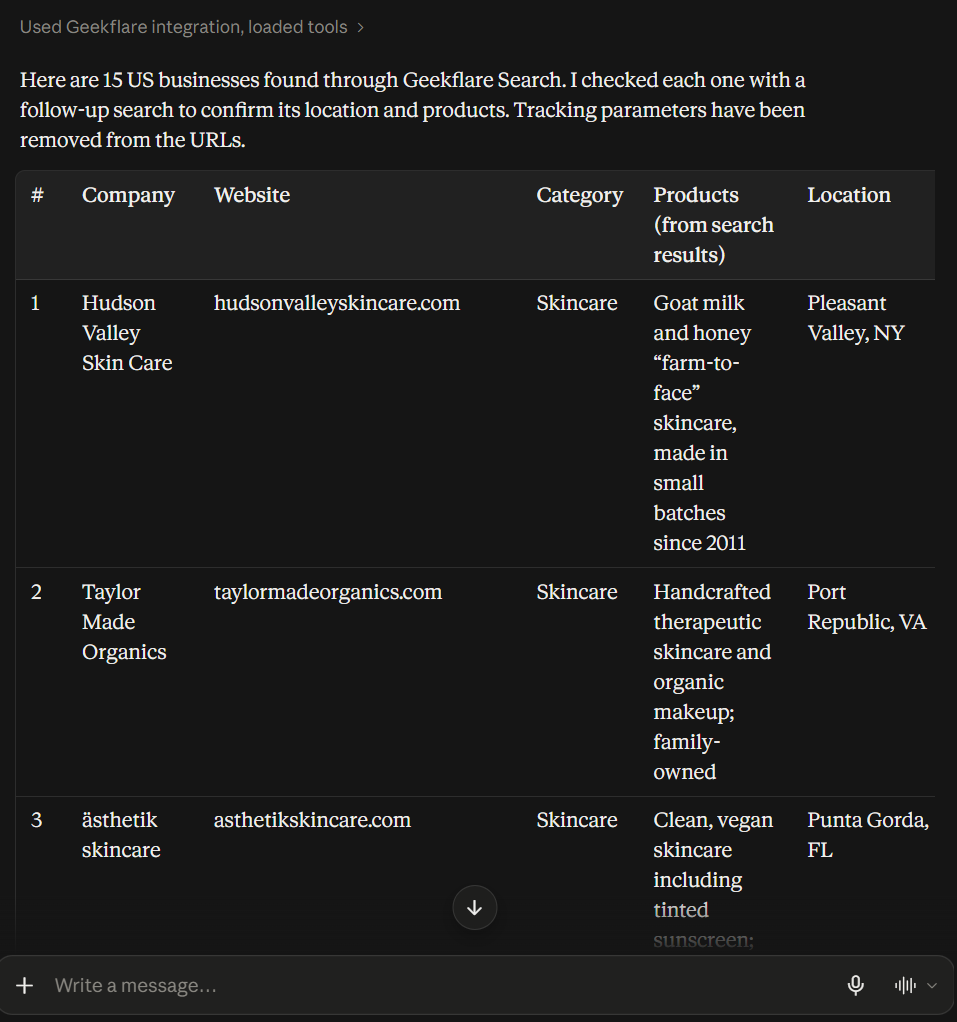
Review the company names and website URLs before moving to the next step.
Step 2: Research the Ecommerce Websites
Claude returned 15 ecommerce businesses in the previous step. Now, we’ll examine their websites to identify potential customer support opportunities.
Use this prompt:
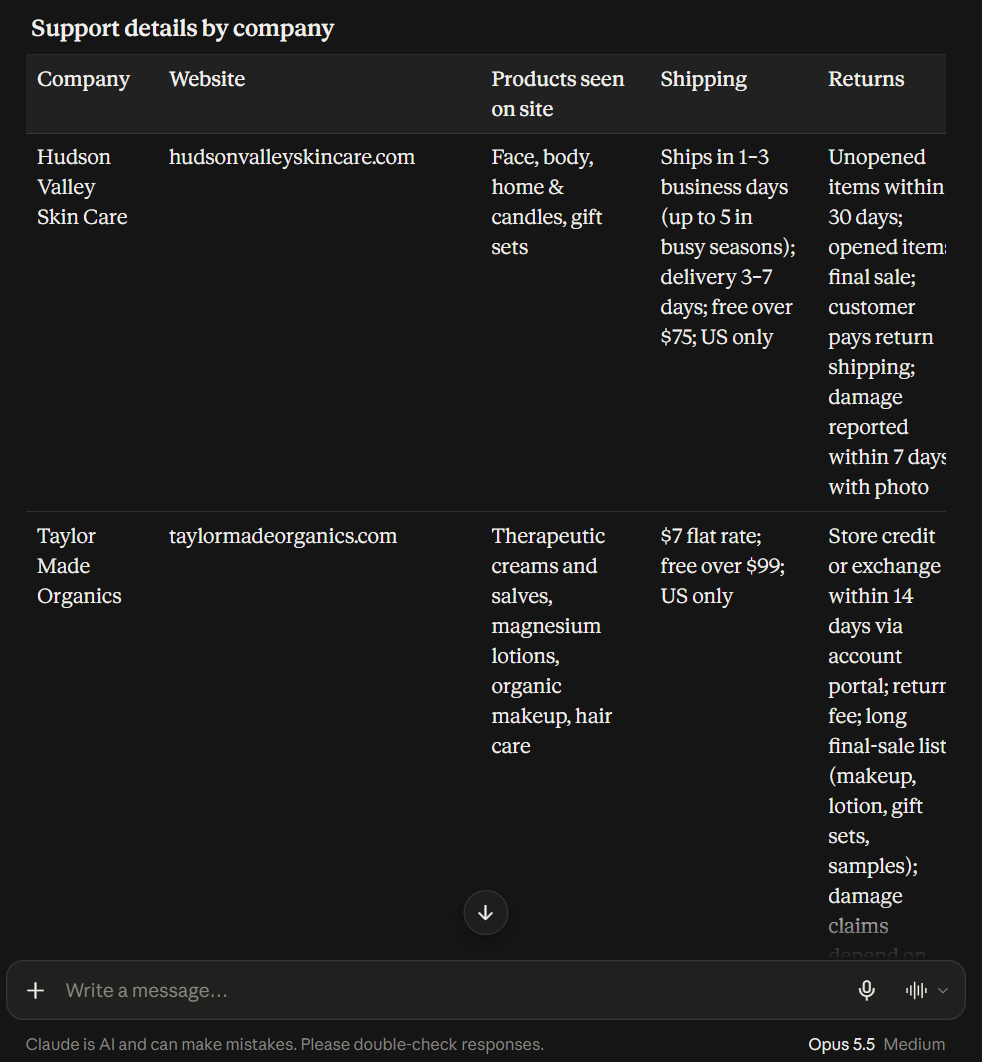
Use the Geekflare Web Scraping API to research the 15 ecommerce websites found earlier. Extract their product details, shipping and return policies, FAQs, and customer support options. Present the findings in a table with company names, website URLs, key support details, and source URLs.

Identify potential opportunities for an AI customer support chatbot based on website evidence. Do not assume a store lacks a chatbot if you cannot confirm it.
Claude can then compare the extracted information and identify potential opportunities for further lead qualification.
Step 3: Qualify and Rank Potential Leads
The website data gives us a clearer picture of each store’s products, shipping policies, and customer support options. Now, we’ll ask Claude to evaluate the businesses against our goal of selling AI customer support chatbots.
Use this prompt:
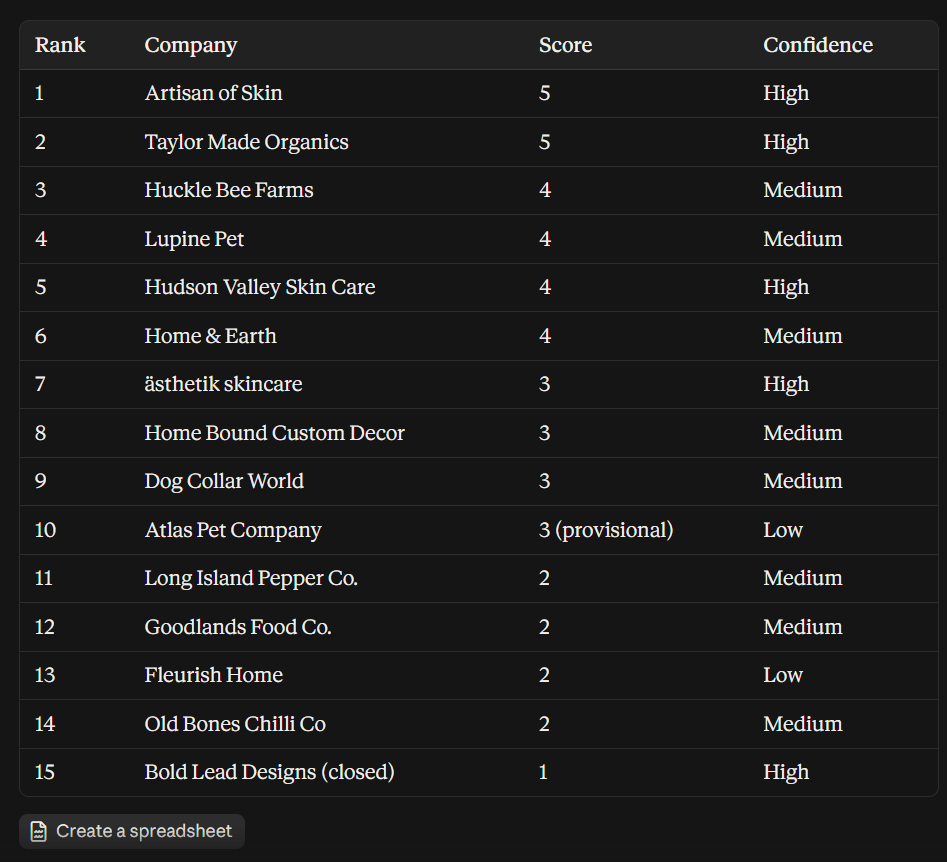
Analyze the 15 ecommerce businesses using the search results and website data collected earlier. Rank them by potential fit for an AI customer support chatbot. Consider their product range, shipping and return policies, FAQs, and existing support options. Give each business a score from 1 to 5.Claude can then rank the prospects and explain why each business may be worth contacting. Review the evidence before treating a high score as a confirmed sales opportunity.
What to Do with Your Qualified Leads
Once Claude ranks your prospects, you can use the results to plan your next sales activities.
- Verify the top prospects: Review their websites and confirm the evidence behind each lead score. Check their products, customer support options, and potential fit for your AI chatbot.
- Find decision makers: Use a business contact database to identify relevant people and their work emails. Geekflare’s Search and Web Scraping APIs help research companies but do not guarantee verified contact details.
- Personalize outreach: Ask Claude to draft emails based on each prospect’s products and website content. Mention specific customer support opportunities, such as answering shipping questions or explaining return policies.
- Track your results: Record outreach, replies, and meetings in a spreadsheet or CRM. Use the results to refine your target customer profile and improve future lead qualification.
Frequently Asked Questions
Can Claude generate B2B leads automatically?
Claude can help discover businesses, research their websites, and rank prospects when connected to suitable data sources such as Geekflare MCP. You should review the results and verify important details before outreach.
Which Geekflare APIs are useful for B2B lead generation?
The Search API helps discover relevant businesses, while the Web Scraping API extracts information from their websites. Claude can analyze the collected data to assess each prospect’s fit.
Can Claude find verified business email addresses?
Claude may find publicly listed contact details, but it cannot guarantee that an email address is valid or belongs to the right decision maker. Use a dedicated contact enrichment service to verify work emails.
How can I improve the quality of AI-generated leads?
Define a clear ideal customer profile, use reliable search results, and ask Claude to support each qualification score with website evidence. Review the highest-ranked prospects before contacting them.
Conclusion
Claude can help turn B2B lead generation into a structured workflow. Geekflare MCP connects Claude to the Search API and Web Scraping API, so you can discover potential customers, research their websites, and rank prospects based on their fit for your offer.
The quality of your lead list depends on the data you collect and the criteria you use. Review the evidence behind each prospect before reaching out, then use your sales results to improve the process over time.