



An API without authentication is like a bank with no security guard. Anyone can walk in and steal money.
That may sound dramatic, but it is exactly what happens when an API is left open. An API is often connected to real business systems: customer records, invoices, product data, user accounts, payment gateways, reports, and internal tools.
If the API does not check who is making the request, it cannot tell the difference between your own application, a trusted partner, a careless user, or an attacker running automated scripts.
The API may still work perfectly from a technical point of view, but it becomes unsafe because it responds to the wrong people.
API authentication acts as the entry check before an API gives access to data or actions. Weak authentication can lead to data exposure, account misuse, and compliance issues.
In this article, we’ll discuss what API authentication means, how it is different from authorization, and how common methods such as API keys, tokens, OAuth, and JWT work.
What is API Authentication?
API authentication is the process of proving who you are before an API gives you access.
When an application calls an API, it usually sends some form of identity proof along with the request. This could be an API key, a token, a username and password, a signed request, or another credential. The API checks that proof before it responds.
For example, imagine an online store using Stripe to accept card payments. When a customer checks out, the store sends a payment request to Stripe’s API. Stripe first checks whether the request includes a valid credential from that store. If it does, Stripe processes the request. If not, the request is rejected.
Authentication does not always mean a human user is logging in. In many API cases, one software system is proving its identity to another software system. Your billing platform may call your CRM. A partner’s system may call your inventory API. In each case, the API needs a trusted way to identify the caller.
Authentication vs. Authorization
Authentication and authorization are often discussed together, but they are not the same thing.
- Authentication confirms identity. It checks who is making the request.
- Authorization controls access. It decides what that authenticated caller is allowed to do.
For example, a company employee logs into an internal system. The login step proves who the employee is. That is authentication.
But once inside, not every employee should see payroll data, approve refunds, or delete customer records. The system still needs to check what permissions that employee has. That is authorization.
The same logic applies to APIs. An API may first check whether the request has a valid token. That proves the caller is recognized. Then it checks whether that caller can read data, update records, create users, access reports, or perform admin-level actions.
In other words, Authentication asks, “Who are you?”. Authorization asks, “What are you allowed to do?”
The 4 Main API Authentication Methods
API authentication can be done in different ways.
- API Key
- Basic Auth
- OAuth 2.0
- JWT
The right method depends on what kind of API you are building, who will use it, and how sensitive the action is.
A simple internal API may only need an API key. An older internal system may still use Basic Auth.
A customer-facing app that lets users sign in through another service needs something stronger, such as OAuth 2.0. A large modern API may use bearer tokens or JWTs to keep access fast and scalable.
The table below gives a quick comparison before we go deeper into each one.
| Method | Best For | Complexity |
|---|---|---|
| API Key | Simple, server-to-server APIs | Low |
| Basic Auth | Legacy or internal systems | Low |
| OAuth 2.0 + Access Token | User-facing apps and third-party access | Medium |
| JWT (Bearer Token) | Stateless, scalable APIs | Medium |
How API Authentication Works in Practice
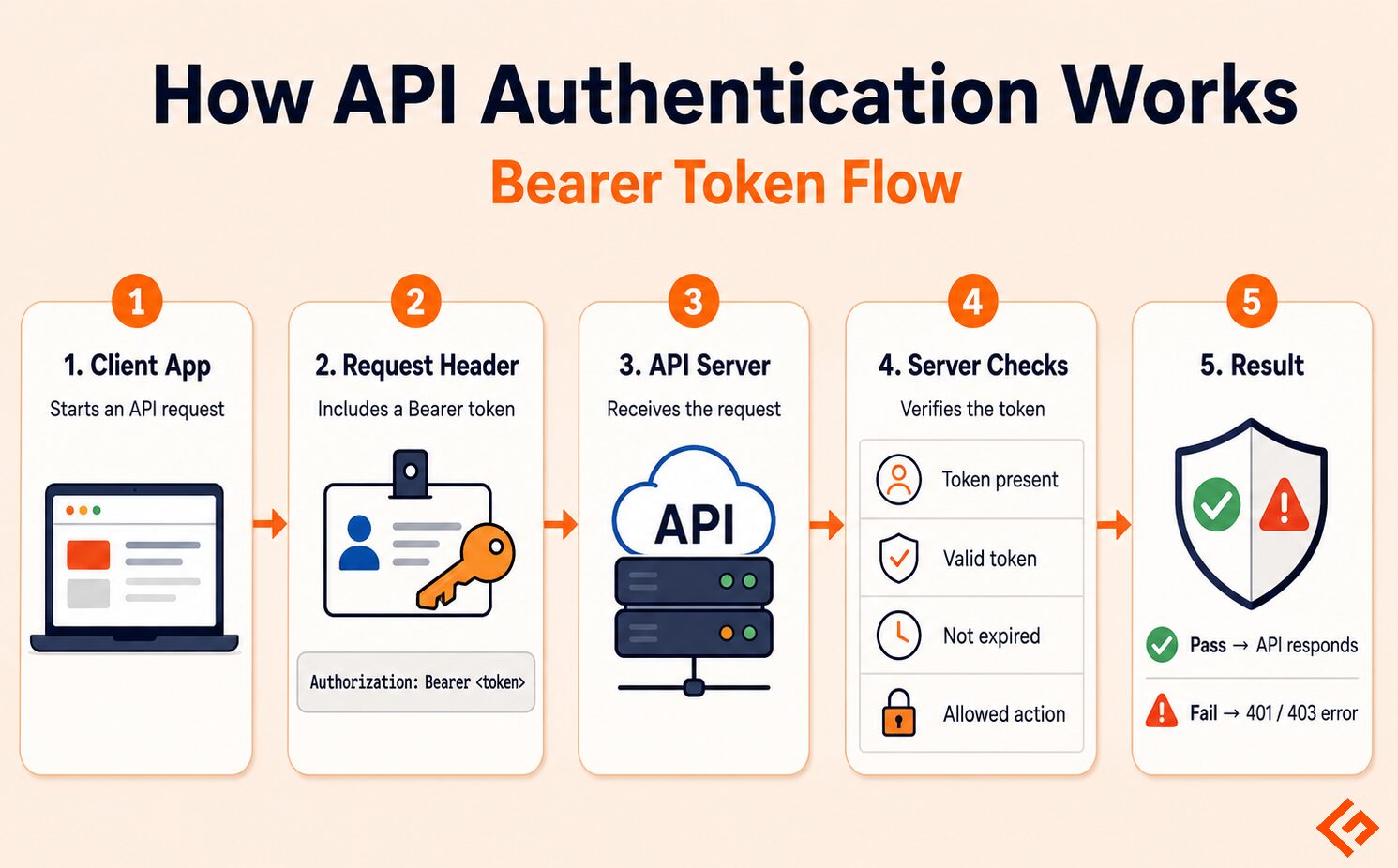
When an application calls a protected API, it sends an authentication credential along with the request. In many modern APIs, this credential is sent as a bearer token in the request header.
A request header is like the envelope around the API request. It carries extra information for the server, such as the content type, app details, and authentication proof. Here’s an example.
Authorization: Bearer <token>The <token> part is the actual access token issued to the application or user after a valid login or authentication step. In a real API call, it would be a long string of letters, numbers, and symbols.
When the server receives this request, it checks the below items before responding:
- Is the token present? If there is no token, the request is usually rejected.
- Is the token valid? The server checks whether the token was issued by a trusted system and has not been tampered with.
- Has the token expired? Many tokens work only for a limited time. This reduces risk if a token is leaked.
- What is this token allowed to access? The server checks whether the caller can perform the requested action, such as reading an order, updating a profile, or creating a payment.
If everything is fine, the API processes the request. If not, it returns an error such as 401 Unauthorized or 403 Forbidden.
Quick Security Tips
API authentication only works well when the credentials are handled carefully. Below are some precautions you should follow while handling APIs.
Never expose API keys in frontend code.
Do not place API keys directly inside JavaScript, mobile app code, or public GitHub repositories. Anything sent to a browser or user device can be viewed, copied, and misused. Keep private keys on the server side.
Always use HTTPS.
API credentials should never travel over an unsecured connection. HTTPS encrypts the request while it moves between the client and the server. This helps prevent attackers from reading tokens, keys, or other sensitive data in transit.
Set token expiry.
Access tokens should not be valid forever. If a token leaks, expiry limits how long it can be used. Many systems use short-lived access tokens and refresh them through a safer process.
Use scopes to limit access.
A token should only have the permissions it needs. For example, a reporting tool may need permission to read order data, but it should not be able to delete orders or change payment settings. Scopes reduce the damage if a credential is misused.
Which API Authentication Method Should You Use?
There is no single “best” API authentication method for every situation. The right choice depends on who is calling the API, what data is involved, and how much control you need.
For a basic starting point, use this guide:
| Scenario | Suitable Method | Why |
|---|---|---|
| Simple server-to-server connection | API Key | Works well when one trusted system talks to another trusted system. |
| Public app with user login | OAuth 2.0 + Access Token | Better when users need to grant access without sharing passwords. |
| Modern enterprise or large-scale API | JWT / Bearer Token | Useful when APIs need fast, stateless authentication across multiple services. |
| Old internal system | Basic Auth | Still found in legacy systems, but not ideal for new public APIs. |
If you are building a small internal integration, an API key may be enough. For example, your backend system calling a reporting API or a monitoring tool calling your own internal API.
If users are involved, OAuth 2.0 is a better fit. It suits cases where users sign in with their Google/Microsoft ID and allow an app to access something on their behalf.
For larger platforms, JWT-based bearer tokens are common because they can carry identity and permission details in a compact format. This helps when many services need to verify requests quickly.
Basic Auth should be treated carefully. It is simple, but it sends a username and password with the request, usually encoded rather than truly hidden. It should only be used over HTTPS and is better suited to older or tightly controlled internal systems.
Final Words
Choose the simplest API authentication method that is still safe for your use case. Do not use OAuth just to look advanced. But do not use a plain API key where user accounts, payments, or sensitive business data are involved.






