



CAPTCHAs were built to keep bots out. Web scraping, QA automation, data collection, and account-protection systems all run into the same wall:
A page asks the visitor to prove they’re human before the workflow can continue.
That friction now sits inside a billion-dollar web scraping software category and a much larger bot-defense market. Imperva’s 2025 Bad Bot Report found that automated traffic made up 51% of web traffic in 2024, with bad bots accounting for 37%.
That explains why sites keep adding stronger bot checks, and why developers keep looking for ways to solve CAPTCHA challenges in authorized automation workflows.
A CAPTCHA solver is software, an API, or a browser-based service that attempts to complete CAPTCHA challenges automatically.
Some solvers use machine learning. Others route challenges to human workers. Some combine both.
This guide is for developers, data scientists, QA testers, and automation teams who need to understand how CAPTCHA solvers work before deciding whether to build, buy, or avoid one. You’ll learn:
- What a CAPTCHA solver does
- How automatic CAPTCHA solving works at a high level
- The main solver types
- Legal and platform risks
- Average cost per solve
- When a managed scraping API is a better option
What Is a CAPTCHA Solver?
A CAPTCHA solver is a tool that automatically solves CAPTCHA challenges, usually through an API, browser extension, or cloud browser session. Its job is to return the text, image answer, interaction result, or verification token needed for a webpage to continue.
In practice, CAPTCHA solvers exist to bypass anti-automation barriers. There are legitimate uses: internal QA testing, accessibility research, bot-defense benchmarking, and scraping public data where the site owner’s rules and local law allow it.
But the same tools can also violate terms of service or trigger legal exposure when used on platforms that did not authorize automation.
CAPTCHA systems started with distorted text that optical character recognition could sometimes read. They later moved into image selection, behavior scoring, browser fingerprinting, and invisible risk analysis.
Popular CAPTCHA and bot-check formats include:
- Text CAPTCHAs
- Image selection CAPTCHAs
- reCAPTCHA v2
- reCAPTCHA v3
- Cloudflare Turnstile
- Arkose Labs FunCaptcha
- Amazon WAF CAPTCHA
- GeeTest
- hCaptcha
For a broader scraping-specific overview, Geekflare has a guide on the methods & tools to bypass CAPTCHAs.
The main distinction is how the solver gets the answer:
| Solver type | How it works | Best fit |
|---|---|---|
| AI-based solver | Uses OCR, computer vision, or behavior models | Simple text/image challenges and high-volume workflows |
| Human-based solver | Sends the challenge to a human worker | New, visual, or ambiguous challenges |
| Hybrid solver | Tries AI first, escalates hard cases to humans | Scale with better fallback accuracy |
How CAPTCHA Solvers Work
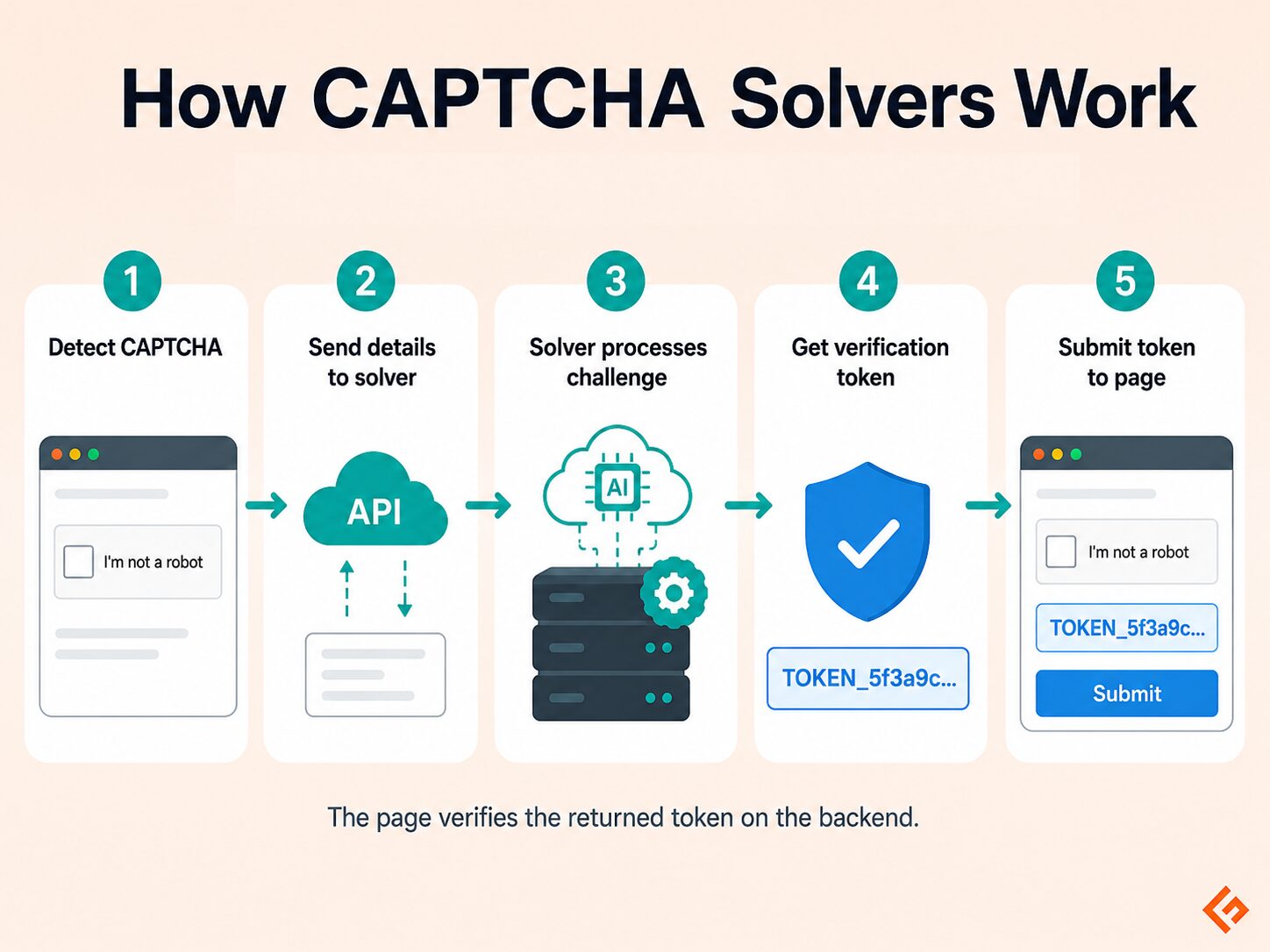
Most CAPTCHA solvers follow one of three techniques: token-based solving, browser-integrated solving, or direct AI recognition.
Token-Based Approach
A token-based solver doesn’t click the checkbox. It generates a verification string that your script submits back to the page the same way a browser would after passing the challenge. reCAPTCHA v2, reCAPTCHA v3, hCaptcha, and Cloudflare Turnstile all work this way.
The process, step by step:
- Your script detects the CAPTCHA and reads its configuration from the page source.
- It sends that configuration to the solver API.
- The solver processes the challenge through AI models, human workers, or a mix of both.
- The solver returns a verification string.
- Your script injects that string into the page and submits it.
From the page’s perspective, the verification string looks like a legitimate response. Google’s reCAPTCHA v3 documentation confirms that the backend verifies this string server-side, which is why the string itself matters more than any visible checkbox click. The checkbox is just UI. The string is what actually gets checked.
One thing to know about reCAPTCHA v3 specifically: it doesn’t show a visible puzzle at all. Instead, it returns a score between 0.0 and 1.0 based on how suspicious the session looks.
A score near 1.0 means the request looks human; a score near 0.0 means the opposite. Solvers targeting v3 have to produce a session that scores above whatever threshold the site owner set, usually around 0.5.
Browser-Integrated Approach
Browser-integrated solvers run inside a managed browser, cloud browser, proxy browser, or browser extension. Instead of sending only a site key to an API, the browser environment handles detection, challenge loading, fingerprinting, interaction, and submission.
This costs more because the provider has to run browsers, manage proxies, and handle retries. The tradeoff is a simpler implementation. Developers do not need to maintain as much CAPTCHA-specific logic.
This approach is common in QA automation, scraping workflows with JavaScript-heavy pages, and internal testing, where the goal is to keep a browser workflow moving.
AI Recognition Process
AI-powered CAPTCHA solvers use different models depending on the challenge.
For text CAPTCHAs, the solver may use OCR and pattern recognition to identify distorted letters or numbers. Image CAPTCHAs may rely on image classification models to detect traffic lights, buses, crosswalks, animals, or other objects.
For score-based systems like reCAPTCHA v3, the challenge is less about recognizing an image and more about browser behavior, session quality, and risk signals.
Cloudflare Turnstile works in a similar risk-analysis direction. Cloudflare says Turnstile can run non-interactive browser challenges, such as proof-of-work, proof-of-space, web API probing, and browser-behavior checks, often without showing a visual puzzle.
Risk Factors
Using CAPTCHA solvers against third-party platforms can create real risk. Major CAPTCHA providers and protected platforms use CAPTCHAs as an anti-abuse control.
Using an automatic captcha solver to bypass those controls will often violate the target website’s terms of service. Consequences can include blocked IPs, suspended accounts, lost API access, legal notices, or termination of service.
There is also a legal risk. In the United States, the Computer Fraud and Abuse Act (CFAA) applies to unauthorized access to protected computers. Case law around scraping is mixed and fact-specific.
Public-data scraping has received some protection in cases like hiQ Labs v. LinkedIn, but courts have also treated bypassing blocks or ignoring revoked access as higher-risk behavior.
Similar laws exist elsewhere, including the UK Computer Misuse Act and privacy laws such as GDPR when personal data is involved.
Use CAPTCHA solvers only for workflows you are authorized to automate. For production scraping, review the target site’s terms, robots.txt, API options, data rights, and local law before you build around a solver.
Types of CAPTCHA Solvers
Different solver types fit different workflows. Keep the choice tied to the problem, not the tool.
AI-Powered Solvers
AI-powered solvers use OCR, image classification, and pattern recognition to solve CAPTCHA challenges without human review.
Pros & Cons
PROS
CONS
Human-in-the-Loop Services
Human-in-the-loop services send challenges to distributed workers who solve them manually.
Pros & Cons
PROS
CONS
Hybrid Solutions
Hybrid solvers use AI first and send failed or low-confidence challenges to humans.
Pros & Cons
PROS
CONS
Browser Extensions
Browser extensions are useful for manual workflows, accessibility testing, and QA sessions where a human is still supervising the browser.
Pros & Cons
PROS
CONS
If you need a CAPTCHA solver for scraping, you may not need to build the solving layer yourself.
A managed scraping API can handle browser rendering, proxy rotation, blocking, retries, and compliance controls in one place.
For that path, consider the Geekflare Web Scraping API instead of maintaining CAPTCHA handling in-house.
What’s the Average Cost per Solve?
CAPTCHA solver pricing usually appears as cost per 1,000 successful solves.
Simple image or text CAPTCHAs often cost about $0.40 to $1.00 per 1,000 solves.
Common token-based challenges, such as reCAPTCHA v2, reCAPTCHA v3, and Cloudflare Turnstile, often land around $1.00 to $3.00 per 1,000 solves. More difficult challenges, enterprise variants, or systems that need more human review can cost more.
Recent public pricing examples:
CAPTCHA type | Typical public range per 1,000 solves | Notes |
|---|---|---|
| Image/text CAPTCHA | $0.40–$1.00 | Fastest and cheapest category |
| reCAPTCHA v2 | $1.00–$2.99 | Often human or hybrid solved |
| reCAPTCHA v3 | $1.00–$2.99 | Score quality matters |
| Cloudflare Turnstile | $1.20–$1.45 | Token-based flow |
| Enterprise/advanced CAPTCHA | $1.50–$50+ | Price depends on type and difficulty |
2Captcha lists reCAPTCHA v2 at $1 to $2.99 per 1,000, image CAPTCHA at $0.50 to $1 per 1,000, and Cloudflare Turnstile at $1.45 per 1,000.
AZcaptcha lists reCAPTCHA v2 at $1 per 1,000, Cloudflare Turnstile at $1.20 per 1,000, and image CAPTCHA at $0.40 per 1,000.
Prices change often, so check the latest vendor pages before budgeting. For a broader vendor shortlist, see Geekflare’s list of CAPTCHA solver APIs.
CAPTCHA Solver Cost Formula
Use this quick estimate before choosing a provider:
Monthly CAPTCHA cost =
(monthly protected requests × CAPTCHA trigger rate × cost per solve) / 1,000
Example:
500,000 monthly requests × 12% CAPTCHA rate × $2.00 per 1,000 solves
= $120/month
That estimate excludes proxy costs, failed retries, browser runtime, engineering time, and account/IP churn. In real scraping systems, those extra costs can exceed the solver bill.
FAQs
What is automatic CAPTCHA solving?
Automatic CAPTCHA solving is the process of using software, an API, an AI model, a human worker network, or a browser automation tool to complete CAPTCHA challenges without manual input from the person running the workflow.
How do you enter CAPTCHA automatically?
In authorized test or automation environments, teams usually enter CAPTCHA automatically through a solver API or managed browser that returns a verification result to the session. Avoid using this against third-party sites unless you have permission and have reviewed the site’s terms.
Is it legal to use a CAPTCHA solver?
It depends on authorization, jurisdiction, site terms, data type, and bypass behavior. Internal testing is lower risk. Bypassing anti-bot controls on third-party platforms can violate terms of service and may create legal exposure under laws such as the CFAA in the US.
Conclusion
A CAPTCHA solver is an automation tool that helps software complete CAPTCHA challenges through AI, human workers, or a hybrid system. It can keep QA tests, research crawlers, and approved automation workflows moving, but it is not a free pass around website controls.
For scraping projects, compare the cost of automatic CAPTCHA solving against a managed scraping API. Once you add proxies, browsers, retries, compliance review, and maintenance, in-house CAPTCHA handling can become the most fragile part of the stack.






