



A few years ago, an indicator idea meant a week of homework. You learned Pine, MQL, or EasyLanguage first. Then you struggled with the compiler. Only then did a line appear on your chart.
That order has flipped. Now, most major platforms take a plain description and hand back code that compiles and backtests.
MetaQuotes says MetaTrader 5 users pushed more than 1 trillion tokens through its assistant within three weeks of launch, according to its August 2026 update.
AI shows up in four different ways, and confusing them leads to painful tool choices:
- LLM code generation: A model writes Pine, MQL5, NinjaScript, JavaScript, or Python from your prompt
- Evolutionary search: A genetic engine breeds thousands of rule sets and keeps the survivors
- ML and RL models: The framework trains a model that learns the signal from data
- MCP servers: Your own coding agent, such as Cursor or Claude Code, drives the platform through tools
Generated code still needs validation. A script that compiles can still repaint, peek into the future, or collapse once fees apply.
This guide compares top frameworks on what developers care about like language, runtime, validation loop, APIs, and deployment.
Need market data before you write a single line? Start with these guides to stock market APIs and cryptocurrency APIs.
Frameworks Comparison
| Framework | Type | Language | AI Capability | Backtesting | Deployment | License/Price |
| dxScript | Scripting platform | JavaScript (ES2024) | Plain English to indicator | Backtesting service API | Charts, embedded apps | Commercial |
| QuantConnect LEAN + Mia | Algo platform | Python, C# | Agentic code and backtest loop, MCP | Event-driven, cloud, or local | Paper and live, many brokers | Open-source engine, free tier |
| Qlib + RD-Agent | Research framework | Python | LLM factor and model mining | Qlib backtester | Research online, serving | MIT license |
| MetaTrader 5 | Trading platform | MQL5 | Agentic assistant, native MCP | Strategy Tester | EAs through brokers | Free |
| NinjaTrader | Futures platform | NinjaScript (C#) | Prompt-to-compiled backtested strategy (beta) | Strategy Analyzer | Desktop, futures brokerage | Free and paid tiers |
| TradingView Pine Script v6 | Charting platform | Pine Script v6 | AI copilot writes and applies Pine, and a data MCP server (beta) | Strategy Tester | Cloud charts, alerts, webhooks | Free and paid tiers |
| StrategyQuant X | Strategy generator | No-code exports MQL and EasyLanguage | Genetic search and AI credits | Tick-level engine, robustness tests | Exported to MT4/MT5, TradeStation, MultiCharts, JForex | One-time or 12 monthly payments for a lifetime license |
| vectorbt PRO | Research library | Python, Rust | Chat, doc search, MCP server | Vectorized parameter sweeps | Your own infrastructure | Monthly and annual subscription along with lifetime option |
| cTrader Algo | Trading platform | C#, Python | External LLMs through official guides | Built-in backtest and optimization | Desktop or cTrader cloud | Free for end-users |
| Freqtrade + FreqAI | Crypto bot | Python | Self-retraining ML and RL models | Backtest with emulated retraining | Dry-run and live on exchanges | Free and open-source under GPLv3 |
| TradingAgents | Agent framework | Python | Multi-agent LLM analysis | Data-pinned research runs | Research, your own execution layer | Apache 2.0 license |
Frameworks
Disclaimer
This guide covers development tools and is not financial advice.
01. dxScript (dxFeed)
JavaScript scripting platformBrokers and fintechs adding AI-generated indicators to their own charts
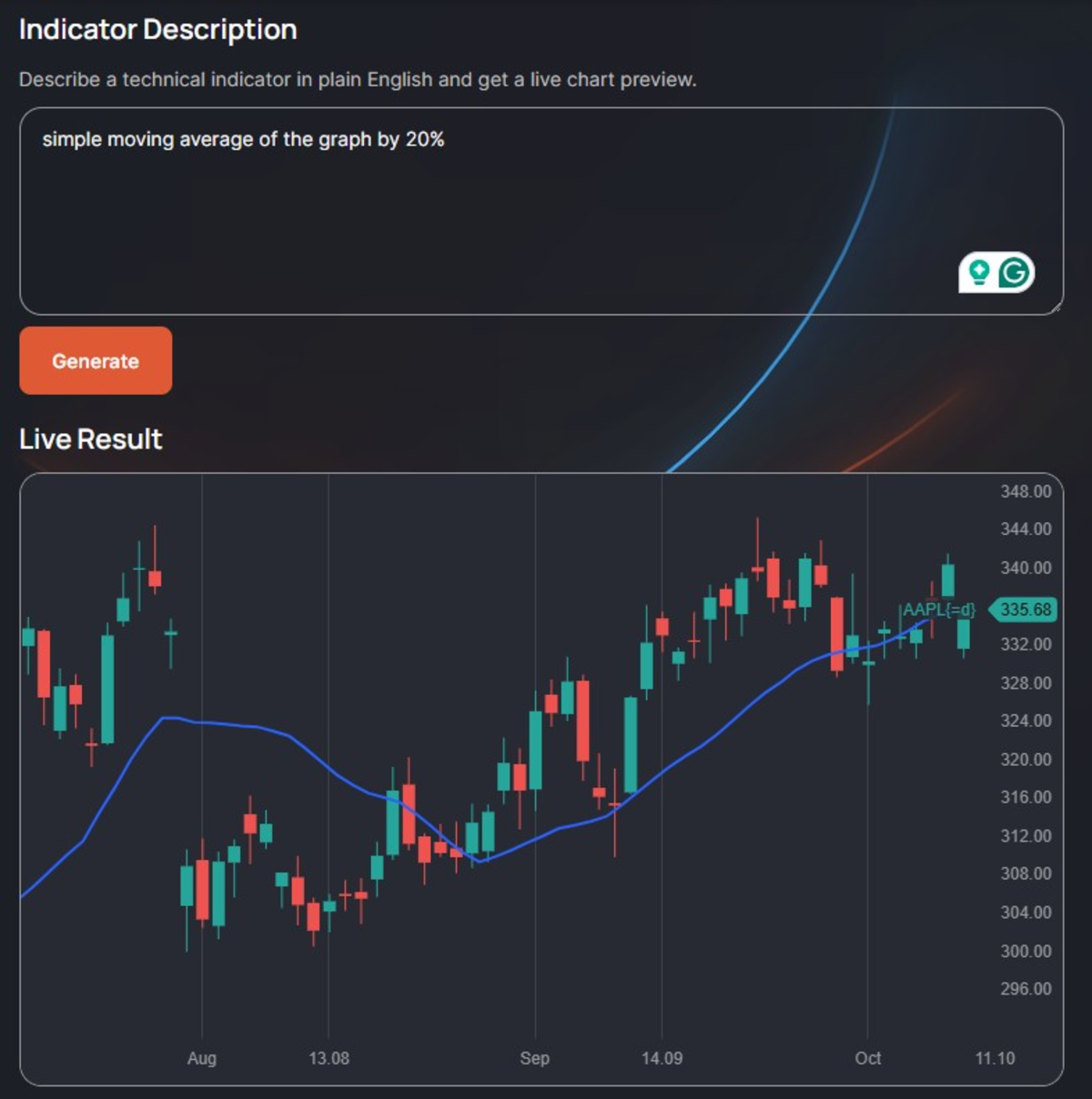
dxScript is a JavaScript-based scripting layer for brokers and fintech teams that embed charts in their own products. It ships in three tiers. Light is a client-side engine for internal dev teams. Pro adds AI generation for end users. Enterprise adds a sandboxed backend, a backtesting engine, and strategies.
Scripts run with ECMAScript 2024 support, allowing arrow functions, destructuring, and optional chaining to work as you expect. Every script has an init section that runs once and an onTick function that runs per bar. The runtime docs list what the sandbox blocks: timers, network calls, modules, and Node or browser globals.
The AI takes a plain-English description and returns dxScript with a live chat preview. Pro accepts English prompts, and Enterprise accepts any language. The vendor has not disclosed the model. The docs also publish llms.txt and llms-full.txt, which allow your own coding agent to load the full language reference.
Validation runs through three platform services on dxLink. The Validator compiles a script against a synthetic candle snapshot and returns its declared inputs and outputs. Backtesting runs over historical candles and returns per-bar outputs plus trade reports.
IndiChart streams live candles and indicator values over WebSocket. Validator and Backtesting accept HTTP or WebSocket RPC to fit both inside a CI job. Server-side alerts and order-routed strategies are marked as coming soon on Enterprise.
// Trend spread: fast SMA minus slow SMA

const fast = input.double("fast", 10, {min: 2, max: 100});

const slow = input.double("slow", 30, {min: 5, max: 300});

function onTick() {

    const spread = ta.sma(close, fast) - ta.sma(close, slow);

    const tone = spread > 0 ? color.GREEN : color.RED;

    spline(spread, {title: "Spread", color: tone});

    spline(0, {title: "Zero"});

}
Pros and Cons
Pros & Cons
PROS
CONS
Pricing
dxScript is licensed to brokers and platforms through sales. There is no self-serve plan.
02. QuantConnect LEAN + Mia
Algorithmic trading platformPython and C# developers who want one codebase from research to live trading
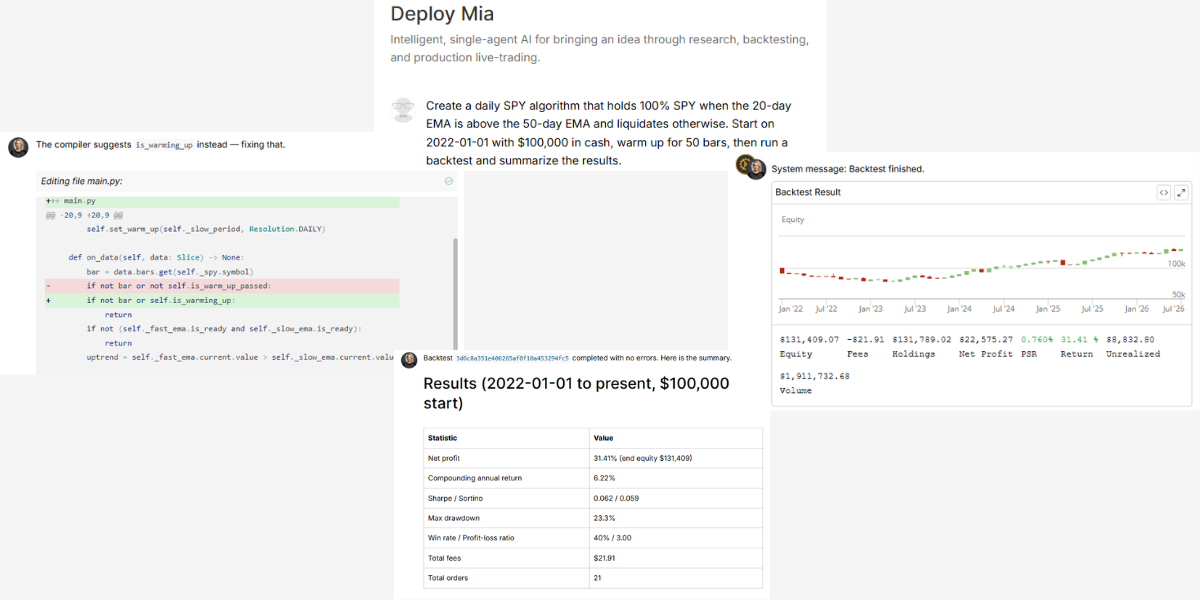
LEAN is an open-source, event-driven engine for multi-asset algorithms, with 22k+ GitHub stars. QuantConnect is the cloud built around it. The pairing suits developers who want one codebase from research notebook to live broker.
You write Python or C# on .NET. Code runs in QuantConnect’s cloud or locally in Docker through the LEAN CLI, with commands, such as lean backtest, lean optimize, and lean live.
Mia is the assistant inside the Algorithm Lab. In the Research Pipeline, you describe an idea on a card and deploy an agent against it. The AI docs list predefined agents for ideas, research, research validation, backtesting, paper testing, and live monitoring. These agents write code, run backtests, read results, and iterate.
The docs say you can connect OpenAI, Claude, or self-hosted LLMs. A remote MCP server lets Claude Code, Cursor, or Copilot create projects, run backtests, and deploy live algorithms. It requires a paid plan with an assistant node.
The engine reports full trade statistics per run, and every tier includes a PDF backtest report. Cloud optimization is an add-on that launches parallel backtests to measure parameter sensitivity, which is your first defense against overfitting.
from AlgorithmImports import *

class EmaCross(QCAlgorithm):

    def initialize(self):

        self.set_start_date(2022, 1, 1)

        self.set_cash(100_000)

        self.spy = self.add_equity("SPY", Resolution.DAILY).symbol

        self.fast = self.ema(self.spy, 20)

        self.slow = self.ema(self.spy, 50)

        self.set_warm_up(50)

    def on_data(self, data: Slice):

        if self.is_warming_up:

            return

        if self.fast.current.value > self.slow.current.value:

            self.set_holdings(self.spy, 1.0)

        else:

            self.liquidate(self.spy)
Pros and Cons
Pros & Cons
PROS
CONS
Pricing
| Plan | Price |
| Free | $0 |
| Researcher | $84/month |
| Team | $168/user/month |
| Trading firm | $480/user/month |
| Institution | $1,272/user/month |
03. Microsoft Qlib + RD-Agent
Open-source quant research frameworkML engineers automating factor and model research on equities
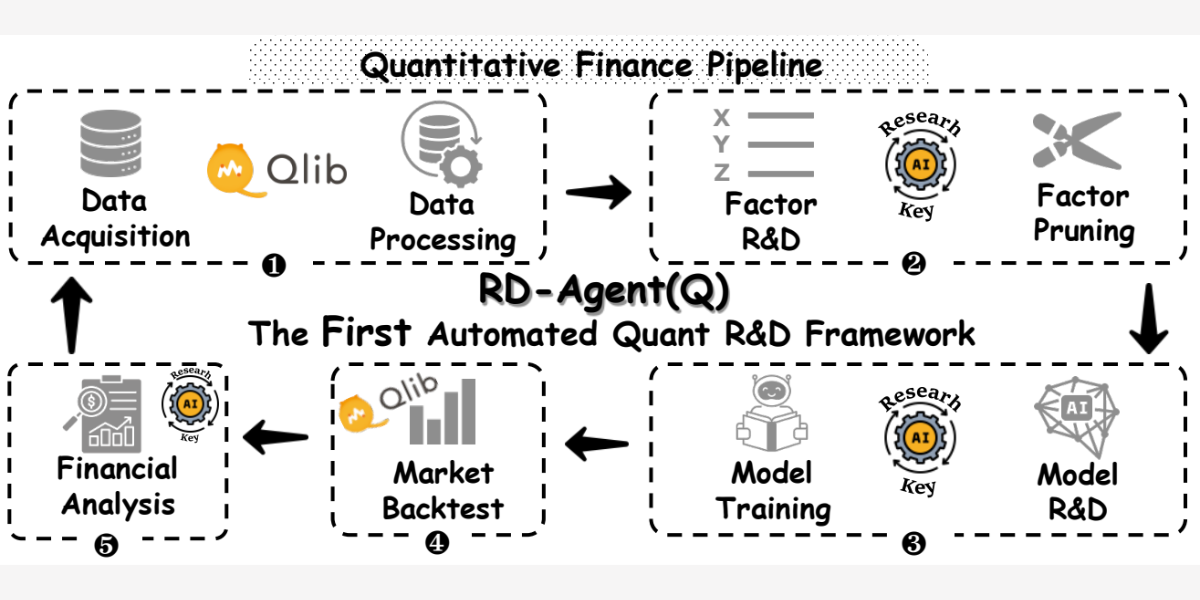
Qlib is an AI-oriented quant research platform with 49k+ GitHub stars. RD-Agent sits on top and automates factor and model research with LLM agents. Together, they suit ML engineers and quant researchers who work on equities.
Qlib is pure Python, supports versions 3.8 to 3.12, and is installed with pip install pyqlib. RD-Agent is stricter. It supports Linux only, needs Docker, and is tested on Python 3.10 and 3.11.
RD-Agent runs a research loop. It proposes a hypothesis, writes the factor or model code, executes it in Docker, reads the backtest feedback, and refines the next attempt. Separate commands cover factor evolution, model evolution, joint optimization, and factor extraction from financial reports.
LiteLLM is the default backend that allows you to point it at OpenAI, Azure, DeepSeek, or another provider that supports chat, JSON mode, and embeddings. The quant scenario shipped in August 2024, and its paper was accepted at NeurIPS 2025. The authors say a full run costs under $10 in LLM calls.
Validation comes from Qlib’s data-processing, model-training, and backtesting pipeline. Reports cover information coefficient, signal autocorrelation, and portfolio results with and without trading costs. The qrun tool executes an entire workflow from one YAML file.
Qlib ships the Alpha158 and Alpha360 datasets for US and China markets. The README notes that the official dataset download is temporarily disabled and points to a community source built on Yahoo Finance data. Online serving and automatic model rolling are built in. Broker connectivity is absent, which means you need to wire execution yourself.
# Joint factor and model evolution on Qlib

pip install rdagent

rdagent health_check

rdagent fin_quant

# Review what the agents tried

rdagent ui --port 19899 --log-dir log/
Pros and Cons
Pros & Cons
PROS
CONS
Pricing
Free under the MIT license. You pay your LLM provider for API usage.
04. MetaTrader 5 (MQL5) + MetaEditor AI Assistant
Trading platform with a built-in AI assistantForex and CFD developers building Expert Advisors in MQL5
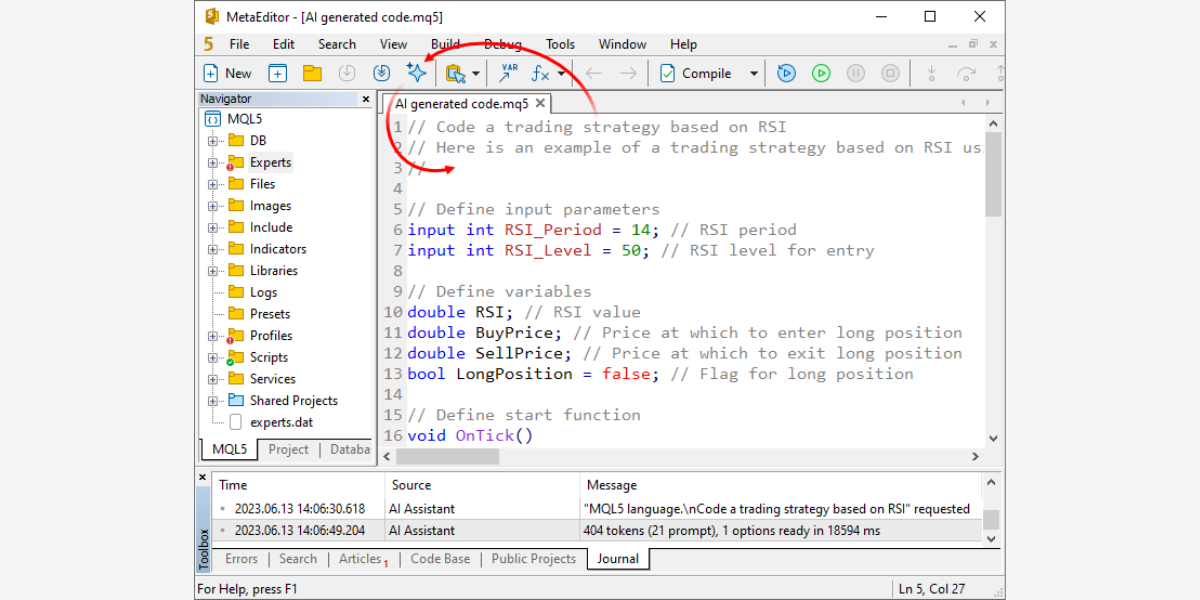
MetaTrader 5 is a multi-asset terminal that brokers distribute, and MQL5 is its C++-style compiled language for indicators and Expert Advisors. It suits developers who trade forex and CFDs through MT5 brokers.
You write and compile MQL5 in MetaEditor, and programs run inside the terminal. A Python package lets external scripts pull data and send orders through the same terminal.
The big change arrived with Build 6060 on July 23, 2026. It added native MCP support and an agentic assistant in both the terminal and MetaEditor. The assistant generates new MQL5 programs, analyzes existing code, detects errors, explains algorithms, and helps with refactoring.
Signing in with an MQL5.community account enables the free MQL5 Lite plan automatically. You can also bring your own keys for OpenAI, Anthropic, Gemini, DeepSeek, or Ollama. External MCP clients, such as Claude Code and OpenAI Codex, connect to the same tools. Separate settings control the AI’s access to network requests and command-line operations.
Validation happens in the Strategy Tester, which replays history across threads and runs parameter optimization. A later build added an MCP tool for stopping the tester. This helps an agent manage the full compile and test cycle.
Data comes from your broker’s feed. Expert Advisors run in your terminal or on a hosted VPS, and ONNX support lets you ship trained models inside an EA.
Pros and Cons
Pros & Cons
PROS
CONS
Pricing
The terminal, MetaEditor, and the MQL5 Lite AI plan are free. Usage on your own API keys is billed by that provider.
05. NinjaTrader (NinjaScript) + AI Strategy Builder
Futures trading platformFutures traders who want plain-English ideas compiled and backtested in one window
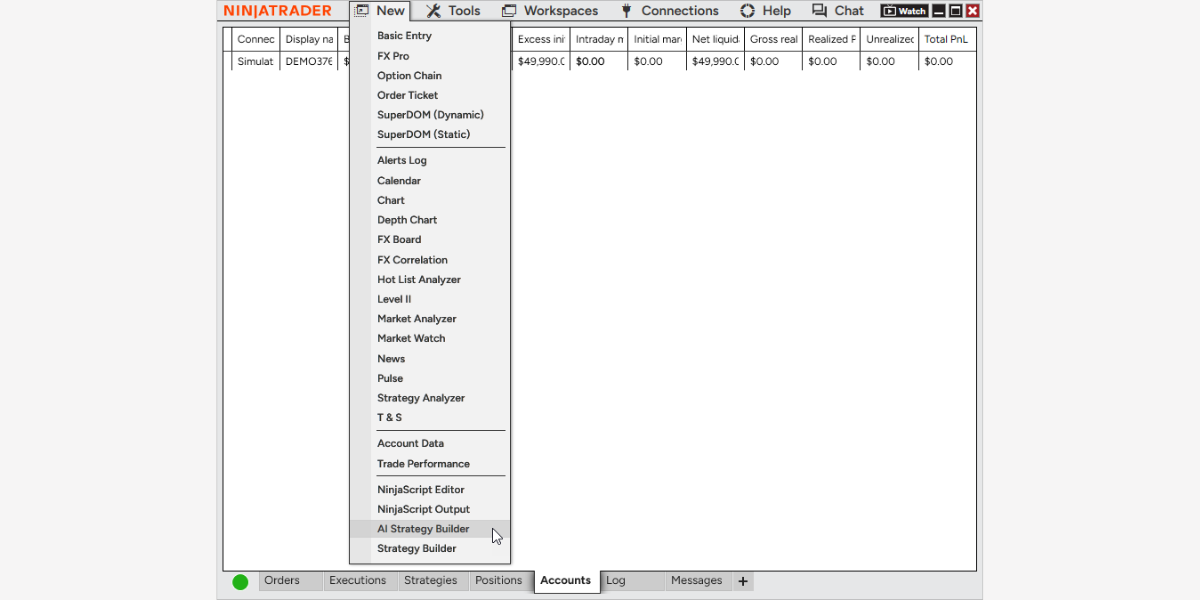
NinjaTrader is a futures-focused desktop platform with its own brokerage, built for active futures traders who automate. NinjaScript is C# on .NET that gives you a full general-purpose language, real debugging, and the wider .NET ecosystem. Strategies run inside NinjaTrader Desktop.
The AI Strategy Builder is in beta and opens from the Control Center. One Window pairs a chat assistant with the Strategy Analyzer. You describe entries, exits, and risk rules in plain English.
The system generates NinjaScript, compiles it, and runs a backtest in the same window. You keep chatting to add filters or adjust stops, and it generates and retests each time.
NinjaTrader runs a compile check on your environment before generation starts, and existing errors must be fixed first. If your prompt references an unavailable indicator, the generation inserts a placeholder in the code. Hourly and daily token limits apply. The features are in English only and are rolling out in phases. The vendor has not disclosed the model.
Validation relies on the Strategy Analyzer, where you change parameters and return instantly. The docs state plainly that generated strategies are a starting point and need code review before live use. Data and execution flow through the brokerage, and simulated trading is free with no time limit.
Pros and Cons
Pros & Cons
PROS
CONS
Pricing
| Plan | Price |
| Free | $0 |
| Monthly | $99/month |
| Lifetime | $1,499 one-time |
06. TradingView Pine Script v6 + AI Copilot
Charting platform and scripting languageTraders who build and share indicators on TradingView charts
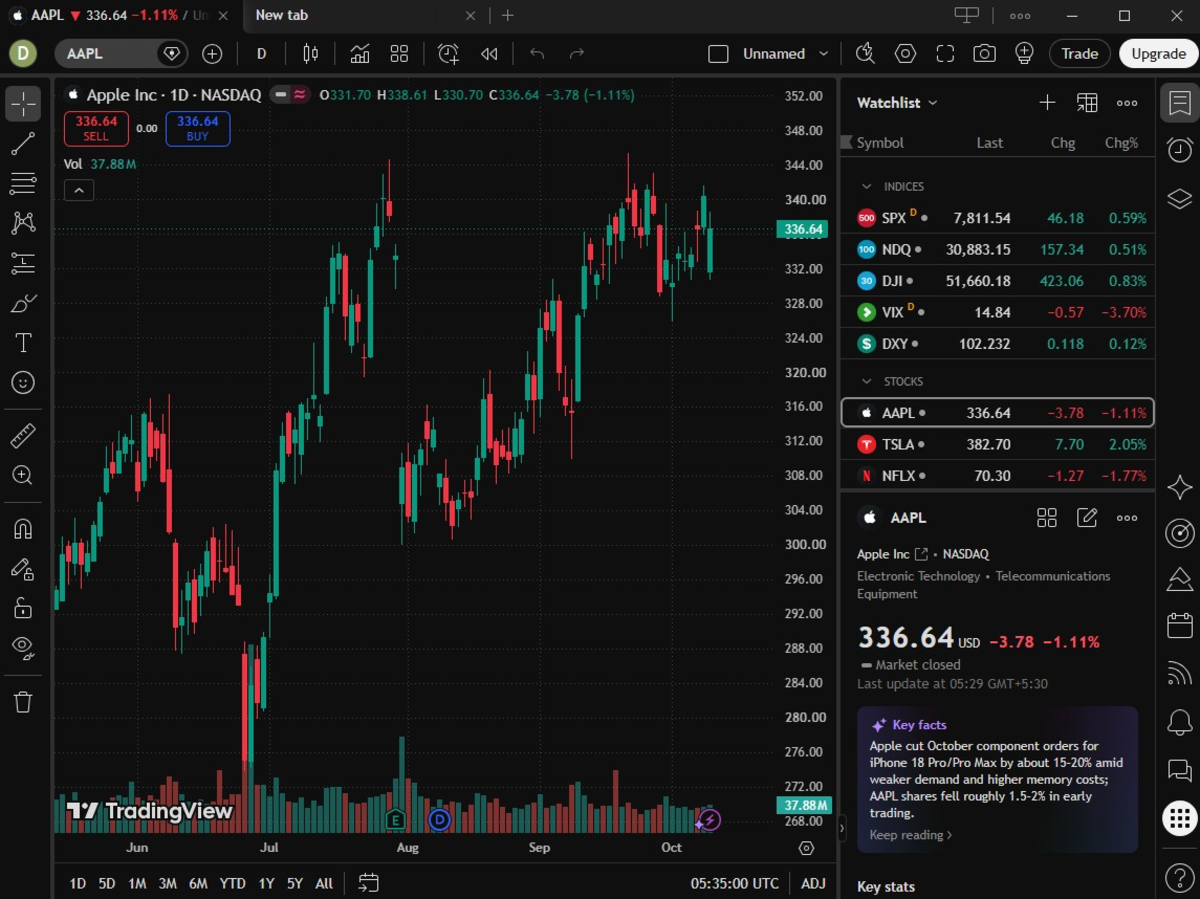
Pine Script v6 is TradingView’s cloud-run language for indicators and strategies. It suits developers who publish scripts or prefer a charts-first workflow. Scripts execute on TradingView’s servers bar by bar. You host nothing, and scripts cannot make outbound HTTP calls. Signals leave the platform through alerts and webhooks.
AI Copilot lives in the side panel of Supercharts and reads what is on your chart. It writes Pine indicators and strategies and applies them to the chart right away. The add-on carries a monthly usage limit and is unavailable in the mobile apps. TradingView has not named the underlying model.
TradingView also runs an official MCP server, in beta on Essential and above. It gives Claude, ChatGPT, Codex, and other MCP clients market data, screeners, news, fundamentals, watchlists, and price alerts. It exposes no Pine or backtesting tools yet, and calls are limited to about 100 per minute.
The Pine compiler is your first validation gate, and the Strategy Tester is the second. Copilot can read backtest output and break down profit factor, drawdown, and win rate. Treat that summary as a prompt for your review, because the vendor itself warns that Copilot can make mistakes.
//@version=6

indicator("EMA Spread", overlay = false)

fastLen = input.int(20, "Fast EMA")

slowLen = input.int(50, "Slow EMA")

spread  = ta.ema(close, fastLen) - ta.ema(close, slowLen)

plot(spread, "Spread", color = spread >= 0 ? color.teal : color.red, style = plot.style_histogram)

hline(0)
Pros and Cons
Pros & Cons
PROS
CONS
Pricing
| Plan | Price (Billed Annually) |
| Basic | Free |
| Essential | $12.95/month |
| Plus | $29.95/month |
| Premium | $59.95/month |
| Ultimate | $199.95/month |
Copilot is a separate monthly add-on for paid plans, priced at checkout.
07. StrategyQuant X
No-code strategy generatorTraders who want genetic strategy search and robustness testing without coding
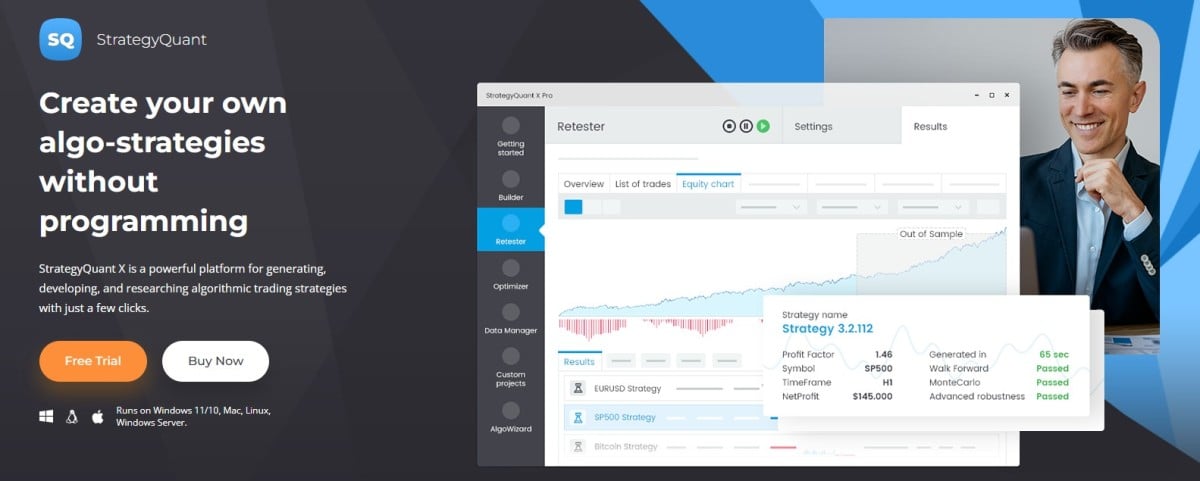
StrategyQuant X is a desktop strategy generator that writes trading systems without you coding them. It suits developers and traders who want machine search across a large rule space.
You don’t need to learn a language up front. You pick building blocks, such as indicators, price patterns, and order types. The Builder then creates strategies through random generation or genetic evolution.
The AI here is evolutionary search first. Candidate strategies mutate and recombine, and only those that pass your filters survive. Newer LLM-backed features run on AI credits that come with each license, including a Results AI plugin on higher tiers.
Validation is where this tool earns its price. The engine backtests at tick precision. The Professional tier adds Monte Carlo simulations, system parameter permutation, walk-forward optimization, and a walk-forward matrix. Custom projects chain builder, restester, optimizer, and filter steps into one repeatable workflow.
Free Dukascopy tick data covers forex, CFDs, and crypto with more than 10 years of history. Equities and futures data are a paid subscription, included for life on Ultimate. Finished strategies export as source code for MetaTrader 4 and 5, TradeStation, MultiCharts, and JForex.
Pros and Cons
Pros & Cons
PROS
CONS
Pricing
| Plan | One-time Payment | 12 Monthly Payments (Lifetime License) |
| Starter | $1290 | $129/month |
| Professional | $1490 | $149/month |
| Ultimate | $2900 | $290/month |
08. vectorbt PRO
Python backtesting and research libraryPython quants testing thousands of parameter combinations at once
vectorbt PRO is a Python and Rust engine for backtesting, parameter optimization, and quantitative research at scale. It suits Python quants who think in arrays. Version 2026.9.5 added native Rust simulators and streaming indicators. Members get full source access.
The AI layer helps you write and run VBT code. SearchVBT uses a retrieval pipeline that embeds, ranks, and returns the most relevant documents from the API reference, private docs, and Discord history.
ChatVBT forwards those results to an LLM for an answer. Function calling works across LLM providers. An MCP server lets Claude Code or Cursor inspect APIs and execute real VBT code. A command-line interface arrived in version 2026.4.7 with vbt chat, vbt interact, and vbt mcp serve.
Vectorized simulation tests thousands of parameter combinations in one pass. The library automates cross-validation, combines indicators from different timeframes, and splits backtests into batches to cut memory use.
vectorbt PRO has no broker layer. Streaming simulations process new data as it arrives and emit signals and orders. You route those through your own broker or exchange integration.
Pros and Cons
Pros & Cons
PROS
CONS
Pricing
| Plan | Starting Price |
| Monthly | $25/month |
| Annually | $20/month |
| Lifetime | $500 one-time |
09. cTrader Algo
Algo trading framework in cTraderDevelopers who want C# or Python bots on a broker platform
cTrader Algo is the automation framework inside the cTrader trading platform. It suits developers who want mainstream languages on a broker-hosted platform. You build three algorithm types: cBots for trading, indicators, and plugins.
You write C# or Python. Both are first-class, and Python algos resolve third-party packages, such as pandas and numpy, from a requirements.txt file. You need the .NET SDK and cTrader for Windows or Mac. Code lives in the built-in editor or an external IDE.
The AI story is different here. The official docs describe no built-in generator. They walk you through creating a cBot with ChatGPT, Claude, Gemini, or another model, then pasting the result into the editor. A third-party plugin in the cTrader Store, CodePilot, generates C# cBot code from plain English. Because the languages are C# and Python, general-purpose LLMs write competent first drafts.
The build step is your compile gate. A failed build returns a summary of every error, which you feed straight back to your model. Built-in backtesting and optimization follow, and you can define custom fitness functions to rank optimization passes.
You create algorithms on the desktop. Existing cBots can then run in the cloud from any cTrader app, keeping your laptop closed.
Pros and Cons
Pros & Cons
PROS
CONS
Pricing
cTrader Algo is free for traders. You get it with the cTrader platform through a supporting broker.
10. Freqtrade + FreqAI
Open-source crypto trading botPython developers running self-hosted crypto bots with self-retraining models
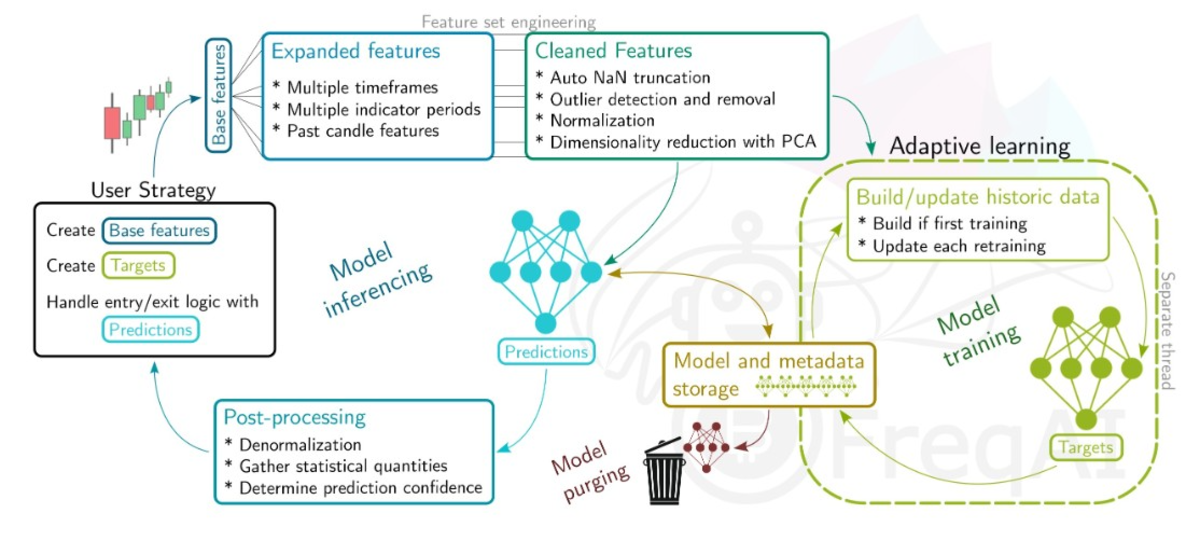
Freqtrade is an open-source Python trading bot for crypto exchanges, and FreqAI is its machine learning module. It suits Python developers who want models that learn signals. FreqAI writes no strategy code for you.
You define base indicators and target labels inside a normal strategy class. FreqAI then trains a model per pair and retrains it on a fixed schedule to follow changing market conditions. Retraining runs on a separate thread, or on a GPU, away from inference and order handling.
The module handles the tedious ML plumbing. It builds feature sets of more than 10,000 features from simple definitions, normalizes data, removes outliers, and reduces dimensions with PCA. The docs list eight example models, such as classifiers, regressors, and a convolutional neural network. It also includes a reinforcement learning path.
Validation is honest by design. The backtesting module emulates periodic retraining on historical data. As a result, a backtest reflects how the live bot will behave. Freqtrade also ships lookahead and recursive analysis commands that flag biased strategies. Dry-run mode trades paper funds against live exchange data.
Deployment is self-hosted. Dedicated Docker tags bundle FreqAI, PyTorch, and RL dependencies. You control the bot through a REST API, Telegram, a web UI, or webhooks. One bot can train models while a fleet of consumer bots uses its signals. FreqAI cannot be combined with pairlists that add and remove pairs dynamically.
Pros and Cons
Pros & Cons
PROS
CONS
Pricing
Free and open source under GPLv3.
11. TradingAgents
Multi-agent LLM research frameworkResearchers studying how AI agents make trading decisions
TradingAgents is a multi-agent LLM framework that mirrors the structure of a trading firm. It has drawn 110k+ GitHub stars. It suits researchers and developers who want to study agent-driven decision-making.
The framework is in Python, built on LangGraph, and tested on Python 3.10 to 3.13. You run it through a CLI or import it as a package. Version 0.5.0 landed on September 18, 2026.
Specialized agents cover fundamentals, sentiment, news, and technicals. Researcher agents debate the evidence. A trader agent proposes a decision, and a risk team reviews it. Recent releases added structured-output decision agents, a five-tier rating scale, a persistent decision log with outcome-based reflections, and checkpoint resume.
The provider registry covers OpenAI, Anthropic, Google, xAI, OpenRouter, Ollama for local models, and any OpenAI-compatible endpoint. TradingAgents produces a reasoned decision for a ticker on a given date. It generates no indicator code.
Validation is the weak spot because LLM output varies between runs and classic backtest tooling expects deterministic rules. The maintainers describe the framework as designed for research purposes. There is no broker layer, which means execution is your own build.
Pros and Cons
Pros & Cons
PROS
CONS
Pricing
Free under Apache 2.0. You pay your LLM provider, or nothing with local models.
Honorable Mentions
These tools solve specific problems as well:
- Build Alpha: A no-code genetic and ML strategy generator with more than 7,000 signals. It exports code for TradeStation, NinjaTrader, MT4/MT5, Pine, and Python.
- Adaptrade Builder: Genetic programming with optional neural-network conditions. It exports EasyLanguage, NinjaScript, MQL4, and AmiBroker AFL.
- FinRL: An MIT-licensed deep financial reinforcement learning library for trading agents, covering PPO, SAC, and TD3.
- Jesse: A self-hosted Python crypto framework with JesseGPT and a built-in MCP server. Coding agents can run backtests and optimization through it.
- Alpaca MCP Server: The official MIT-licensed server that lets agents pull market data and place paper or live orders.
- TrendSpider: JavaScript custom indicators with Sidekick agentic coding, which plans, runs, and debugs indicator builds step-by-step.
- Composer by SoFi: A natural-language builder for rules-based stock and ETF strategies. Its official MCP server lets an LLM create and backtest strategies.
Security Notes
An agent with broker access is a production system with a wallet attached. Treat it that way from the first prompt.
- Never paste broker API keys into prompts. Use scoped keys in environment variables and start on paper accounts
- Require human approval before any live order from an agent. MetaTrader 5 keeps separate settings for what its AI can access
- Prefer sandboxed execution for user-generated scripts. dxScript’s backend blocks network access and globals, which is the model to copy
- Restrict agent tools to the minimum. Alpaca’s MCP server supports toolset filtering to prevent the research agent from accessing order tools
- Log every tool call an agent makes to reconstruct events after an incident
Agents that read news, forums, or web pages can be steered by hidden instructions in that content. Our guide to prompt injection explains how to detect and block it.
FAQs
Can AI write a profitable trading strategy?
AI can write and test strategy code fast. Profitability still depends on validation, and no tool guarantees it. A generated strategy has to survive out-of-sample tests, walk-forward analysis, realistic fees, and slippage before it deserves trust.
Which framework is best for Python developers?
It depends on where you want the code to run:
QuantConnect LEAN: Best when you want one Python codebase from research to live brokers
vectorbt PRO: Best for fast research across thousands of parameter combinations
Qlib + RD-Agent: Best for ML-driven equity research with agent-run experiments
Freqtrade + FreqAI: Best for self-hosted crypto bots with retraining models
cTrader Algo: Best when you need Python inside a broker platform
Do I need to know Pine, MQL5, or NinjaScript to use these AI tools?
You can start without them. AI Copilot, the MetaEditor assistant, and the AI Strategy Builder all turn plain English into code that compiles. You still need enough of the language to review that code. Repainting, lookahead bias, and incorrect order handling hide in details only a code reader will catch.
Can I connect Claude Code or Cursor to a trading platform?
Yes, through MCP. MetaTrader 5 has native MCP support from Build 6060 and names Claude Code and OpenAI Codex as compatible clients.
TradingView’s beta MCP server covers data, screeners, and alerts on paid plans.
QuantConnect runs a remote MCP server for Claude Code, Cursor, and Copilot on paid plans. vectorbt PRO and Jesse ship their own MCP servers.
Alpaca and Composer offer official servers for execution and strategy building. Start on a paper account and keep order tools behind human approval.






