


Preparing a research manuscript for submission often involves one final round of reference checks. You may need to verify cited sources, check reference URLs, and identify sources that need another look before submitting the paper.
You can turn an AI assistant into a free pre-publication checker to handle these checks. This guide walks through the process of creating one using Geekflare APIs and an AI assistant.
You will connect the APIs through MCP, give the assistant a research manuscript to review, and use a single prompt to run the checks and produce a structured report.
Create a Free Pre-Publication Checker With Geekflare APIs
Geekflare provides a collection of web APIs that give the AI assistant access to the information needed to review a research manuscript. You can start with 500 free credits, and API calls typically cost 1, 2, or 5 credits, depending on the API and request.
We’ll use four APIs for this workflow:
- Search API: Finds cited research papers, articles, and other sources referenced in the manuscript.
- Web Scraping API: Retrieves information from source pages so the assistant can compare it with the references.
- Broken Link API: Checks whether URLs cited in the manuscript are still accessible.
- URL Redirection API: Follows reference URLs and identifies redirects to different destinations.
To access these APIs, create a Geekflare account and open the API dashboard. Copy your API key and keep it ready for the next step.
Connect the Pre-Publication Checker to an AI Assistant
Geekflare MCP lets an AI assistant access the Geekflare APIs through a single connection. You can use different AI assistants that support MCP for this workflow. We’ll use Claude for the walkthrough.
The connection takes only a few minutes. You already have the Geekflare API key from the previous step, so the next step is to connect that key through Geekflare MCP.
Follow this guide to connect Geekflare MCP to Claude
Once the connection is complete, the assistant can use the Search, Web Scraping, Broken Link, and URL Redirection APIs during the manuscript review.
Run the Pre-Publication Checker With a Sample Research Paper
To demonstrate the checker, we’ll use the published Attention Is All You Need research paper as a sample manuscript. It provides a realistic reference list for testing the source and URL verification workflow.
Download the paper and upload the PDF to your AI assistant. You can replace this sample with your own manuscript when you want to run the checker on your research paper.
Once the PDF is uploaded, paste the following prompt into the AI assistant:
Act as a pre-publication checker for the attached research manuscript. Use the connected Geekflare tools to review its references and publicly available sources.

1. Extract the references

Identify all references cited in the manuscript. For each reference, capture:
- Author names
- Paper or article title
- Journal, conference, or publisher
- Publication year
- DOI or other identifier
- Reference URL, if available

2. Verify the cited sources

Use the Geekflare Search API to locate each cited source. Check whether the source can be found and compare its available details with the citation in the manuscript.

Use the Geekflare Web Scraping API to inspect relevant source pages and retrieve information needed for the comparison.

3. Check reference URLs

Use the Geekflare Broken Link API to check whether URLs cited in the references are accessible.

Use the Geekflare URL Redirection API to identify redirects and report the final destination when a reference URL redirects.

4. Identify references that need attention
Flag a reference if:
- The cited source cannot be found
- The source details do not appear to match the citation
- The reference URL is inaccessible
- The URL redirects to an unexpected destination
- There is not enough information to verify the reference
Do not assume a reference is correct when the available evidence is insufficient.

5. Present the findings

Create a table with these columns: Reference | Source Found | Citation Match | URL Status | Redirect | Finding | Action
Use clear statuses such as Verified, Needs Review, or Action Required.
Finish with a Pre-Publication Review Summary that lists the references requiring attention and briefly explains why.

Clearly distinguish verified information from findings that require manual verification.
Do not assess the manuscript's scientific validity, originality, methodology, plagiarism, or research ethics. Focus on reference and source verification supported by the Geekflare tools.
The same prompt can then be reused with your own manuscript when you want to perform the final reference check before submission.
Understanding the Pre-Publication Checker Results
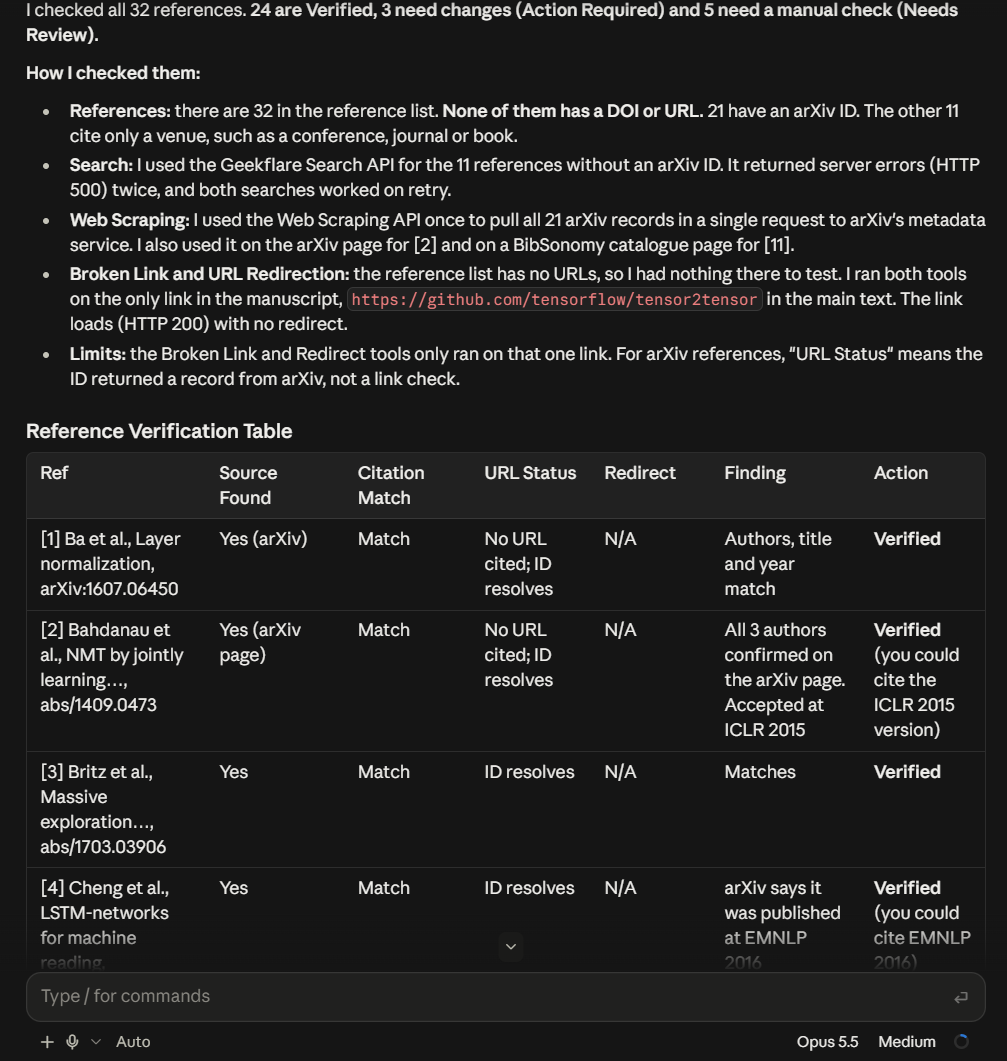
The checker reviewed 32 references from the sample research paper. It found 24 verified references, 3 requiring changes, and 5 needing manual review.
The results show how the checker can help identify reference issues before submission:
| Status | References | What the checker found |
|---|---|---|
| Verified | 24 | The cited source was found and the available citation details matched the source |
| Action Required | 3 | Missing author information or an incomplete title was identified |
| Needs Review | 5 | Minor citation differences or missing publication details need manual verification |
The three references marked Action Required had specific citation problems. Reference [5] was missing an author, [20] had the authors in the wrong format, and [22] used an incomplete paper title.
The Needs Review results covered smaller issues such as missing venue details, an incorrect issue number, capitalization, and an author name typo. The checker also flagged special characters that should be checked against the original PDF.
The results also show an important point about the workflow. The paper’s reference list did not contain URLs or DOIs, so the Broken Link and URL Redirection APIs could not check those references. The checker did find one GitHub link in the main text, and that link returned HTTP 200 with no redirect.
This gives the researcher a focused review list. Verified references can be left alone, while references marked for action or manual review can be checked against their original sources before submission.
What the Pre-Publication Checker Can and Cannot Verify
The checker focuses on reference and source verification. It can help identify issues before submission, but it does not replace the broader review process for a research manuscript.
What it can verify
- Whether a cited source can be found online
- Whether source details appear consistent with the manuscript citation
- Whether reference URLs are accessible
- Whether a reference URL redirects to another destination
- Which references need further manual review
What it cannot verify
- Scientific validity of the research
- Accuracy of experiments or results
- Research methodology
- Plagiarism or originality
- Research ethics
- Journal specific submission requirements
- Whether the manuscript’s conclusions are scientifically justified
The results should therefore be treated as a reference checking aid. Any item flagged by the AI should be reviewed against the original source before you submit the manuscript.
Why Use a Pre-Publication Checker?
A final reference review can take time when a manuscript contains many citations and external sources. An AI powered checker gives you a repeatable way to review these details before submission.
The workflow can help you:
- Save time: Check multiple references through one AI assisted workflow.
- Find broken references: Identify URLs that no longer respond.
- Spot redirects: See when a cited URL leads to a different destination.
- Prioritize manual checks: Focus your attention on references that the checker could not verify clearly.
- Reuse the workflow: Run the same checks on future manuscripts with the same prompt and connected Geekflare tools.
The goal is not to replace your final review. It is to give you a faster first pass before the manuscript reaches the submission stage.
Conclusion
A pre-publication review does not have to involve checking every reference manually from the start. An AI assistant connected to Geekflare APIs can handle the initial source and URL checks, then point you toward references that need closer attention.
The workflow uses Search API, Web Scraping API, Broken Link API, and URL Redirection API through Geekflare MCP. Since Geekflare offers 500 free credits, you can try the workflow before committing to a paid API plan.
The same setup can be reused with your own research manuscripts. Upload the paper, run the checking prompt, review the results, and manually verify any references flagged for attention before submission.
Frequently Asked Questions
What is a pre-publication checker?
A pre-publication checker reviews a research manuscript’s references and source URLs before submission. It can help identify sources that need verification, broken links, and unexpected redirects.
Can I use this pre-publication checker for free?
Yes. Geekflare provides 500 free credits that you can use to test the workflow. API calls typically consume 1, 2, or 5 credits depending on the API and request.
Which Geekflare APIs are used for the pre-publication checker?
The workflow uses the Search API, Web Scraping API, Broken Link API, and URL Redirection API. Each API handles a different part of the reference verification process.
Can the pre-publication checker replace peer review?
No. It focuses on reference and source verification. It does not assess scientific validity, research methodology, plagiarism, research ethics, or journal specific requirements.
Can I use an AI assistant other than Claude?
Yes. Geekflare MCP can connect the APIs to compatible AI assistants. Claude is used in this walkthrough as the example.





