


Modern businesses often depend on information from websites for research, sales, marketing, content, monitoring, and other day-to-day activities. These activities can require teams to collect information from webpages, check website changes, verify links, or gather search results regularly.
As these requirements become part of daily operations, business software may need capabilities that are not available in its existing setup. Web APIs provide a way to add such capabilities to an application through requests and structured responses.
Once integrated, these APIs can support specific business requirements inside internal tools, dashboards, reporting systems, and other applications. This can reduce repetitive manual work and give teams a consistent way to access web-based information.
This article explores Web APIs for business, the types of tasks they can support, and how Geekflare APIs can be integrated into business applications.
What Are Web APIs?
Web APIs let businesses access capabilities and data from online services through defined endpoints. A business sends the required information to an endpoint, and the API returns a result that can be used in its own system.
For example, a business may need web search results for a research tool or webpage data for an internal reporting system. A Web API can provide that information on request, so the business can incorporate it into an existing process.
The API handles the requested task, and the business system determines how to use the returned result. This makes Web APIs useful for adding web-based capabilities to existing applications and developing new business tools.
Web API Capabilities for Business Applications
Businesses often need web-based data and capabilities as part of their daily operations. These requirements can arise across research, marketing, content, monitoring, sales, and internal business processes.
Geekflare provides a collection of Web APIs that businesses can integrate into applications. Each API handles a specific web-based task, and multiple APIs can be used together for a larger business requirement.
| Geekflare API | What It Does |
|---|---|
| Web Scraping API | Extracts webpage data in Markdown, HTML, or JSON format. |
| Search API | Searches the internet and extracts content from relevant pages. |
| Meta Scraping API | Extracts webpage metadata such as titles, descriptions, and Open Graph tags. |
| Screenshot API | Captures full-page or viewport screenshots of webpages. |
| PDF Generator API | Converts URLs into PDFs for documents such as invoices and reports. |
| Broken Link API | Crawls webpages to identify dead internal and external links. |
| Lighthouse API | Generates website performance audits in JSON or HTML using Google Lighthouse. |
| Loadtime API | Measures page load speed and timing metrics such as TTFB, DNS lookup, and connection time. |
| URL Redirection API | Traces URL redirect paths and provides HTTP status codes. |
| Site Uptime API | Checks whether a website is reachable and monitors HTTP status codes. |
| DNS Record API | Retrieves DNS records such as A, AAAA, MX, NS, and TXT records. |
| Port Scanner API | Scans public IPs or domains to identify open ports. |
| TLS Scan API | Checks SSL/TLS certificates for validity, issuer details, and expiration dates. |
These APIs can be used individually for specific requirements or combined to support a larger business process. Geekflare also provides SDKs for multiple programming languages, so developers can integrate the APIs into existing applications and systems.
Execute a Geekflare API Request
Geekflare offers individual APIs for specific web-based tasks, and you can use these APIs directly in your applications. Let’s start with the Geekflare Search API and send a search request from Python to see how it works in practice.
Step 1: Install the Geekflare SDK
Install the Geekflare Python SDK from the terminal:
pip install geekflare-apiStep 2: Configure the Search Request
Create a Python file search.py and add the following code:
from geekflare_api.client import GeekflareClient
from geekflare_api.models import SearchDto

with GeekflareClient(api_key="<api-key>") as client:
    result = client.search(
        SearchDto(
            source="news",
            category="research",
            format="json",
            grounded_answer=True,
            limit=5,
            exclude_domains=["reddit.com"],
            query="AI automation for business"
        )
    )

    print(result)
Replace <api-key> with your Geekflare API key.
The query parameter contains the search term and is required for the request.
In this example, the search is for “AI automation for business.” The other parameters control the type and amount of information returned:
sourcespecifies the search source. The API supportsweb,news, andimages; this example usesnews.categoryfilters the search by category. The API provides options such asgeneral,code,pdf,research,linkedin, andwiki.formatdetermines the response format. This example usesjson.grounded_answerenables an AI-generated answer based on the search results.limitsets the number of results to return. It accepts values from 1 to 100.exclude_domainsremoves results from specified domains. Here, results fromreddit.comare excluded.
These parameters are optional, so you can adjust them based on the search requirement. The query parameter is the only required body parameter for this request.
Step 3: Run the Request
Save the file and run it from the terminal:
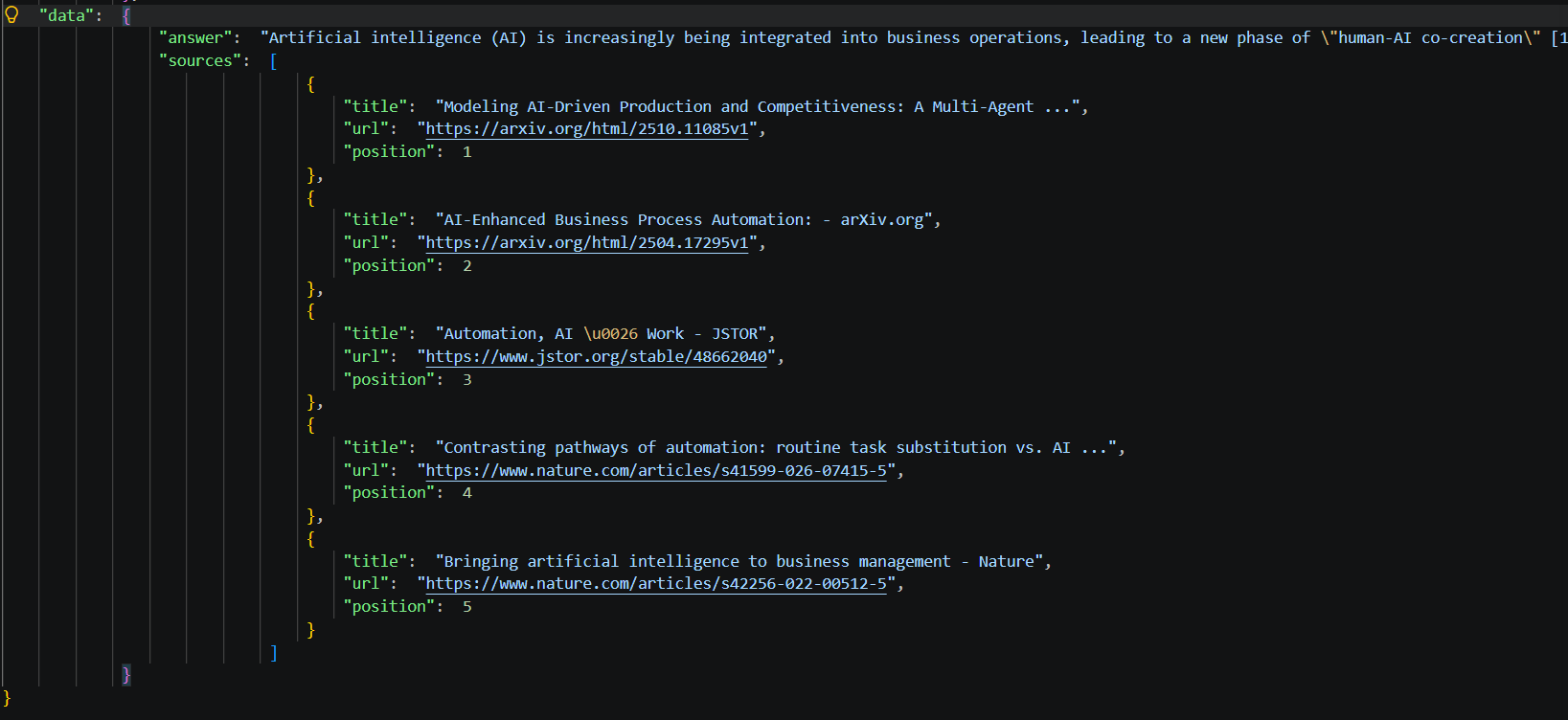
python search.pyThe API returns a structured response containing the request status, metadata, and search results. With format="json", the response is returned in JSON format, which can be processed further by the application.
Geekflare also offers a no-code option through Playground, where you can test individual APIs before integrating them into your application and adjust their parameters easily.
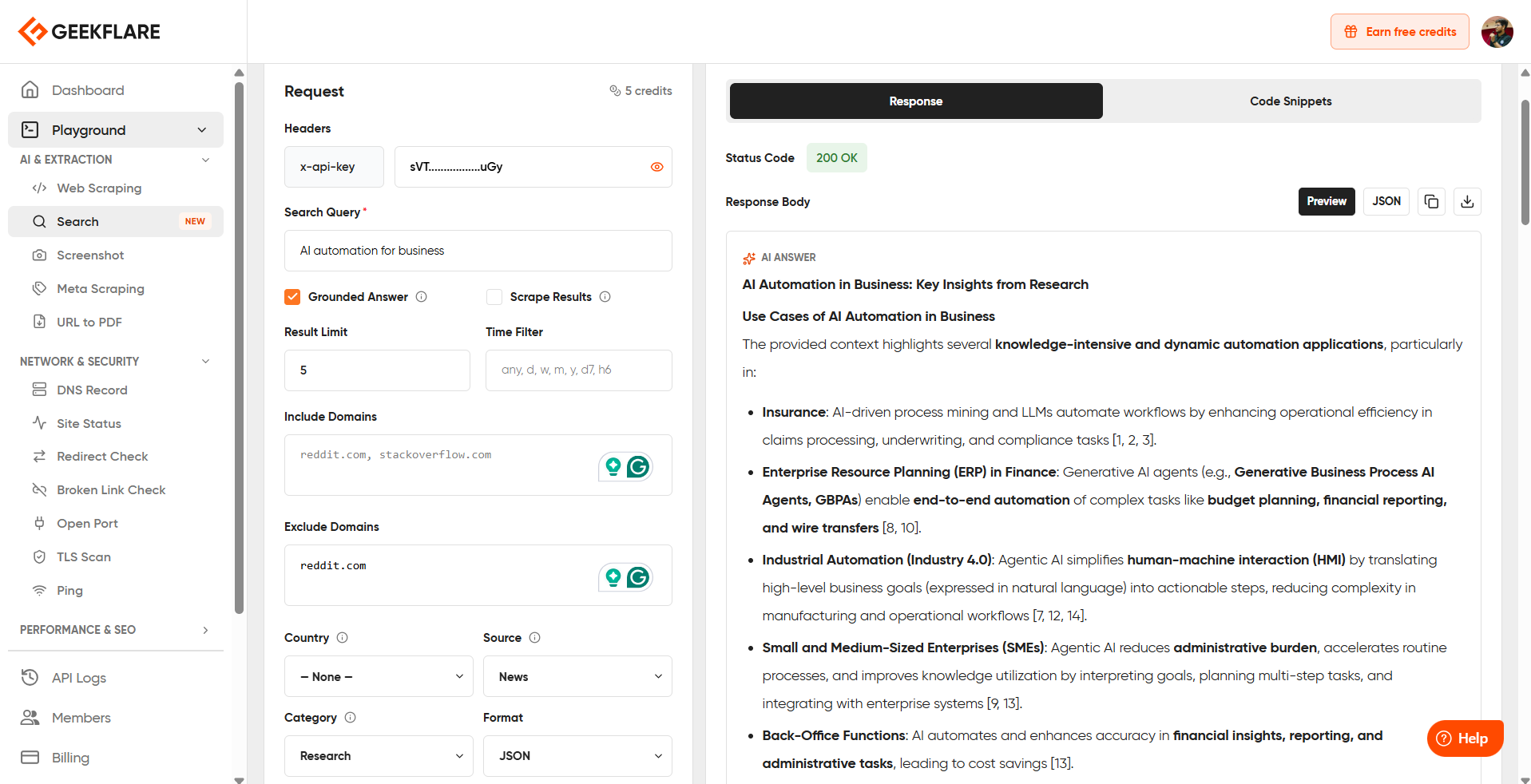
Once you have a request you want to use, you can also copy its generated code snippet in Python, cURL, PHP, or Node.js.
Execute Multiple Web APIs With Geekflare MCP
Geekflare MCP makes its API capabilities available to AI agents and LLMs such as Claude, Codex, and other compatible clients. This can simplify tasks that require multiple web capabilities, since the AI agent can work with the relevant Geekflare tools as part of the same interaction.
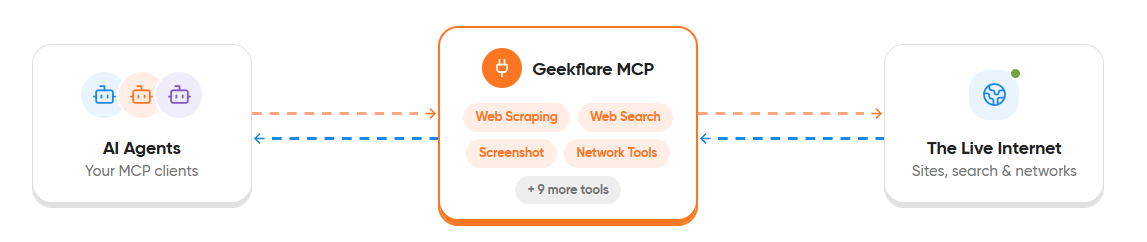
For this example, we’ll use Claude to perform a competitor research task with multiple Geekflare APIs. You can give Claude the business requirement and ask it to combine the available Geekflare tools to complete the task.
If you want to understand MCP and learn how to set up Geekflare MCP with Claude, refer to the detailed guide.
Example: Competitor Research With Geekflare MCP and Claude
We’ll use Hubspot as the competitor website and ask Claude to research it using multiple Geekflare tools.
Use the following prompt in Claude:
Research HubSpot as a competitor for a B2B marketing team using the available Geekflare tools.
Analyze https://www.hubspot.com/ and prepare a competitor research report that helps a marketing team understand HubSpot’s positioning, offerings, and target audience.
Use the available Geekflare tools to:
- Find relevant information about HubSpot and identify useful pages for the research.
- Collect key information from the HubSpot website about its products, services, features, and target customers.
- Gather relevant webpage metadata.
- Capture a screenshot of the homepage for visual reference.
Combine the information from the different Geekflare tools into one report. Do not treat each tool’s result as a separate response.
Structure the final report as:
1. Company Overview — What HubSpot offers and who it serves.
2. Products and Services — Major offerings and their purpose.
3. Target Audience — The types of businesses and teams HubSpot targets.
4. Website Positioning — How HubSpot presents its products and value proposition.
5. Marketing Observations — Important observations a marketing team should consider when evaluating HubSpot.Add source URLs for relevant findings and use the collected website information to support your observations.
Finish with five key findings that would be useful to a marketing team evaluating HubSpot as a competitor.
Complete the task by combining multiple Geekflare tools. Choose the appropriate Geekflare tools based on the requirements above and use their results together in the final analysis.
Claude can then use the relevant Geekflare tools to gather the requested information.
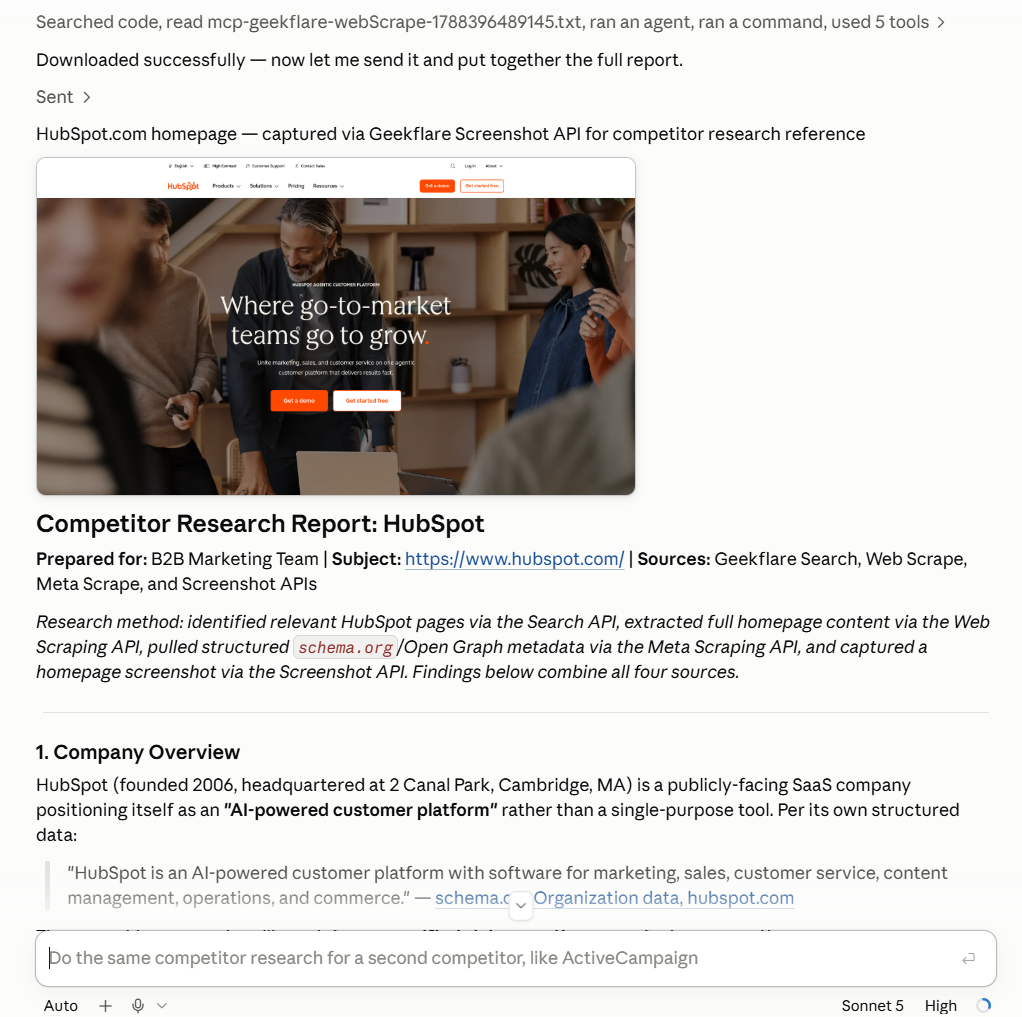
The final response brings the results from the different APIs together into a single competitor research report. This demonstrates how MCP can connect multiple Geekflare capabilities to an AI agent for one business requirement.
Use Cases for Web APIs for Business
Web APIs can support different teams by bringing web-based capabilities into the tools they already use. A business can combine multiple APIs based on the task.
These capabilities can fit into everyday processes across sales, marketing, content, web operations, and client services. Here are some practical ways teams can use them:
Prospect Research
Sales teams can use multiple Geekflare APIs to gather information about potential customers before adding them to a CRM or starting outreach.
The Search API can help find relevant pages about a prospect, such as its website, product pages, or other publicly available information. The Web Scraping API can then extract specific information from selected pages, and the Meta Scraping API can retrieve page titles, descriptions, and other metadata.
The collected information can be added to a CRM record or sales research tool, giving representatives useful context about a prospect before they contact them. This can also reduce the manual effort required to visit several pages and copy relevant details into the CRM.
Competitor Research
Marketing teams can use these APIs to build a repeatable process for tracking competitor activity. For example, a marketing research tool can take a list of competitor websites, gather relevant pages, and collect details that the team wants to compare.
The Search API can help discover competitor pages, and the Web Scraping API can collect selected information from those pages. The Meta Scraping API can provide page-level metadata, and the Screenshot API can preserve the appearance of important pages at the time of research.
A marketing dashboard can bring these results together, giving the team a central record for comparing competitor websites and tracking changes over time.
Website Monitoring
Web teams can use Geekflare APIs to keep track of important pages and website availability. A monitoring system can periodically check whether a site is reachable, measure page loading performance, capture screenshots, and collect selected webpage content.
The Site Uptime API, Loadtime API, Screenshot API, and Web Scraping API can work together for this purpose. The results can be stored in a monitoring dashboard, giving the team a record of availability, performance, visual changes, and page content that can be reviewed when a website needs attention.
Website Quality Checks
Teams responsible for website maintenance can use Geekflare APIs to review important pages and identify issues that may affect visitors. This can be useful after content updates, during landing page reviews, or as part of regular website checks.
The Broken Link API can identify links that return errors, the URL Redirection API can trace redirect paths, and the Screenshot API can capture affected pages for reference. The Web Scraping API can also retrieve selected page content, giving the team information needed to review the page and its links.
Content and SEO Research
Content and SEO teams can use Geekflare APIs to gather information from search results and target webpages during research. A research tool can collect source material and page details, giving writers and SEO specialists a structured starting point for evaluating topics and competing content.
The Search API can help discover relevant pages, the Web Scraping API can retrieve selected webpage content, and the Meta Scraping API can collect page metadata. The Screenshot API can also preserve the appearance of important pages for reference during the research process.
Client Reporting for Agencies
Digital agencies can combine several Geekflare APIs when preparing website reports for clients. A reporting system can gather performance data, loading information, screenshots, and link-status results as part of a single reporting process.
The Lighthouse API can provide website audit results, the Loadtime API can provide page loading metrics, the Screenshot API can add visual references, and the Broken Link API can identify links that return errors. These results can be compiled into a client report that gives the agency measurable information to discuss with the client.
Conclusion
Web APIs help businesses add web-based capabilities to their applications and processes. Web APIs for Business can support search, data extraction, monitoring, link checking, research, and other tasks.
Geekflare provides these APIs with SDKs for integration. You can also combine multiple APIs through MCP with AI clients such as Claude to handle larger business tasks. Geekflare Playground lets you test individual APIs, adjust parameters, review responses, and copy code snippets before integration.





