A webpage can contain far more information than you need. You may want only its title, meta description, canonical URL, or structured data for an SEO audit. A content analysis project may require the complete page text, headings, links, and images.
The extraction method matters because these two requirements produce very different results. Metadata extraction vs. full-page scraping helps you identify the right approach based on the data your project needs.
This guide explains how metadata extraction differs from full-page scraping, when to use each method, and how to extract both types of data from the same webpage using Geekflare APIs.
What Is Metadata Extraction?
Metadata extraction collects information that describes a webpage. This information is usually stored in the page’s HTML and provides details about the page, its author, search engine instructions, and social sharing data.
Common metadata fields include:
- Title: The name assigned to the webpage.
- Meta description: A short summary of the page.
- Canonical URL: The preferred URL for the page.
- Open Graph tags: Information that controls how the page appears when shared on social platforms.
- Author: The person or organization associated with the published content.
- Robots tags: Instructions that tell search engine crawlers how to handle the page.
- Structured data: Machine-readable information such as JSON-LD and Schema.org markup.
Metadata extraction is useful for SEO audits, competitor research, website indexing, content categorization, and link previews. It is a good fit for tasks that need specific details about a webpage.
What Is Full-Page Scraping?
Full-page scraping extracts the content and data available on a webpage. It can collect the information displayed to visitors along with other relevant page elements.
A full-page scraper can extract:
- Text: Paragraphs, article content, product details, and other written content.
- Headings: Page headings such as H1, H2, and H3.
- Links: URLs and anchor text found on the page.
- Images: Image URLs and related page data.
- HTML: The underlying HTML structure of the webpage.
Full-page scraping is useful for content research, data collection, content analysis, AI applications, and retrieval-augmented generation (RAG). It is a good fit for tasks that require the actual information published on a webpage.
Metadata Extraction vs. Full-Page Scraping
Metadata extraction and full-page scraping differ in the type, amount, and purpose of the data they collect. The following table highlights the key differences.
| Feature | Metadata Extraction | Full-Page Scraping |
|---|---|---|
| Primary focus | Information that describes a webpage | Content and data published on a webpage |
| Typical output | Title, meta description, canonical URL, Open Graph tags, robots directives, and structured data | Text, headings, links, images, HTML, and page content |
| Data volume | Small and focused | Larger and more comprehensive |
| Content depth | Page-level information | Detailed webpage content |
| Processing requirement | Lower when only specific page attributes are needed | Higher when processing complete page content |
| Common applications | SEO analysis, indexing, link previews, and content categorization | Content research, data collection, content analysis, AI, and RAG |
| Main question answered | “What information describes this webpage?” | “What information does this webpage contain?” |
The key difference is the scope of extraction. Metadata extraction targets attributes that describe a page. Full-page scraping targets the content and elements found on the page itself.
How to Extract Metadata and Full-Page Content With Geekflare
Geekflare provides APIs for both types of webpage extraction.
Prerequisites
Before testing the APIs, make sure you have:
- Geekflare API key: Create a Geekflare account and copy your API key from the dashboard.
- Python: Install Python on your system.
- Geekflare Python SDK: Install the SDK with:
pip install geekflare-apiExtract Full-Page Content
Geekflare’s Web Scarping API extracts actual content from webpages and provides several options for controlling requests. For this comparison, we can use: https://www.nytimes.com
The following example requests the page in JSON format and sets several available options:
from geekflare_api.client import GeekflareClient
from geekflare_api.models import WebScrapeDto

with GeekflareClient(api_key="YOUR_API_KEY") as client:
    result = client.web_scrape(
        WebScrapeDto(
            url="https://www.nytimes.com",
            format=["JSon"],
            device="desktop",
            render_j_s=True,
            block_ads=True,
            stealth=False,
            file_output=False
        )
    )

    print(result)
Geekflare also provides AI extraction for extracting specific information from webpage content based on your requirements. You can define the data you want to extract and let the API return the relevant information in a structured format.
For more information on AI extraction with the Web Scraping API, see the Geekflare guide on AI extraction with the Web Scraping API.
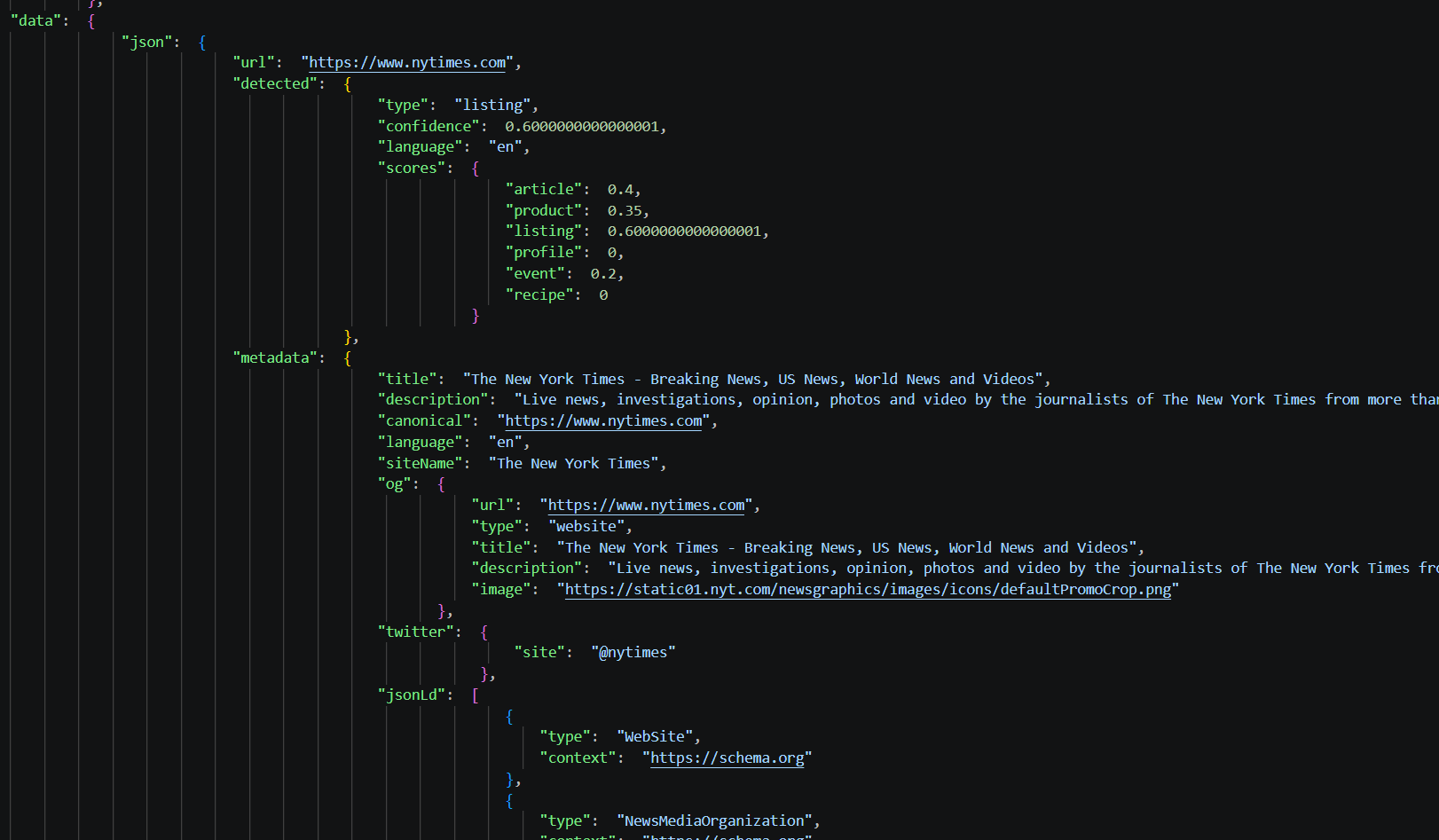
The response contains the scraped webpage content along with request and status details. The data field contains the extracted content in the format selected in the request.
Here, the result contains the webpage content in JSON format.
Extract Metadata From the Webpage
Now, we’ll reuse the same https://www.nytimes.com URL to see how the metadata response differs from the full-page scraping response.
Geekflare’s Meta Scraping API can extract metadata and structured information from a webpage. The following Python example sends the URL to the Meta Scraping API and prints the response:
from geekflare_api.client import GeekflareClient
from geekflare_api.models import MetaScrapeDto

with GeekflareClient(api_key="YOUR_API_KEY") as client:
    result = client.meta_scrape(
        MetaScrapeDto(
            render_j_s=True,
            block_ads=True,
            url="https://www.nytimes.com"
        )
    )

    print(result)
The request uses three parameters:
urlspecifies the webpage to analyze.render_j_srenders JavaScript before metadata extraction.block_adsblocks advertisements during page loading.
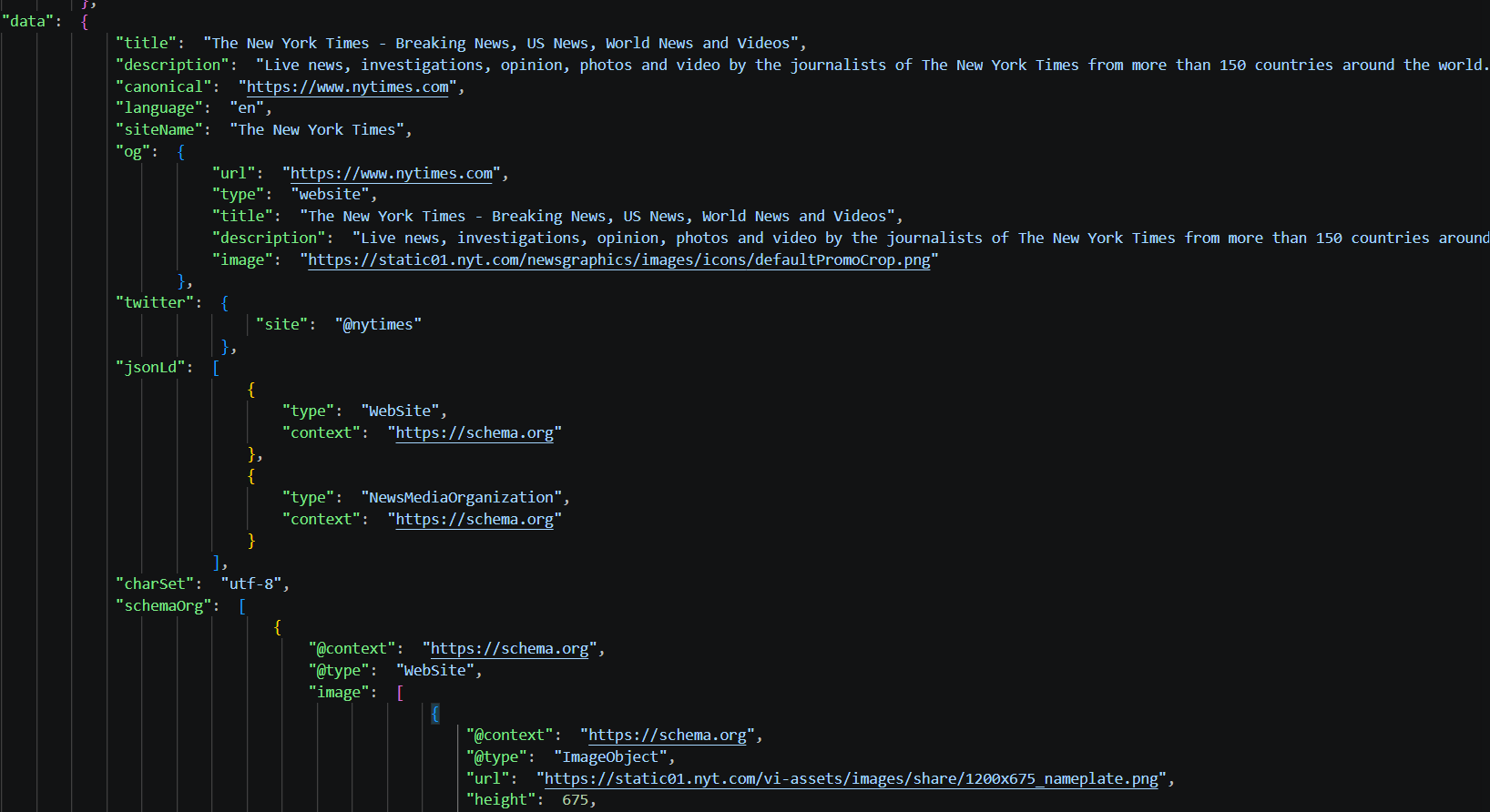
The API returns the extracted information in a structured response. The response can contain the page title, description, canonical URL, Open Graph data, Twitter metadata, JSON-LD, Schema.org data, and other meta tags.
Comparing the Two Responses
The two responses show that the same webpage can produce very different results based on the extraction method.
The metadata response is structured around specific page attributes, such as SEO fields, social tags, and structured data. The full-page response contains the webpage content and can also carry metadata found in the HTML.
This distinction matters when processing the results. A metadata response is easier to work with when an application needs selected page attributes. A full-page response is more useful when the application needs the content itself, along with other information available in the page.
Run Both Scraping APIs at the Same Time With Geekflare MCP
Geekflare offers an MCP server that lets you connect Geekflare APIs with compatible AI tools and agents. You can access multiple Geekflare API capabilities through the same connection, making it possible to combine different API functions in a single workflow.
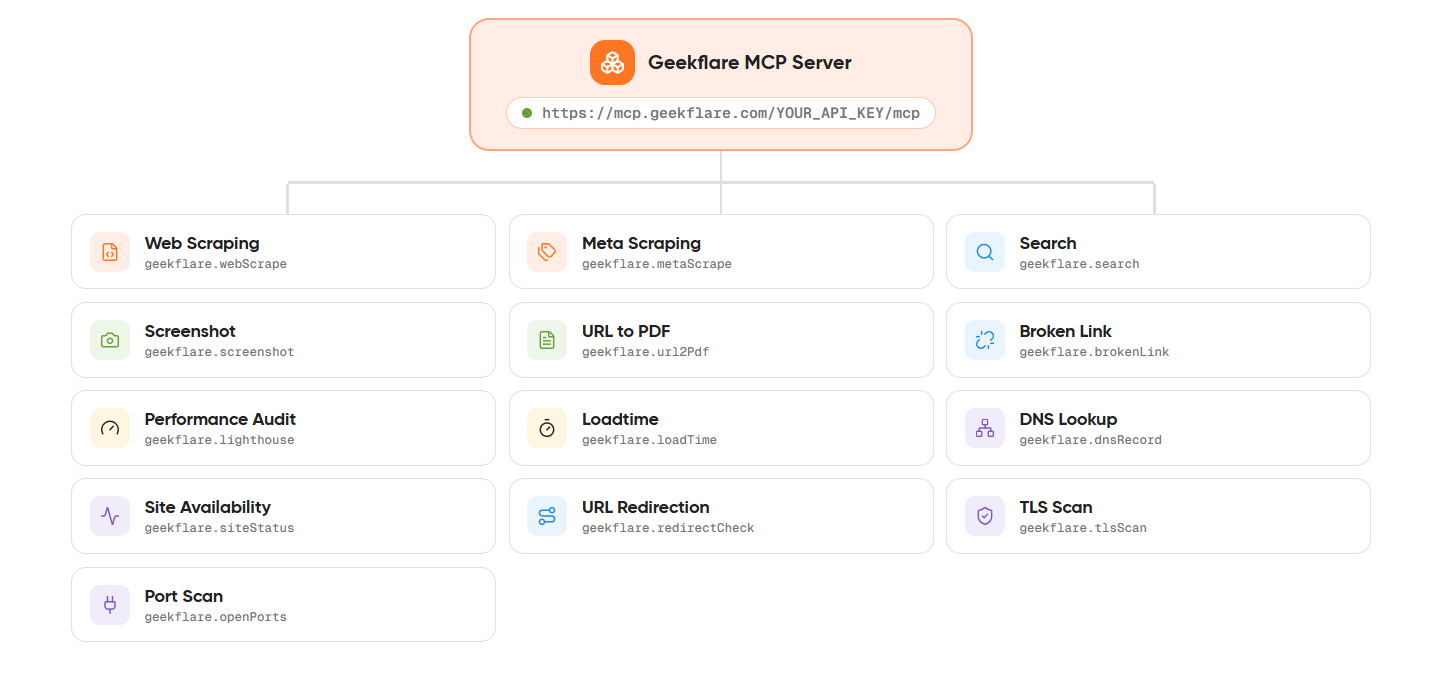
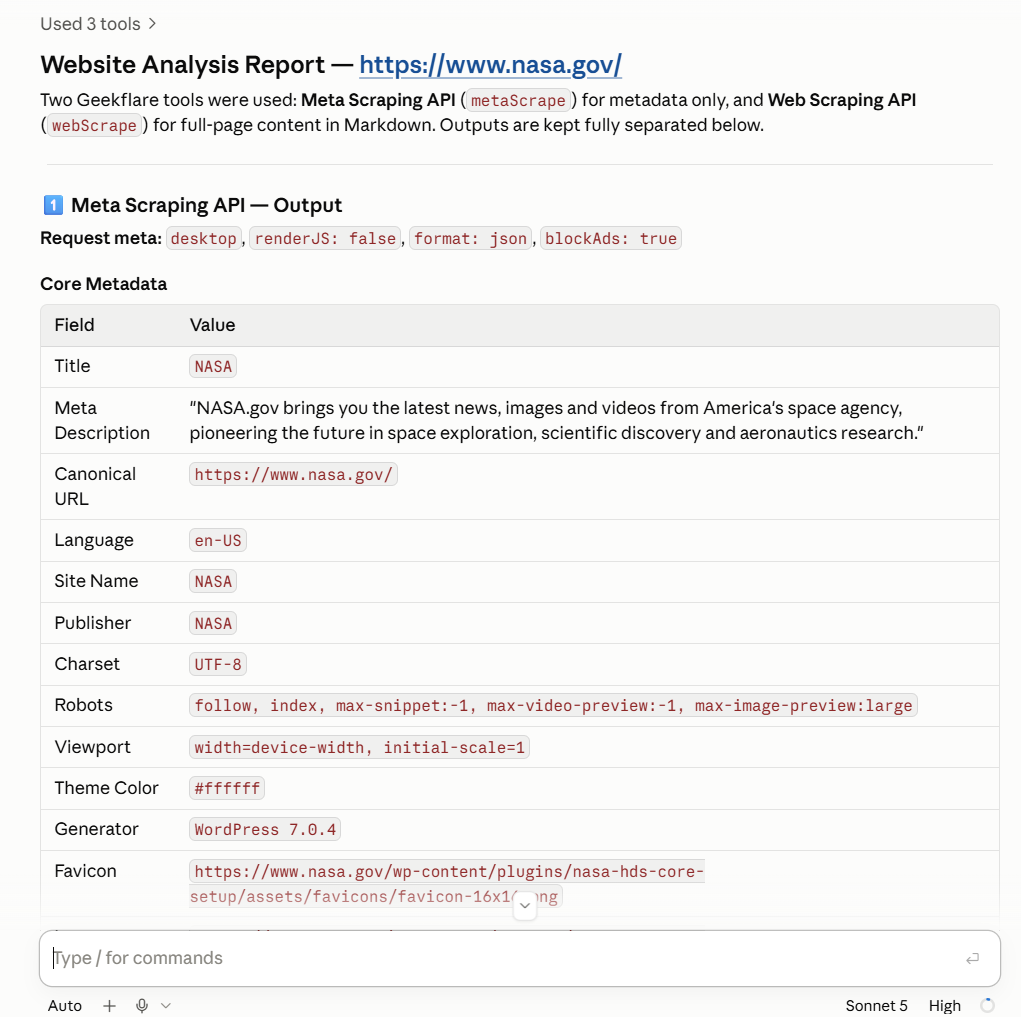
For this example, we’ll use Claude with the Geekflare MCP server. We’ll ask Claude to use both the Web Scraping API and Meta Scraping API on a webpage, then organize the results into a single comparison.
For the setup, follow the Geekflare MCP setup guide for Claude. Once connected, you can use both APIs from Claude Code.
Analyze a Webpage With Claude
After connecting Claude to the Geekflare MCP server, give it the following prompt:
Use the Geekflare MCP tools to analyze this webpage:

https://www.nasa.gov/

I want you to use both the Web Scraping API and Meta Scraping API.

1. Use the Meta Scraping API to extract the webpage metadata. Collect all relevant information returned by the API, such as:
   - Page title
   - Meta description
   - Canonical URL
   - Open Graph data
   - Twitter metadata
   - JSON-LD
   - Schema.org data
   - Other available metadata

2. Use the Web Scraping API to extract the webpage content. Return the content in Markdown format.

3. Keep the outputs from both APIs clearly separated.

4. Create a comparison table with two columns:
   - Meta Scraping API
   - Web Scraping API

5. Summarize the key differences between the two responses. Explain what information comes from the metadata response and what information comes from the full-page scraping response.

6. Do not omit useful fields returned by either API. If a field is unavailable, state that it was not returned.

Present the final result in a clear, structured format.
Claude can then call both Geekflare APIs through the MCP connection and return the results in a single workflow. This approach is useful for tasks that need page metadata and full-page content together.
Understanding the Response
The response from Claude combines the outputs from both APIs. The Meta Scraping API response provides page-level information, and the Web Scraping API response provides the extracted webpage content.
Conclusion
Metadata extraction and full-page scraping serve different data requirements. Metadata extraction is suitable for collecting page-level details, and Full-page scraping is useful when you need the entire webpage content.
Geekflare provides APIs for both approaches, along with options for customizing scraping requests and AI extraction for specific data needs. Its MCP server also lets compatible AI tools access multiple Geekflare APIs in a single workflow.
Frequently Asked Questions
What is the difference between metadata extraction and full-page scraping?
Metadata extraction and full-page scraping mainly differ in the scope of data collected. Metadata extraction focuses on page-level information such as titles, descriptions, canonical URLs, social tags, and structured data.
Full-page scraping extracts the content of the webpage and can also contain metadata found in the page.
When should I use metadata extraction?
Use metadata extraction when your application needs specific information that describes a webpage. Metadata extraction vs. full-page scraping is an important consideration for SEO audits, indexing, link previews, and workflows based on structured page information.
Does full-page scraping also return metadata?
Yes. A full-page scraping response can contain metadata because the scraper processes the webpage and its HTML. Geekflare’s Meta Scraping API provides a more focused metadata response.
How can I extract data from multiple webpages?
You can send multiple webpage URLs to a scraping workflow and process the returned results according to your requirements. Geekflare APIs can be integrated into applications and AI workflows for automated webpage data extraction.