



Have you ever wondered how much revenue you lose on missed calls?
Invoca found that 42% of leads convert during the call, based on a sample size of 70M+ calls.
Thus, missing a call can lead to revenue loss.
But why does that happen? Can’t you just hire a receptionist? You can. But they’re expensive. With a $38,010/yr median salary (2025), you can only cover business hours, with no option to cover nights/weekends.
Nextiva XBert can solve these two problems in one go: cost and availability.
XBert is an AI-driven employee that manages customer interactions 24/7.
With XBert’s $0.99-per-conversation price, you get a cheaper way to manage your customers, and it offers a handoff to humans when it’s unable to handle the nuances.
However, it’s not for everyone. If your business has low call volume or requires complex replies, then XBert is not for you.
Should you trust your business with XBert?
In this review article, I’ll cover Nextiva XBert in detail, including key features, pricing, and pros & cons. I’ll also do real-world tests to see how well it performs and compare it to a human answering service.
Let’s get started.
What is Nextiva XBert?
Nextiva XBert is an AI receptionist and customer service assistant that helps manage customer interactions. It can manage customers via calls, texts, and chats. It functions as an answering service, support agent, and receptionist.
As a business, you can consider XBert as your AI employee that can handle routine customer interactions, answer questions, manage leads, or book appointments.
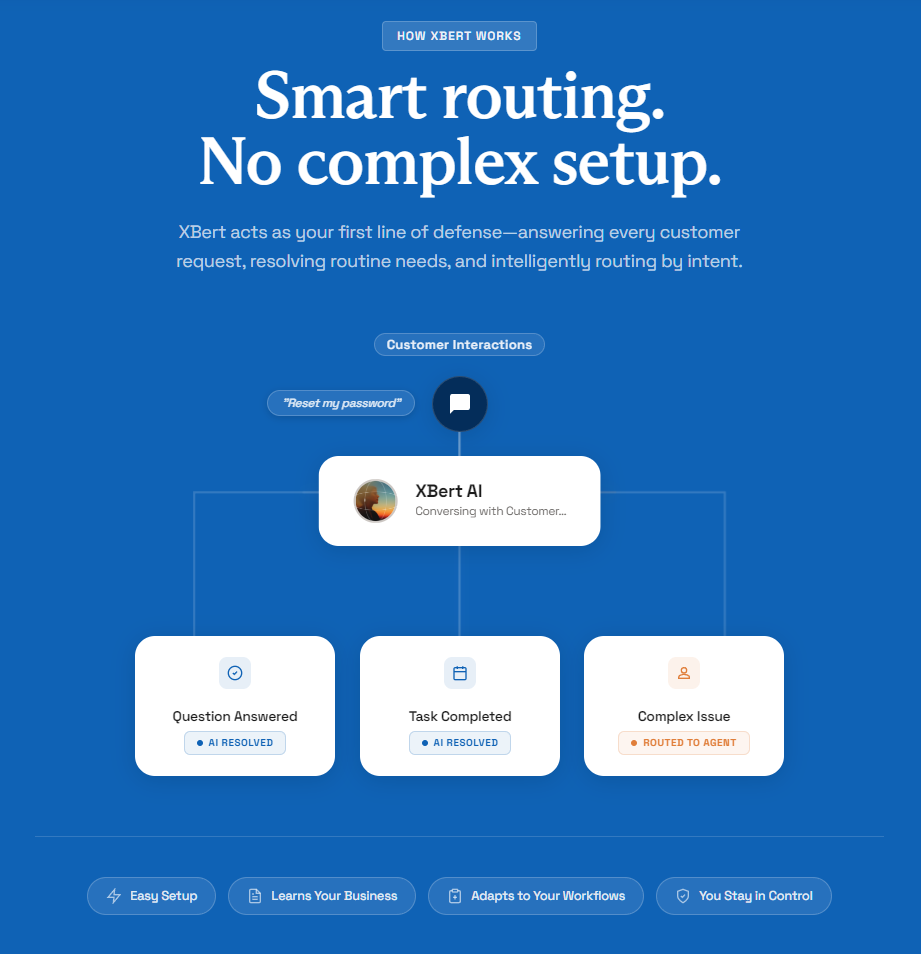
In the background, XBert AI analyzes intent, checks the knowledge base, and converses with customers to get their questions answered and tasks completed. If any issue is complex, then XBert routes it to an agent (human) for resolution.
To better understand, let’s take a look at Nextiva’s stack. It consists of two aspects:
- Platforms: NEXT Platform, Contact Center, Business Phone
- Capabilities: AI Employee, AI Receptionist, AI Voice Agent, Agent Assist
XBert is an AI employee layer that works with different plans. It can also operate independently.
For example, you can take Standalone XBert, which gives you your own number and learns from the business knowledge base/site. Standalone, it hands off via notification/alert. If you’re using it with Contact Center, then it does a live transfer to a staffed agent with full context.
As an add-on, XBert integrates with Business Phone Tier or Contact Center, acting as XBert AI Receptionist.
These are four names for the same product; each just spotlights a different job:
- XBert: Brand name under which different features are available
- AI Receptionist: 24/7 inbound that answers queries and resolves issues with an escalation option if needed.
- AI Employee: A broader autonomous tool that handles end-to-end tasks, including booking, CRM updates, follow-ups, etc.
- AI Voice Agent: A voice agent that automates customer calls and is delivered via XBert.
Nextiva XBert uses voice, text, and chat channels to operate and communicate with customers.
Key Features
In this section, I’ll go through Nextiva XBert’s key features.
AI Answering Service
Nextiva XBert offers 24/7 call handling with the ability to understand intent and respond naturally.
It uses natural-language responses with the option of message-taking. XBert notes down customer information and their preferred callback, and passes this information to your team.
XBert uses NLP (natural language processing) to understand the user’s intent and resolve customer queries. If it can’t resolve the issue or the customer requests human interaction, it can escalate to a human agent via notification (if used standalone) or live transfer (if using Contact Center).
Agent Assist
XBert’s Agent Assist helps human agents handle live conversations via the Contact Center. This is different from XBert AI Employee.
During the call, Agent Assist finds relevant information that can help a human agent provide a resolution to the customer, including a sentiment flag.
It can surface relevant articles, procedures, and scripts, all based on the knowledge base and actual relevant documentation. It also provides automated summaries and can help with faster onboarding (coming soon).
Furthermore, it follows proper compliance and security when dealing with sensitive information.
Transcription & Summarization
XBert is good at transcription and summarization.
Once a call is complete, it creates a dedicated space for the associated number. Under it, you can find all the summaries of each conversation that took place until now.
The summaries are clean, with a focus on providing the gist of the call. If you need more detail, you can also check the transcript, along with the voice recording. You can check below the transcript of a sample call I tried.
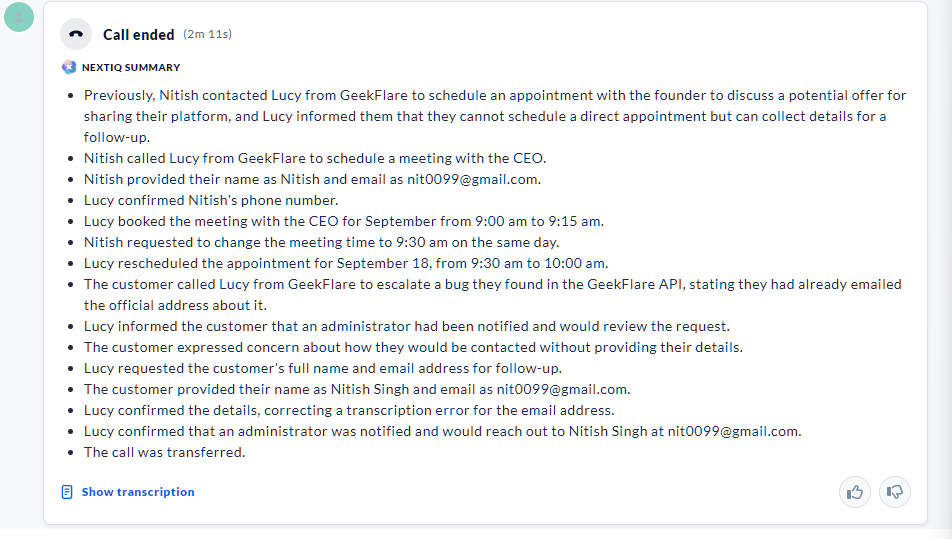
P.S.: This is a made-up scenario; there are no bugs in the Geekflare API 😉.
Additionally, XBert provides appointment, sentiment, and completion status.
Appointment booking & calendar sync
XBert is fully capable of handling appointment booking and calendar sync. It supports different calendars via skills, including:
- Outlook
- Google (I have tested this)
- Calendly
By connecting to a calendar, it can know your availability and book appointments accordingly. I found it worked reliably and was able to automatically suggest the best possible slot. XBert was also flexible enough to change slots when asked.
However, it may take time to train the booking skill (more in the testing section).
Smart routing
I found Nextiva XBert smart enough to route customer requests. It handles customer calls and resolves them.
For example, if the caller asks a simple question or seeks information, XBert can handle it if it is covered in the knowledge base or connected documents. XBert is equally capable of completing tasks such as booking meetings.
But if it finds a complex issue, it can do soft escalation by sending the context to the team via email or message. XBert with Contact Center has the ability to do direct transfer to a live agent.
Setting up XBert can be slightly time-consuming. Non-tech users may also find it complex and would want support to get started.
Training & guardrails
As a business, you have full control over how to train your XBert AI employee. You can feed it business policies, services, working hours, and FAQs; basically any information that helps it operate.
XBert also learns from Google Business Profile.
During the setup of the Lucy AI employee, I went through a long list of questions that needed accurate answers. It was lengthy, but important for the proper functioning of the AI employee.
Businesses can also set up guardrails with concrete guidelines. You can set authority limits that ensure that the AI employee doesn’t cross a threshold. For example, you can set a rule for auto-refunding plans that are within the guaranteed refund window. Anyone requesting refunds outside the window gets declined by the AI employee.
Voice quality
I found Nextiva XBert voice quality good during my experiment. The voices offer clarity and a friendly tone.
The XBert employee has strong interruption handling. It stopped a few times when I started talking again (like how a normal human would), ensuring that the customer is heard first.
Latency was also low, as found in our real-world test results (check the real-world test results section).
Setup and onboarding walkthrough
“I went through the whole setup and onboarding of Nextiva XBert using their 14-day free trial. The process was frictionless; onboarding lets you create a basic AI employee, which can then be further configured once you reach the dashboard. Overall, it took me three minutes to complete onboarding and an additional ten minutes to make the Lucy AI employee ready to take calls.”
Before getting started, make sure to have all your company information, including the knowledge base, working hours, and FAQ list.
To get started, you need to visit the join page.
Anyone can try it, as it has a 14-day free trial (credit card required).
Once you enter your website, it’ll ask you to customize your AI employee. You can name it, choose its brand name, and the gender of your choice (Male or Female). They also have AI employee voices for each gender, which makes it easy to further customize it (preview option available).
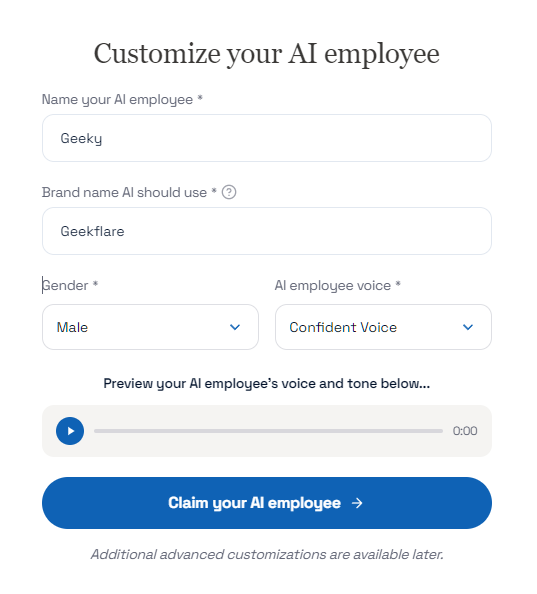
For example, there are multiple employee voice options — Intuitive, Confident, Smooth, Animated, and Bright under Male voices, and Poised, Brisk, Bright, Expressive, and Clear under Female voices.
I tried most of them and found them good enough to use, with a touch of robotic tone. However, the closest voice that mimics humans is the Male/Confident voice. It had a natural flow. Your choice may differ based on your brand requirements.
Note: More customization options unlock after you’re onboarded.
Once everything’s done, your AI employee gets a number, and the process redirects you to Nextiva’s dashboard.
To make your AI employee ready to use, follow the 4 key steps:
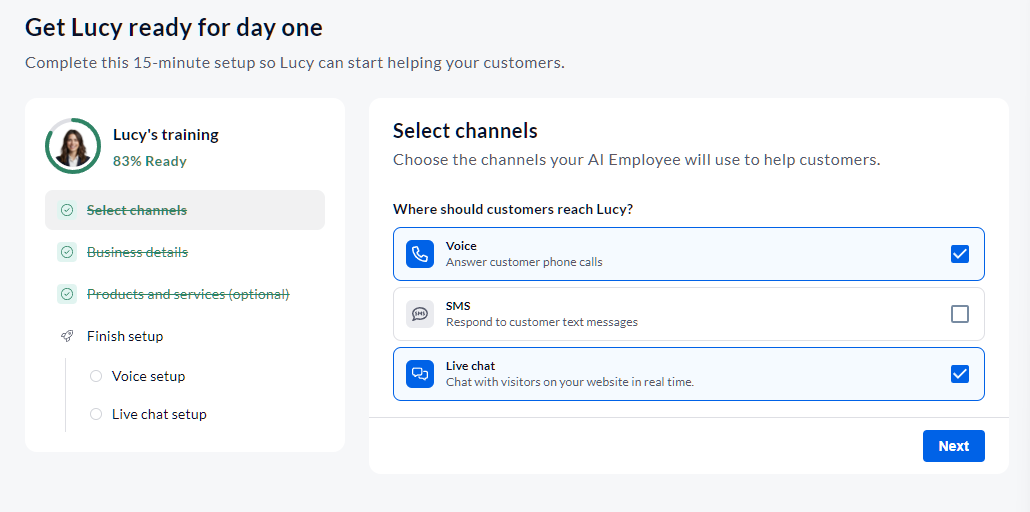
1. Selecting channels
The first step is to select the channels for which you want to help customers. Nextiva gives you three options to choose from:
- Voice
- SMS
- Live chat
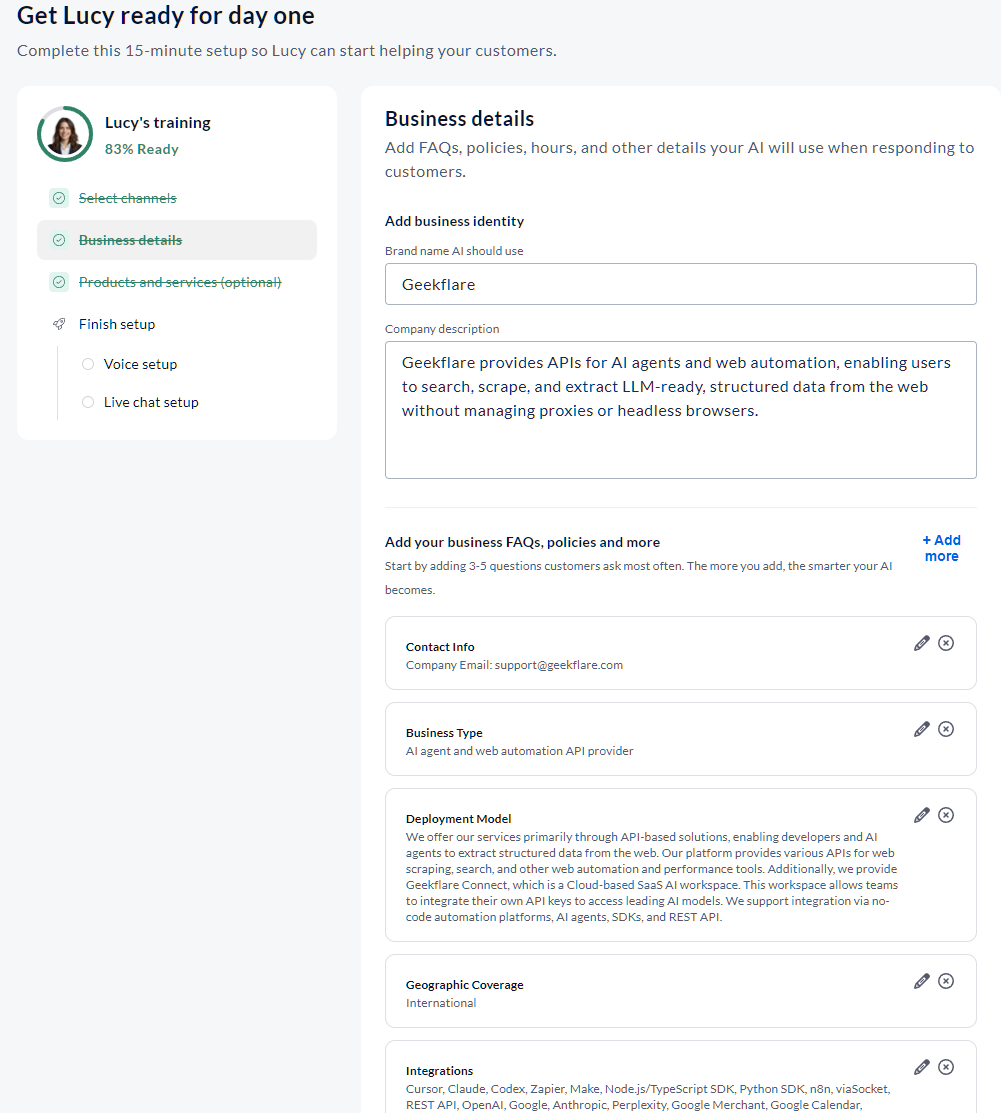
2. Business Details
This is an important step in making your bot capable of handling your customers. It requires a long list of business-related information to be filled in.
And it’s vital.
So, taking your time to fill everything, including contact info, deployment model, geographic coverage, platform features, etc., can go a long way in an AI employee’s success.
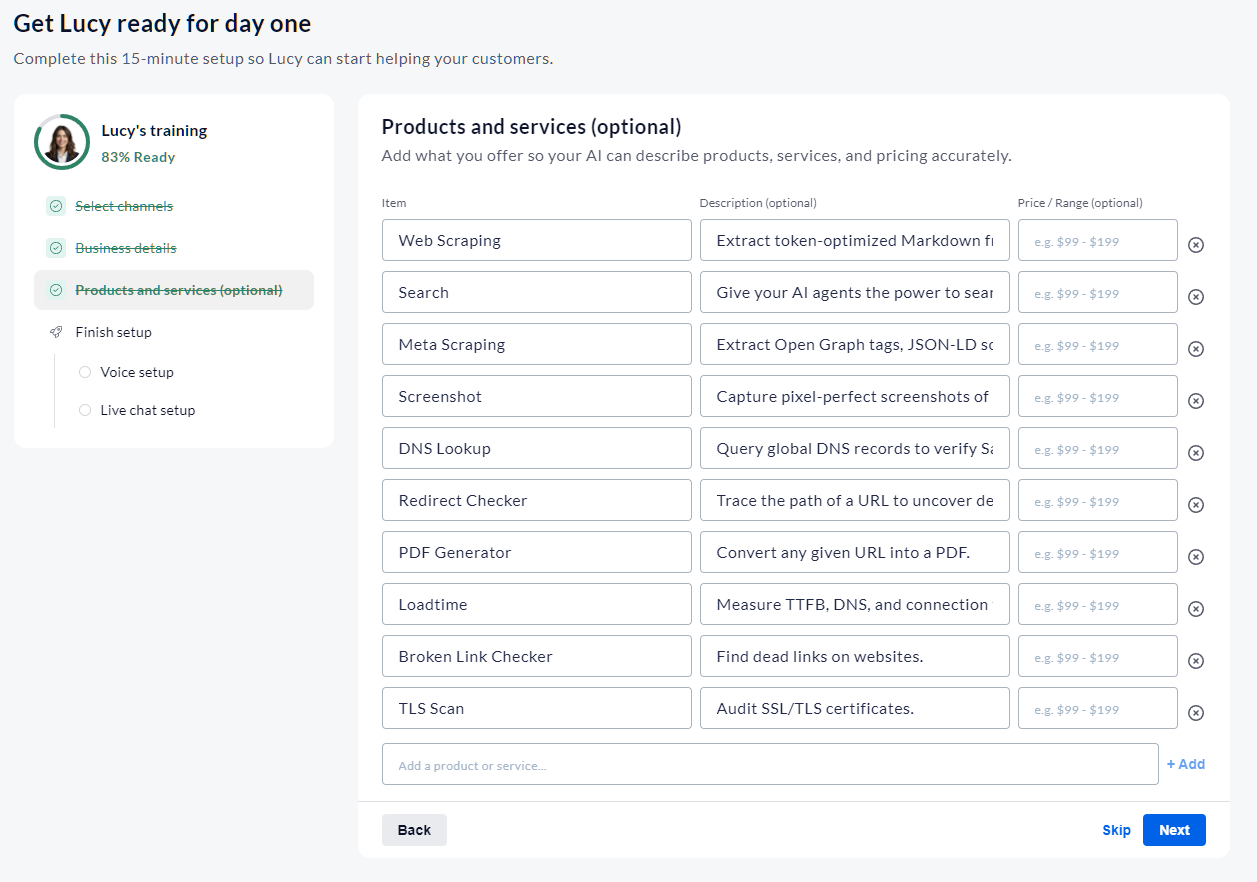
3. Products and services (optional)
This is an optional section where you list all your products and services, along with their pricing.
Any information mentioned here will enable your AI employee to handle customer requests regarding the same, especially someone looking to learn what product/service your business offers.
4. Finish setup
In this last step, you test your AI employee voice and set up options for what to do when a caller asks for a real person (text or email).
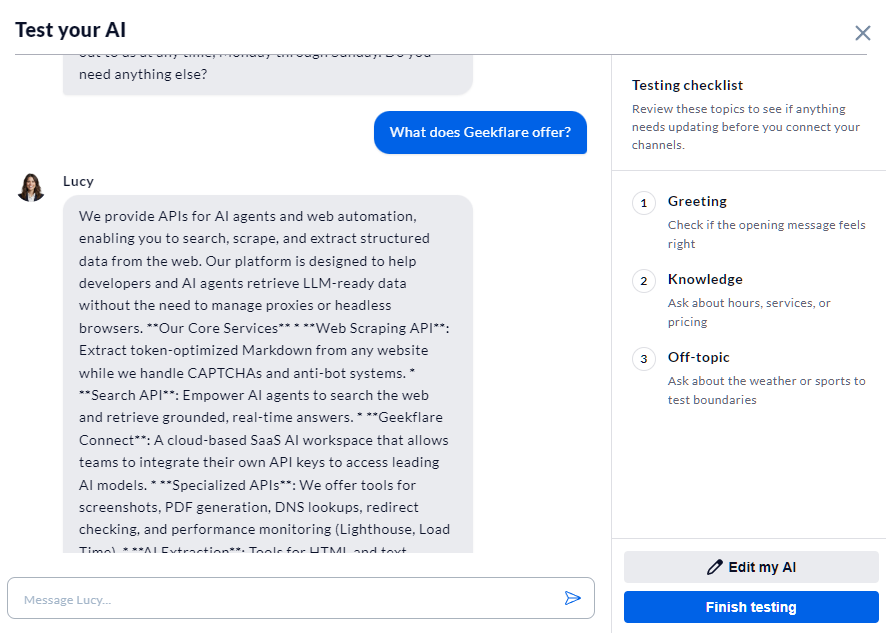
This section also contains the code to integrate a live chat agent to your site.
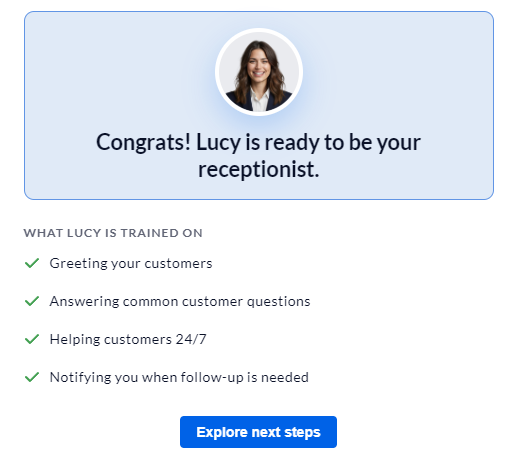
And that’s not the end. You can add new skills by choosing any of the 16 available skills, which include Shopify Support, Calendly Appointment, Zoho Customer Management, and so on. You can also create custom skills and train the AI on them.
Real-world test results
To check XBert’s capabilities, I ran a series of tests to check how accurate and responsive it is. Here is a quick table of all the results.
Note: For each metric, I ran 2-3 calls and put the AI employee under different scenarios. For these tests, I used an Indian number.
| Metric | How I tested it | Unit |
|---|---|---|
| Pickup latency | Ring start -> XBert’s first spoken words | Almost instant ( 2 seconds) |
| Answer accuracy | Checked against known knowledge base | Accurate in all my tests |
| Hallucination count | Times it asserts a business fact that is false/not in KB | I couldn’t get it to hallucinate in my tests |
| Successful bookings | Book via call and verify the actual calendar | Able to do successful bookings and reschedule when asked |
| Escalation accuracy | Check if the escalation is done correctly | Highly accurate and able to escalate issues, but failed to mark the ticket as high priority |
| Transcript fidelity | How well the AI employee follows the transcript | Clear transcripts with summaries |
Calling on the phone is instant. The pickup latency (i.e., time to first spoken words) was around 1-2 seconds, which is optimal to instantly connect with the customer.
Next comes answer accuracy. For this test, I asked questions related to Geekflare’s products. It answered correctly and guided me. I also asked about a particular product, “Sparkian,” and it was correct in its response.
As for hallucinations. I didn’t encounter any made-up responses in my test.
To test its booking capabilities, I tested it with and without the booking add-on.
Without the add-on, the AI employee was kind enough to ask me my time zone and availability and recorded my number, so that it could forward this information to the customer team.
For 2nd testing, I added the “Google Appointment Management Skill.” Here, you need to add the Google Calendar app (free) to your account via Nextiva Marketplace.
Note: I used guided setup to train the appointment skill, where it asked a list of questions.
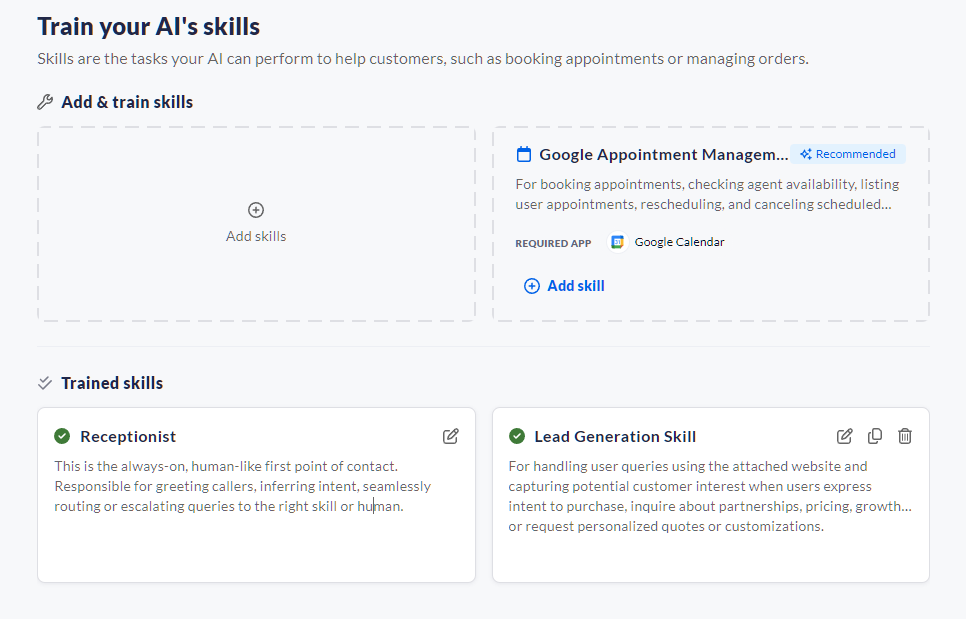
It took me quite some time to train a new skill, as it asked a long list of questions before going live.
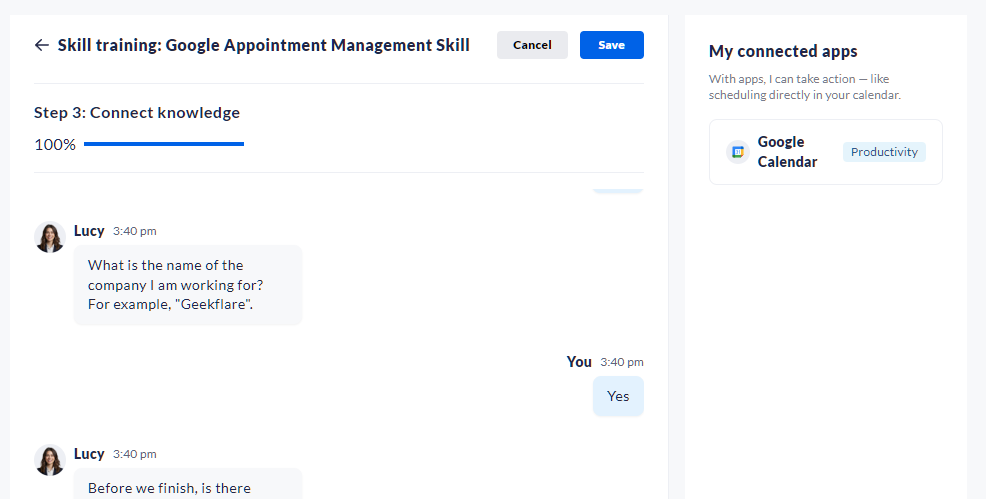
During the test, I found the scheduler to be well-behaved, accurate, and flowy. It was able to schedule a meeting with no problem and change the time when asked.
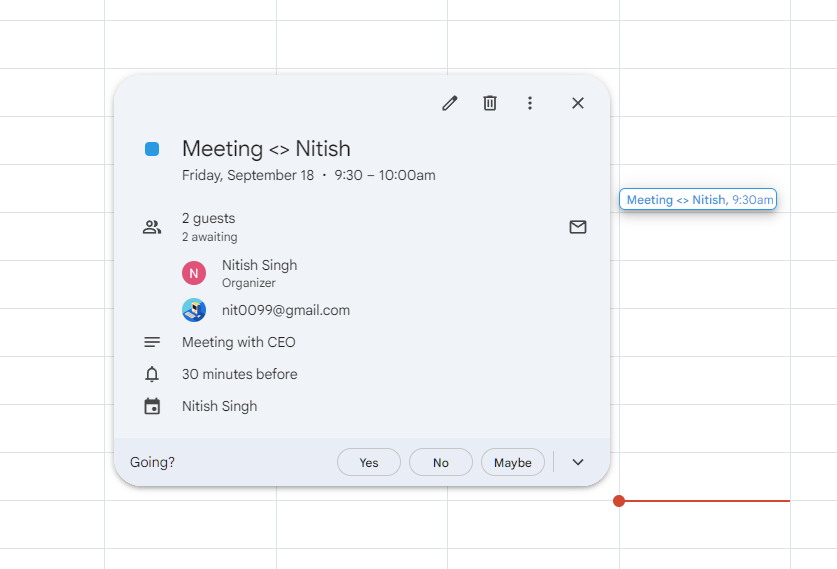
Now, coming to escalation. I created a fake scenario where, as a user, I found an API bug that needs immediate attention. Lucy (AI employee) was able to understand the urgency and assured me that the team would be notified.
In the backend, XBert created the ticket and assigned it to the bot. However, I found no signs of it being put into high priority by the system, considering that it is an escalation request.
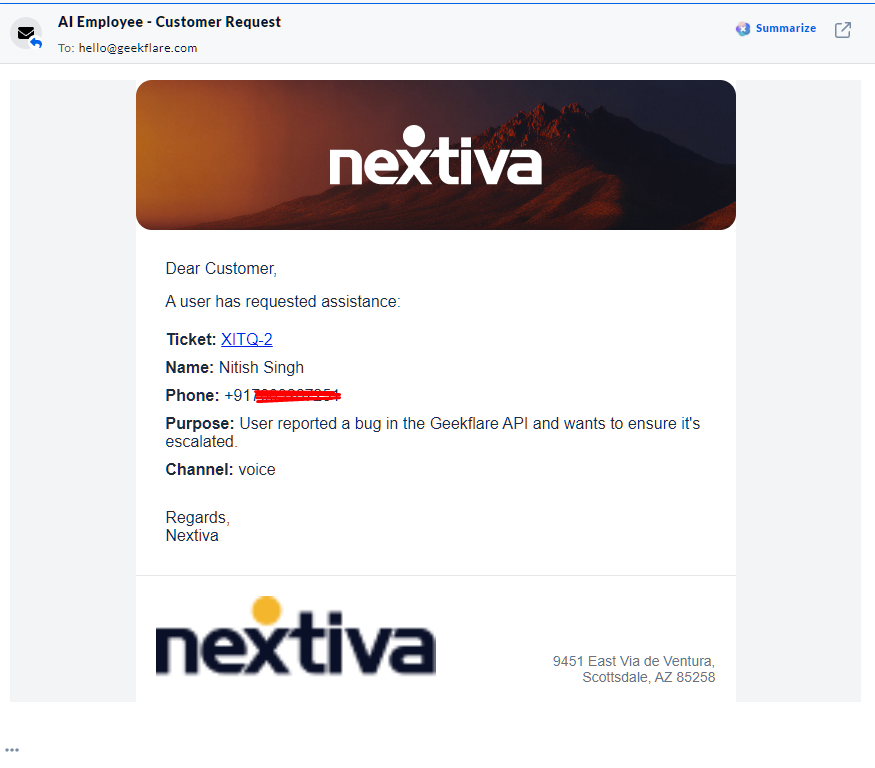
As a customer support agent or admin, you can go through the whole voice call, read the transcript, and get summaries directly from the Shared General Inbox.
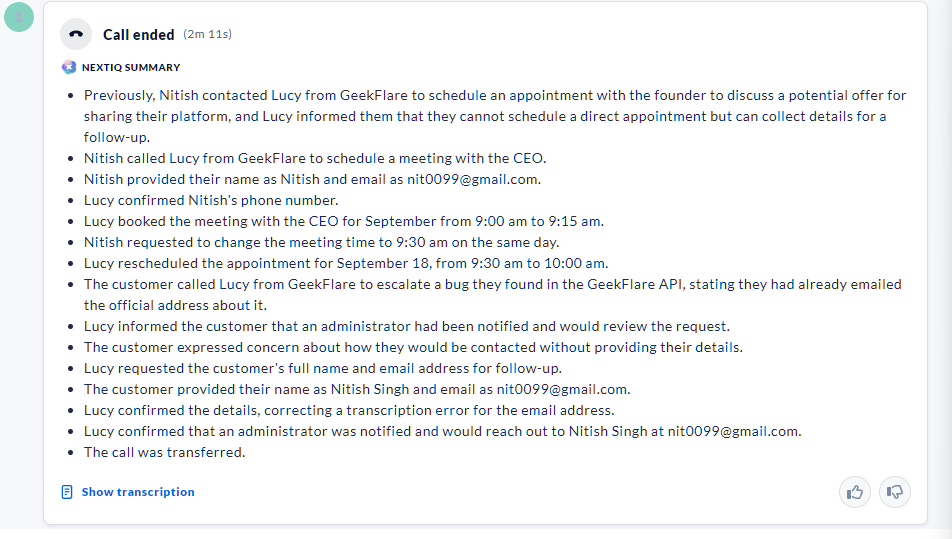
I checked the transcript and found it almost accurate, with a few issues, especially when capturing email addresses. It needs to be said twice or thrice before it properly catches it.
Overall, I found Nextiva XBert to be a good solution for businesses looking to automate their customer handling. It offers ready-to-use skills with the option to create custom ones if needed. The transcript capture and responses are crystal clear, with high accuracy in response and resolution. However, its failure to correctly mark escalation tickets as high or urgent is worth noting.
Pricing
Nextiva XBert starts at $99 per month, making each conversation cost $0.99 with a minimum of 100 conversations/month. This means that, above 100 conversations, you need to pay an additional $0.99 per conversation.
But what constitutes a call?
To simplify calculations, Nextiva follows the rule of 30+ seconds of call time as a single conversation. For web chat/SMS, it is 3+ AI interactions.
Also, they don’t offer volume discounts. This can increase the overall cost — depending on the number of calls your business handles.
Let’s simplify it via the table.
Conversations/mo. Total monthly cost Effective $/conversation
| Conversations/mo. | Total monthly cost | Effective $/conversation |
|---|---|---|
| 100 | $99 | $0.99 |
| 500 | $99 + (400 x0.99) = $495 | $0.99 |
| 2000 | $99 + (1,900 × $0.99) = $1,980 | $0.99 |
Because $99 is a monthly minimum, low volume gets punished; at 50 conversations, you’re still paying the full $99, so the effective rate doubles to $1.98.
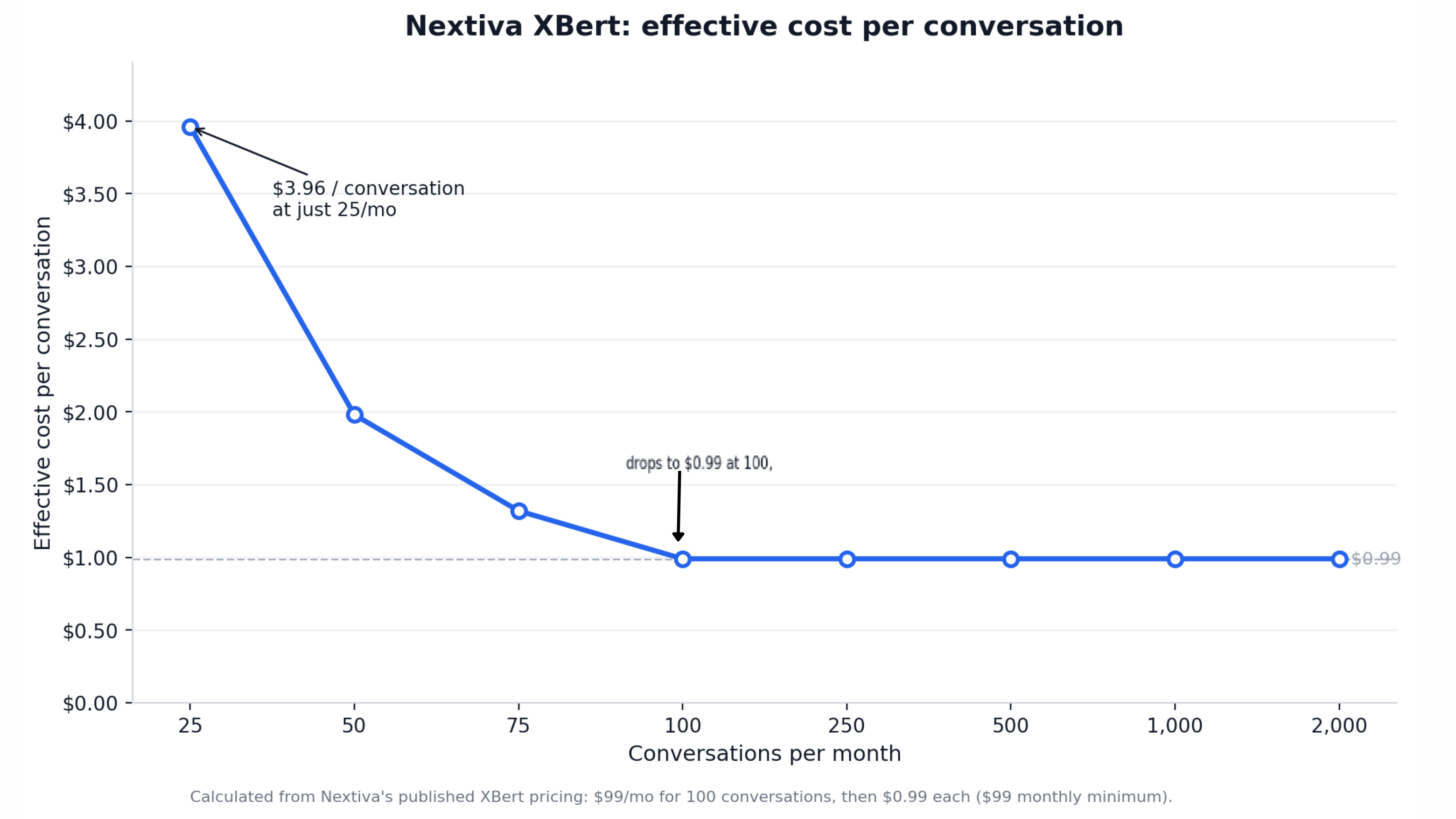
Overall, I found Nextiva XBert pricing rigid in its approach. Businesses with very low call volume may skip their plans completely, as it doesn’t really offer value for money.
Nextiva XBert Pros & Cons
PROS
CONS
XBert vs Human Answering Service
XBert is an automated approach that helps with 24/7 customer handling. It can handle unlimited simultaneous calls and routine queries and complete routine tasks such as booking meetings, with the option to escalate to human support when needed.
A human answering service, on the other hand, mostly works around local business hours. A 24/7 human service is also common but costs more. It has a limit on the caller queue, but excels at handling nuance and offering empathy. However, the call quality can differ based on the agent and how the agent handles the call.
If your business works at scale and is looking for an overall cost-effective solution to customer handling, XBert is the right choice. It offers hand-off to humans when needed and can be set up in minutes.
Comparing both, you’re free to choose an answering service for business that fits your business requirements. If your customers’ calls mostly require handling basic information, then XBert is a good pick. If not, having real humans handle customers is great for building solid long-term business.
Who should buy XBert?
I recommend XBert for businesses in the following industries:
- Healthcare to streamline patient operations
- Accounting for delivering secure, reliable service
- Real estate for closing deals faster
- Retail to improve daily sales and automate order status and returns
- Automotive for service scheduling and driving services
- Legal to get more clients
However, Nextiva XBert should be avoided by businesses with low call volume (as found in pricing analysis) or businesses that need to handle complex conversations requiring human judgment, especially for fields like legal and financial.
Security, compliance and reliability
XBert runs on the Nextiva platform, which offers solid security, compliance, and reliability. However, there are caveats that you should know.
Nextiva offers SOC 2 Type II, ISO 27001, and PCI DSS. Here, SOC 2 Type II is not certified, but only audited.
Nextiva platform also supports HIPAA, but only with a signed BAA. So, no blanket compliance here either.
Apart from these, the Nextiva platform also follows HITRUST practices and is GDPR-adherent. In both cases, it is not certified, so proceed accordingly.
As for recording consent, Nextiva does record/transcribe over calls. However, I couldn’t find deeper information on whether they store it or not in any of their support pages, including security or privacy policy. It’s best to ask their support about recording and data retention policies before going forward with any of their plans.
Note: 11 US states require all-party consent for recording, which requires businesses to disclose recording at the start. It’s a good idea to confirm this from support before diving into paid plans.
In terms of reliability, Nextiva excels by providing 99.999% uptime. It achieves this by offering geo-redundant servers and using techniques such as N+1 power and automatic failover. They also maintain a live status page.
Does XBert work without a Nextiva phone plan?
Yes, a standalone version exists that works without a Nextiva phone plan.
What happens when XBert can’t answer?
If XBert cannot answer, then the action depends on which tier you’re on. If standalone, it escalates via notification/alert. However, if used via Contact Center, it sets up a live transfer to a staffed agent with context.
How accurate are the call summaries?
I found the call summaries to be accurate, with few or no hallucinations. However, it does struggle to capture emails over voice, which might translate to summaries.
Can it handle multiple languages?
As of now it works mainly with English. Spanish also works, but with some configurations.
Can I train it on my own documents?
Yes, you can train via your documents.
Is there a free trial?
Yes, there is a free trial available for new customers. Credit card required.
Final verdict
Nextiva XBert does what it promises, with some drawbacks.
XBert AI employee is capable of handling customers’ questions, completing tasks, and escalating when needed.
Onboarding is easy, but time-consuming. However, once set up, its smooth and rarely require any intervention.
However, the best part is XBert can work standalone at a flat rate of $0.99 per conversation. The price is steep when scaled to a higher volume of calls, but XBert does offer volume discounts for its clients on request.
As for accuracy, XBert AI is accurate and responsive. The AI voices offer clarity and understanding and have the ability to converse tactfully, with empathy thrown in the mix — however, they may sound robotic in a few instances.
I recommend XBert for businesses that want to handle after-hours calls with a focus on resolving customers’ queries and handling basic tasks such as booking appointments. It can work for the health, accounting, retail, automotive, and real estate sectors, at least during the starting phase of customer acquisition.
As an alternative, I recommend Rosie as a low-cost alternative and Smith.ai if you want to use a real human on complex calls.
I strongly recommend trying the XBert demo and deciding for yourself.
Reviewer score: 4.2 out of 5.






