


Web scraping extracts data from the pages, while an API is an official way a website offers to fetch data in a structured format.
If a site has an API that includes the data you need, use it. It’s more stable and mostly allowed. Scrape when there’s no API, when the API leaves out the data you want, or when its limits or price don’t fit your project.
That’s the short answer.
The longer one depends on details, I collected the same data both ways and measured how much data each method returned, what broke when the page changed, which one was faster, and how both behave when you hit a rate limit.
How I tested this
I tested with Python 3.14, Requests, and BeautifulSoup. Most tests use TestingURL.dev that serves the 10 products as HTML pages and as a JSON API.
The real-world test uses Hacker News, which has both a public website and an API.
Web Scraping vs. API at a Glance
| Official API | Web scraping | |
|---|---|---|
| How you get data | Request structured data from an endpoint the site provides | Download pages and extract data from the HTML |
| Data format | JSON or XML with typed fields | Text that you clean and convert yourself |
| What you can get | Only what the API exposes | Anything visible on the page |
| Stability | Versioned, and changes are usually announced | Breaks when the page layout changes |
| Limits | Documented rate limits and quotas | Undocumented limits, blocks, and CAPTCHAs |
| Cost | Often free tiers, then paid plans | Free to write, but you pay in maintenance, proxies, or a scraping service |
| Permission | Explicitly allowed under the API terms | Depends on the site’s terms, robots.txt, and the data involved |
| Setup | API key and authentication | No key needed, but you must study each page |
Test 1: Data Scraped and From the API
TestingURL.dev serves one product list both as a web page and as a JSON API. This scraper reads the page:
import requests
from bs4 import BeautifulSoup


def scrape(url):
    soup = BeautifulSoup(requests.get(url, timeout=10).content, "html.parser")
    return [
        {
            "name": item.select_one(".product-name").get_text(strip=True),
            "price": item.select_one(".product-price").get_text(strip=True),
        }
        for item in soup.select("li.product")
    ]


products = scrape("https://testingurl.dev/scraping/markup/clean")
print(len(products), "products:", products[0])
This call gets the same products from the API:
import requests

data = requests.get("https://testingurl.dev/scraping/js-rendered/api", timeout=10).json()
item = data["items"][0]
print(len(data["items"]), "products:", {k: item[k] for k in ("name", "price", "rating", "stock")})
print("Fields per product:", ", ".join(item.keys()))
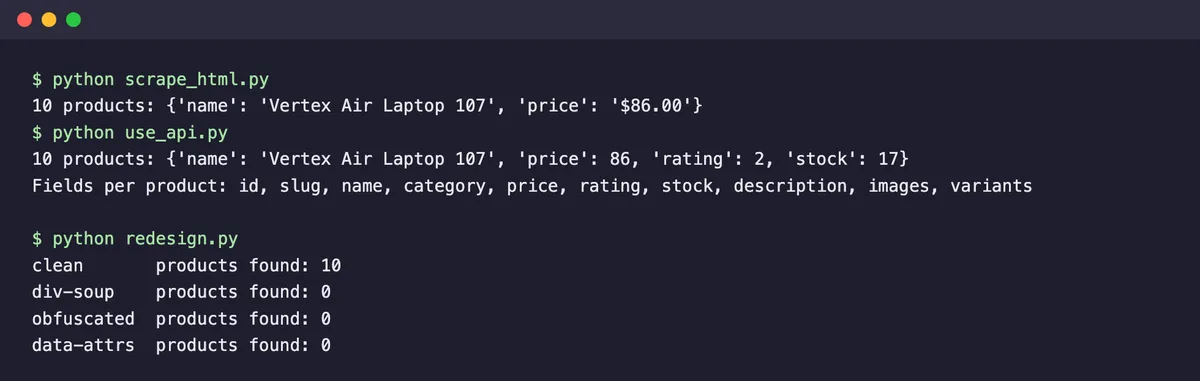
Both returned 10 products, but not the same data. The scraper got what the page shows like a name and a price as text, “$86.00”, which I’d still need to clean before doing any math.
The API returned 10 fields per product, including the price as a number, a rating, stock count, description, images, and variants, none of which needed parsing. It also took fewer lines of code.
Test 2: What Happens When the Page Changes
The biggest cost of scraping is when the site changes its HTML. TestingURL.dev has four layouts of the same 10 products with semantic HTML, “div soup” with no classes, machine-generated class names, and data attributes. I ran the scraper from Test 1 against all four:
import requests
from bs4 import BeautifulSoup

# The same scraper, run on four layouts of the same 10 products
for layout in ["clean", "div-soup", "obfuscated", "data-attrs"]:
    url = f"https://testingurl.dev/scraping/markup/{layout}"
    soup = BeautifulSoup(requests.get(url, timeout=10).content, "html.parser")
    found = len(soup.select("li.product .product-name"))
    print(f"{layout:<11} products found: {found}")
It found all 10 products on the layout it was written for and 0 on each of the other three. Nothing errored, it just silently returned nothing, which is how scrapers usually fail in production.
The API response stays the same no matter how the page looks, because it doesn’t depend on the HTML at all.
If you scrape, you can reduce this risk. Target stable hooks such as data-* attributes or IDs instead of styling classes, check that each run returns a sensible number of items, and alert yourself when the count drops to zero.
Test 3: When the API Is Slow
Official APIs aren’t always faster. Hacker News has an official API, and getting the 30 stories on its front page takes one request for the list of story IDs, then one request per story:
import time

import requests
from bs4 import BeautifulSoup

HEADERS = {"User-Agent": "geekflare-guides-test/1.0"}

# Option 1: scrape the front page (one request)
start = time.perf_counter()
soup = BeautifulSoup(requests.get("https://news.ycombinator.com/", headers=HEADERS, timeout=10).content, "html.parser")
scraped = []
for row in soup.select("tr.athing")[:30]:
    title = row.select_one(".titleline > a").get_text()
    score = row.find_next_sibling("tr").select_one(".score")
    scraped.append((title, score.get_text() if score else "no score"))
scrape_time = time.perf_counter() - start

# Option 2: the official Hacker News API (1 request for the list + 1 per story)
start = time.perf_counter()
session = requests.Session()
ids = session.get("https://hacker-news.firebaseio.com/v0/topstories.json", timeout=10).json()[:30]
stories = [session.get(f"https://hacker-news.firebaseio.com/v0/item/{i}.json", timeout=10).json() for i in ids]
api_time = time.perf_counter() - start

print(f"Scraping: 1 request, {len(scraped)} stories in {scrape_time:.2f}s | fields: title, points")
print(f"API: {1 + len(stories)} requests, {len(stories)} stories in {api_time:.2f}s | fields: {', '.join(sorted(stories[0].keys()))}")
Scraping the front page took 1 request and about 0.6 seconds. The API took 31 requests and between about 4 and 5.5 seconds across two runs. But the API returned more including the author, the exact timestamp, the number of comments, the story URL, and the IDs of the comments, against just the title and points from the page. It’s also the access route Hacker News provides for programs.

Scraping has its own rules here too. Hacker News’s robots.txt asks crawlers to wait 30 seconds between requests, so a scraper that fetches many pages can’t simply go faster.
Check robots.txt before you choose speed as the reason to scrape.
Test 4: Both Hit Rate Limits
APIs publish their limits, and scrapers run into limits that nobody tells them about. Either way, your code needs to handle a 429 Too Many Requests response. TestingURL.dev’s rate-limit endpoint allows 5 requests a minute and sends a Retry-After header telling you how long to wait:
import time

import requests

URL = "https://testingurl.dev/http/rate-limit"
session = requests.Session()

for i in range(1, 7):
    response = session.get(URL, timeout=10)
    if response.status_code == 429:
        wait = int(response.headers.get("Retry-After", 60))
        print(f"Request {i}: 429 Too Many Requests, waiting {wait}s as Retry-After says")
        time.sleep(wait)
        response = session.get(URL, timeout=10)
    print(f"Request {i}: {response.status_code}")
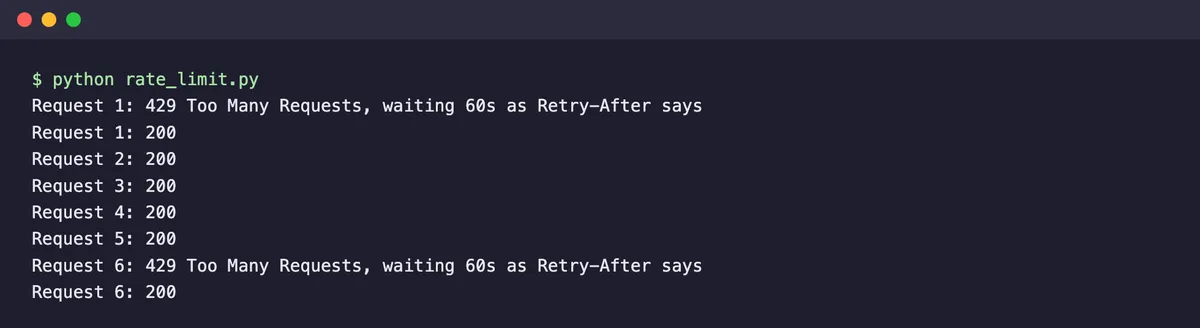
When I ran it, the limit was already used up from earlier tests, so the first request got a 429. The script waited the 60 seconds the server asked for, continued, and handled the next 429 at request 6 the same way. Respecting Retry-After keeps you from getting blocked outright, whether you’re calling an API or scraping pages.
When to Use an API
- The site offers an API that includes the fields you need.
- You need data that has to stay accurate over months, such as for a product feature or a financial report.
- You’re working with personal or account data, where the API’s terms and authentication give you a clear, permitted route.
- You need to write data back, such as posting, updating, or deleting, which scraping can’t do safely.
When to Scrape
- There’s no API, as is common for small business sites, listings, and many ecommerce stores.
- The API leaves out data that’s visible on the page, such as prices on some marketplaces or rankings in search results.
- The API’s rate limits or pricing don’t fit your volume, and the site’s terms allow scraping.
- You need data from many different sites, where learning dozens of APIs isn’t practical.
You can also combine them. Use the API for the core data, and scrape only the few fields it doesn’t include. That keeps most of your pipeline stable and limits the parts that can break.
The Third Option? A Web Scraping API
A web scraping API is a different thing from a website’s official API, even though the names sound alike. It’s a service you send a URL to, and it returns the page’s HTML, Markdown, or extracted data, while it handles proxies, JavaScript rendering, and blocking on its side. It is not for internal data but scrapes the public page for you.
This suits teams that need to scrape but don’t want to maintain headless browsers and proxy pools. The Geekflare Web Scraping API is one example, and it can also extract structured data with AI, which helps with the layout changes from Test 2.
Our list of Apify alternatives compares other services, and if you’d rather build it yourself, start with our test of Python web scraping libraries.
What About Screen Scraping vs. API?
In banking and fintech, screen scraping usually means logging into a user’s account with their credentials and reading data from the screens, which apps did before open banking APIs existed.
It’s a riskier practice than scraping public pages, because it involves handling passwords and private financial data. Where a regulated API such as an open banking API exists, it’s the safer choice.
A Decision Checklist
- Does the site have an official API? If not, scraping or a scraping API is your route.
- Does the API include every field you need? If some are missing, consider using both.
- Do the API’s rate limits and price fit your volume? If not, compare them with the cost of maintaining a scraper.
- Do the site’s terms and robots.txt allow scraping the pages you need? If not, use the API or don’t collect the data.
- How long must this run? For anything long-lived, favor the API, or build scraper monitoring from day one.
If you’re new to scraping, our explainer on what web scraping is covers the legal questions and best practices in more depth.
FAQ
Is web scraping better than using an API?
Not in general. An official API is more stable and returns cleaner data, so it’s usually the better choice when it includes what you need. Web scraping is better when there’s no API, when the API leaves out data shown on the page, or when its limits or price don’t fit your project.
Is it legal to scrape a website that has an API?
Having an API doesn’t make scraping illegal, but many sites’ terms of service say to use the API instead of scraping. Check the terms and robots.txt, avoid personal data without a lawful basis, and use the API when the terms require it. This isn’t legal advice.
Why is my scraper returning no data?
The most common cause is a layout change. In our test, a scraper that found 10 products on one layout found 0 on three others, without any error. Other causes are content loaded by JavaScript, which needs a browser tool or the page’s API, and blocking by the site.
What is the difference between an API and a web scraping API?
A website’s API is an official way to request that site’s data. A web scraping API is a third-party service that fetches and parses any public page for you, handling proxies and JavaScript rendering. It scrapes pages rather than accessing a site’s internal data.
Can I use web scraping and an API together?
Yes. A common approach is to get most data from the official API and scrape only the fields it doesn’t include. That keeps the stable part of your pipeline on the API and limits what can break when the website changes.