



Modern apps are no longer one large system sitting behind a login screen. They are spread across web apps, mobile apps, APIs, cloud services, analytics tools, identity providers, and partner systems. A single action on the screen can trigger several API calls in the background.
Earlier web applications mostly relied on session cookies. You logged in, the server created a session, and the browser carried a cookie to prove that session existed. That worked well when most applications lived inside one website. That does not work well anymore.
Today, software has become more distributed. Web apps, mobile apps, partner APIs, cloud services, and microservices all need a way to pass authorization safely between systems. Each system needs to know whether the request should be trusted.
Security has also changed. Earlier, systems trusted requests once they came from a known network or internal application. That does not work well anymore. In a zero-trust setup, every request needs to prove itself. Not just once at login, but each time it requests data.
Every time an app opens a dashboard, displays customer records, shows shopping delivery status, or performs a financial transaction, it has to check: Who is accessing this data, and what are they allowed to do?
That is where access tokens come in. The access token is a small piece of data that tells an API that the request has been authorized. The API reads the token, checks what it allows, and then decides whether to return the data or block the request.
In this article, we’ll look at what an access token is, how access tokens work, where they are used, and how they differ from refresh tokens and other authentication methods.
What is an Access token?
An access token is a temporary credential that gives an application permission to access a resource.
That resource could be a user profile, an invoice, a file, an admin panel, a payment status, or a set of API records. The token may not describe the full identity of the person in a human-readable way, but it tells the receiving system that the request has been approved and what level of access is allowed.
For example, after you sign in to a web app, the app may receive an access token from the login system. When the app later asks an API to fetch your account details, it sends that token along with the request. The API checks the token before sharing the data.
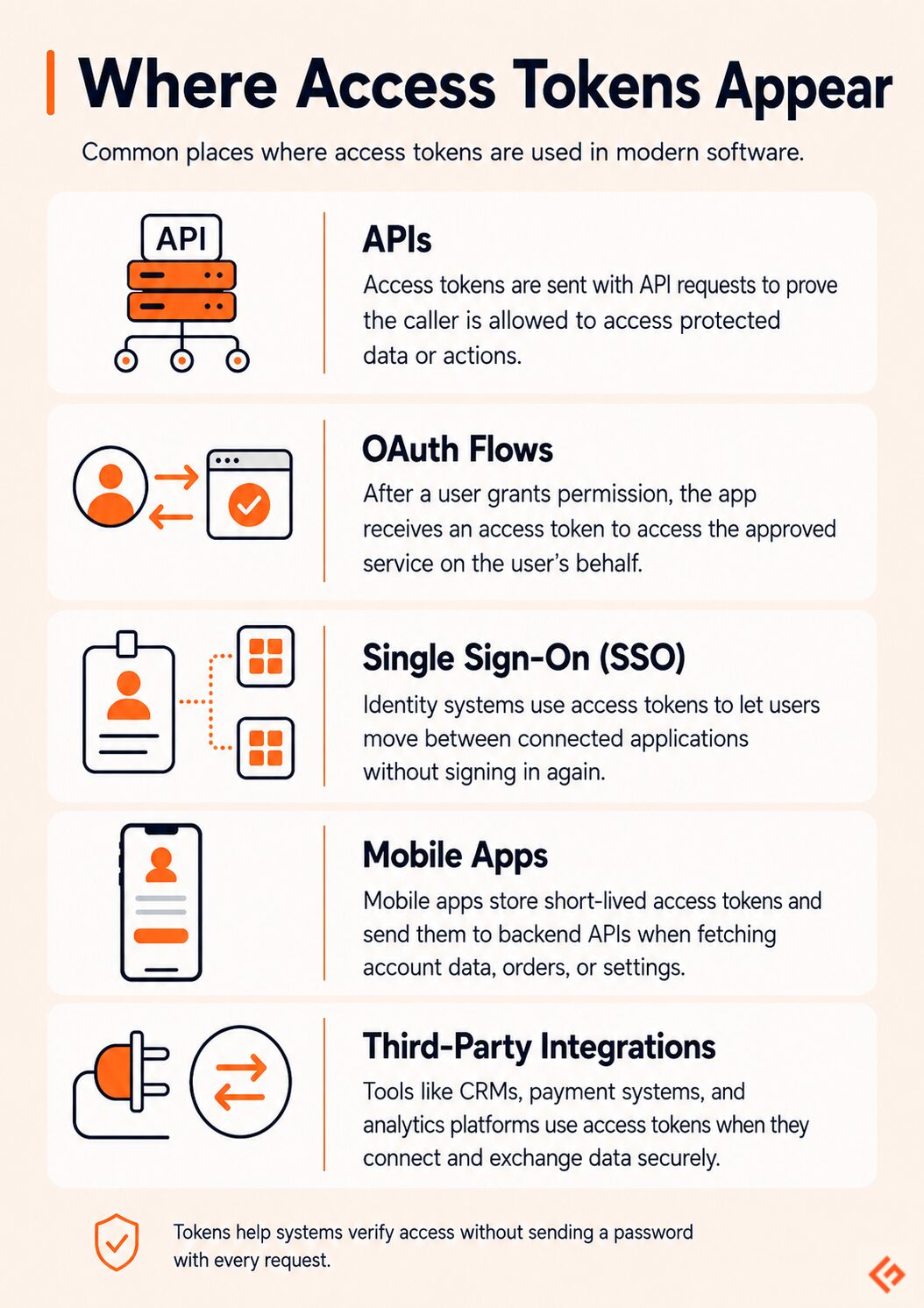
Access tokens appear in many places:
- APIs use them to decide whether a request should be accepted.
- OAuth flows use them after a user approves access for an app.
- SSO systems use them to let users move between connected applications.
- Mobile apps use them to keep users signed in while protecting backend APIs.
Some access tokens are simple strings that only the issuing system can understand. These are often called opaque tokens because the receiving API cannot decode them directly. The API or authorization server has to look them up to know what they mean.
Others are structured tokens, such as a JWT access token. JWT stands for JSON Web Token. It can carry information such as who issued the token, when it expires, and what permissions it represents. This makes it useful in API authentication because different systems can verify the token in a consistent way.
But a JWT is not automatically safer just because it looks more advanced. If it is poorly configured, valid for too long, or exposed in the wrong place, it can still create security risks. The format matters, but the way the token is issued, stored, verified, and expired matters more.
In short, an access token is the pass an application carries when it asks another system for something protected. The receiving system does not need the user’s login and password. It just checks the token, reads the rules attached to it, and acts accordingly.
How Access Tokens Work
An access token usually appears after a user or application has already proved who they are. You sign in, approve access, or connect one app to another. But in reality, a few systems work together to decide whether access should be granted.
1. A user or app requests access. This could be a user logging in, a mobile app opening account data, or one software system trying to call another API.
2. The authentication server checks the request. It verifies the login, app identity, password, MFA, client credentials, or any other required proof.
3. If the request is valid, the server creates an access token. This token usually has an expiry time and a defined scope. For example, it may allow read-only access to invoices but not permission to delete them.
4. The app sends the token to the API in the request header, often like this:
Authorization: Bearer <access_token>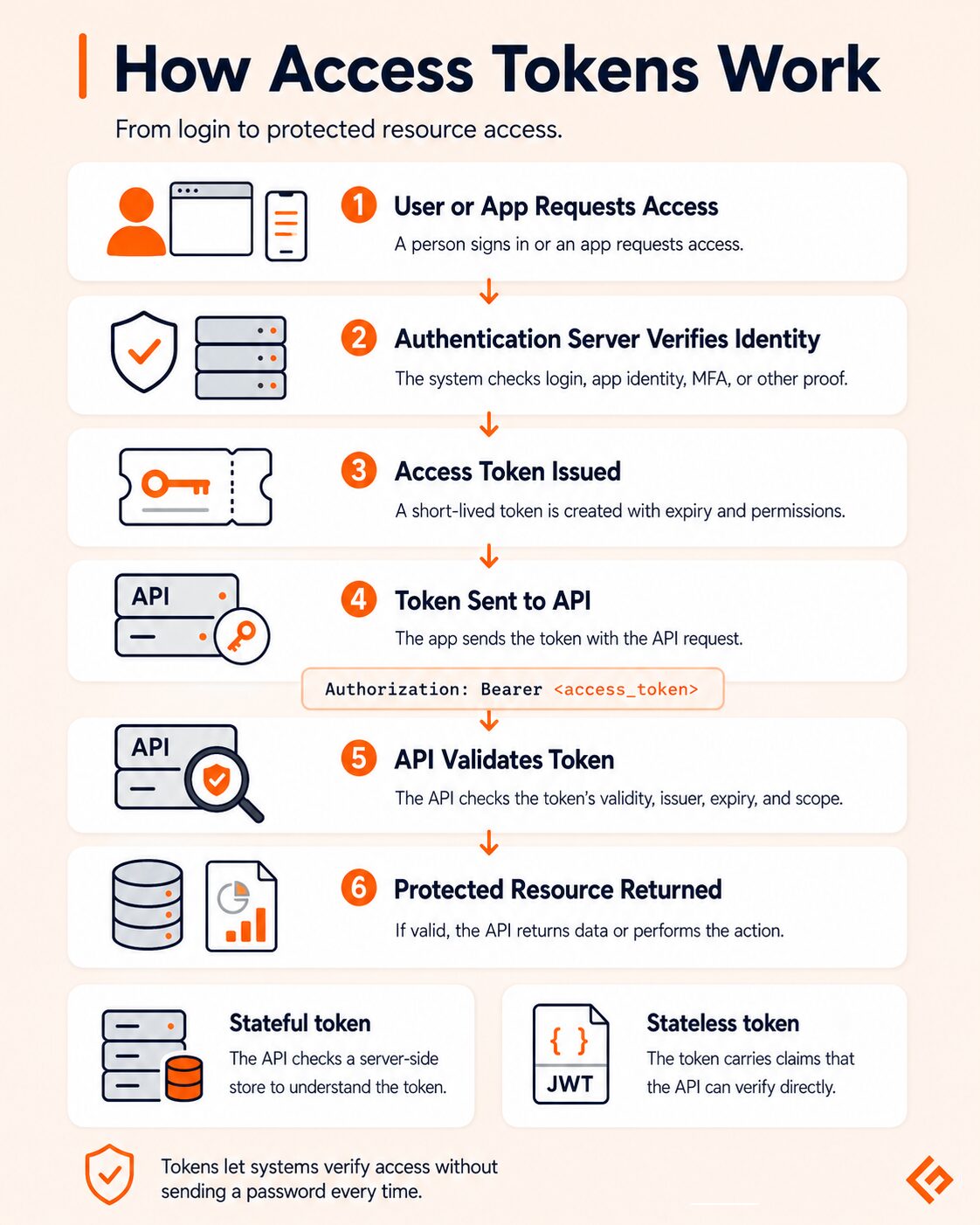
Stateful vs. Stateless Tokens
Access tokens can be stateful or stateless.
A stateful token works like a reference number. The token itself may not contain much information. When the API receives it, the system checks a database or token store to understand what the token means.
This gives the server more control. If a token needs to be revoked immediately, the system can mark it as invalid.
A stateless token carries more information inside the token itself. A JWT access token is a common example. The API can verify the token by checking its signature and reading its claims, such as issuer, expiry time, user ID, and permissions.
Stateless tokens are easier to use across distributed systems because every API does not need to check a central database for every request. But they need tighter handling. If a stateless token is valid for too long, it may continue working until it expires unless the system has a separate revocation mechanism.
Stateful tokens give stronger central control. Stateless tokens work well for scale. The choice depends on the system design.
Types of Access Tokens
Not all access tokens have the same format. It depends on the system issuing the token and how the receiving API validates it.
Opaque Tokens
An opaque token is a random-looking string. The API cannot understand it just by reading it.
For example:
8xY92LmQpR17vAqK0zP1The token has meaning only to the authorization server that issued it. When the API receives the token, it may need to call the authorization server or check a token store to confirm whether the token is valid.
Opaque tokens are useful when the system wants strict control, for example, OpenAI API keys. The token can be revoked or changed centrally because the actual meaning is stored on the server side.
JWT Access Tokens
A JWT, or JSON Web Token, is a structured token. It usually has three parts: a header, a payload, and a signature.
Unlike an opaque token, a JWT can carry useful information inside it. Something like:
{
 "sub": "user_12345",
 "iss": "https://auth.example.com",
 "aud": "https://api.example.com",
 "scope": "read:orders",
 "exp": 1735689600
}
The important part is the signature.
The signature is created from the JWT header and payload using a secret key or private key. When the API receives the JWT, it verifies the signature (with a public key) to confirm two things:
- The token was issued by a trusted system
- The payload has not been changed after the token was issued
This is what makes JWT useful. The payload may be readable, but it cannot be changed safely. If someone changes "scope": "read:orders" to "scope": "delete:orders" or changes the expiry time, the signature will no longer match. The API will reject the token.
It is frequently used in API-heavy systems where multiple services need to verify access quickly. For example, a web app may call an orders API, payment API, and notification API. Each API can verify the JWT by checking its signature and claims instead of calling the authorization server every time.
But a JWT is not a safe place for secrets. Its payload is encoded, not automatically encrypted. Anyone who gets the token may be able to decode and read the payload.
JWTs are best used for carrying non-sensitive authorization details, such as user ID, issuer, audience, expiry, and scopes. Do not put passwords, API keys, financial data, personal secrets, or confidential business information inside a JWT payload.
SAML Tokens
SAML is common in enterprise identity systems, especially in older single sign-on setups.
Strictly speaking, SAML uses assertions. A SAML assertion is an XML-based message that says something about the user, such as who they are, which system verified them, and what application they are trying to access.
In everyday enterprise conversations, people may still call them “SAML tokens” because they behave like tokens in a login flow. They carry trusted identity information from one system to another.
For example, an employee may sign in through the company’s identity provider and then open tools such as HR software, finance systems, or internal dashboards without logging in separately to each one. SAML helps pass that trusted login information between the identity provider and the business application.
SAML is less common in modern API access than JWTs, but it is still widely seen in corporate SSO environments.
Macaroons
Macaroons are a less common type of token that can carry extra conditions called caveats. These caveats can limit what the token can do.
For example, a macaroon may say:
- valid only before 6 PM
- valid only from a specific IP range
- valid only for read access
- valid only for one service
This makes macaroons useful when permissions need to be narrow and context-aware. Instead of giving a broad token and checking everything separately, the restrictions can travel with the token itself.
They are not as widely used as JWTs or opaque tokens, but they are a good example of how token design can support fine-grained access control.
Access Token vs. Refresh Token vs. ID Token
Access tokens, refresh tokens, and ID tokens often appear in the same login or app-connection flow, but they have different functions.
- Access token: proves what the app is allowed to access.
- Refresh token: helps the app get a new access token when the old one expires.
- ID token: proves who the user is.
| Token | What it answers | Used for | Typical lifespan | Security note |
|---|---|---|---|---|
| Access token | “What can this app access?” | Calling APIs and accessing protected resources | Short-lived | If stolen, it can be used until it expires |
| Refresh token | “Can this app get a new access token?” | Keeping a session active without asking the user to log in again | Longer-lived | More sensitive because it can create new access tokens |
| ID token | “Who is this user?” | Telling the app that the user has been authenticated | Usually short-lived | Should not be used as an API access token |
An access token is used when the app calls an API. For example, it may allow the app to read a user’s profile, fetch order history, or access a file.
An ID token is not about API access. It is about identity. It tells the application that the user has been authenticated by a trusted identity provider.
For example, when someone uses Sign in with Google on another app, Google may send an ID token to that app. The app uses it to understand, “This user has successfully logged in through Google.” The token may include basic identity details such as user ID, email, issuer, audience, and expiry.
The app can use the ID token to start a user session inside its own product. But it should not use that ID token to call protected APIs. For API access, the app needs an access token with the right permission.
A refresh token is used when the access token expires. Instead of making the user sign in again every few minutes, the app uses the refresh token to request a new access token.
Refresh tokens are often misunderstood. They are not “more secure” than access tokens. They are usually more sensitive because they live longer and can be used to get new access tokens. They become safer only when protected with secure storage, rotation, expiry rules, and revocation.
Access Token Lifespan & Expiry
Access tokens are usually short-lived, as this reduces damage if the token is stolen. If an attacker gets a token that expires in 15 or 30 minutes, the window of misuse is limited. If the token is valid for 30 days, the risk is much higher.
There is no single OAuth rule that says every access token must expire in under one hour. OAuth leaves many implementation details to the authorization server.
Google Apigee says a good starting point for OAuth access token lifetime is 30 minutes, while Microsoft’s browser guidance says access tokens have a default recommended expiration of one hour.
When an access token expires, the API should reject it. The app then has two choices:
- use a refresh token to silently get a new access token
- ask the user to sign in again
From the user’s side, this should feel smooth. The app should not suddenly break or lose work just because the token expired.
From the developer’s side, expiry needs careful handling. The app should detect expired tokens, refresh them safely, retry the failed request when required, and avoid creating endless refresh loops.
Long-lived tokens may feel convenient, but they increase exposure. Short-lived tokens improve security, but they require better session handling. A good system should strike a balance between both.
Where Are Access Tokens Used
Access tokens are used wherever an application needs controlled access to protected data, actions, or services. They are most visible in APIs, login systems, mobile apps, internal services, and now AI agent workflows.
REST APIs and GraphQL APIs
Access tokens are commonly used with both REST and GraphQL APIs.
In a REST API, the app may call different endpoints such as /users, /orders, or /reports. In a GraphQL API, the app may send one query asking for specific fields. In both cases, the API still needs to check whether the caller is allowed to access that data or perform that action.
Consider a platform like Geekflare API. It offers REST APIs for tasks such as web scraping, screenshots, DNS checks, etc. The API should not run the request just because the URL is valid. It also needs to verify which account is making the call, whether that account has access to the feature, and whether the usage is within allowed limits.
OAuth 2.0 and OpenID Connect and Newer Login Models
OAuth access tokens are widely used when one app needs permission to access another service.
For example, when a scheduling app connects to Google Calendar, it should not ask for the user’s Google password. Instead, the user approves access, and the scheduling app receives an access token with limited permission.
That token may allow the app to read calendar events, but not delete files from Google Drive or access Gmail. This is the important part: the token carries specific permission, not unlimited account access.
OpenID Connect is often used in the same login flows. It adds identity information through an ID token, while the access token is still used for API access.
Newer login models are also changing how identity is proven. In Web3 Auth platforms, users may sign in with crypto wallets instead of passwords. The flow is different, but the goal is similar: prove identity, issue trusted access, and let applications interact securely.
Mobile Apps
Mobile apps use access tokens to talk to backend APIs.
When you open an app, it may use a stored token to fetch your profile, orders, messages, or settings. The token helps the backend know that the app request is tied to an authorized user session.
Mobile apps need careful token storage because phones can be lost, rooted, or compromised. Tokens should be stored in secure platform storage, not casually saved in plain text.
Microservices and Service-to-Service Auth
In modern backend systems, services often talk to other services.
For example, an order service may call an inventory service. A billing service may call a subscription service. Each service should not be trusted just because it sits inside the same cloud network.
Access tokens help prove service identity and enforce permissions between internal systems.
AI Agents and LLM Tool Use
Access tokens are very important in AI agent workflows.
An AI agent may need to call a CRM, search a database, open a support ticket, fetch analytics, or trigger a workflow. Each tool call needs controlled access.
This creates a new risk: tokens may leak through prompts, logs, traces, tool outputs, browser sessions, or poorly designed agent memory. As AI agents become more connected to real systems, token handling becomes part of AI security, not just API security.
Access Token Security Best Practices
Access tokens should be treated like sensitive credentials.
Avoid Storing Tokens in localStorage
Storing access tokens in localStorage is risky because JavaScript can read them. If the site has an XSS vulnerability, an attacker may steal tokens from the browser. OWASP recommends not storing sensitive information in local storage and notes that httpOnly cookies can reduce exposure because JavaScript cannot read them directly.
Use httpOnly Cookies or Secure Memory
For web apps, httpOnly, Secure, and SameSite cookies are often safer than localStorage for session-style handling.
For mobile apps, use secure storage provided by the operating system, such as Keychain on iOS or Keystore on Android.
For backend services, store tokens in secure secrets managers or encrypted stores.
Rotate and Revoke Tokens
Tokens should not live forever.
Use rotation for refresh tokens. When a refresh token is used, issue a new one and invalidate the old one. This helps detect reuse and reduces long-term exposure.
Also implement revocation. If a user changes a password, leaves an organization, loses a device, or disconnects an integration, the old tokens should stop working.
Keep Scopes Small
Do not issue a token with more access than needed.
If an app only needs to read invoices, do not give it invoice deletion rights. If an integration only needs access to one workspace, do not give it organization-wide access.
This is the principle of least privilege. It limits damage when something goes wrong.
Watch Token Leakage in AI and LLM Pipelines
AI workflows create new leakage paths.
Tokens can accidentally appear in:
- prompts
- debug logs
- traces
- screenshots
- browser automation sessions
- shared chat histories
- tool call outputs
Never paste live tokens into AI tools. Mask them in logs. Redact them in traces. Use short-lived, scoped tokens for agent workflows. Give each agent or tool its own identity instead of sharing one broad credential.
Real-World Example
A common example of access tokens is the “Sign in with Google” option you see on many websites and apps.
For example, when someone opens Geekflare Chat and chooses to sign up or log in with Google, they are not giving their Google password to Geekflare Chat. Google handles the login. Geekflare Chat receives trusted information from Google after the user approves the sign-in.
The flow looks like this:
- The user clicks Sign in with Google.
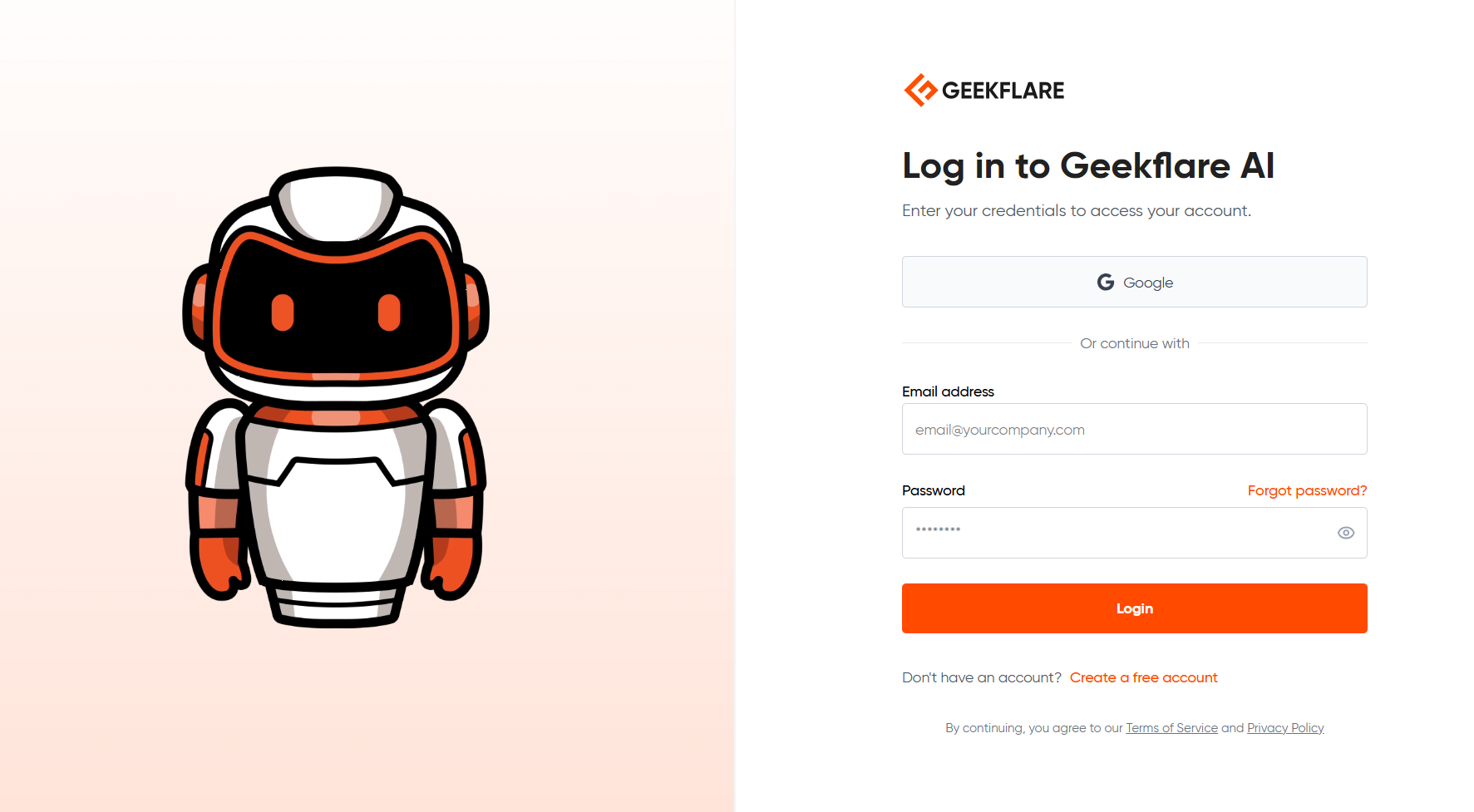
- Google asks the user to choose an account and complete the login.
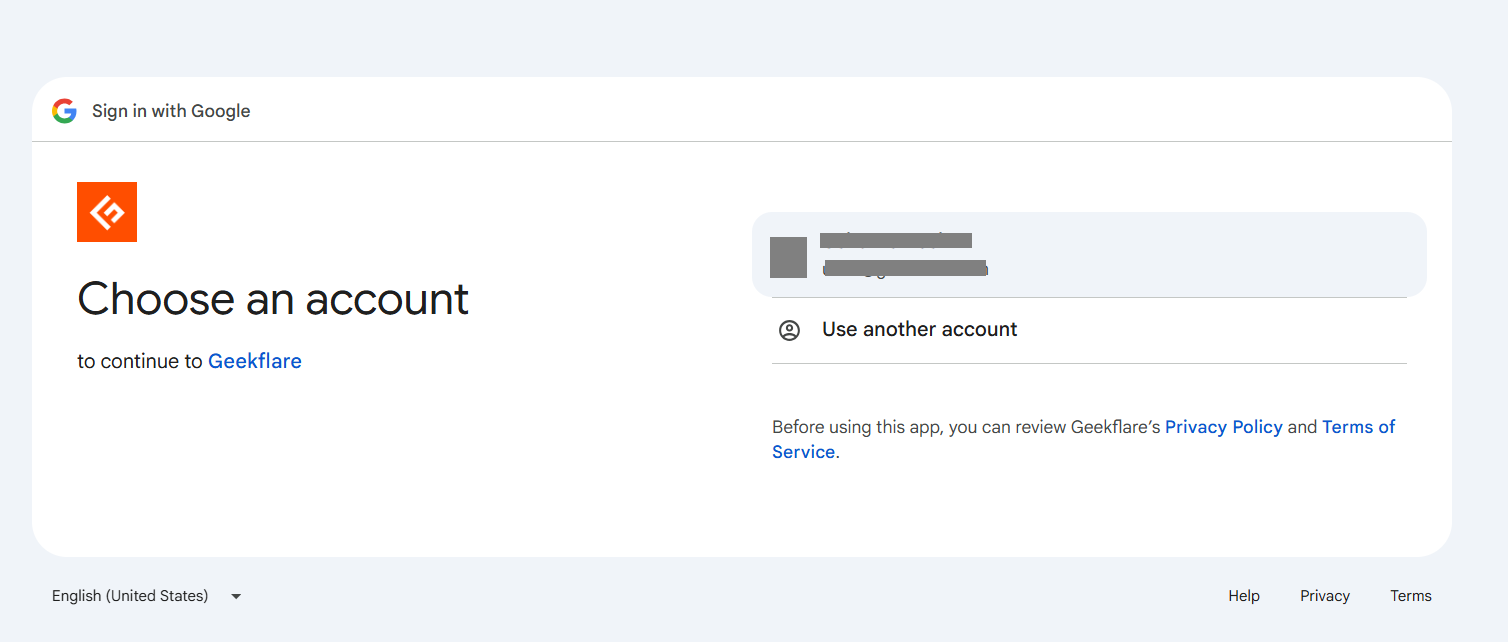
- After successful login, Google sends a response back to the application (Geekflare).
- Geekflare receives tokens from Google.
- Geekflare uses those tokens to confirm the user’s identity and, where needed, access approved resources.
This is where different tokens may appear.
An ID token tells the application who the user is. For example, it may confirm that the user signed in through Google and provide basic identity details such as user ID, email address, issuer, and expiry time.
An access token is different. It is used when the application needs permission to access a protected Google API. For example, if an app wants to read Google Calendar events or fetch Google Drive files, it needs an access token with that specific permission.
So, in a simple Google sign-in flow, the application may use the ID token to log the user in. If the app also needs to call Google APIs, it uses an access token for that API access.
A simplified request to a Google API may look like this:
GET https://www.googleapis.com/oauth2/v3/userinfo
Authorization: Bearer <access_token>
The token is sent in the Authorization header. Google checks whether the token is valid, whether it has expired, and whether it has permission to access the requested information.
A simplified JWT-style token payload may look like this:
{
  "iss": "https://accounts.google.com",
  "sub": "112233445566778899",
  "aud": "your-app-client-id",
  "email":"[email protected]",
  "email_verified": true,
  "exp": 1735689600
}
Here is what the fields mean:
| Claim | Meaning |
|---|---|
iss | The issuer. In this case, Google issued the token. |
sub | The unique user ID from the identity provider. |
aud | The application the token is meant for. |
email | The user’s email address, if included. |
email_verified | Whether the email has been verified by the provider. |
exp | When the token expires. |
The application should not blindly trust a token just because it exists. It must check that the token came from the expected issuer, is meant for the correct application, has not expired, and has a valid signature.
In plain terms: Google proves the user’s identity, the application receives trusted token-based proof, and the user does not have to create another password.
Common Mistakes Developers Make
Access token mistakes are common because tokens are easy to use but easy to mishandle.
Logging Tokens Accidentally
Developers sometimes log full request headers during debugging. That can expose access tokens in logs, monitoring tools, error trackers, or shared screenshots.
Tokens should be masked automatically.
Bad:
Authorization: Bearer eyJhbGciOi...Better:
Authorization: Bearer [REDACTED]Issuing Over-Scoped Tokens
A token should not carry admin-level access unless it truly needs it.
Over-scoped tokens make breaches worse. If a reporting tool only needs read access, give it read access, but not write access or delete access or full account access.
Ignoring Revocation
Expiry is not enough.
A token may need to be killed before its natural expiry. For example, when a user is removed from a company or an integration is disconnected.
Systems should support revocation, especially for refresh tokens and high-risk access.
Trusting Token Presence Without Validation
This is one of the worst mistakes.
An API should not say, “A token is present, so allow the request.”
It must check:
- Is the token signature valid?
- Has it expired?
- Was it issued by a trusted authority?
- Is it meant for this API?
- Does it have the required scope?
- Has it been revoked?
A token is not proof by itself. A valid token is proof.
Access Tokens in a Zero-Trust Architecture
Traditional security depended heavily on perimeter security. The idea was to protect the network boundary and trust what is inside. If a request came from inside the corporate network, it was often treated as safe.
That approach worked better when employees, applications, and databases mostly lived inside a corporate network, but it does not fit modern systems. Users and remote employees log in from different devices and locations, some even using public WiFi.
Applications now run across cloud services, SaaS tools, APIs, remote devices, partner systems, and AI agents, where the boundaries are blurry. A compromised internal account can be just as dangerous as an external attacker.
Zero trust works on the assumption: do not automatically trust any request just because it comes from a known network, device, or application. Verify it each time.
Access tokens support this model because they give every request a way to prove access. This is how access tokens fit into zero trust. They:
- reduce dependence on network location
- support short-lived access
- carry specific permissions
- help APIs verify each request
- make access easier to revoke or limit
Platforms such as AWS, Microsoft Entra ID (formerly Azure AD), and Okta use these ideas in different ways. The common principle is the same: access is not granted once and trusted forever. It is checked continuously based on identity, permission, context, and risk.
In a zero-trust setup, an access token is not just a technical detail. It becomes a short-lived proof that the current request is allowed.






