



Search Console says our guide to DNS servers ranks second in the US for “dns servers”. It has said so nearly every day for the past ten days. So we checked Google from five US locations, and the page wasn’t on page one in any of them.
Neither number is broken. They’re measuring different things, and that gap is the whole problem with rank tracking. A position only means something once you know where the search happened, on what device, and on which part of Google.
To see how big the differences really are, we tracked 100 keywords across 20 US cities and compared desktop with mobile. This guide shares what we found, then walks through how to track rankings in free with Search Console, with a rank tracking tool, or with a SERP API feeding a Google Sheet or a Python script.
What We Found When We Tracked 100 Keywords
We picked 35 local keywords (“dentist”, “emergency plumber”), 35 software and product keywords (“best crm software”, “password manager”) and 30 informational ones (“how to file taxes”, “what is kubernetes”). Then we pulled Google’s first page for each one in 20 US cities, plus desktop and mobile results from Chicago.
| Local | Software and products | Informational | |
|---|---|---|---|
| Results two cities share (of the top 8) | 0.9 | 6.8 | 6.4 |
| Same #1 result in every city | 0 of 35 | 17 of 35 | 20 of 30 |
| Results desktop and mobile share (of the top 8) | 6.4 | 6.0 | 5.6 |
| Same #1 on desktop and mobile | 26 of 34 | 24 of 33 | 18 of 27 |
| Results pages with an AI Overview | 5% | 93% | 99% |
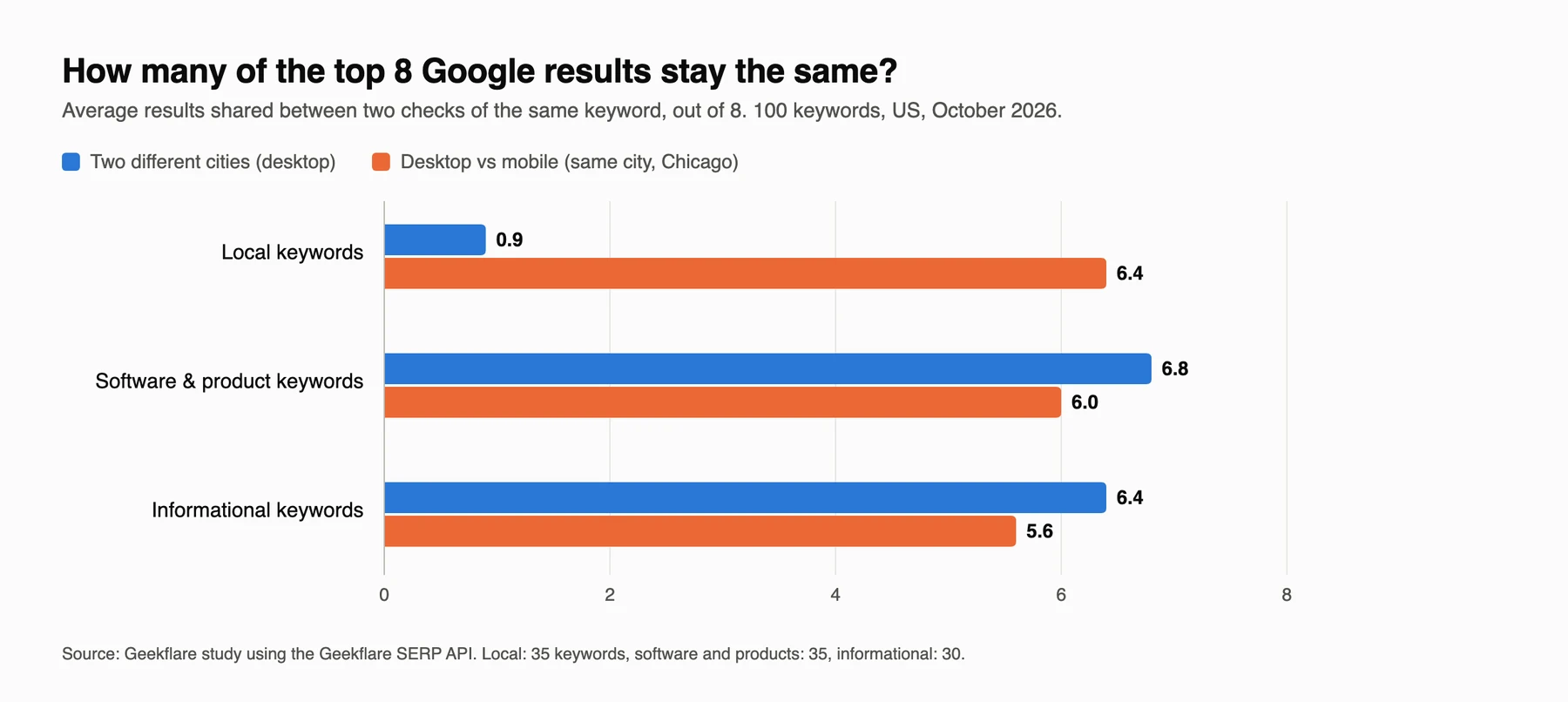
Local results are almost completely different from one city to the next. On average, two cities shared less than one of their top eight results. Software and informational keywords are far more stable. Only a little over half of them (37 of 65) had the same #1 result everywhere, and for 33 of the 65 non-local keywords, at least one page moved three or more positions between cities.
Device matters less than location for local searches, and slightly more than location for everything else. A typical informational keyword lost two or three of its desktop results on mobile.
How WE ran the test
We checked 100 keywords using Geekflare’s SERP API, with Google US results pinned to 20 cities (New York to Salt Lake City) on desktop, and to Chicago on both desktop and mobile. We compared the top 10 organic results.
Separately, we compared Search Console data for 13 of our own Guides pages with live results from five US locations.
Why Your #1 Isn’t Everyone’s #1
Location changes local results
For “dentist”, all 15 cities with clean data had a different #1 result. “Emergency plumber” had 11 different #1 results across 13 cities, usually a local company with a city-specific page. Yelp’s search page was the only result that appeared in all 13, and even Yelp moved between #1 and #5. Big brands localize too. Delta Dental ranked first for “dentist” in Minneapolis, Dallas, and Chicago, but with a different state-specific page each time.
So if you’re tracking a local keyword, a single national number is meaningless. You need one number per city you care about.
It matters for national keywords too
You might expect “how to file taxes” to look the same everywhere. The IRS held #1 in every city, sure. But H&R Block’s free filing page ranked anywhere from #2 to #6 depending on where we searched from. If that were your page, your rank tracker could report a three-position swing on a day when nothing changed except the city it happened to check from.
The top spot can also be shaky in ways that don’t show up in a simple position number. For “best vpn”, a Reddit thread was #1 in all nine cities, but it wasn’t always the same thread.
Desktop and mobile are different results pages
On average, a desktop result set lost two of its top eight results on mobile, and about a quarter of keywords had a different #1. Informational queries moved the most. Mobile is where most searches happen now, so if you only track desktop, you’re watching the half of your audience.
Personal history skews your own checks
Checking your rankings by searching Google yourself adds one more distortion. Google adjusts results based on your location, language, and past activity, so the site you visit every day tends to look better to you than others. For a quick check of a single keyword, use our free SERP checker, which searches from any country or city without your history.
Why Search Console Disagrees With Your Rank Tracker
Back to that DNS guide. We pulled Search Console data for 13 Guides pages with an average US desktop position in the top 10, then checked the live results for the same queries from five US locations. In all 65 checks, our page didn’t appear anywhere on page one.
| Query | Search Console avg. position (US, desktop) | Daily impressions | Found on page one? |
|---|---|---|---|
| dns servers | 2.6 | 2 to 5 | No (0 of 5 checks) |
| scrape google serp | 3.2 | 1 to 11 | No (0 of 5 checks) |
| best answering service | 5.3 | 4 to 18 | No (0 of 5 checks) |
| free vpn reddit | 6.9 | 36 to 78 | No (0 of 5 checks) |
| api monitoring tools | 9.3 | 4 to 16 | No (0 of 5 checks) |
The impression counts are the giveaway. A page ranking second for “dns servers” on the regular results page would collect far more than a handful of impressions a day. Those impressions are coming from somewhere else.
The most likely source is AI Mode. Since June 2025, Google has counted AI Mode clicks, impressions, and positions in the regular Search Console performance report, using the same position rules as a normal results page. If AI Mode links to you near the top of its answer, that counts as a high position. Search Console’s average also blends every country, city, and device into one number.
The generative AI performance reports, available to all sites since August 31, 2026, show your impressions inside AI Overviews and AI Mode by page, country, device, and date. They don’t break results down by query yet, so you still can’t see exactly which searches drove those AI impressions.
None of this makes Search Console wrong. It’s the only source of real impressions and clicks you have. It just answers a different question (“how visible were we, averaged across everything?”) from a rank tracker (“where do we rank in Chicago on mobile today?”). You need both.
What to Track Besides Your Position
A position on its own tells you less than it used to. Every time you check a keyword, record these as well:
- The ranking URL – if the page that ranks keeps changing, two of your pages are probably competing for the same query.
- Whether there’s an AI Overview, and whether it cites you – AI Overviews appeared on 93% of the software results pages and 99% of the informational ones in our study. Being cited in one can matter more than moving from #4 to #3.
- Who’s above you – store the full top 10. Competitor tracking is then free.
- Organic rank and page position – your organic rank ignores ads, AI Overviews, and other blocks. Your position on the whole page counts them, which is closer to what a searcher actually sees. The Geekflare SERP API returns both as
rankandglobal_rank.
SERP features such as People Also Ask, video carousels, and local packs deserve their own tracking. Our guide to SERP features covers how often each one appears and how to track them.
Six Ways to Track Keyword Rankings
Google Search Console
Search Console is the place to start because it’s free and it’s data from Google. Open the Performance report, filter by query or page, and set the country and device you care about. Then check the new generative AI report alongside it, so you can see how much of your visibility now comes from AI features.
Treat the position column as a trend line. It’s an average of every impression on every surface, it lags by a couple of hours, and it only covers queries where you already appear. It can’t tell you where a competitor ranks or where you stand in a specific city.
A rank tracking tool
Tools like Semrush, Ahrefs, SE Ranking, and AccuRanker check a keyword list for you on a schedule. They’re the easiest option if you want dashboards and don’t want to write any code. Our list of SEO monitoring tools covers several of them.
Before you pick one, test it against what our data showed:
- Can you set a city, not just a country, for each keyword?
- Is mobile tracked separately, and at what price?
- Does it record AI Overview presence and citations?
- Can you export the raw results, including competitors, to your own sheet or warehouse?
Most tools price by the number of tracked keywords, so the cost climbs quickly when you add cities and devices. Twenty keywords across five cities on two devices is 200 tracked keywords.
A SERP API
A SERP API returns Google’s results page as structured data, and you decide what to store and how often to check. It’s the flexible option and the cheapest at scale. It’s also how we ran this study.
Disclosure
Geekflare SERP check costs 2 credits, includes the AI Overview, and lets you set a country, a city (65,000+ are supported), and device as desktop or mobile.
The free plan includes 500 credits a month, which works out to about 250 checks.
Track rankings in Google Sheets
We built a Google Sheet that checks your keywords and logs the results every day. Make a copy, add your Geekflare API key under Rank tracker → Set API key, and list your keywords on the Keywords tab with your domain, country, optional city, and device.
Copy this Geekflare rank tracker Google Sheet.
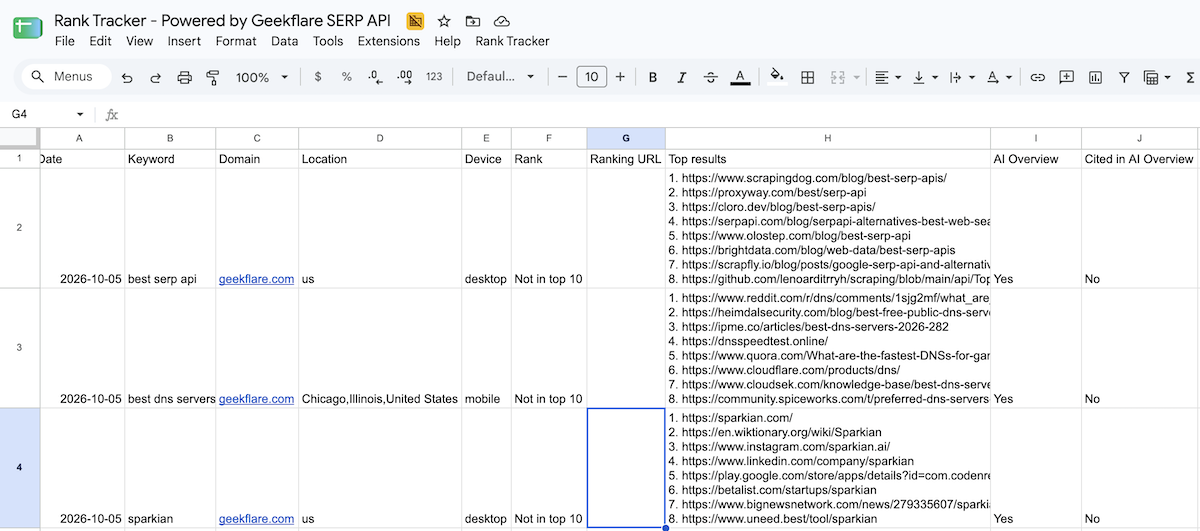
Use Rank Tracker → Check rankings now for a one-off check, or Run daily at 6 AM to schedule it. Each run adds a row per keyword to the Rankings tab with your position, the ranking URL, the current #1 result, and whether an AI Overview appeared and cited you. Because the sheet keeps every run, you can chart any keyword over time with a regular Sheets chart.
The sheet checks page one of Google, so anything lower shows as “Not in top 10”.
Track rankings with Python
If you’d rather run it from a server, this script checks keywords across locations and devices and appends the results to a CSV file. It’s the same logic the sheet uses.
import csv, datetime, os, requests

API_KEY = os.environ["GEEKFLARE_API_KEY"]
DOMAIN = "geekflare.com"
KEYWORDS = ["serp api", "web scraping api", "what is an ats"]
LOCATIONS = [("us", None), ("us", "Chicago,Illinois,United States")]
DEVICES = ["desktop", "mobile"]

def host(url):
    return url.split("//")[-1].split("/")[0].removeprefix("www.").lower()

def check(keyword, country, city, device):
    body = {"query": keyword, "serp": True, "location": country, "device": device}
    if city:
        body["city"] = city
    r = requests.post("https://api.geekflare.com/search", json=body,
                      headers={"x-api-key": API_KEY}, timeout=90)
    data = r.json()["data"]
    mine = lambda url: host(url) == DOMAIN or host(url).endswith("." + DOMAIN)
    hit = next((o for o in data.get("organic", []) if mine(o["link"])), None)
    aio = data.get("ai_overview")
    return {
        "date": datetime.date.today().isoformat(),
        "keyword": keyword,
        "location": city or country,
        "device": device,
        "rank": hit["rank"] if hit else "",
        "url": hit["link"] if hit else "",
        "ai_overview": bool(aio),
        "cited_in_ai_overview": bool(aio) and any(mine(x.get("url") or x.get("href") or "") for x in aio.get("references", [])),
    }

rows = [check(k, c, city, d) for k in KEYWORDS for c, city in LOCATIONS for d in DEVICES]
new_file = not os.path.exists("rankings.csv")
with open("rankings.csv", "a", newline="") as f:
    w = csv.DictWriter(f, fieldnames=rows[0].keys())
    if new_file:
        w.writeheader()
    w.writerows(rows)
print(f"Saved {len(rows)} checks")
Run it once a day with cron or a GitHub Actions schedule, and you have a rank tracker you fully control. Swap the CSV for BigQuery or Postgres when the list grows.
Ask Claude to check your rankings
For a quick check without opening a spreadsheet, connect the Geekflare MCP server to Claude and ask in plain English. In Claude Desktop, add a custom connector named Geekflare with the server URL https://mcp.geekflare.com/YOUR_API_KEY/mcp, then ask something like:
Use the Geekflare search tool to check where geekflare.com ranks on Google in the US for "best serp api", "best rotating proxies" and "hsts checker". Show the position and ranking URL for each, and tell me which of them have an AI Overview.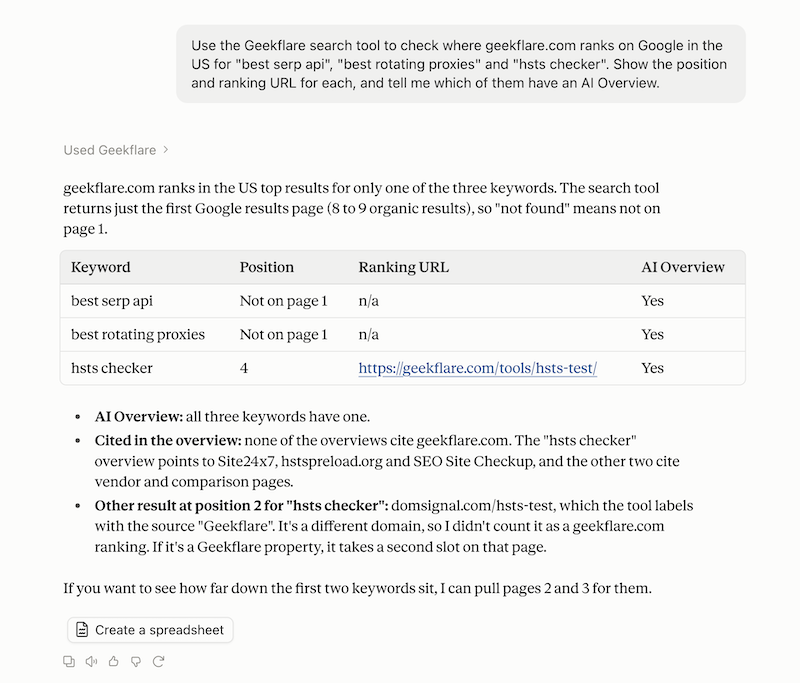
It’s handy for spot checks and for questions a dashboard can’t answer, like “who replaced us at #3 this week?”. We used the same setup for competitor SEO research with Claude.
How to Track Local Rankings
Our local results make the rule simple, track every city you serve as its own keyword. A plumber in Dallas and Fort Worth should track “emergency plumber” twice, once per city, and never rely on a US-wide number.
Use the city setting in your tool or API rather than adding the city to the keyword. Someone in Dallas usually types “emergency plumber”, not “emergency plumber dallas”, and Google localizes the first one based on where they are. Track both versions if you like, but the plain keyword pinned to the city is what most local customers actually see.
Also check mobile, since local searches skew heavily toward phones.
How to Track Competitor Rankings
If you store the whole top 10 on every check, competitor tracking needs no extra work. For each keyword, you can see who entered or dropped out of the top 10, who took the #1 spot, and which domains keep appearing across your keyword list. Those recurring domains are your real search competitors, and they’re often not the companies your sales team would name.
Watch which competitor pages get cited in AI Overviews, too. When a competitor is cited and you aren’t, compare the two pages side by side. The cited one usually answers the query more directly near the top.
How Often Should You Check Rankings?
Daily checks make sense for keywords that drive revenue and for anything you’ve just published or updated.
A weekly check is enough for a long list of informational keywords.
Local keywords you can check at least weekly per city, since local results shift with new reviews and new businesses.
Whatever schedule you pick, look at trends over a week or month rather than reacting to single-day moves. As the H&R Block example showed, a three-position jump can just be a different location.
Common Rank Tracking Mistakes
- Tracking a national position for local keywords
- Tracking desktop only
- Reading Search Console’s average position as your actual ranking
- Checking rankings by searching Google from your own browser
- Ignoring which URL ranks, so keyword cannibalization goes unnoticed
- Tracking your own position but not storing who outranks you
- Treating an AI Overview as “just another feature” when it now appears on most commercial and informational results pages
- Reacting to one day’s movement instead of the trend
FAQ
Why do my rankings look different from my rank tracker’s?
Google personalizes results using your location, language, device, and search history. A rank tracker checks from a fixed location and device without your history, so the two often disagree. In our study, local results shared less than one of their top eight results between two US cities.
Why is Search Console’s average position different from my rank tracker?
Search Console averages every impression across all locations, devices, and surfaces, including AI Mode, which Google has counted in the performance report since June 2025. A rank tracker checks one location and device on the classic results page. Use Search Console for real impressions and clicks, and a tracker for where you rank in a specific place.
Can I track keyword rankings for free?
Yes. Google Search Console is free and shows your average position for queries where you already appear. For specific locations and competitors, the Geekflare SERP API’s free plan includes 500 credits a month, about 250 ranking checks, which you can run from our Google Sheet.
Should I track mobile and desktop rankings separately?
Yes. In our study, about a quarter of keywords had a different #1 result on mobile than on desktop in the same city, and a typical desktop result set lost two of its top eight results on mobile.
How often should I check keyword rankings?
Check revenue keywords and newly published pages daily, local keywords at least weekly per city, and long lists of informational keywords weekly.
How do I track rankings in a specific city?
Use a tool or API that lets you set the city for each check. The Geekflare SERP API accepts a city parameter in the format City,Region,Country.
Final Thoughts
A ranking is a measurement taken from somewhere. Once you choose that somewhere on purpose like the cities you serve, both devices, and the AI Overview on top, the numbers stop contradicting each other and start telling you something useful.
Start with Search Console for the big picture. Then pick 20 keywords that matter, pin them to the right cities, and track them on desktop and mobile with a tool, a sheet, or a script.






