



Proxy server types can be confusing because they may sound similar, but they exist for different functions. Choosing the wrong one can lead to IP bans, slower performance, unnecessary costs, or poor results.
A proxy server sits between your device and the website you connect to, forwarding your requests instead of sending them directly. If you’re new to the concept, start with our guide on what a proxy is.
In this guide, I’ll explain the main proxy types and when to use each one so you can select the right proxy for your needs.
Types of Proxy
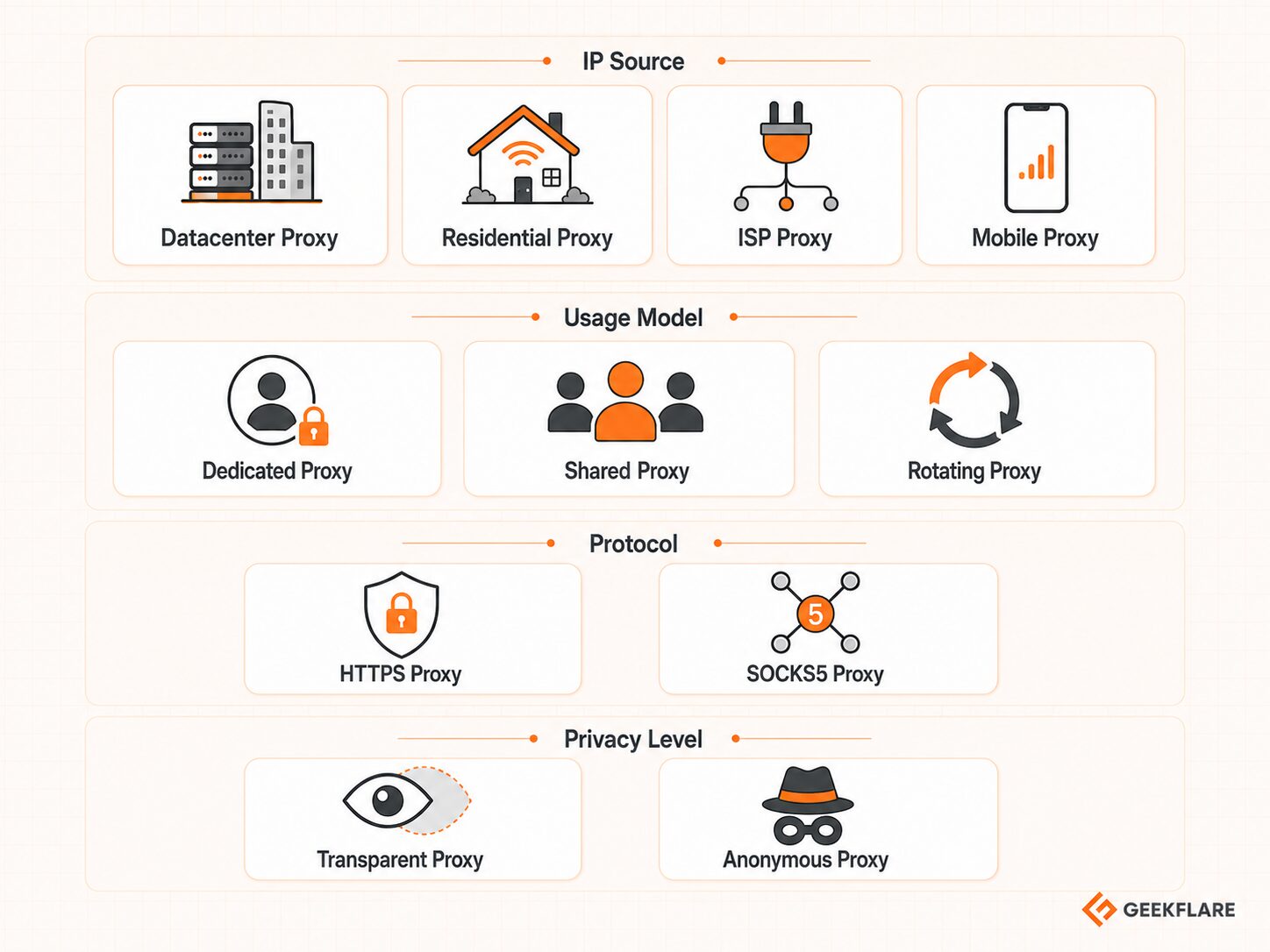
Proxy types are not all grouped by the same rule.
- Datacenter, residential, ISP, and mobile proxies are classified by the IP address’s origin.
- Dedicated, shared, and rotating proxies describe how IP addresses are used.
- HTTPS and SOCKS5 describe protocol support.
- Transparent and anonymous proxies describe the privacy level.
Datacenter Proxy
A datacenter proxy uses IP addresses hosted on cloud servers or datacenter infrastructure, not home or mobile networks. These proxies are usually fast, inexpensive, and easy to buy in large numbers, making them useful when speed and cost matter more than appearing to be a regular consumer.
However, many websites can identify datacenter IPs because they come from hosting providers rather than residential ISPs or mobile carriers, and your access could be blocked. That does not make datacenter proxies useless, but it does mean they are easier to flag on strict websites.
Use datacenter proxies for high-speed scraping on low-protection websites, market research, bulk checks, and other tasks where the target site does not aggressively block automated traffic.
Residential Proxy
A residential proxy uses an IP address assigned by a legitimate Internet Service Provider to a real home connection. To the website you visit, the request appears to come from a normal household network rather than a cloud server.
This gives residential proxies a higher trust score than datacenter proxies. They are harder to block and better suited for tasks where location accuracy and user-like traffic matter, such as geo-targeted browsing, ad verification, price monitoring, and public web data collection.
The downside is cost and speed. Residential proxies are usually more expensive, often priced by bandwidth, and can be slower than datacenter proxies because the traffic depends on real residential network routes. They are more trusted, but not unblockable.
ISP Proxy
An ISP proxy sits between the datacenter and residential proxies. It usually runs on a stable server infrastructure, but the IP address is registered through a consumer Internet Service Provider rather than a typical hosting company.
That is why ISP proxies are often called the best of both worlds. They can be faster and more stable than many residential proxies while looking more trustworthy than standard datacenter IPs. This makes them useful when you need both speed and session consistency.
The limitation is availability. ISP proxy pools are usually smaller, location options can be more limited, and prices are often higher than those for regular datacenter proxies. They are not the same as residential proxies, but they do offer a similar trust advantage with a more stable setup.
Mobile Proxy
A mobile proxy uses an IP address assigned by a mobile carrier over 3G, 4G, 5G, or LTE networks. The request appears to come from a mobile network rather than a home broadband connection or a datacenter server.
Mobile proxies are often trusted because mobile carriers often place many users behind shared public IP addresses. This is known as Carrier Grade NAT, or CGNAT, which means a single mobile IP address can represent many real users at once.
This makes mobile proxies useful for social media automation, mobile ad verification, app testing, and mobile-first location checks. The trade-off is that they are usually expensive, slower than datacenter or ISP proxies, and less predictable because mobile network conditions can change.
Datacenter vs. Residential vs. ISP vs. Mobile Proxies
| Proxy Type | IP Source | Speed | Trust Level | Cost | Best For | Main Limitation |
|---|---|---|---|---|---|---|
| 🏢 Datacenter Proxy | Cloud/server infrastructure | High | Low to medium | Low | Bulk scraping, speed-heavy tasks, market research | Easier to detect on strict websites |
| 🏠 Residential Proxy | Home ISP networks | Medium | High | High | Geo-targeting, ad verification, price monitoring | Slower and often bandwidth-priced |
| 🔌 ISP Proxy | ISP-registered IPs on stable infrastructure | High | High | Medium to high | Account stability, sneaker sites, e-commerce tasks | Fewer locations and smaller pools |
| 📱 Mobile Proxy | Mobile carrier networks | Medium | Very high | High | Social media, mobile ad testing, app checks | Expensive and less predictable |
Dedicated Proxy
With a dedicated proxy, one IP address is reserved for one user. You are not sharing it with other customers, so you have more control over which activities are tied to that IP.
This is helpful when you need stable access to the same account, dashboard, login session, or workflow. For example, if a platform expects you to return from the same IP address repeatedly, a dedicated proxy is usually a better fit than a shared one.
Please note that “dedicated” describes who uses the IP, not where the IP comes from. A dedicated proxy can still be a datacenter proxy, an ISP proxy, a residential proxy, or another proxy type.
Shared Proxy
Shared proxies work the opposite way. Multiple users share the same IP or proxy pool, keeping costs low.
The trade-off is reputation risk. If another user abuses the same IP, sends too many requests, or triggers blocks on certain websites, that IP’s reputation can suffer even if you did nothing wrong.
Shared proxies can still work for basic browsing, simple checks, or low-risk workflows where account consistency does not matter much. Avoid shared proxies for sensitive logins, long-running accounts, or tasks where one bad IP reputation can break the whole workflow.
Rotating Proxy
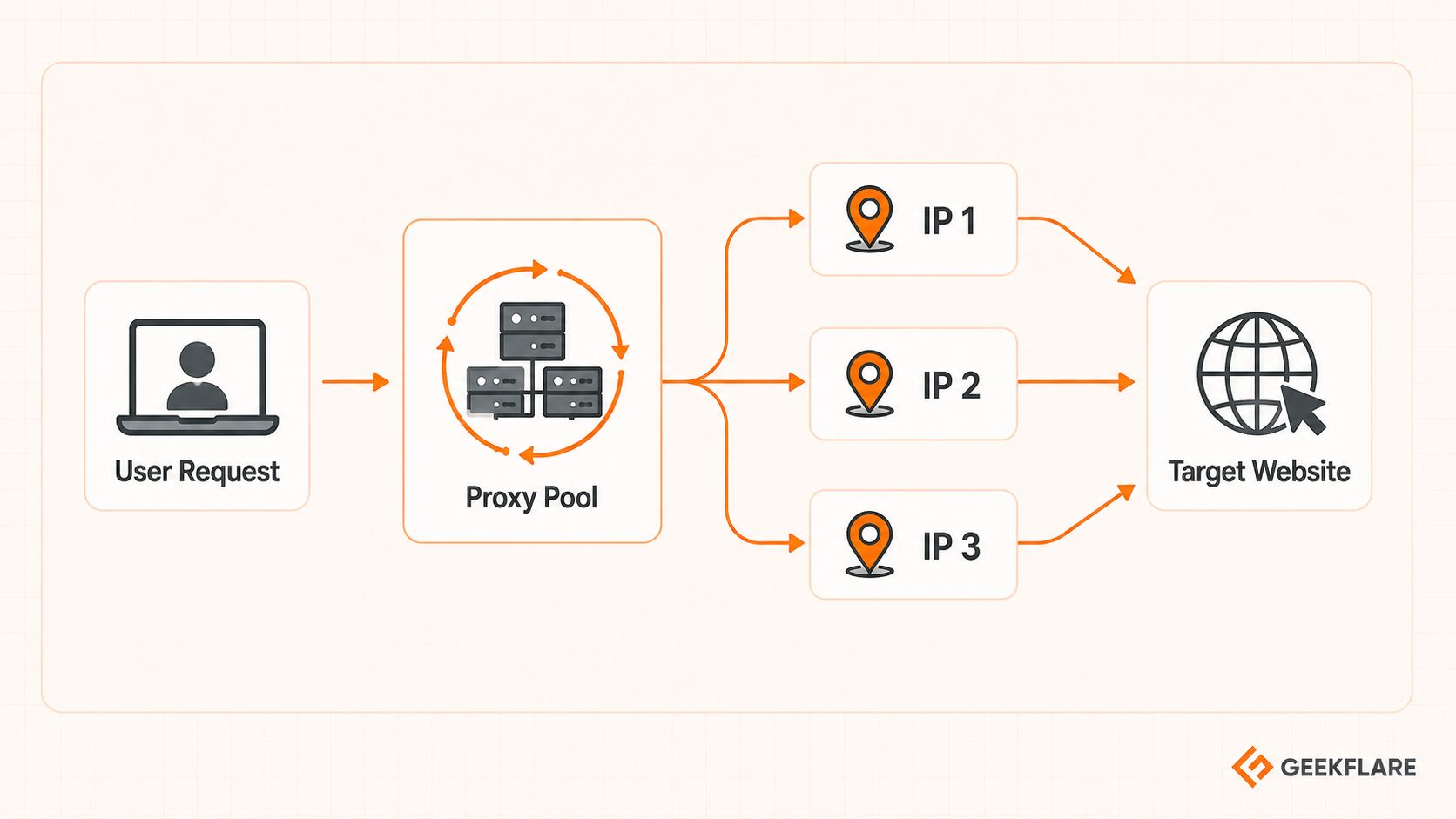
A rotating proxy does not describe where the IP comes from. It describes how the proxy behaves. Instead of keeping the same IP for every request, the proxy automatically switches IPs after each request, after a set time interval, or after a session ends.
This is useful for web scraping at scale because it spreads requests across multiple IPs rather than sending everything through a single IP address. If you’re new to the concept, read our guide on what web scraping is.
A rotating proxy can be residential, mobile, ISP-based, or datacenter-based. Rotation helps reduce pressure on a single IP, but it does not guarantee success on its own. Rate limits, request patterns, headers, target website rules, and permission to collect data still matter.
HTTPS Proxy
An HTTPS proxy is built for web traffic, especially when a browser or app needs to connect to websites securely. It is commonly used for browsing, web app testing, and routing HTTP or HTTPS requests through a proxy server.
For HTTPS traffic, the proxy usually uses the HTTP CONNECT method to create a tunnel between your device and the destination website. After that tunnel is created, the proxy relays traffic between the two sides.
The key point is that an HTTPS proxy supports secure web connections, but it does not automatically make every activity private or safe. The actual protection depends on how the connection, website, and proxy setup are configured.
SOCKS5 Proxy
SOCKS5 proxies are more flexible than HTTPS proxies because they support more than just browser-based web traffic. SOCKS5 operates at a lower level and can handle various types of application traffic, including TCP and UDP connections.
That flexibility makes SOCKS5 useful for P2P tools, gaming, streaming apps, and other software that does not rely only on HTTP or HTTPS. It is often chosen when compatibility matters more than web-specific features.
The main limitation is encryption. SOCKS5 does not encrypt traffic by default, so confidentiality depends on the app, website, or additional security layer you use. In simple terms, SOCKS5 is traffic-flexible, not automatically more secure.
Transparent Proxy
A transparent proxy sits between the user and the internet without acting as a privacy layer. It can intercept or route traffic without special setup on the user’s device, and it may still expose the user’s original IP or make the proxying visible to the destination website.
Schools, offices, public Wi-Fi providers, ISPs, and corporate networks often use transparent proxies for filtering, caching, monitoring, or access control. For example, a company may use one to block certain websites or apply browsing rules across employee devices.
Transparent proxies are useful for network management, but they are not the right choice if your goal is privacy or IP masking.
Anonymous Proxy
An anonymous proxy hides your original IP address from the destination website. Instead of seeing your direct IP, the website sees the proxy server’s IP.
This can help with basic privacy, region checks, and situations where you do not want a website to see your real network address. However, “anonymous” does not mean “invisible.” A website may still detect that the traffic is coming through a proxy.
I’d treat anonymous proxies as a basic privacy layer, not a complete anonymity solution. They hide your direct IP, but they do not erase every signal a website can use to identify suspicious or automated traffic.
How to Choose the Right Proxy
The right proxy depends on what you need it to do. Use this quick table to match the proxy type to the job.
| Use Case | Best proxy type | Why it fits | Avoid |
|---|---|---|---|
| 🧾 Web Scraping & Data Extraction | Rotating Residential or Datacenter | Residential proxies help with stricter websites, while datacenter proxies are faster and cheaper for lower-protection targets. | Shared proxies for strict targets |
| 📱 Social Media Management | Mobile or Dedicated ISP | Mobile IPs are well-suited to mobile-first platforms, while dedicated ISP proxies provide more stable sessions. | Shared rotating proxies |
| 🛒 Sneaker Copping & E-commerce | Fast ISP or Sticky Residential | Speed and session consistency matter more than simply changing IPs often. | Slow-rotating pools |
| 📍 SEO Monitoring & Ad Verification | Geo-targeted Residential | Residential IPs help check local SERPs, ads, and pricing from real regions. | Random datacenter locations |
Conclusion
There is no single “best” proxy. The right choice depends on your budget, how strict the target website is, how much speed you need, and whether IP trust or session stability matters more for your task.
As a general rule, datacenter proxies are the fastest and most affordable, residential proxies offer higher trust and better geo-targeting, ISP proxies balance speed with a trusted IP reputation, and mobile proxies are well-suited for mobile-first and social media workflows.
Instead of choosing the most advanced or expensive option, choose the proxy type that best matches what you’re trying to accomplish.
FAQs
What is the best proxy type for beginners?
A datacenter proxy is usually the easiest starting point because it is fast, affordable, and simple to set up. It works well for basic browsing, testing, and low-risk automation. If the target website often blocks datacenter IPs, a residential or ISP proxy may be a better fit.
What is the difference between a residential proxy and an ISP proxy?
A residential proxy uses an IP address assigned to a real home internet connection. An ISP proxy uses an ISP-registered IP but is usually hosted on more stable server infrastructure. Residential proxies look more like real home users, while ISP proxies offer a stronger balance of trust, speed, and stability.
Is a rotating proxy always better?
No. A rotating proxy is useful when you need to spread requests across many IPs, especially for large-scale web scraping. It is not always better for account logins, dashboards, or sessions that need the same IP each time. For those tasks, a dedicated or sticky proxy is usually safer.
What is the difference between HTTPS and SOCKS5 proxies?
HTTPS proxies are mainly built for web traffic, such as browser requests and web apps. SOCKS5 proxies are more flexible because they can handle different types of app traffic, including TCP and UDP. However, SOCKS5 does not encrypt traffic by default, so it is not automatically more secure.






