


Almost every email marketing platform now has an AI integration. Some write a campaign from a prompt. Others build segments from a sentence, pick best send times, or run as agents that plan automations and report on results. How good they are varies a lot, and the AI you see in a demo is often available on a higher plan.
To see the difference, I asked some of these tools to write the same Black Friday email for Ridgeline Coffee, offering 30% off the first three months of a subscription to past one-time buyers. The brief asked for a warm, slightly playful tone with no hype, and a button that says “Start my subscription.”
I also asked for five subject lines and, where the tool could build one, a segment of people with at least two orders in the last 90 days and none in the last 30.
Below you’ll find what each AI produced, which plan its features need, and what it costs. For a broader comparison of platforms beyond AI, see our guide to the best email marketing software.
AI Email Marketing Tools Comparison
| Tool | Type | Best for | AI on the free plan | Free plan | Paid plans from | Link |
|---|---|---|---|---|---|---|
| 01 Omnisend | Ecommerce email and SMS | AI tools inside an email and SMS platform built for online stores | Subject lines, preheaders, segments | Yes, 250 contacts and 500 emails/month | $16/month | Visit |
| 02 Klaviyo | Ecommerce marketing with an AI agent | An AI marketing agent that plans, writes, and checks its own data | Composer agent ($10 of usage/month) | Yes, 250 profiles and 500 emails/month | $20/month | Visit |
| 03 Brevo | All-in-one marketing | Fast AI campaigns and a data assistant on every plan | Aura AI writing and campaign generator | Yes, 300 emails/day | $9/month | Visit |
| 04 Mailchimp | Email for small businesses | AI writing and analytics on Standard and above | None | Yes, 250 contacts and 500 sends/month | $20/month (Standard) | Visit |
| 05 ActiveCampaign | Marketing automation | AI that builds automations and campaigns on every plan | No free plan | No (14-day trial) | $15/month | Visit |
| 06 HubSpot Marketing Hub | CRM-based marketing | Breeze agents for teams already on HubSpot CRM | Subject lines and preview text | Yes, 2,000 sends/month | $7/seat/month (Starter) | Visit |
| 07 GetResponse | Email and webinars | A step-by-step AI email generator | No (free version after trial) | Free version, 500 contacts | $19/month | Visit |
| 08 beehiiv | Newsletter platform | The natural AI copy, built for newsletters | Limited Ask beehiiv usage | Yes, up to 2,500 subscribers | $49/month | Visit |
| 09 Campaigner | Email automation | Affordable automation with light AI features | Subject line generator (trial) | No (30-day trial) | $14/month | Visit |
AI Test Results at a Glance
Results from the same coffee brief in each tool. “Not available” means the feature isn’t on that plan or doesn’t exist in the product.
| Tool and plan | Email from the brief | Details it made up | Subject lines | Segment from a sentence |
|---|---|---|---|---|
| Omnisend (Free) | Not available without a connected store | None | 3 good options in about 5 seconds, one with a merge tag | Correct rules |
| Klaviyo (Free) | Designed draft with an AI photo in about 75 seconds | None, and it left the mailing address as a placeholder | 1 at first, then 5 strong ones on request | Correct rules, and it flagged the missing order data |
| Brevo (Free) | Text in chat in about 25 seconds, designed email in about 90 | A coupon code and a pause-anytime policy | 5 in chat, hype-heavy in the campaign generator | Professional plan only |
| GetResponse (trial) | Designed email in the editor in about 25 seconds | Monthly rotating single-origin beans | 5 near-identical lines | Not available |
| beehiiv (Free) | Copy only, in about 20 seconds | Roast choice and cancel-anytime terms | 5 strong lines plus preview text | Not available |
Omnisend and Klaviyo was the only tool that wrote a full email without adding facts that weren’t in the brief. I would recommend setting up your brand kit before you judge the copy.
Best AI Email Marketing Tools
01. Omnisend
Ecommerce email and SMSAI tools inside an email and SMS platform built for online stores
Omnisend is an email, SMS, and push platform for online stores, with integrations for Shopify, WooCommerce, BigCommerce, and others. Its AI features are called Omnisend Agent, and they appear where you already work. There’s a small AI button next to the subject line, a prompt box at the top of the segment builder, and on paid plans a chat panel that can analyze results and draft campaigns.
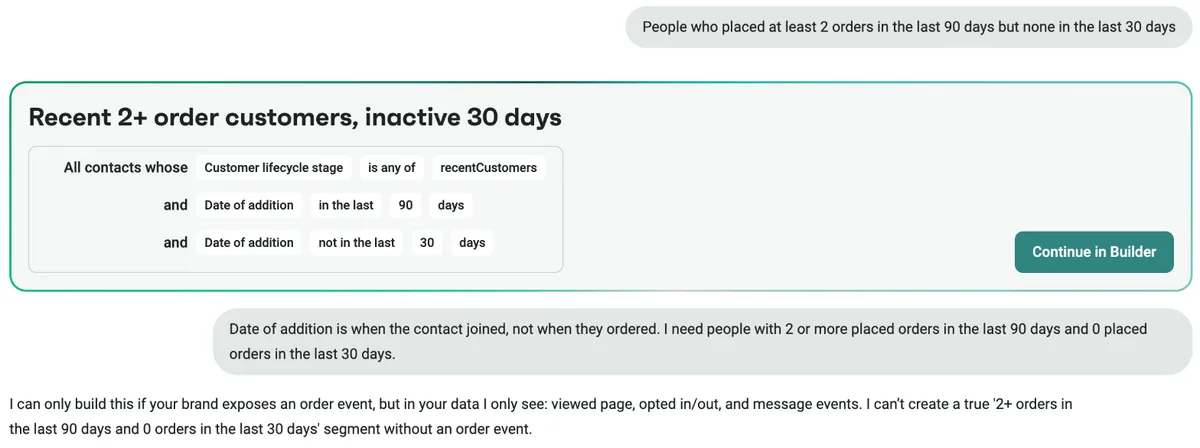
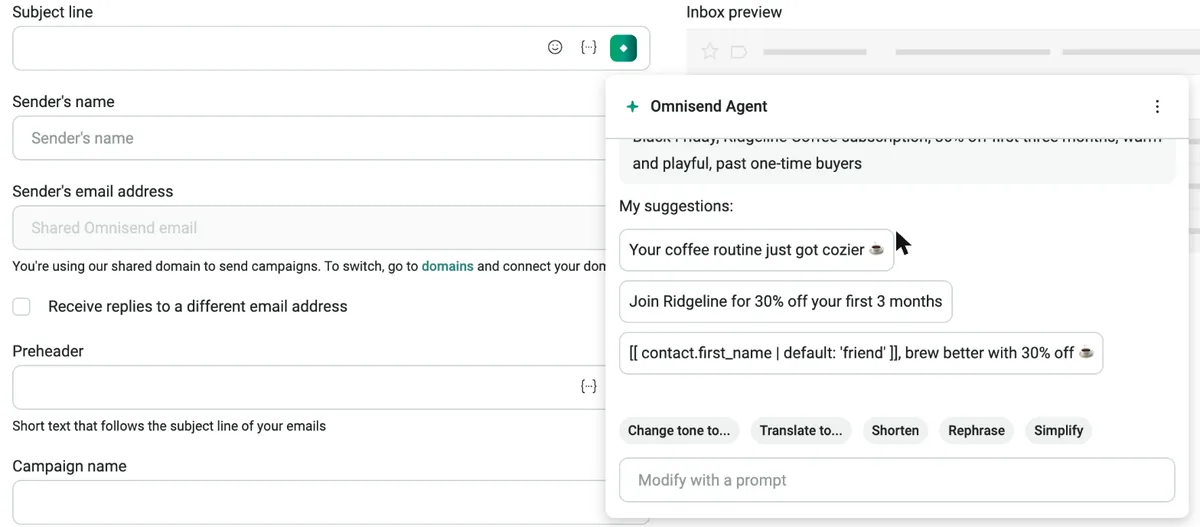
The subject line agent was the quickest of any tool I tried. I typed a few keywords about the offer and got three suggestions in about five seconds, including one that opened with a first-name merge tag and a “friend” fallback it added on its own.
Buttons under the suggestions change the tone, translate, shorten, or rephrase, and a prompt box handles anything else.
The preheader agent wrote a preheader from the subject line and the brand. My account’s brand profile describes Geekflare, so all three suggestions talked about web data and APIs under a subject line about coffee. One correction prompt fixed it, and the rewritten options were ready to use.
I also asked the segment agent for people with two or more orders in the last 90 days and none in the last 30. It returned a segment titled “Recent 2+ order customers, inactive 30 days,” but the rules filtered on the date each contact was added, not on orders. When I pointed that out, it explained that the account had no order events to work with. A store connection fixes the data problem, but read the rules it writes rather than the title.
The AI Writer in the email builder needs a connected store, and Agent Chat and Agent for Forms start on Standard. Pro adds a product recommender, personalized send times, and dynamic content blocks.
Omnisend says its AI suggestions reflect the tone set in Brand Assets, which matches what I saw.
Our take: The good value for small and mid-size online stores. Free-plan AI covers subject lines, preheaders, and segments, and Standard at $16 a month adds the chat agent. Connect your store and fill in Brand Assets first, since the AI relies on both.
Standout AI features:
- Subject line and preheader agent with tone, translate, and shorten options
- Segments from a plain-English description
- Agent Chat and AI form builder on paid plans
- Product recommender and personalized send time on Pro
Pros & Cons
PROS
CONS
Pricing
The Free plan includes 250 contacts, 500 emails a month, and AI subject lines, preheaders, and segments.
Standard costs $16 a month for 500 contacts and 6,000 emails, and adds Agent Chat and Agent for Forms.
Pro costs $59 a month at 2,500 contacts with unlimited email, and includes Omnisend Agent Pro.
02. Klaviyo
Ecommerce marketing with an AI agentAn AI marketing agent that plans, writes, and checks its own data
Klaviyo’s AI agent, Composer works across campaigns, flows, and segments. It produced the best work in my tests.
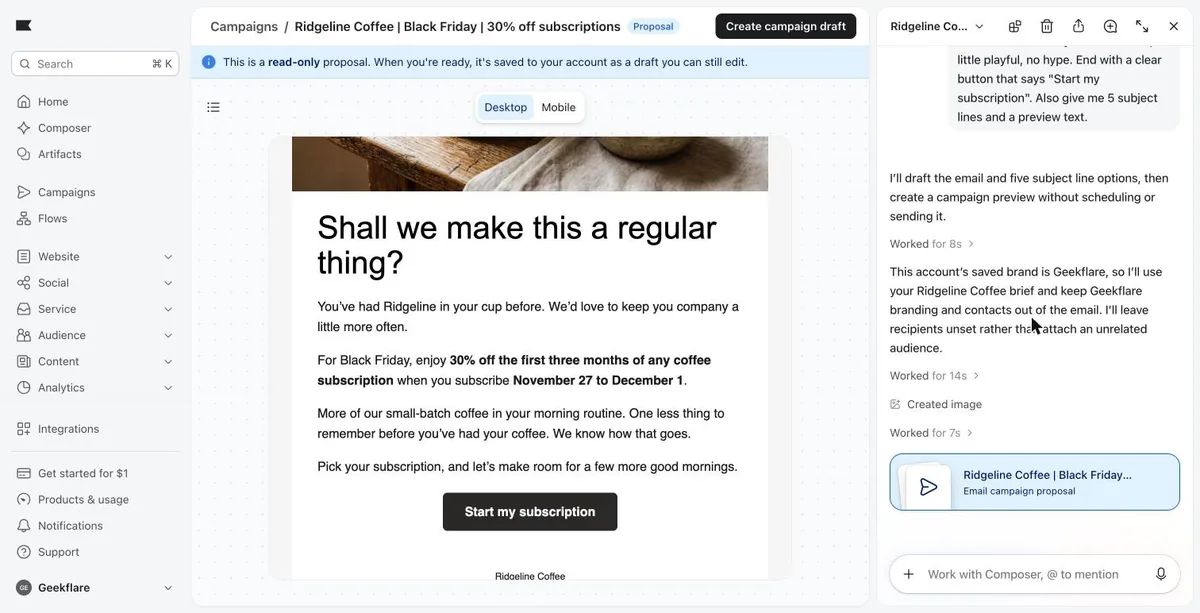
From the coffee brief, Composer built a designed campaign in about 75 seconds. It created a hero photo of a mug on a wooden table, wrote copy that hit the offer, dates, audience, and tone, and used the exact button text. Before writing, it noticed that the account’s saved brand was Geekflare and said it would keep that branding out of a Ridgeline email. Where it didn’t know something, such as the mailing address, it left a placeholder instead of hallucinating.
It did miss one instruction. I asked for five subject lines and it set only one, so I had to ask again. The five that came back were good, including “Your mug called. It wants a subscription.”
Composer also handled planning work well. For the segment, it wrote the right rules on the first try and said clearly that the account had no order data, so it couldn’t preview the result. For a three-email welcome flow, it added a purchase check before each email and chose not to reuse the Black Friday discount outside its dates.
My four prompts used 25% of the free plan’s weekly Composer allowance, so heavy use needs a paid Composer add-on. Klaviyo also offers Customer Agent for support, an MCP server, and apps for Claude and ChatGPT.
Our take: The capable AI email marketing tool for established businesses . It gets expensive as profiles grow, which is why many stores compare it with Omnisend. Our Klaviyo alternatives guide covers the price gap in detail.
Standout AI features:
- Composer agent for campaigns, flows, and segments
- AI image creation inside email drafts
- Customer Agent for support conversations
- MCP server and apps for Claude and ChatGPT
Pros & Cons
PROS
CONS
Pricing
The Free plan includes 250 active profiles, 500 emails a month, and $10 of Composer usage a month.
The Email plan starts at $20 a month for 500 active profiles and 5,000 emails.
On paid plans, Composer is an add-on at $20, $100, or $1,000 a month depending on capacity.
03. Brevo
All-in-one marketingFast AI campaigns and a data assistant on every plan
Brevo’s AI is called Aura, and there are three ways to use it.
A chat assistant in the top bar answers questions and writes copy, a Generate campaign with AI button turns a brief into a designed email, and an Insights agent answers questions about your campaign data. All three worked on a free account.
The chat responded in about 25 seconds. Aura wrote a full email with a headline, a merge tag for the first name, the right button, and five subject lines that matched the tone. It added a claim that subscribers can pause or skip anytime.
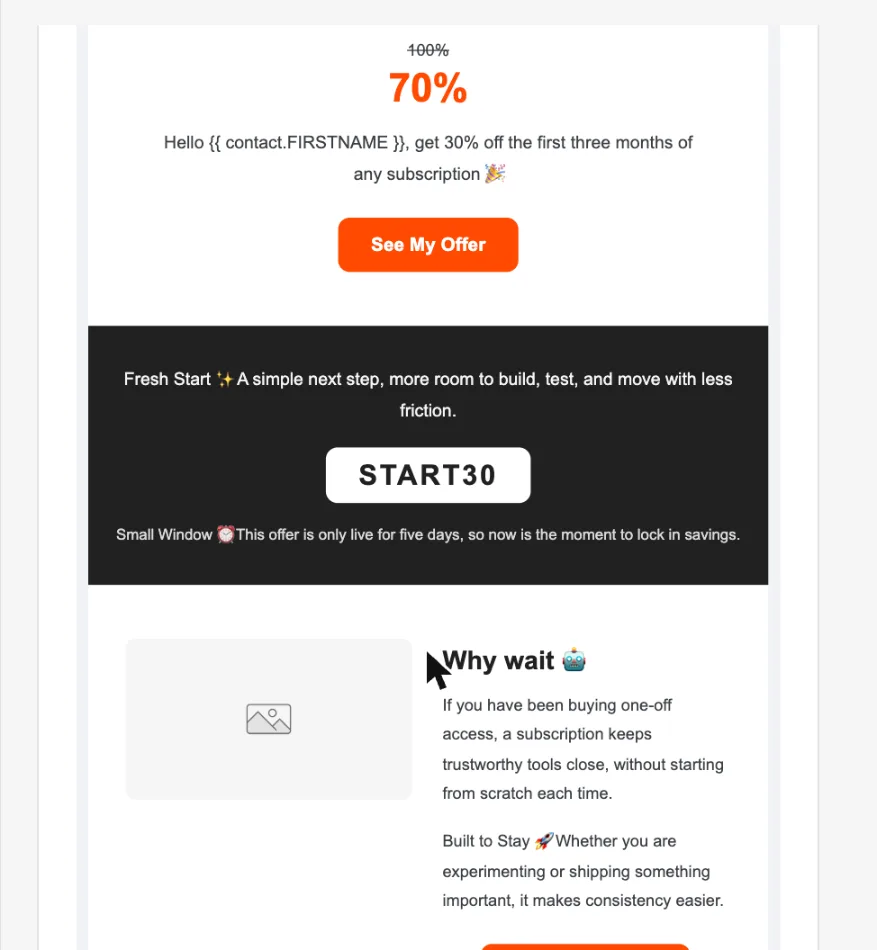
The campaign generator went further off-brief. It took about 90 seconds to produce an email, but it pulled in the account’s Geekflare brand profile and mixed in copy about tools to “build, test, and ship.” It also invented a coupon, START30, showed a confusing “100% to 70%” price graphic, and used four different button labels.
The Insights agent answered a question about click rates on real past campaigns in seconds.
Our take: Good value if you want AI drafting and a free plan, with SMS, WhatsApp, and a CRM in the same app. Fill in your brand settings, check every claim and code in a generated campaign, and cross-check the Insights numbers with your reports.
Our Brevo review covers the rest of the platform.
Standout AI features:
- Aura chat for copy and subject lines
- AI campaign generator with full designs
- Insights agent for campaign questions (beta)
- AI send time on Standard, AI segments on Professional
Pros & Cons
PROS
CONS
Pricing
The Free plan sends up to 300 emails a day and includes Aura AI.
Starter costs $9 a month and Standard $18 a month at 5,000 emails.
Professional costs $499 a month and adds AI segmentation and the AI Data Analyst.
04. Mailchimp
Email for small businessesAI writing and analytics on Standard and above
Mailchimp’s AI now runs under the Intuit Intelligence name. On Standard and Premium, Write with AI drafts subject lines, preview text, and body copy inside the email builder, and Send Time Optimization picks a time for each campaign. If you connect a store, Mailchimp also predicts each customer’s lifetime value and likelihood to buy, which you can use in segments.
Two newer features I noticed were added recently. Analytics AI answers questions about campaign and store performance in your language for account admins and owners. The AI Segment Builder turns a description into a segment. AI-powered flow templates, which write on-brand automation emails from your brand kit, are also available but need a connected store.
Mailchimp’s pricing page says its AI assistant works in English and in selected countries. The Free and Essentials plans don’t include generative AI at all, so Standard is where the AI starts. The Mailchimp apps for ChatGPT and Claude are available in the US, Canada, the UK, and Australia.
Our take: A sensible upgrade for teams already on Mailchimp who want help writing and timing campaigns. Several of the interesting features are in beta or limited by country, so confirm what your account gets before upgrading for them.
Standout AI features:
- Write with AI for subject lines and email copy
- Send Time Optimization and predicted customer value
- Analytics AI for plain-language reporting
- AI Segment Builder and AI flow templates
Pros & Cons
PROS
CONS
Pricing
The Free plan includes 250 contacts and 500 sends a month, without generative AI.
Essentials starts at $13 a month, also without generative AI.
Standard starts at $20 a month for 500 contacts and 6,000 sends, and Premium at $350 a month.
Paid plans have a 14-day free trial.
05. ActiveCampaign
Marketing automationAI that builds automations and campaigns on every plan
ActiveCampaign groups its AI under Active Intelligence, and the core tools are available on every plan. Starter accounts can describe an automation and have the builder lay it out, generate a campaign from a prompt, get AI-suggested segments, and run a spam check before sending. A remote MCP server connects the account to Claude and ChatGPT.
Writing help depends on the plan. AI content and image generation start on Plus, and Pro adds predictive sending, which times each email for when a contact usually engages.
Advanced AI features draw on monthly credits, 10 on Starter, 50 on Plus, and 500 on Pro and Enterprise.
Our take: The good pick for businesses that run branching automations, such as service companies and B2B teams. Ten credits a month on Starter won’t last long, so plan on Plus if AI writing is important to you.
Standout AI features:
- AI automation builder from a description
- AI campaign builder and AI-suggested segments
- Content and image generation on Plus
- Predictive sending on Pro, MCP for Claude and ChatGPT
Pros & Cons
PROS
CONS
Pricing
Starter costs $15 a month billed yearly for 1,000 contacts.
Plus costs $49, Pro $79, and Enterprise $145 a month billed yearly at 1,000 contacts.
06. HubSpot Marketing Hub
CRM-based marketingBreeze agents for teams already on HubSpot CRM
Every plan, including the free one, can generate subject lines and preview text for marketing emails, and the Breeze Assistant chat is available on all plans.
The bigger email features need Marketing Hub Professional. AI email creation writes a full email from a prompt. Nurture Agent rewrites each automated email for the person receiving it. Campaign and Content Agents plan and produce assets, and AI segment suggestions help build lists from CRM data.
Agent work uses HubSpot credits. Professional includes 3,000 a month, and Nurture Agent uses 10 credits per personalized email, so the included credits cover about 300 personalized emails a month. Because Breeze reads the CRM, it can use deal stages, past purchases, and support tickets.
Our take: Worth it when your sales and service teams already work in HubSpot. For email AI alone, the jump from Starter to Professional, with an $800 monthly price and a $3,000 onboarding fee, is costly for smaller businesses.
Standout AI features:
- AI subject lines and preview text on all plans
- AI email creation from a prompt (beta)
- Nurture Agent for per-contact email rewrites (beta)
- Campaign Agent, Content Agent, and AI segment suggestions
Pros & Cons
PROS
CONS
Pricing
The Free plan sends up to 2,000 emails a month with HubSpot branding.
Starter starts at $7 per seat a month for new customers, with 1,000 contacts and 500 credits.
Professional starts at $800 a month with three seats, 2,000 contacts, 3,000 credits, and a $3,000 onboarding fee.
07. GetResponse
Email and webinarsA step-by-step AI email generator
In GetResponse’s AI email generator, you describe the email in up to 300 characters, pick your business type, audience, email type, and tone, then choose a layout and color palette. That structure makes it easy for beginners, but the brief had to be trimmed to fit.
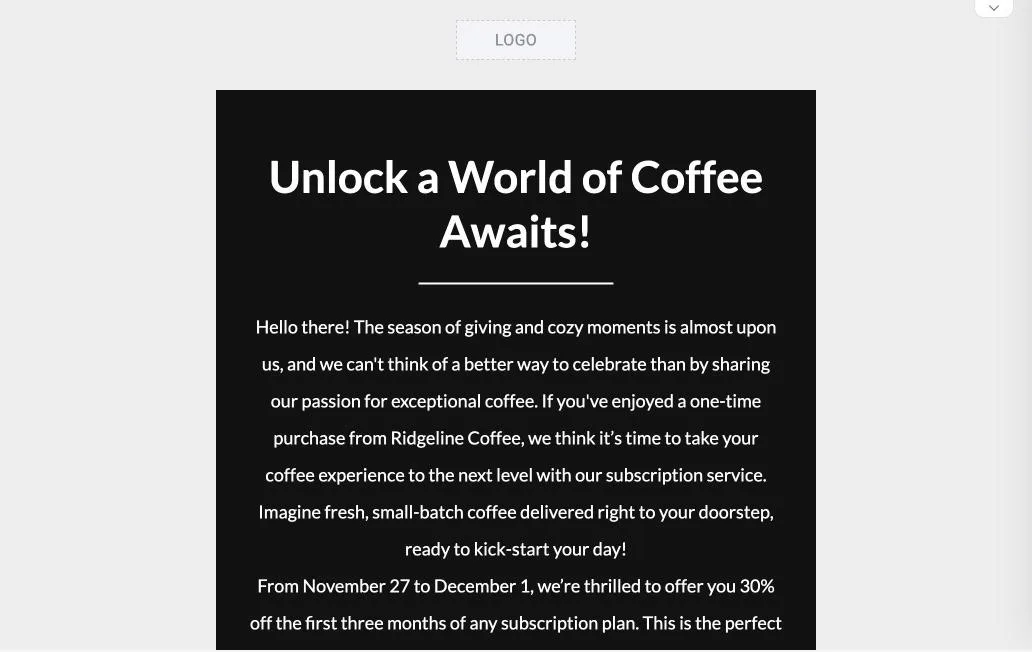
The result arrived in about 25 seconds as a finished email in the drag-and-drop editor. The copy was okish. It ran long and leaned on hype, the headline read “Unlock a World of Coffee Awaits!,” and it promised a monthly rotating selection of single-origin beans that the brief never mentioned. The button said “Start My Journey” instead of the requested text, and the subject line was “Brewing Magic Awaits: Unlock Your Coffee Adventure Now!”
A separate subject line generator takes up to three keywords and a business type. It returned five safe variations of the same line, such as “Black Friday Exclusive: Save 30% on Coffee Subscriptions”.
Our take: Fine for a first draft if you’re new to email and like a guided form, but expect to rewrite. You would need a Marketr plan if you intend to use AI tools regularly.
Standout AI features:
- AI email generator with tone, audience, and layout steps
- AI subject line generator
- AI website creator on Creator
- Webinars and landing pages in the same account
Pros & Cons
PROS
CONS
Pricing
Starter costs $19 a month at 1,000 contacts, with three uses of each AI generator.
Marketer costs $59 and Creator $69 a month at 1,000 contacts, with the AI tools included.
08. beehiiv
Newsletter platformThe natural AI copy, built for newsletters
beehiiv is a newsletter platform rather than an e-commerce email tool, but its AI assistant, Ask beehiiv, wrote the very good copy in my tests. It offers modes to analyze, brainstorm, grow, and monetize a publication.
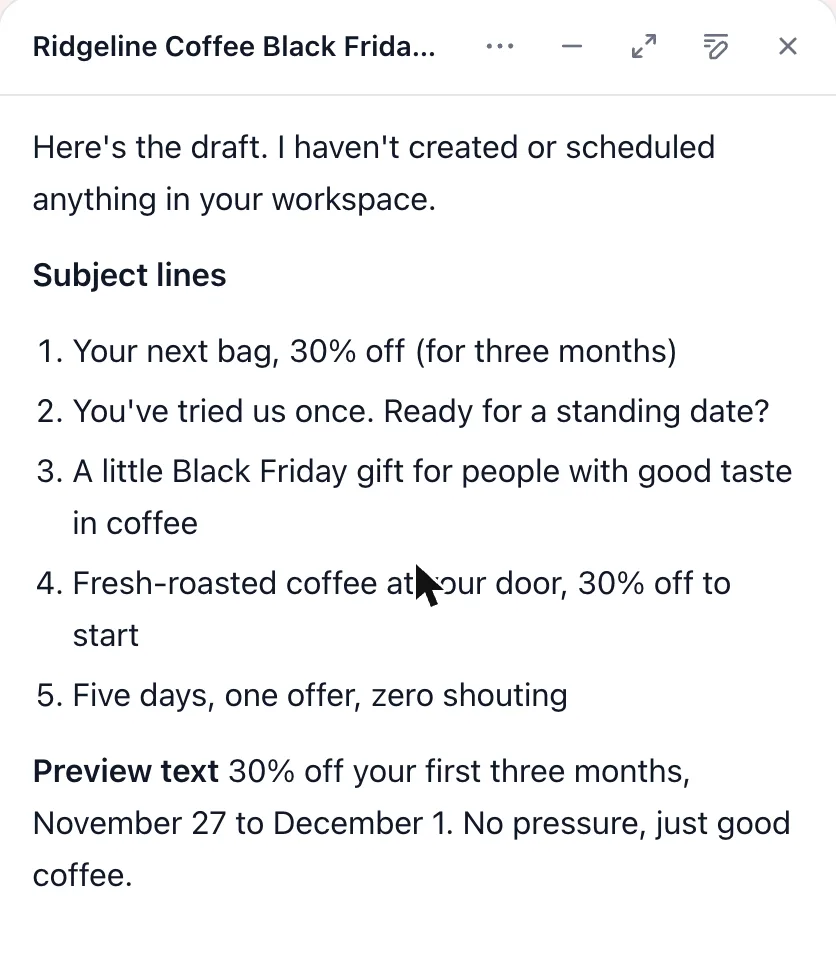
Asked for the coffee email in chat, it replied in about 20 seconds with five subject lines, a preview text, and the email itself. The tone was the closest match to “warm, a little playful, no hype,” with lines like “Five days, one offer, zero shouting” and a P.S. offering help choosing a roast.
In-editor AI writing starts on the Lite plan, and AI usage on the free plan is limited. beehiiv’s agent and MCP connection can read data on every plan and make changes on Lite and above.
Our take: The pick for creators and publishers who send newsletters. Stores that need flows, product blocks, and purchase data are better served by Omnisend or Klaviyo.
Standout AI features:
- Ask beehiiv chat for copy, ideas, and analysis
- In-editor AI writing on Lite and above
- AI website builder
- Agent and MCP access for Claude and ChatGPT
Pros & Cons
PROS
CONS
Pricing
The Free plan covers up to 2,500 subscribers with limited AI usage.
Lite costs $49 a month billed annually or $59 monthly at 1,000 subscribers.
Pro costs $95 a month billed annually or $109 monthly, with five times Lite’s AI usage.
09. Campaigner
Email automationAffordable automation with light AI features
Campaigner email platform is good for small and mid-size businesses, with automation workflows, SMS, and integrations for stores on WooCommerce and BigCommerce. Its AI is narrower than the other tools here. An AI Subject Line Generator is included on every plan, and AI Insight Builder, a paid add-on, answers plain-language questions about your contacts.
Campaigner doesn’t list AI-written email bodies or AI send-time optimization, so most of the writing is still yours. The 30-day free trial includes every feature, which is longer than most competitors offer.
Our take: Choose Campaigner for its automation and price, with AI as a small bonus. If AI drafting is the main reason you’re shopping, start with the tools higher on this list.
Standout AI features:
- AI Subject Line Generator on all plans
- AI Insight Builder add-on for contact questions
- Automation workflows with SMS steps
- 30-day trial with full feature access
Pros & Cons
PROS
CONS
Other AI Email Marketing Tools
A simple email platform with an AI writing assistant and smart sending on its Comfort and Power plans.
Built around AI, with generators for campaigns, templates, automations, and segments, plus a performance analyzer. It also supports interactive AMP emails.
Uses AI to pick the best send time for each contact in HubSpot or Marketo. The Business plan costs $400 a month billed annually for 25,000 contacts.
Sends AI-personalized newsletters where each subscriber gets stories picked for their interests. Pricing is quoted by organization size with no per-contact fees.
Enterprise AI for brand copy across email, SMS, and push, with agents for brand, compliance, and performance. It lists Sephora and Costco among its customers.
How to Choose an AI Email Marketing Tool
- Check which plan offers AI features you need. For example, Mailchimp has no generative AI below Standard, HubSpot’s email agents need Professional, and GetResponse caps Starter at three uses per tool.
- Look at usage limits as well as features. Klaviyo meters Composer weekly, ActiveCampaign gives Starter 10 credits a month, and HubSpot charges credits per personalized email.
- Fill in your brand kit before testing.
- Read every generated email for factual errors.
- If you mostly need help writing one-to-one emails rather than campaigns, an inbox assistant is a better fit.
If cost matters more than AI, our guide to free email marketing tools compares the free plans in more detail. On top of free or cheaper email marketing tools, you can consider using Sparkian to write subjects, emails, generate images, and brainstorm ideas.
FAQ
What can AI do in email marketing tools?
AI can write subject lines, preview text, and full emails from a brief, create images, build segments from a plain-language description, lay out automations, pick send times for each contact, and answer questions about campaign results.
Which email marketing tools have free AI features?
Klaviyo’s free plan includes $10 of Composer agent usage a month. Omnisend’s free plan includes AI subject lines, preheaders, and segments, Brevo’s Aura AI is on every plan, HubSpot’s free plan generates subject lines and preview text, and beehiiv includes limited AI on its free plan.
Can I send AI-written emails without editing them?
It isn’t a good idea, and I wouldn’t suggest it. Check every offer, date, code, and promise against what your business actually provides before sending.
Can AI build email segments and automations?
Yes. Klaviyo and Omnisend build segments from a description, ActiveCampaign has an AI automation builder on every plan, and Klaviyo’s Composer can plan a full flow with conditional splits.
Do email marketing tools work with ChatGPT or Claude?
Several do. Klaviyo, ActiveCampaign, Brevo, and beehiiv offer MCP connections, Mailchimp and HubSpot have apps or connectors for ChatGPT and Claude, and Omnisend lets you connect it to both.
Conclusion
Omnisend is our top pick for online stores because it puts useful AI on the free plan and keeps paid plans cheap as a list grows. Klaviyo’s Composer produced the most accurate work in my tests and is worth its higher price if you want an agent that plans flows and segments as well as writing them.
Brevo and beehiiv write quickly and well on free plans, with Brevo adding designs and beehiiv the most natural copy. Whichever you choose, treat the AI as a first draft and check the facts before anything goes out.